1. Įvadas
Ačiū, kad pirkoteasing the Lenco SPR-100BK Splash-Proof Bluetooth Speaker. This portable speaker delivers powerful sound with strong bass and features FM radio, USB, SD card playback, and integrated light effects. Designed for durability, it is splash-proof, making it suitable for various environments. This manual provides essential information for safe and optimal use of your device.
2. Svarbios saugos instrukcijos
- Nelaikykite prietaiso ekstremaliose temperatūrose, tiesioginiuose saulės spinduliuose ar didelėje drėgmėje.
- Ensure the charging port cover is securely closed when near water to maintain splash-proof integrity.
- Neardykite ir nemodifikuokite įrenginio. Visus techninės priežiūros darbus patikėkite kvalifikuotiems darbuotojams.
- Naudokite tik nurodytą įkrovimo laidą.
- Saugokite įrenginį nuo stiprių magnetinių laukų.
- Stenkitės, kad prietaisas nenumestų ar nepatirtų stipraus smūgio.
3. Produktas baigtasview
Familiarize yourself with the components of your Lenco SPR-100BK speaker.
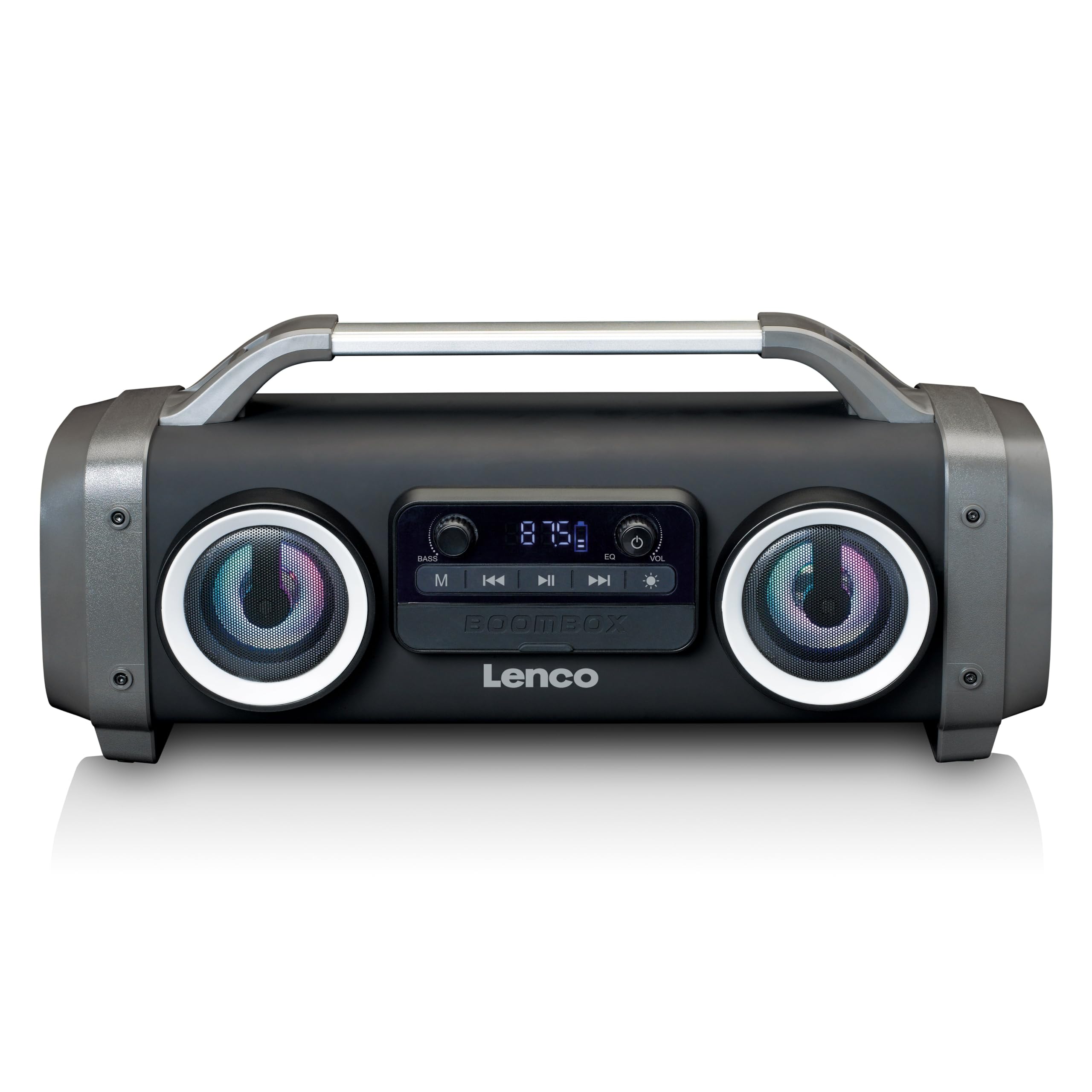
1 pav.: priekis view of the Lenco SPR-100BK speaker, showing the main speaker grille, control panel, and integrated light effects.
3.1 Valdikliai ir prievadai
- Maitinimo mygtukas: Įjungia arba išjungia garsiakalbį.
- Režimo mygtukas: Switches between Bluetooth, FM Radio, USB, SD, and AUX modes.
- Atkūrimo / pristabdymo mygtukas: Paleidžia arba pristabdo garsą.
- Garsumo valdymo rankenėlė: Reguliuoja pagrindinį garsumą.
- Bass Boost Knob: Reguliuoja žemųjų dažnių lygį.
- Šviesos efekto mygtukas: Cycles through or turns off light effects.
- USB prievadas: USB atmintinės įrašų atkūrimui.
- SD kortelės lizdas: Skirta SD kortelės atkūrimui.
- AUX įvestis (3.5 mm): Skirtas prijungti išorinius garso įrenginius.
- Charging Port (Mini USB): Skirta vidinei baterijai įkrauti.
4. Sąranka
4.1 Išpakavimas
Carefully remove the speaker and all accessories from the packaging. Ensure the following items are present:
- Lenco SPR-100BK Bluetooth Speaker
- USB įkrovimo laidas
- 3.5mm Audio Cable (AUX cable)
- Vartotojo vadovas
4.2 Akumuliatoriaus įkrovimas
- Locate the Mini USB charging port on the speaker.
- Prijunkite pridedamą USB įkrovimo laidą prie garsiakalbio įkrovimo prievado.
- Connect the other end of the USB cable to a compatible USB power adapter (5V/1A, not included) or a computer's USB port.
- Įkrovimo metu šviečia įkrovimo indikatoriaus lemputė, paprastai raudona. Kai visiškai įkraunama, ji užgęsta arba pakeičia spalvą (pvz., mėlyna).
- A full charge takes approximately 4-5 hours and provides up to 15 hours of playback (without light effects).
4.3 Pradinis įjungimas
Paspauskite ir palaikykite Maitinimo mygtukas for a few seconds until the speaker powers on and you hear an audible prompt or see the display light up.
5. Operacija
5.1 Maitinimo įjungimas/išjungimas
- Norėdami įjungti: paspauskite ir palaikykite Maitinimo mygtukas.
- Norėdami išjungti: paspauskite ir palaikykite Maitinimo mygtukas vėl.
5.2 Bluetooth ryšys
- Įjunkite garsiakalbį. Jis automatiškai įsijungs „Bluetooth“ susiejimo režimu, ką parodys mirksintis LED indikatorius.
- Įjunkite „Bluetooth“ savo mobiliajame įrenginyje (išmaniajame telefone, planšetiniame kompiuteryje ir kt.).
- Ieškokite galimus „Bluetooth“ įrenginius ir pasirinkite „SPR-100BK“ iš sąrašo.
- Kai garsiakalbis bus susietas, pasigirs patvirtinimo garsas ir šviesos diodas nustos mirksėti.
- Tikrasis belaidis stereofoninis (TWS) režimas: If you have two SPR-100BK speakers, you can pair them for stereo sound.
- Įsitikinkite, kad abu garsiakalbiai įjungti ir veikia „Bluetooth“ režimu.
- On one speaker (the master), press and hold the Režimo mygtukas until you hear a TWS pairing prompt.
- The two speakers will automatically connect. Once connected, pair your device to the master speaker as described above.
5.3 FM radijas
- Paspauskite Režimo mygtukas repeatedly until you select FM Radio mode.
- Norėdami automatiškai nuskaityti ir išsaugoti stotis: paspauskite ir palaikykite Atkūrimo/pauzės mygtukas. The speaker will scan for available FM stations and save them automatically.
- To switch between saved stations: Use the Ankstesnio / kito takelio mygtukai (if available, otherwise it will cycle through automatically).
- Pastaba: For better FM reception, ensure the included 3.5mm audio cable is plugged into the AUX input, as it acts as an external antenna.
5.4 USB / SD kortelės atkūrimas
- Įdėkite USB atmintinę arba SD kortelę (su palaikoma garso įranga) files) į atitinkamą prievadą/lizdą.
- The speaker will automatically switch to USB or SD mode and begin playback. If not, press the Režimo mygtukas kad pasirinktumėte tinkamą šaltinį.
- Naudokite Atkūrimo/pauzės mygtukas ir Ankstesnio / kito takelio mygtukai valdyti atkūrimą.
5.5 AUX įvestis
- Connect one end of the supplied 3.5mm audio cable to the AUX input on the speaker.
- Kitą galą prijunkite prie išorinio įrenginio ausinių lizdo arba garso išvesties.
- Paspauskite Režimo mygtukas norėdami pasirinkti AUX režimą.
- Valdykite atkūrimą ir garsumą iš išorinio įrenginio.
5.6 Šviesos efektai
Paspauskite Šviesos efekto mygtukas to cycle through different light modes or to turn the lights off. The speaker features 12 color light effects.
5.7 Garso reguliavimas
- Apimtis: Pasukite Garsumo valdymo rankenėlė to increase or decrease the overall sound level.
- Bosas: Pasukite Bass Boost Knob to adjust the intensity of the bass.
6. Priežiūra
6.1 Valymas
Wipe the speaker with a soft, dry cloth. Do not use abrasive cleaners, waxes, or solvents. For stubborn dirt, a slightly damp cloth can be used, ensuring all port covers are sealed.
6.2 Akumuliatoriaus priežiūra
- To prolong battery life, fully charge the speaker before first use.
- Venkite dažnai visiškai iškrauti akumuliatorių.
- Jei garsiakalbį ilgesnį laiką nenaudosite, įkraukite jį iki maždaug 50 % kas kelis mėnesius.
6.3 Saugykla
Garsiakalbį laikykite vėsioje, sausoje vietoje, toliau nuo tiesioginių saulės spindulių ir ekstremalių temperatūrų.
7. Problemų sprendimas
| Problema | Galima priežastis | Sprendimas |
|---|---|---|
| Garsiakalbis neįsijungia. | Baterija išsikrovusi. | Įkraukite garsiakalbį naudodami pridedamą USB laidą. |
| Nėra garso. | Garsumas per mažas; pasirinktas neteisingas režimas; įrenginys neprijungtas. | Increase volume; press Mode button to select correct source; ensure Bluetooth device is paired or AUX cable is connected. |
| „Bluetooth“ susiejimas nepavyksta. | Garsiakalbis neįjungtas susiejimo režimu; įrenginys per toli; trukdžiai. | Ensure speaker is in Bluetooth pairing mode (flashing LED); move device closer; turn off other Bluetooth devices. |
| Prastas FM radijo priėmimas. | No external antenna; weak signal. | Plug in the 3.5mm AUX cable to act as an antenna; try moving the speaker to a different location. |
| USB/SD atkūrimas neveikia. | Nepalaikoma file formatavimas; kortelė / diskas netinkamai įdėtas; sugadintas files. | Užtikrinti files are in a supported format (e.g., MP3); reinsert the USB drive/SD card; try a different drive/card. |
8. Specifikacijos
| Modelio numeris | SPR-100BK |
| Prekės ženklas | Lenco |
| Maitinimo išvestis | 25 vatų efektinė vertė |
| Ryšys | Bluetooth, USB, SD Card, 3.5mm AUX Input |
| Baterijos tipas | Ličio jonų (4400 XNUMX mAh) |
| Atkūrimo laikas | Up to 15 hours (reduced with light effects) |
| Įkrovimo įvestis | 5V/1A (Mini USB) |
| Ypatingos savybės | Splash-proof design, Integrated light effects, FM Radio, TWS function |
| Matmenys (I x P x A) | 60 x 60 x 85 cm |
| Svoris | 2 kilogramo |
Pastaba: specifikacijos gali būti keičiamos be išankstinio įspėjimo.
9. Garantija ir palaikymas
9.1 Informacija apie garantiją
This Lenco product is covered by a warranty for a period of 2 metai on parts from the date of purchase. This warranty covers manufacturing defects and workmanship under normal use. It does not cover damage caused by misuse, accidents, unauthorized modifications, or normal wear and tear.
9.2 Programinės įrangos naujiniai
Software updates for this product are guaranteed until 13 m. balandžio 2030 d.
9.3 Pagalba klientams
For technical assistance, warranty claims, or product inquiries, please contact Lenco customer support through their official website or the retailer where the product was purchased. Please have your model number (SPR-100BK) and proof of purchase ready.
Oficialus Lenco Websvetainė: www.lenco.com


