1. Įvadas
Welcome to the user manual for your Nokia 216 Dual SIM mobile phone. This guide provides essential information to help you set up, operate, and maintain your device. The Nokia 216 (RM-1187) is a classic feature phone designed for reliable communication, featuring dual SIM capability, a 2.4-inch display, and a VGA camera.
Please read this manual carefully to ensure proper use and to get the most out of your phone.
2. Pakuotės turinys
Įsitikinkite, kad jūsų prekės pakuotėje yra visi šie daiktai:
- Nokia 216 Dual SIM Mobile Phone (RM-1187)
- Baterija
- Maitinimo adapteris
- USB kabelis
3. Įrenginys baigtasview
Familiarize yourself with the key components of your Nokia 216 phone.
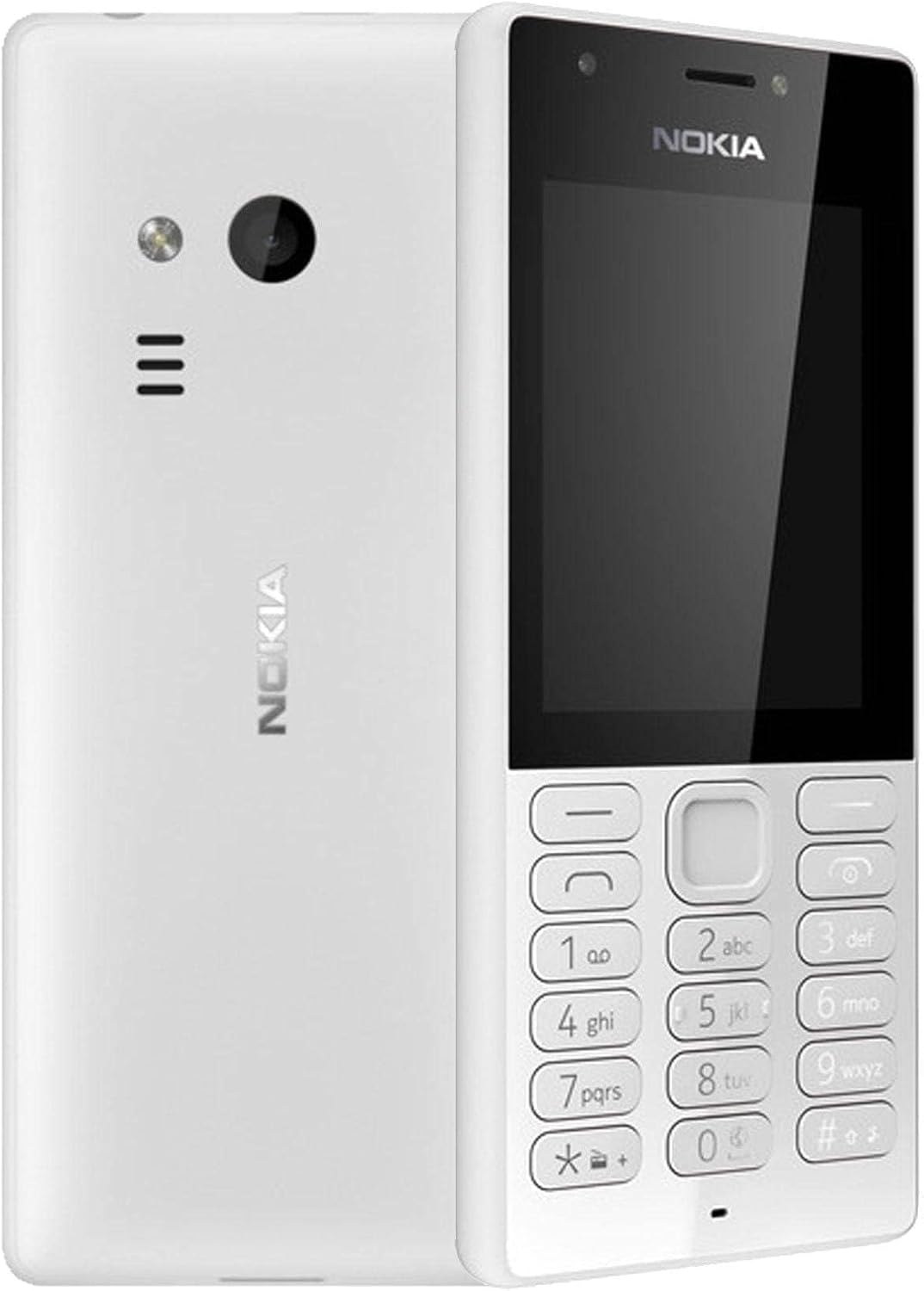
3.1 paveikslas: Priekyje ir gale view of the Nokia 216 Dual SIM mobile phone. The front shows the display, earpiece, and numeric keypad. The back features the rear camera, LED flash, and loudspeaker grille.

3.2 paveikslas: Priekyje view of the Nokia 216 Dual SIM mobile phone. This image highlights the 2.4-inch display, the navigation keys, and the alphanumeric keypad for dialing and text input.

3.3 paveikslas: Atgal view of the Nokia 216 Dual SIM mobile phone. This view shows the rear VGA camera lens, the LED flash, and the Nokia branding.
Pagrindiniai komponentai:
- Ekranas: 2.4 colio QVGA ekranas.
- Klaviatūra: Alphanumeric keypad for dialing and text entry, with navigation keys.
- Galinė kamera: VGA camera with LED flash.
- Garsiakalbis: For audio playback and hands-free calls.
- Mikrofonas: Balso įvedimui skambučių ir įrašų metu.
- 3.5 mm garso lizdas: Ausinėms arba išoriniams garsiakalbiams.
- Įkrovimo prievadas: Micro-USB port for charging and data transfer.
4. Sąranka
4.1. Insert SIM Card(s)
- Išjunkite telefoną ir atjunkite bet kokį įkroviklį.
- Carefully remove the back cover by prying it open from the notch.
- Jei baterija įdėta, išimkite ją.
- Insert the SIM card(s) into the designated slot(s) with the gold contacts facing down. For dual SIM models, ensure both SIMs are correctly seated.
- If applicable, insert a microSD card into its slot for additional storage.
- Pakeiskite bateriją.
- Sulygiuokite galinį dangtelį ir tvirtai jį paspauskite, kol jis užsifiksuos vietoje.
4.2. Įkraukite akumuliatorių
- Prijunkite maitinimo adapterį prie sieninio lizdo.
- Plug the micro-USB end of the cable into the phone's charging port.
- Ekrane esantis akumuliatoriaus indikatorius rodys įkrovimo būseną.
- Kai telefonas bus visiškai įkrautas, atjunkite įkroviklį nuo telefono, o tada – nuo sieninio lizdo.
5. Naudojimo instrukcijos
5.1. Maitinimo įjungimas/išjungimas
- Norėdami įjungti: Paspauskite ir palaikykite įjungimo mygtuką (dažniausiai raudoną „Baigti skambutį“ mygtuką), kol telefonas suvibruos ir pasirodys „Nokia“ logotipas.
- Norėdami išjungti: Press and hold the power key until the 'Power off' option appears on the screen, then select it.
5.2. Skambinimas
- Pradiniame ekrane įveskite telefono numerį naudodami skaitmeninę klaviatūrą.
- Press the green 'Call' key to initiate the call.
- To end a call, press the red 'End Call' key.
5.3. Sending Text Messages (SMS)
- Eikite į Meniu > Žinutės > Sukurti pranešimą.
- Įveskite pranešimą naudodami klaviatūrą.
- Įveskite gavėjo telefono numerį arba pasirinkite jį iš kontaktų.
- Pasirinkite Siųsti.
5.4. Fotoaparato naudojimas
- Eikite į Meniu > Fotoaparatas.
- Kadruokite kadrą naudodami ekraną.
- Norėdami nufotografuoti, paspauskite centrinį naršymo klavišą.
6. Priežiūra ir priežiūra
To ensure the longevity and optimal performance of your Nokia 216, follow these care guidelines:
- Keep the device dry: Moisture can damage electronic circuits.
- Use original accessories: Only use batteries, chargers, and accessories approved by Nokia.
- Švelniai valykite: Use a soft, clean, dry cloth to clean the surface of the device.
- Venkite ekstremalių temperatūrų: Do not expose your device to very high or low temperatures.
- Elkitės atsargiai: Stenkitės, kad prietaisas nenumestų ar nepatirtų stipraus smūgio.
7. Problemų sprendimas
If you encounter issues with your Nokia 216, try these common troubleshooting steps:
| Problema | Sprendimas |
|---|---|
| Telefonas neįsijungia | Įsitikinkite, kad akumuliatorius įkrautas. Prijunkite įkroviklį ir bandykite dar kartą. Patikrinkite, ar akumuliatorius tinkamai įdėtas. |
| Nėra tinklo signalo | Patikrinkite, ar SIM kortelė tinkamai įdėta. Persikelkite į vietą, kurioje geresnis tinklo ryšys. Paleiskite telefoną iš naujo. |
| Akumuliatorius neįkraunamas | Įsitikinkite, kad įkroviklis tinkamai prijungtas prie telefono ir maitinimo lizdo. Išbandykite kitą maitinimo lizdą arba įkroviklį. Patikrinkite, ar įkrovimo prievadas nepažeistas. |
| Negalima skambinti arba priimti skambučių | Check network signal. Ensure your SIM card is active and has sufficient credit/plan. Verify that call barring is not enabled. |
8. Specifikacijos
| Funkcija | Detalė |
|---|---|
| Prekės ženklas | Nokia |
| Modelio pavadinimas | RM-1187 |
| Operacinė sistema | Symbian 9.1 (Series 30) |
| Ekrano dydis | 2.4 colių |
| Ekrano raiška | 240 x 320 pikselių |
| Atnaujinimo dažnis | 90 Hz |
| Įdiegtos RAM dydis | 256 MB |
| Atminties talpa | 3.9 GB (Internal, likely for system/apps, expandable via microSD) |
| CPU modelis | A10 |
| Korinio ryšio technologija | 2G |
| Belaidžio ryšio technologijos | Korinis |
| Ryšio technologijos | USB, „Bluetooth“, „Wi-Fi“ |
| GPS | A-GPS |
| Primary Device User Interface | Buttons, Numeric Keypad, Microphone |
| Kitos kameros funkcijos | Rear Camera (VGA) |
| Garso lizdas | 3.5 mm |
| Formos faktorius | Klasika |
| Spalva | Pilka |
| Pokalbių laikas | Iki 18 valandų |
| Prekės svoris | 339 gramų |
| Pakuotės matmenys | 13.4 x 12.6 x 3.6 cm |
| Kas yra dėžutėje | Maitinimo adapteris, USB laidas |
9. Garantija ir palaikymas
Informacijos apie garantiją ieškokite gaminio pakuotėje esančioje garantijos kortelėje arba apsilankykite oficialioje „Nokia“ svetainėje. website. If you require further assistance or technical support, please contact Nokia customer service through their official channels.
Išsaugokite pirkimo kvitą kaip pirkimo įrodymą garantiniams reikalavimams.


