1. Įvadas
This user manual provides detailed instructions for the setup, operation, and maintenance of your FIFINE USB Podcast Microphone K678. Designed for recording, streaming, gaming, and vocal applications, the K678 offers high-quality audio capture with convenient controls and broad compatibility. Please read this manual thoroughly before using the microphone to ensure optimal performance and longevity.
2. Pakuotės turinys
Patikrinkite, ar pakuotėje yra visi toliau išvardyti daiktai:
- FIFINE USB Podcast Microphone K678
- Reguliuojamas stalinis stovas
- USB Cable (6.56 ft / 2m)
- 5/8-inch Male to 3/8-inch Female Mic Thread Screw Adapter
- Vartotojo vadovas (šis dokumentas)

Figure 2.1: Contents of the FIFINE K678 package, including the microphone, stand, USB cable, and screw adapter.
3. Produktas baigtasview
The FIFINE K678 microphone features a robust design with intuitive controls for ease of use.
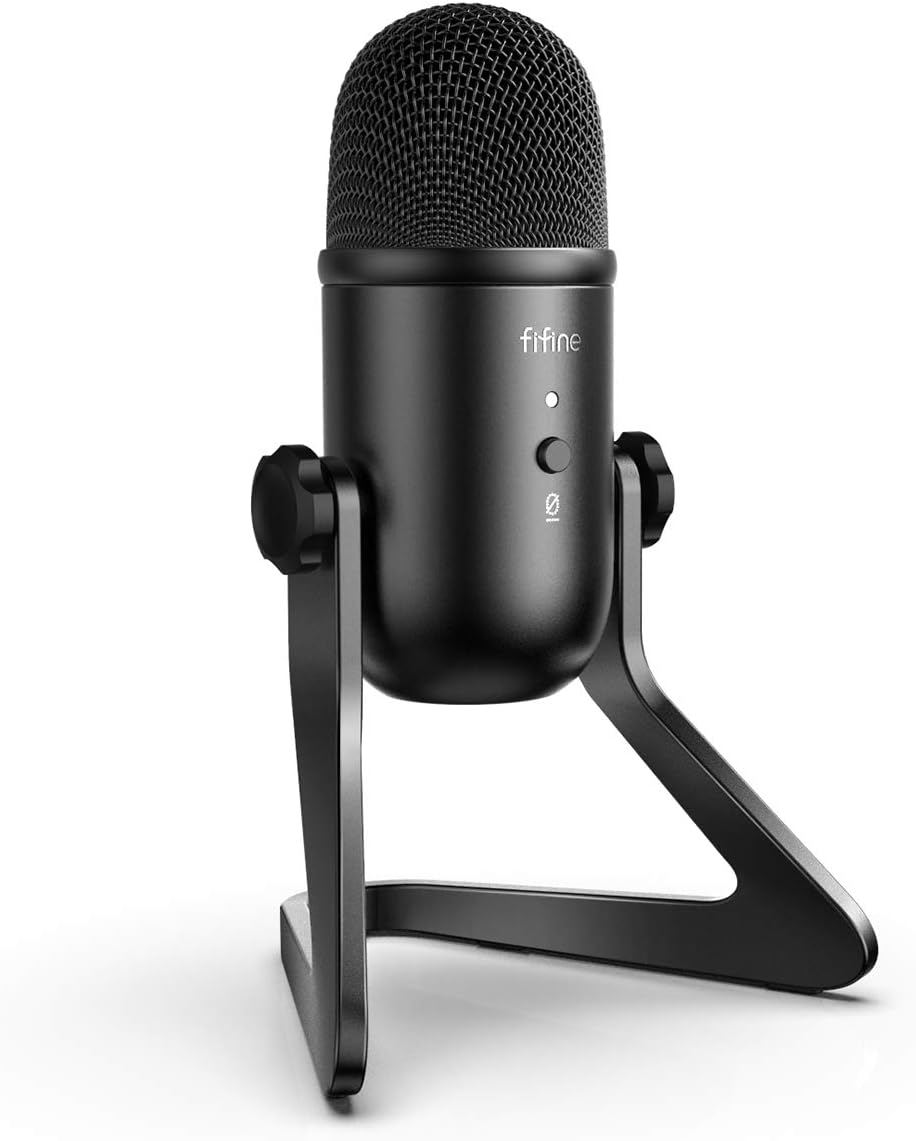
3.1 pav.: priekis view of the FIFINE K678 microphone on its desk stand.
3.1 Pagrindinės savybės ir komponentai

3.2 pav. Išsamus view of the microphone's controls and ports.
- Microphone Gain Knob: Adjusts the microphone's input sensitivity. Turn clockwise to increase gain, counter-clockwise to decrease.
- Ausinių garsumo rankenėlė: Controls the volume of the 3.5mm headphone output for direct monitoring.
- Nutildymo mygtukas: Paspauskite, norėdami nutildyti arba įjungti mikrofoną.
- LED indikatorius:
- Green: Microphone is active.
- Red: Microphone is muted.
- 3.5 mm ausinių lizdas: For real-time, zero-latency monitoring of your audio.
- USB-B prievadas: Connects the microphone to your computer using the provided USB cable.
- Stalinis stovas: Provides stable support and allows for angle adjustment.
3.2 Poliarinis modelis
The K678 features a cardioid polar pattern, which primarily picks up sound from the front of the microphone, reducing unwanted noise from the sides and rear. This is ideal for vocal recordings, streaming, and podcasting where isolating the main sound source is crucial.

Figure 3.3: Diagram illustrating the cardioid pickup pattern of the microphone.
4. Sąranka
The FIFINE K678 is designed for simple plug-and-play operation with Windows and Mac OS.
4.1 Mikrofono surinkimas
- Išpakuokite visus komponentus iš dėžutės.
- Attach the microphone to the adjustable desk stand. Ensure it is securely fastened. The stand allows for angle adjustment to optimize sound capture.

Figure 4.1: The FIFINE K678 microphone assembled on its desk stand, ready for connection.
4.2 Prijungimas prie kompiuterio
- Connect the Mini-B end of the provided USB cable to the USB-B port on the bottom of the microphone.
- Prijunkite USB-A laido galą prie laisvo kompiuterio (PC arba „Mac“) USB prievado.
- The LED indicator on the microphone will illuminate green, indicating it is powered on and ready for use.

Figure 4.2: Illustrates connecting the USB cable from the microphone to a computer.
4.3 System Settings (Windows/Mac)
After connecting, your computer should automatically recognize the microphone. If not, follow these steps:
„Windows“:
- Eikite į Nustatymai > Sistema > Garsas.
- Under "Input," select "FIFINE K678" as your input device.
- Prireikus reguliuokite įvesties garsumą.
„Mac OS“:
- Eikite į Sistemos nuostatos > Garsas.
- Pasirinkite skirtuką „Įvestis“.
- Choose "FIFINE K678" from the list of devices.
- Adjust the input volume using the "Input volume" slider.
Note: The FIFINE K678 is incompatible with Xbox, phones, and iPads.
5. Naudojimo instrukcijos
5.1 Mikrofono stiprinimo reguliavimas
The Microphone Gain Knob on the front of the K678 controls the sensitivity of the microphone. Turn it clockwise to increase the input level for quieter sources or to capture sound from further away. Turn it counter-clockwise to decrease the input level to prevent distortion when recording loud sources.
5.2 Using the Mute Function
Press the Mute Button to instantly mute or unmute the microphone. The LED indicator will change color to show the microphone's status:
- Žalias šviesos diodas: Microphone is active and picking up sound.
- Raudonas šviesos diodas: Mikrofonas nutildytas.
5.3 Ausinių stebėjimas
Connect your headphones to the 3.5mm Headphone Jack on the microphone for direct, zero-latency monitoring of your audio. This allows you to hear exactly what the microphone is picking up without any delay. Adjust the headphone volume using the Headphone Volume Knob.
Figure 5.1: Illustration of the microphone gain, headphone volume, and mute button controls.
5.4 Optimal Microphone Placement
For best results, position the microphone directly in front of the sound source (e.g., your mouth) within a few inches. The cardioid pattern will help to reject off-axis sounds. Experiment with distance and angle to find the optimal sound for your specific application.

Figure 5.2: The adjustable stand allows for tilting the microphone to achieve optimal angle for sound capture.
6. Priežiūra
To ensure the longevity and optimal performance of your FIFINE K678 microphone, follow these maintenance guidelines:
- Valymas: Use a soft, dry cloth to wipe down the microphone body and stand. Do not use liquid cleaners, aerosols, or solvents, as they may damage the finish or internal components.
- Saugykla: When not in use, store the microphone in a clean, dry place away from extreme temperatures, humidity, and direct sunlight.
- Tvarkymas: Avoid dropping the microphone or subjecting it to strong impacts, as this can damage the internal capsule or external casing.
- Kabelio priežiūra: Do not bend or crimp the USB cable excessively. Store it neatly to prevent tangles and damage.
7. Problemų sprendimas
If you encounter issues with your FIFINE K678 microphone, refer to the following common problems and solutions:
| Problema | Galima priežastis | Sprendimas |
|---|---|---|
| Iš mikrofono nėra garso išvesties. |
|
|
| Sound is distorted or too loud. |
|
|
| Nėra garso iš ausinių. |
|
|
| Kompiuteris neatpažįsta mikrofono. |
|
|
8. Specifikacijos
| Funkcija | Detalė |
|---|---|
| Prekės ženklas | GERAI |
| Modelis | K678 |
| Ryšio technologija | USB |
| Jungties tipas | USB, 3.5 mm lizdas |
| Polinis raštas | Vienakryptis (kardioidas) |
| Suderinami įrenginiai | MacBook, Laptop, Personal Computer, PS4/5 |
| Rekomenduojami naudojimo būdai | Meeting, Online Course, Gaming, Streaming, Recording, Voice-Over, Podcasting |
| Prekės svoris | 2.2 svaro (apie 1 kg) |
| Kabelio ilgis | 6.56 ft (2 metrai) |
9. Garantija ir palaikymas
FIFINE provides friendly technical support for its products. For warranty information, technical assistance, or customer service inquiries, please visit the official FIFINE websvetainėje arba susisiekite tiesiogiai su jų palaikymo komanda.
Official FIFINE Websvetainė: Apsilankykite FIFINE parduotuvėje „Amazon“ svetainėje (or refer to the official FIFINE website for direct support contact information).
Išsaugokite pirkimo įrodymą, kad galėtumėte kreiptis dėl garantijos.


