1. Įvadas
This manual provides essential information for the proper setup, operation, and maintenance of your KEF R8a Dolby Atmos Module Surround Speakers. The KEF R8a is designed to function as a surround or rear speaker, capable of reflecting sound off the ceiling to enhance the immersive experience of Dolby Atmos audio. It features a 130mm (5.25in.) Uni-Q array with a 25mm (1 in.) tweeter, engineered for precise sound direction and three-dimensional audio reproduction.
2. Pakuotės turinys
Patikrinkite, ar jūsų siuntinyje yra visi toliau išvardyti daiktai:
- 1 Pair KEF R8a Speakers (Gloss Black)
- 1 Pair Magnetic Grilles
- 1 Product Manual (this document)

1 vaizdas: priekis view of the KEF R8a speaker, showcasing the Uni-Q driver array.
3. Produkto ypatybės
- Dolby Atmos Compatibility: Designed to bounce sound off the ceiling for an immersive, cinematic Dolby Atmos experience.
- Universalus išdėstymas: Can be used as surround or rear speakers, wall-mounted, or placed on top of other R Series speakers.
- „Uni-Q“ tvarkyklės masyvas: Features a 12th Generation Uni-Q driver (130mm / 5.25in. mid-bass, 25mm / 1in. tweeter) for precise and pure sound reproduction.
- Magnetinės grotelės: Includes matching precision-cut magnetic cloth grilles for aesthetic integration and driver protection.
- Akustinis dizainas: Engineered to steer sound effectively for genuine 3D audio results.

2 paveikslėlis: Stambus planas view of the KEF Uni-Q driver array, highlighting the concentric tweeter and mid-range driver.
4. Sąranka ir diegimas
Proper placement and connection are crucial for optimal performance. The KEF R8a offers flexible installation options.
4.1 Įdėjimo parinktys
- Dolby Atmos Height Speaker: Place the R8a directly on top of your front or rear floorstanding speakers. Ensure the speaker is stable and positioned to reflect sound off the ceiling towards the listening area.
- Surround/Rear Speaker (Wall-Mounted): Utilize the integrated wall mounting bracket to install the R8a on a wall as a side or rear surround speaker. Ensure secure mounting to a stud or using appropriate wall anchors.

Image 3: KEF R8a speaker positioned on top of a larger floorstanding speaker, demonstrating its use as a Dolby Atmos height module.

Image 4: KEF R8a speaker mounted on a wall, illustrating its use as a surround or rear channel speaker.
4.2 Garsiakalbių jungtys
Connect the R8a speakers to your amplifier or AV receiver using high-quality speaker cables. Ensure correct polarity (+ to + and - to -) for each speaker to maintain proper phase and sound imaging.
- Identify the positive (+) and negative (-) terminals on the back of the R8a speaker and your ampkeltuvas/imtuvas.
- Strip approximately 1/2 inch (12mm) of insulation from the ends of your speaker cables.
- Tvirtai susukite plikas vielos gijas.
- Unscrew the binding posts on the R8a speaker, insert the bare wire, and tighten the posts securely. Ensure no stray wire strands are touching the opposing terminal.
- Pakartokite su amplifier/receiver connections.

5 vaizdas: galinis view of the KEF R8a speaker, showing the speaker terminals and keyhole slots for wall mounting.
5. Naudojimo instrukcijos
Once properly set up and connected, the KEF R8a speakers operate as passive speakers, receiving audio signals from your amplifier or AV receiver. Ensure your amplifier is powered on and configured for the correct input source.
- Dolby Atmos Configuration: If using the R8a as Dolby Atmos height speakers, configure your AV receiver's speaker setup menu to recognize them as "Dolby Enabled Speakers" or "Height Speakers" as appropriate for your system. Refer to your AV receiver's manual for specific instructions.
- Erdvinis garsas: When used as traditional surround or rear speakers, ensure your AV receiver is configured for the correct channel assignment (e.g., "Surround L/R" or "Rear Surround L/R").
- Garsumo valdymas: Garsumą reguliuokite naudodami savo amplifier or AV receiver's controls. Avoid excessively high volumes that may cause distortion or damage to the speakers.
6. Priežiūra
To ensure the longevity and optimal appearance of your KEF R8a speakers, follow these maintenance guidelines:
- Valymas: Gently wipe the speaker cabinets with a soft, dry, lint-free cloth. For the magnetic grilles, a soft brush or vacuum cleaner with a brush attachment can be used to remove dust. Avoid using abrasive cleaners, solvents, or excessive moisture.
- Grotelių priežiūra: The magnetic grilles can be easily removed for cleaning or if you prefer the aesthetic of the exposed drivers. Handle them carefully to avoid bending or damaging the fabric.
- Vieta: Avoid placing speakers in direct sunlight or near heat sources, as this can affect the finish and internal components.
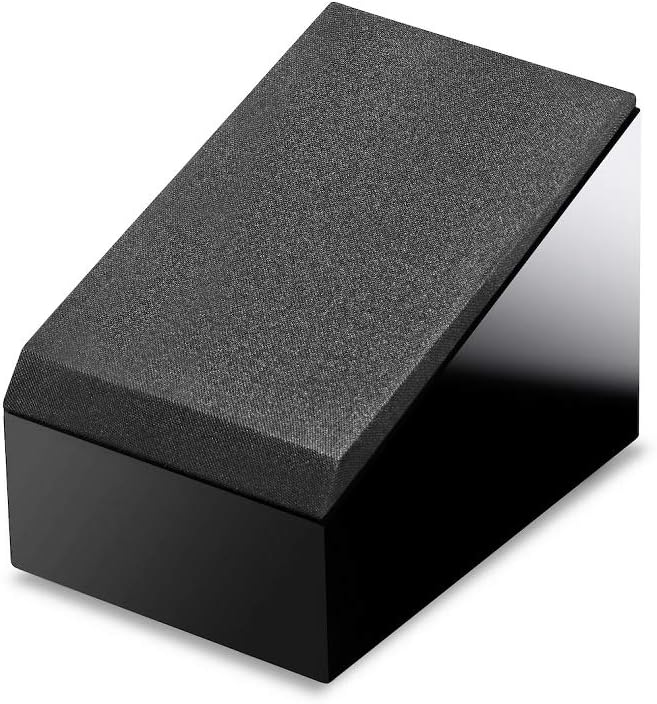
Image 6: KEF R8a speaker with its magnetic cloth grille attached, providing a clean and protected appearance.
7. Problemų sprendimas
If you encounter issues with your KEF R8a speakers, please refer to the following common troubleshooting steps:
- Nėra garso:
- Patikrinkite visus garsiakalbių kabelių prijungimus tiek prie garsiakalbio, tiek prie amplifier/receiver. Ensure they are secure and correctly polarized.
- Patikrinkite, ar jūsų ampĮrenginys / imtuvas įjungtas ir pasirinktas tinkamas įvesties šaltinis.
- Confirm that the volume is not muted or set to a very low level.
- Iškraipytas garsas:
- Sumažinkite garsumo lygį savo ampstiprintuvas/imtuvas. Per didelis garsumas gali sukelti iškraipymus.
- Check speaker cable connections for any loose strands or short circuits.
- Užtikrinkite savo amplifier's power output is suitable for the R8a speakers' impedance and power handling.
- Uneven Sound or Poor Imaging:
- Verify that all speaker connections have correct polarity (+ to + and - to -).
- Check speaker placement to ensure they are symmetrically positioned relative to the listening area.
- If using as Dolby Atmos height speakers, ensure your AV receiver's room correction and speaker setup are properly calibrated.
8. Specifikacijos
Detailed technical specifications for the KEF R8a Dolby Atmos Module Surround Speakers:
| Modelio pavadinimas | R8a |
| Garsiakalbio tipas | Satellite, Atmos Enabled |
| Dažnio atsakas (± 3dB) | 105 Hz–18.5 kHz |
| Varža | 8 omų |
| Garsiakalbio dydis | 5.25 Inches (Uni-Q Driver) |
| Rekomenduojama Ampgyvybingesnė galia | 25–150 vatų |
| Gaminio matmenys (D x P x A) | 10.2 colio x 6.9 colio x 6.8 colio (259 mm x 174 mm x 173 mm) |
| Prekės svoris | 19.6 svaro (už porą) |
| Spalva | Blizgus juodas |
| Montavimo tipas | Wall Mount, On-speaker placement |
| UPC | 637203214080 |
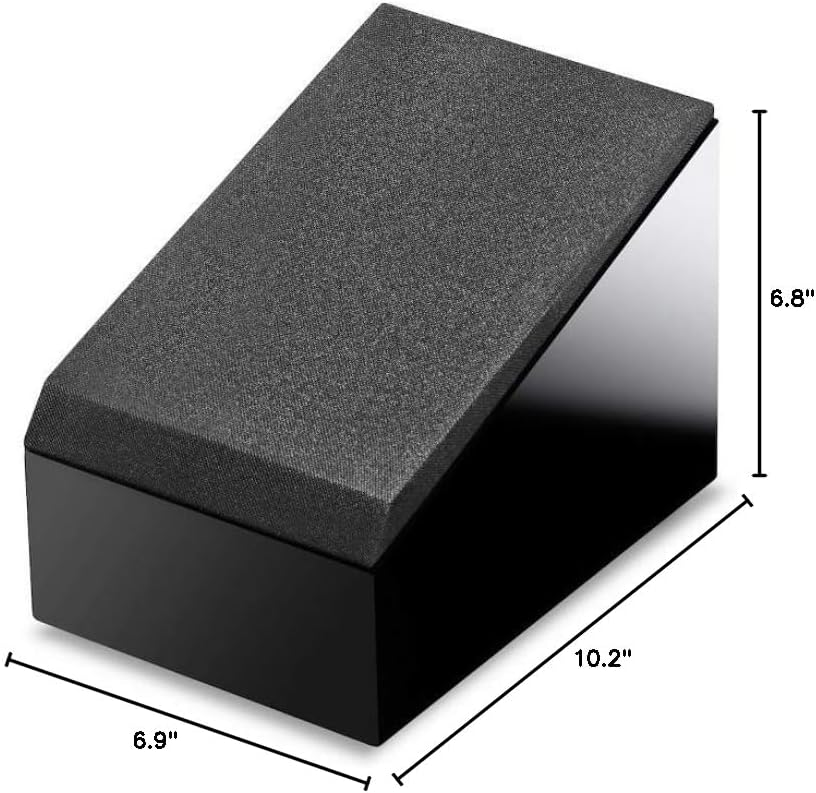
Image 7: Diagram showing the dimensions of the KEF R8a speaker (10.2"D x 6.9"W x 6.8"H).
9. Garantija ir palaikymas
KEF products are manufactured to high standards and are backed by a limited warranty. For specific warranty terms and conditions, please refer to the warranty card included with your product or visit the official KEF websvetainę.
For technical support, service inquiries, or additional product information, please contact KEF customer service or visit the official KEF support page. You can find more information and contact details on the KEF Store on Amazon or the official KEF websvetainę.


