1. Įvadas
The TC Electronic Flashback 2 Mini Delay is a compact and powerful delay pedal designed for guitarists. It features next-generation delay algorithms, the innovative MASH footswitch for expressive control, and TonePrint technology for custom sound creation. This manual provides essential information for setting up, operating, and maintaining your Flashback 2 Mini Delay pedal.
2. Svarbios saugos instrukcijos
- Prieš naudodami įrenginį, atidžiai perskaitykite šias instrukcijas.
- Išsaugokite šias instrukcijas, kad galėtumėte pasinaudoti ateityje.
- Laikykitės visų įspėjimų ir vykdykite visas instrukcijas.
- Nenaudokite šio prietaiso šalia vandens.
- Valykite tik sausa šluoste.
- Neužblokuokite jokių ventiliacijos angų. Montuokite pagal gamintojo instrukcijas.
- Nemontuokite šalia jokių šilumos šaltinių, pvz., radiatorių, šilumokaičių, viryklių ar kitų įrenginių (įskaitant ampkeltuvai), kurie gamina šilumą.
- Naudokite tik gamintojo nurodytus priedus/priedus.
- Visą techninę priežiūrą patikėkite kvalifikuotam aptarnavimo personalui. Techninė priežiūra reikalinga, kai aparatas yra bet kokiu būdu pažeistas.
3. Pakuotės turinys
Patikrinkite pakuotę, ar joje yra šie daiktai:
- TC Electronic Flashback 2 Mini Delay Pedal
- Vartotojo vadovas (šis dokumentas)
- TC Electronic sticker
Note: A 9V DC power supply (not included) is required for operation.
4. Valdikliai ir jungtys

1 pav.: priekis view of the Flashback 2 Mini Delay pedal, showing the three control knobs and the MASH footswitch.
4.1 Viršutinio skydelio valdikliai
- DELAY Knob: Controls the delay time, from short slap-back echoes to long, ambient repeats.
- F.BACK rankenėlė: Adjusts the number of repeats (feedback) for the delay effect. Turn clockwise for more repeats, counter-clockwise for fewer.
- LEVEL rankenėlė: Sets the mix level of the delayed signal relative to the dry signal.
- MASH kojinis jungiklis: This multi-functional footswitch acts as an on/off switch with a single tap. Pressing and holding the footswitch engages the MASH expression control, allowing you to dynamically control various delay parameters depending on the selected TonePrint.
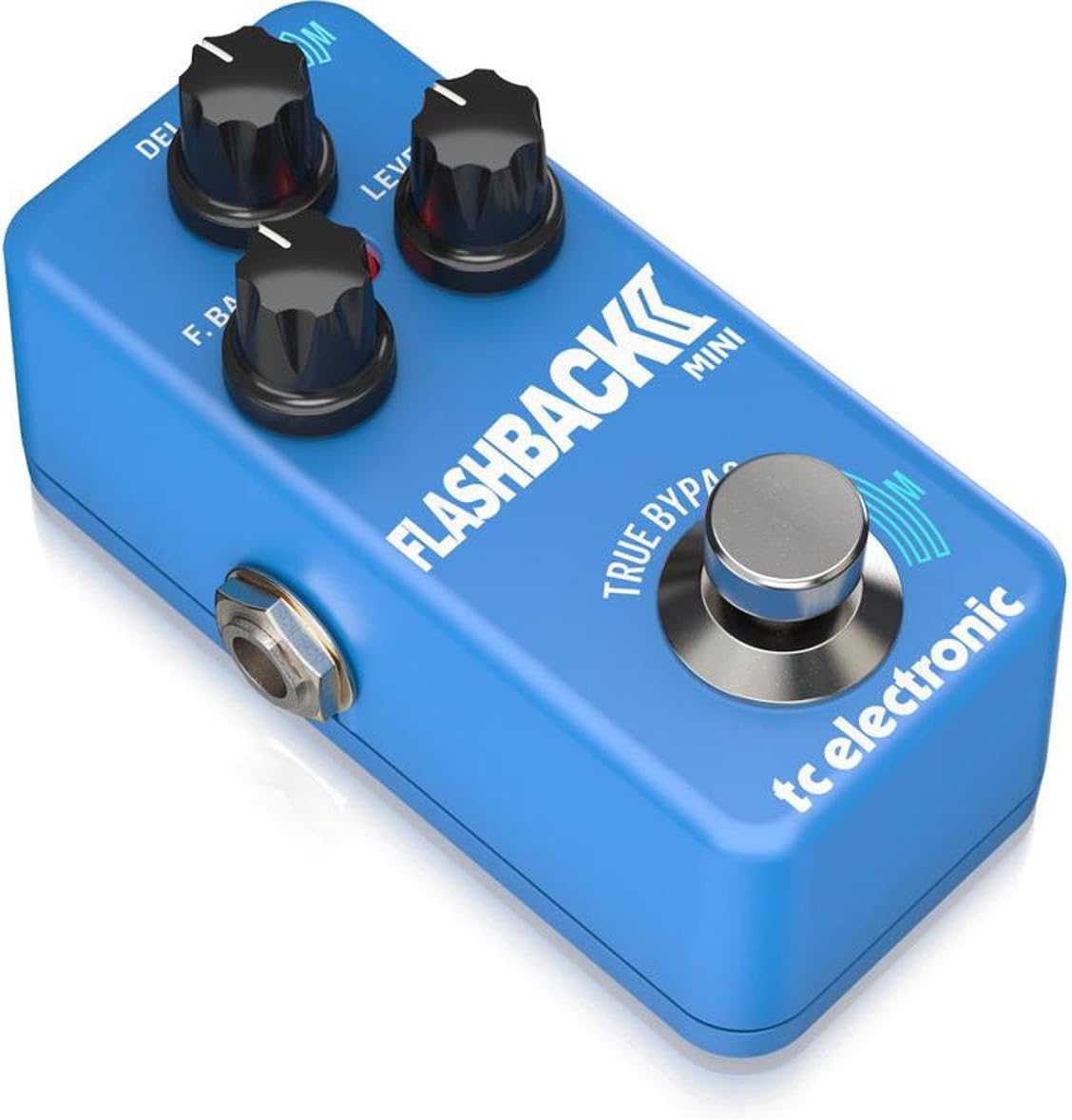
2 pav.: Kampinis view of the Flashback 2 Mini Delay pedal, highlighting the input, output, and power connections.
4.2 Side Panel Connectors
- Įvesties lizdas: Connect your guitar or the output of another pedal here using a standard 1/4-inch instrument cable.
- IŠVESTIES lizdas: Prijunkite tai prie savo amplifier or the input of the next pedal in your signal chain using a standard 1/4-inch instrument cable.
- 9V DC maitinimo įvestis: Connect a standard 9V DC, center-negative power supply (not included) here.
- USB prievadas: Used for connecting the pedal to a computer for TonePrint editing and firmware updates.
5. Sąranka
Follow these steps to connect your Flashback 2 Mini Delay pedal:
- Užtikrinkite savo amplifier is turned off or its volume is set to zero.
- Connect your guitar (or the output of a preceding pedal) to the ĮVESTIS jack of the Flashback 2 Mini using a 1/4-inch instrument cable.
- Prijunkite IŠVADA jack of the Flashback 2 Mini to your amplifier (or the input of a subsequent pedal) using another 1/4-inch instrument cable.
- Connect a 9V DC, center-negative power supply (not included) to the 9V DC maitinimo įvestis.
- Kai visos jungtys bus saugios, galėsite įjungti įrenginį amplifier and begin using the pedal.
6. Operating the Flashback 2 Mini
6.1 Pagrindinės operacijos
To activate the delay effect, simply tap the MASH footswitch. The LED indicator will illuminate. Tap it again to bypass the effect. Adjust the DELAY, F.BACK, and LEVEL knobs to shape your desired delay sound.
6.2 MASH Footswitch Functionality
The MASH footswitch offers pressure-sensitive expression control. While the effect is active, press and hold the footswitch with varying pressure to dynamically control a specific parameter of the delay. The parameter controlled by MASH is determined by the selected TonePrint. For example, MASH can control delay time, feedback, modulation, or other effects.
6.3 TonePrint Feature
TonePrint allows you to load custom delay sounds created by TC Electronic and famous artists, or design your own using the free TonePrint Editor software. To load a TonePrint:
- Download the free TC Electronic TonePrint App for your smartphone or the TonePrint Editor for your computer.
- Using the app, select a TonePrint and 'beam' it to your pedal by holding your phone's speaker near your guitar pickup.
- Alternatively, connect the pedal to your computer via the USB port and use the TonePrint Editor software to load or create custom sounds.
6.4 Delay Algorithms
The Flashback 2 Mini features a range of high-quality delay algorithms, including new Tape and Analog algorithms for classic delay tones, and Crystal Delay algorithms based on the Sub'n'Up Octaver for unique, shimmering effects.
6.5 Bypass Modes (True Bypass / Buffered Bypass)
The pedal offers switchable bypass modes: True Bypass and Buffered Bypass. True Bypass ensures that your signal remains completely unaltered when the pedal is off, while Buffered Bypass provides a strong, clean signal over long cable runs. The bypass mode can typically be switched via an internal dip switch or through the TonePrint Editor software. Refer to the TonePrint Editor documentation for specific instructions on changing the bypass mode.
7. Priežiūra
- Pedalą valykite minkštu, sausu skudurėliu. Venkite naudoti abrazyvinius valiklius ar tirpiklius.
- Pedalą laikykite sausoje vietoje, atokiau nuo ekstremalių temperatūrų ir drėgmės.
- Ensure all cables are securely connected during use and disconnected when not in use to prevent accidental damage.
8. Problemų sprendimas
- Nėra garso: Check all cable connections. Ensure the power supply is correctly connected and functioning. Verify that your amp„Lifier“ įjungtas, o jo garsumas padidintas.
- Silpnas arba iškraipytas garsas: Check cable integrity. Ensure the power supply provides the correct voltage (9V DC) and polarity (center-negative). Adjust the LEVEL knob on the pedal.
- Pedal Not Turning On: Confirm the power supply is connected and working. Try a different power outlet or power supply.
- MASH Footswitch Not Responding: Ensure the pedal is powered on and the effect is active. If using a custom TonePrint, verify that MASH control is assigned to a parameter within the TonePrint Editor.
- TonePrint Transfer Issues: Ensure your smartphone speaker is placed directly over your guitar pickup for beaming. For USB connection, ensure the correct drivers are installed and the TonePrint Editor software is up to date.
9. Specifikacijos
| Prekės svoris | 7.1 uncijos (200 gramų) |
| Gaminio matmenys | 3.66 colio ilgio x 2.01 colio pločio x 1.97 colio aukščio (9.3 x 5.1 x 5 cm) |
| Maitinimo šaltinis | Corded Electric (9V DC, center-negative, not included) |
| ttage | 9 voltų |
| Techninės įrangos sąsaja | USB |
| Signalo formatas | Analog (Analog-Dry-Through) |
| Apėjimo režimas | Switchable True Bypass / Buffered Bypass |
10. Garantija ir palaikymas
TC Electronic products are designed for reliability and performance. For detailed warranty information, please refer to the warranty card included with your product or visit the official TC Electronic website. For technical support, firmware updates, or to access the TonePrint Editor, please visit the TC Electronic support page online.
You can find additional resources and contact information at: www.tcelectronic.com


