1. Įvadas
This manual provides detailed instructions for the safe and effective use of your Elecom LBT-TWS05BK True Wireless Bluetooth Earphones. Please read this manual thoroughly before using the product and retain it for future reference.
The Elecom LBT-TWS05BK earphones are designed for stable connectivity, superior comfort, and high usability, delivering rich audio performance. They feature an ergonomic design, advanced communication technology, and convenient smart features.
2. Saugos informacija
Norėdami užtikrinti saugų darbą ir išvengti žalos, laikykitės šių atsargumo priemonių:
- Saugokite ausines ar įkrovimo dėklą nuo ekstremalių temperatūrų, drėgmės ar skysčių.
- Stenkitės, kad prietaisas nenumestų ar nepatirtų stipraus smūgio.
- Nebandykite ardyti ar modifikuoti gaminio. Tai panaikins garantiją.
- Laikyti vaikams ir naminiams gyvūnėliams nepasiekiamoje vietoje.
- Klausykitės vidutiniu garsumu, kad nepažeistumėte klausos.
- Be aware of your surroundings when using the earphones, especially in traffic or dangerous situations.
3. Pakuotės turinys
Patikrinkite, ar jūsų prekės pakuotėje yra visi šie daiktai:
- Elecom LBT-TWS05BK True Wireless Bluetooth Earphones (Left and Right)
- Įkrovimo dėklas
- USB įkrovimo laidas (A tipo į C tipo)
- Ear Caps (XS, S, M, L sizes; M size pre-installed)
- Instrukcijų vadovas
4. Produktas baigtasview
Familiarize yourself with the components of your Elecom LBT-TWS05BK earphones.

Vaizdas: Stambus planas view of the Elecom LBT-TWS05BK true wireless earbuds, showcasing their sleek black design and the ELECOM branding.

Image: The Elecom LBT-TWS05BK earbuds placed inside their compact charging case, ready for storage or charging.
The earphones feature a compact design with a 6.0mm diameter external magnetic dynamic driver for clear sound. The charging case is designed for single-handed operation with a push-button lid.
5. Sąranka
5.1. Ausinių ir dėklo įkrovimas
- Connect the supplied USB Type-A to Type-C cable to the charging case's USB Type-C port and a USB power source.
- The LED indicators on the charging case will show the charging status. Four LEDs indicate a full charge.
- Įdėkite ausines į įkrovimo dėklą. Jos pradės krautis automatiškai.
- A 15-minute charge provides approximately 1 hour of music playback. A full charge of the earphones allows for about 5 hours of continuous music playback or 4.5 hours of talk time. The charging case can recharge the earphones up to 2.5 times, providing a total of about 17.5 hours of use.
5.2. Pradinis poravimas
The Elecom LBT-TWS05BK supports auto-pairing and Google Fast Pair for compatible Android devices.

Image: An illustration demonstrating the Google Fast Pair feature, where simply opening the charging case near a compatible smartphone prompts a pairing notification. Also shows the one-push open mechanism of the case.
- Įsitikinkite, kad jūsų išmaniajame telefone įjungtas „Bluetooth“ ryšys.
- Atidarykite įkrovimo dėklą. Ausinės automatiškai įsijungs susiejimo režimu.
- For Android devices with Google Fast Pair, a notification will appear on your screen. Tap to connect.
- For other devices, go to your device's Bluetooth settings and select "LBT-TWS05BK" from the list of available devices.
- Once paired, the earphones will automatically connect to the last paired device when removed from the case.
5.3. Ausinių uždėjimas
The earphones feature an ergonomic design for optimal fit and stability.
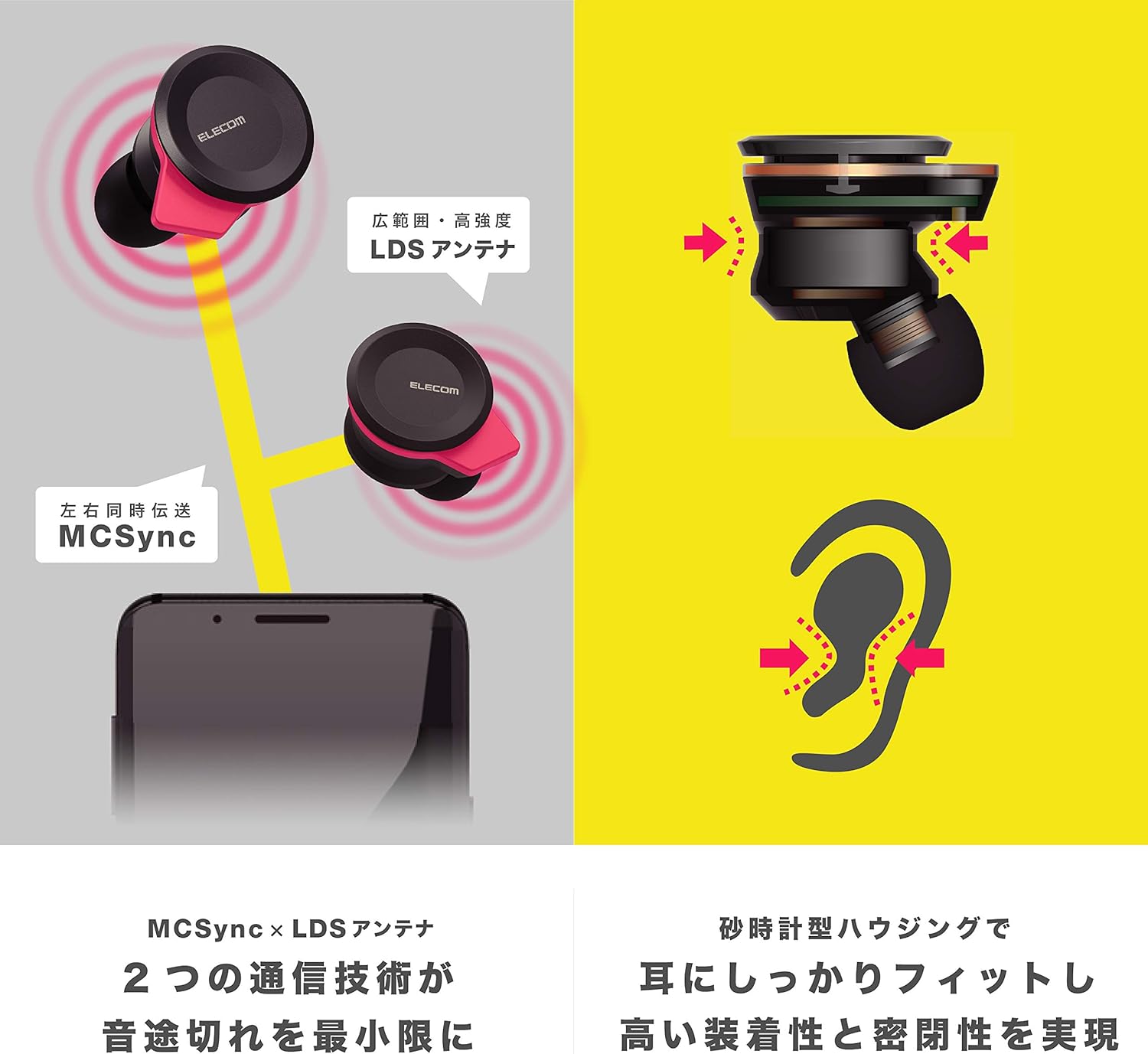
Image: An illustration showing the ergonomic hourglass shape of the earbud designed to fit securely in the ear, alongside a diagram explaining the MCSync and LDS antenna technologies for stable communication.
- Select the ear caps that provide the best seal and comfort from the four included sizes (XS, S, M, L). The M size is pre-installed.
- Švelniai įkiškite ausinę į ausies kanalą.
- Adjust the earbud so that the hourglass shape is firmly seated between your ear tragus and anti-tragus for a stable fit.
6. Naudojimo instrukcijos
The Elecom LBT-TWS05BK earphones offer various functions for audio playback, calls, and smart assistant interaction.
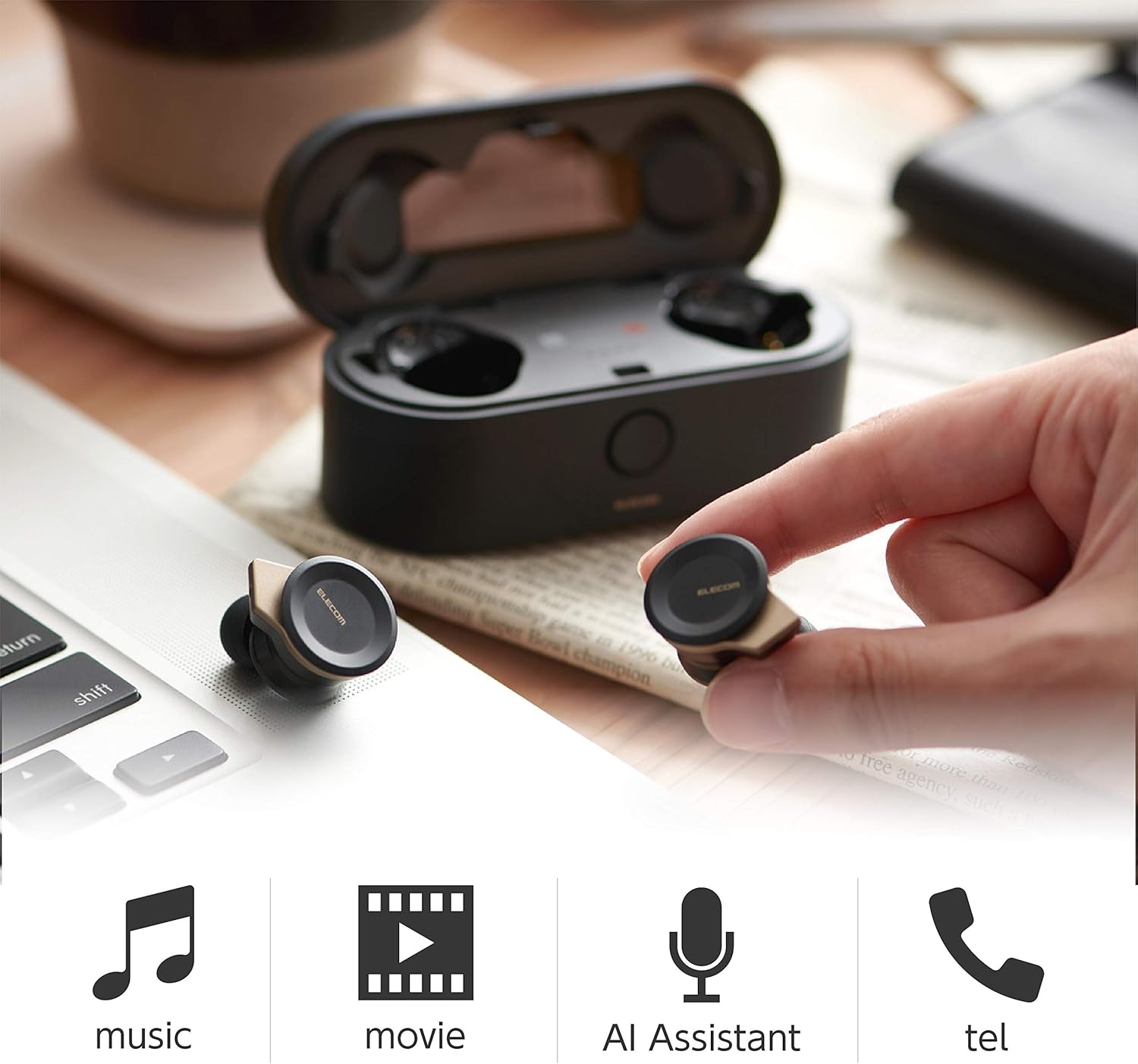
Image: The Elecom LBT-TWS05BK earbuds displayed with icons representing their versatile uses: music playback, movie watching, AI assistant activation, and phone calls.
6.1. Maitinimo įjungimas/išjungimas
- Maitinimas: Remove the earphones from the charging case. They will power on automatically.
- Išjungti: Įdėkite ausines atgal į įkrovimo dėklą. Jos išsijungs automatiškai.
6.2. Muzikos atkūrimas
Use the buttons on the earphones to control music playback (specific button functions may vary, refer to quick start guide for exact mapping):
- Leisti / pristabdyti: Vieną kartą paspauskite ant bet kurios ausinės.
- Kitas takelis: Dukart paspauskite ant dešiniojo ausinės.
- Ankstesnis takelis: Dukart paspauskite ant kairiojo ausinės.
- Garsumo valdymas: Adjust via your connected device or voice assistant.
6.3. Skambučių tvarkymas
The right earbud supports calls and voice AI functions.
- Atsiliepti / Baigti skambutį: Single press on the right earbud.
- Atmesti skambutį: Paspauskite ir palaikykite dešiniąją ausinę 2 sekundes.
6.4. Voice AI Activation
Compatible with voice AI assistants like Siri and Google Assistant.
- Activate Voice AI: Tris kartus paspauskite dešinįjį ausinės antgalį.
6.5. External Sound Capture Function
This function allows you to hear surrounding sounds while wearing the earphones.
- Suaktyvinti / išjungti: Paspauskite ir 2 sekundes palaikykite kairę ausinę.
7. Priežiūra
Tinkama priežiūra užtikrina ausinių ilgaamžiškumą ir našumą.
- Valymas: Ausinėms ir įkrovimo dėklui valyti naudokite minkštą, sausą šluostę. Nenaudokite abrazyvinių valiklių ar tirpiklių.
- Ausų gaubteliai: Remove and clean ear caps regularly with water and mild soap. Ensure they are completely dry before reattaching.
- Saugykla: Kai nenaudojate, laikykite ausines įkrovimo dėkle, kad apsaugotumėte jas nuo dulkių ir pažeidimų.
- Akumuliatoriaus priežiūra: Venkite dažnai visiškai iškrauti akumuliatorių. Reguliariai įkraukite, kad palaikytumėte akumuliatoriaus būklę.
8. Problemų sprendimas
If you encounter issues with your Elecom LBT-TWS05BK earphones, refer to the following common solutions:
- Nėra garso / ryšio problemų:
- Ensure earphones are charged and powered on.
- Patikrinkite, ar jūsų prietaise įjungtas „Bluetooth“ ryšys.
- Pabandykite iš naujo susieti ausines su savo įrenginiu.
- Ensure earphones are within the 10m transmission distance.
- Ausinės neįkraunamos:
- Patikrinkite, ar įkrovimo laidas yra tvirtai prijungtas tiek prie dėklo, tiek prie maitinimo šaltinio.
- Check if the charging case has sufficient battery.
- Įsitikinkite, kad ausinės tinkamai įdėtos į įkrovimo dėklą.
- Prasta garso kokybė:
- Ensure ear caps provide a good seal in your ear.
- Nuvalykite visas šiukšles nuo ausinių antgalių.
- Priartėkite prie prijungto įrenginio, kad pagerintumėte signalo stiprumą.
- Voice AI/Calls Not Working on Left Earbud:
- Note that calls and voice AI functions are only compatible with the right earbud.
9. Specifikacijos
| Funkcija | Specifikacija |
|---|---|
| Modelio numeris | LBT-TWS05BK |
| Bendravimo metodas | Bluetooth Standard Version 5.0 |
| Išvestis | „Bluetooth“ 1 galios klasė |
| Maksimalus perdavimo atstumas | Apytiksliai 10m |
| Dažnių juosta | 2.4 GHz |
| Moduliavimo metodas | FHSS (dažnio šokinėjimo paskleistas spektras) |
| Palaikomas „Bluetooth Pro“files | A2DP, AVRCP, HFP, HSP |
| A2DP Compatible Codec | SBC, AAC |
| A2DP Compatible Content Protection | SCMS-T |
| Maximum Registration Capacity | 8 įrenginių |
| Multipoint (Simultaneous Standby) | Nesuderinamas |
| Vairuotojo tipas | 6.0mm diameter external magnetic dynamic driver (ETEMDriver) |
| Komunikacijos technologija | MCSync (MultiCast Synchronization), LDS Antenna |
| Mikrofonas | High-quality MEMS microphone with HDVoice |
| Nuolatinis pokalbių laikas | apytiksliai 4.5 valandas |
| Continuous Music Playback Time | apytiksliai 5 valandas |
| Bendras atkūrimo laikas (su įkrovimo dėklu) | apytiksliai 17.5 valandas |
| Įkrovimo prievadas | C tipo USB |
| Greitas įkrovimas | 15 min. įkrovimas 1 valandos atkūrimui |
| Svoris | 61 Grams (total package weight) |
| Medžiaga | Plastikiniai |
| Atsparumo vandeniui lygis | Atsparus vandeniui |
| Suderinami įrenginiai | Smartphones, Tablets, iOS Devices, Android Devices |
10. Garantija ir palaikymas
For warranty information and customer support, please refer to the official ELECOM websvetainėje arba susisiekite su vietiniu pardavėju. Išsaugokite pirkimo įrodymą, jei prireiktų pateikti garantinį prašymą.


