Įvadas
This manual provides detailed instructions for the safe installation, operation, and maintenance of your Hinkley Marquis 52-Inch 5-Blade Ceiling Fan. Please read all instructions carefully before beginning installation and retain this manual for future reference. Proper installation and operation are essential for optimal performance and safety.
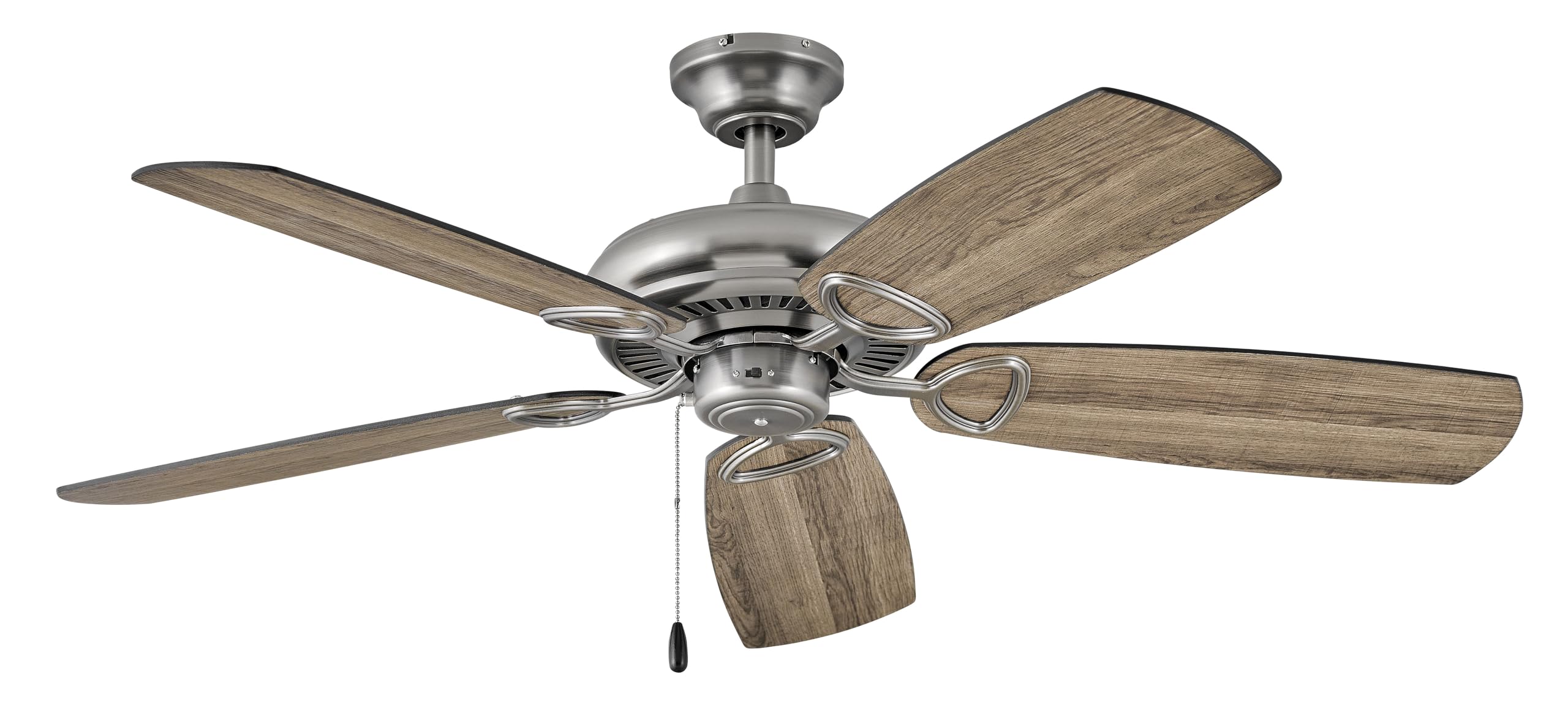
Image: Hinkley Marquis 52-Inch 5-Blade Ceiling Fan in Pewter finish with five wooden-look blades.
Saugos informacija
WARNING: To reduce the risk of fire, electric shock, or personal injury, always follow these safety guidelines.
- Ensure the electrical supply is disconnected at the circuit breaker or fuse box before installation or servicing.
- Visus elektros instaliacijos darbus turi atlikti kvalifikuotas elektrikas, laikydamasis nacionalinių ir vietinių elektros kodeksų.
- Tvirtinimo konstrukcija turi būti pajėgi išlaikyti ventiliatoriaus svorį (maždaug 18.92 svaro).
- Nenaudokite ventiliatoriaus su pažeistomis mentėmis ar korpusu.
- Maintain a minimum clearance of 7 feet from the floor to the bottom edge of the fan blades.
- Venkite dėti daiktų besisukančių peilių kelyje.
Pakuotės turinys
Prieš pradėdami diegti, patikrinkite, ar yra visi komponentai:
- Lubų ventiliatoriaus surinkimas
- Ventiliatoriaus mentės (5)
- Montavimo įranga
- Nuotolinio valdymo pultas
- Instrukcijų vadovas
Specifikacijos
| Prekės ženklas | Hinkley |
| Modelio numeris | 901352FPW-NIA |
| Spalva | Alavas |
| Elektrinio ventiliatoriaus dizainas | Lubinis ventiliatorius |
| Maitinimo šaltinis | Su laidu elektra |
| Kambario tipas | Dining Room, Bedroom, Living Room |
| Rekomenduojami naudojimo būdai | Oro cirkuliacija, aušinimas |
| Apdailos tipas | Baigta |
| ttage | 120 voltų |
| Jungiklio tipas | Pull Chain (Remote Control included) |
| Prekės svoris | 18.92 svaro |
| Įtraukti komponentai | Nuotolinis |
| Naudojimas viduje / lauke | Lauke |
| Kontrolės metodas | Nuotolinis |
| Gaminio matmenys | 52 x 52 x 13.25 colio |
| Surinktas aukštis | 13.25 colių |
| Surinktas ilgis | 52 colių |
| Surinktas plotis | 52 colių |
| Atspalvio medžiaga | Stiklas |
| Šviesos kryptis | Žemutinis apšvietimas |
Informacija apie energiją
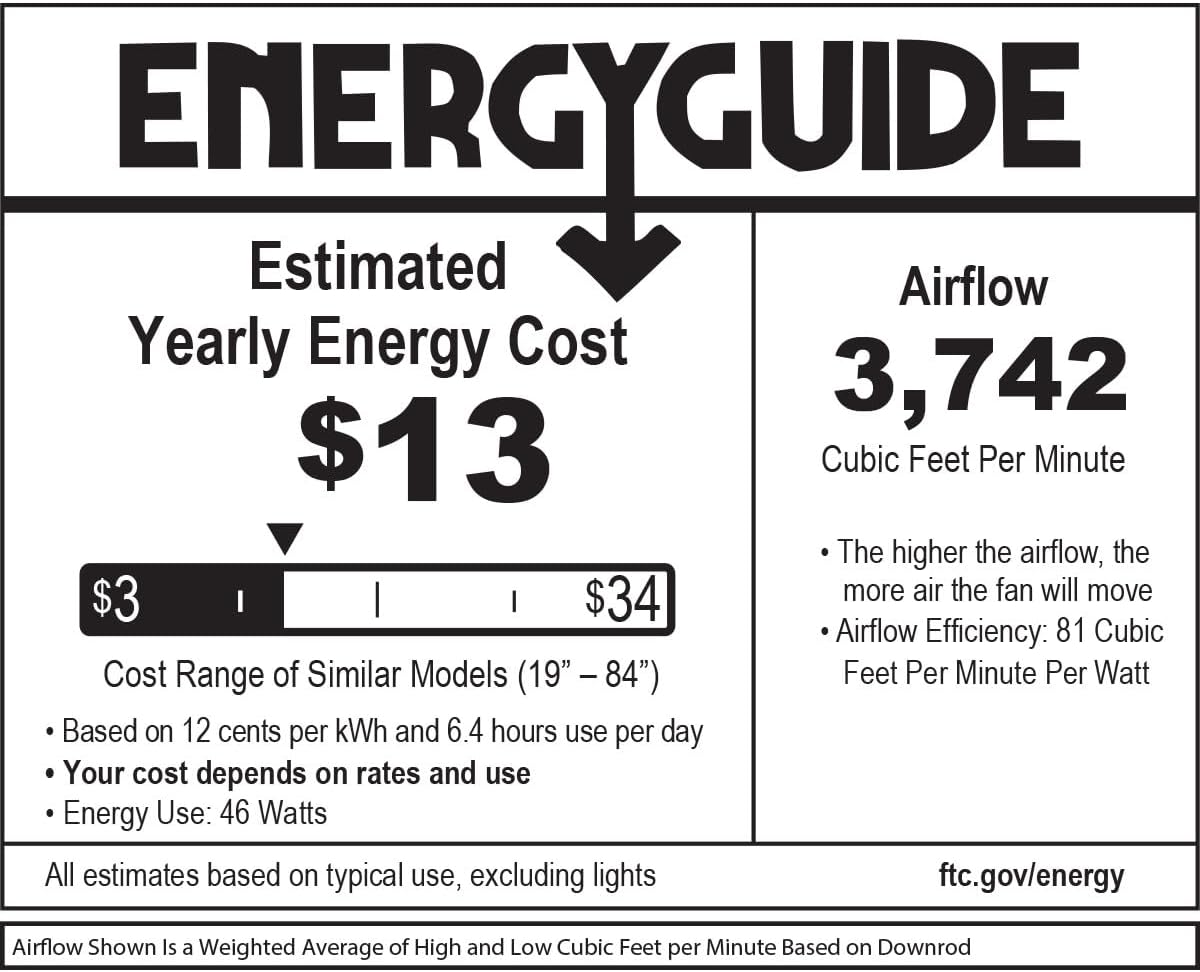
Image: EnergyGuide label indicating an estimated yearly energy cost of $13 and an airflow of 3,742 Cubic Feet Per Minute.
Sąranka ir diegimas
Professional installation by a qualified electrician is highly recommended for safety and proper function. Ensure all local electrical codes are followed.
Patikrinimai prieš montavimą
- Verify that the electrical box is securely mounted and rated for ceiling fan support.
- Confirm that the chosen location allows for proper blade clearance from walls and other obstructions.
Ventiliatoriaus montavimas
- Secure the mounting bracket to the electrical outlet box using the provided screws.
- Atsargiai pakelkite ventiliatoriaus variklio mazgą ir pakabinkite jį nuo tvirtinimo laikiklio.
Laidų jungtys
Connect the fan's electrical wires to the household wiring according to the wiring diagram provided in the full installation guide (not included in this summary). Ensure all connections are secure and insulated.
Attaching Blades and Canopy
- Attach the fan blades to the motor housing using the blade screws. Ensure all blades are securely fastened.
- Install the canopy over the mounting bracket, securing it with the designated screws.
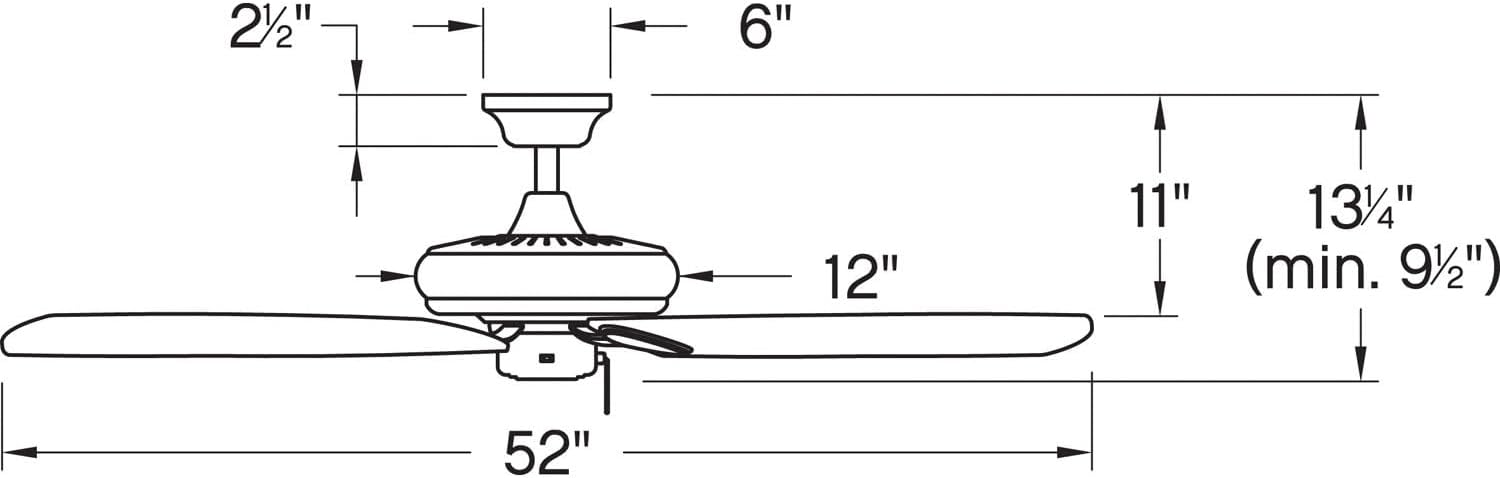
Image: Dimensional diagram of the ceiling fan, illustrating key measurements for installation.
Naudojimo instrukcijos
The Hinkley Marquis ceiling fan is operated using the included remote control. It also features smart home compatibility (WiFi accessory sold separately).
Nuotolinio valdymo pulto funkcijos
- Ventiliatoriaus greitis: Use the speed buttons to adjust the fan's rotation speed (typically low, medium, high).
- Šviesos valdymas: Press the light button to turn the light on or off. Hold the button to dim or brighten the light (if dimmable).
- Ventiliatoriaus kryptis: A button may be present to reverse the fan's direction for seasonal use (downward airflow for cooling, upward for heat circulation).
Išmaniųjų namų suderinamumas
This fan is designed to be smart home compatible. A WiFi accessory, sold separately, is required to enable features such as speed, light, and seasonal mode control via a smart device or voice activation. This allows for setting schedules and preferences for enhanced convenience.

Image: WiFi compatibility features, highlighting smartphone control, voice activation, and scheduling options (requires separate accessory).
Priežiūra
Regular maintenance ensures the longevity and efficient operation of your ceiling fan.
Valymas
- Prieš valydami visada išjunkite ventiliatoriaus maitinimą grandinės pertraukikliu.
- Naudokite minkštą, damp cloth to clean the fan blades and motor housing. Avoid abrasive cleaners that may damage finishes.
- Nenaudokite vandens tiesiai ant ventiliatoriaus variklio ar elektrinių komponentų.
Tikrinamos jungtys
Periodically check all screws and connections on the fan and mounting hardware to ensure they are secure. Tighten any loose screws as needed.
Trikčių šalinimas
Jei kyla problemų dėl lubų ventiliatoriaus, žr. šias dažniausiai pasitaikančias problemas ir sprendimus:
| Problema | Galima priežastis | Sprendimas |
|---|---|---|
| Ventiliatorius neįsijungia | Ventiliatoriui netiekiamas maitinimas; atsilaisvinusios laido jungtys; išsikrovusi nuotolinio valdymo pulto baterija. | Check circuit breaker/fuse; ensure all wiring connections are secure; replace remote control battery. |
| Ventiliatoriaus virpėjimas | Atsilaisvinę peilių varžtai; nesubalansuoti peiliai; atsilaisvinęs tvirtinimo laikiklis. | Tighten all blade screws; ensure blades are balanced (balancing kit may be required); check mounting bracket for secure attachment. |
| Triukšmingas veikimas | Loose screws; motor not seated properly; fan not broken in. | Check and tighten all screws; ensure motor housing is properly secured; allow for a break-in period (usually 24 hours). |
| Šviesa neveikia | Bulb needs replacement; loose wire connection; remote control issue. | Replace light bulb; check light kit wiring; ensure remote control battery is functional. |
Garantija ir palaikymas
For specific warranty information and details regarding your Hinkley Marquis ceiling fan, please refer to the warranty card included with your product or visit the official Hinkley website. For technical support or assistance with parts, contact Hinkley customer service directly.
You can find more information and contact details on the official Hinkley websvetainė: www.hinkley.com


