Įvadas
This manual provides detailed instructions for the MageGee K1 RGB Gaming Keyboard and Mouse combo. Please read this manual carefully before using the product to ensure proper setup and operation. This product is designed for use with personal computers and laptops, offering a full-size keyboard with RGB backlighting and a high-resolution gaming mouse.

Image: The MageGee K1 RGB Gaming Keyboard and Mouse set, featuring a pink keyboard with RGB backlighting and a matching pink mouse.
Pakuotės turinys
Įsitikinkite, kad pakuotėje yra visi daiktai:
- MageGee K1 RGB Gaming Keyboard
- MageGee K1 Gaming Mouse
- Vartotojo vadovas (šis dokumentas)
Sąranka
Prietaiso prijungimas
- Locate an available USB 2.0 port on your computer or laptop.
- Plug the USB connector of the MageGee K1 Keyboard into the USB port.
- Plug the USB connector of the MageGee K1 Mouse into another available USB port.
- The keyboard and mouse are plug-and-play devices. Your operating system should automatically detect and install the necessary drivers. No additional software or drivers are typically required.
Suderinamumas
The MageGee K1 RGB Gaming Keyboard and Mouse are compatible with the following operating systems:
- Windows XP
- Windows Vista
- Windows 7
- Windows 8
- Windows 10
- Mac OS
- Linux
Operating the Keyboard and Mouse
Klaviatūros ypatybės
The K1 keyboard features a full-size 104-key layout with ergonomic design for comfortable use. It includes a numeric keypad and function keys.

Image: Illustration of the ergonomic design of the MageGee K1 keyboard, showing the keycap profile patogiam rašymui.
RGB foninio apšvietimo valdymas
The keyboard features RGB backlighting with multiple customization options:
- Šviesios spalvos: 8 distinct colors.
- Apšvietimo režimai: 5 different lighting effects.
- Ryškumo lygiai: Adjustable to suit your preference.
- Greičio valdymas: Reguliuokite dinaminio apšvietimo efektų greitį.
Norėdami valdyti foninį apšvietimą:
- Refer to the keyboard's dedicated backlight control keys or FN key combinations for specific adjustments.
- The backlight can be turned on or off as needed.

Image: Diagram illustrating the RGB backlight features of the MageGee K1 keyboard, including 5 light modes, 8 light colors, adjustable speed/brightness, and light on/off functionality.
Multimedijos funkcijos
The keyboard includes multimedia shortcut keys accessible via the FN raktas:
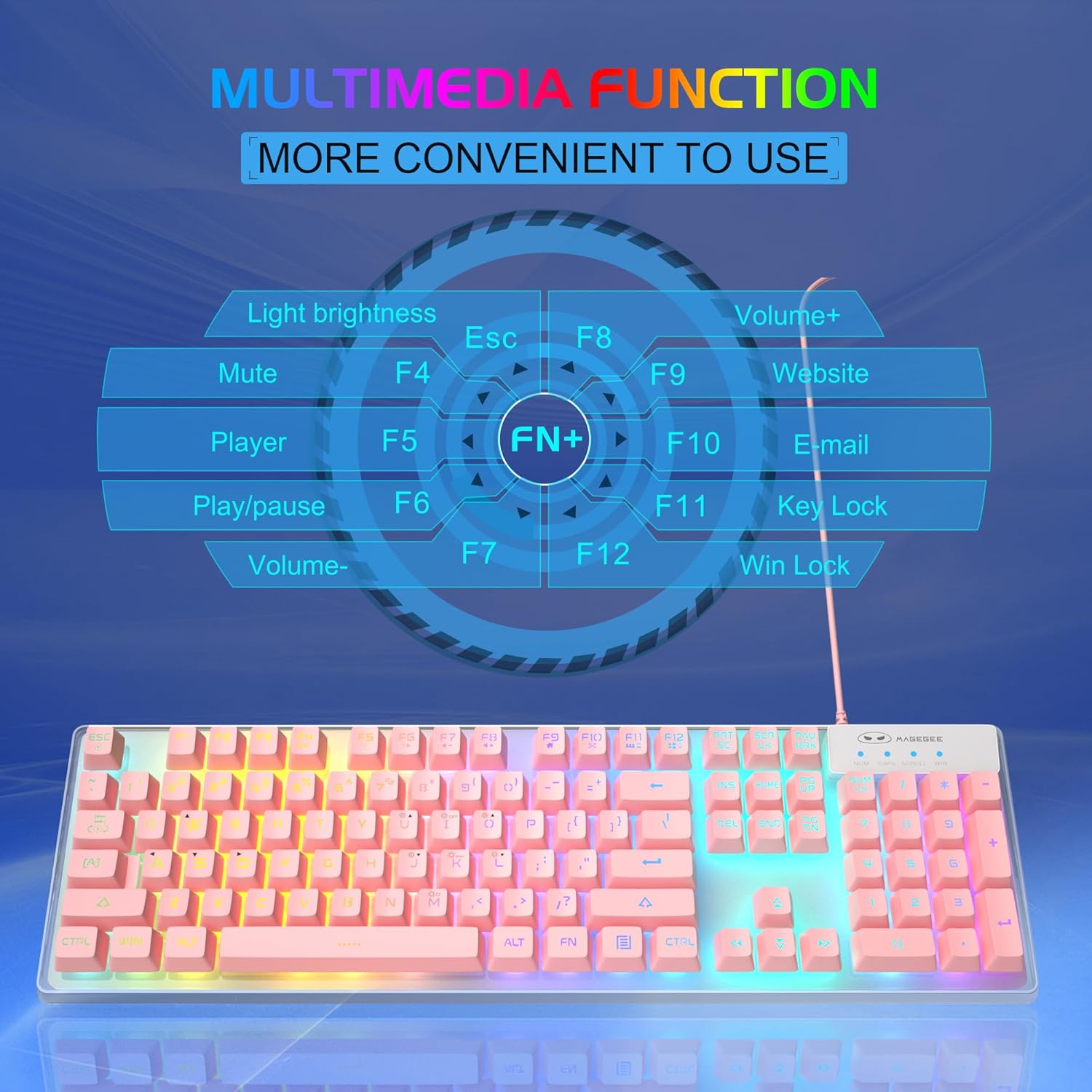
Image: A visual guide to the multimedia functions of the MageGee K1 keyboard, showing FN key combinations for mute, volume control, media playback, website, email, and key lock.
- FN + F1: Nutildyti
- FN + F2: Sumažinti garsumą
- FN + F3: Padidinti garsumą
- FN + F4: Žaidėjas
- FN + F5: Leisti / pristabdyti
- FN + F6: Ankstesnis takelis
- FN + F7: Kitas takelis
- FN + F8: Sustok
- FN + F9: El. paštas
- FN + F10: Web Naršyklė
- FN + F11: Raktų užraktas
- FN + F12: Win Lock (disables Windows key)
Pelės savybės
The K1 mouse offers high resolution and responsive tracking for gaming and general computing.
DPI reguliavimas
The mouse features 6 adjustable DPI (Dots Per Inch) levels to match your precision and speed requirements:
- DPI lygiai: 600 / 800 / 1200 / 1600 / 2400 / 3200
To change DPI, press the dedicated DPI button on the mouse. Each press cycles through the available DPI settings.

Image: Diagram showing the MageGee K1 mouse with its 6 DPI levels (600-3200) and instructions for changing and locking the 7-color LED backlight.
LED Backlight Control (Mouse)
The mouse features a 7-color LED backlight with a breathing effect. To lock the mouse LED backlight to a specific color:
- While the mouse cycles through colors, press the šoninis mygtukas (forward button) and the vidurinis mygtukas (scroll wheel click) simultaneously. This will lock the current color.

Image: Display of the MageGee K1 mouse showing its 7-color cycled breathing LED lights in green, yellow, purple, cyan, red, and white.
Priežiūra
Valymas
To maintain the performance and appearance of your MageGee K1 keyboard and mouse:
- Prieš valydami atjunkite įrenginius nuo kompiuterio.
- Šiek tiek naudokite minkštą, be pūkelių šluostę dampnuplauti vandeniu arba švelniu valymo tirpalu.
- Avoid using harsh chemicals, abrasive cleaners, or solvents, as these can damage the surface and keycap legends.
- For the keyboard, you can use compressed air to remove dust and debris from between the keys.
- For the mouse, gently wipe the surface and the optical sensor area.
Bendroji priežiūra
- Venkite prietaisų laikymo ekstremaliose temperatūrose, tiesioginiuose saulės spinduliuose ar didelėje drėgmėje.
- Nenumeskite ir nelaikykite prietaisų stipriai sutrenktų.
- Keep liquids away from the keyboard and mouse. While the keyboard has some water-resistant features, it is not fully waterproof.
Trikčių šalinimas
If you encounter issues with your MageGee K1 keyboard and mouse, refer to the following common solutions:
| Problema | Galimas sprendimas |
|---|---|
| Klaviatūra / pelė nereaguoja |
|
| Backlight not working (Keyboard) |
|
| Pelės sekimo problemos |
|
| Multimedijos klavišai neveikia |
|
Specifikacijos
Below are the technical specifications for the MageGee K1 RGB Gaming Keyboard and Mouse:

Image: Detailed dimensions of the MageGee K1 keyboard (438mm x 137mm x 35mm) and mouse (123mm x 63mm x 39mm).
| Funkcija | Detalė |
|---|---|
| Prekės ženklas | MageGee |
| Modelio numeris | K1 |
| Spalva | K1 Pink |
| Ryšio technologija | Wired USB 2.0 (Gold-plated interface, Anti-interference magnetic ring) |
| Klaviatūros išdėstymas | Full-size 104 keys |
| Foninis klaviatūros apšvietimas | RGB (8 colors, 5 modes, adjustable brightness/speed) |
| Klaviatūros dangtelio tipas | Double-shot injection molded, Membrane style |
| Special Keyboard Features | Ergonomic, Backlit, Shortcut and Multimedia keys, Anti-ghosting (19 keys) |
| Pelės jutiklių technologija | Optinis |
| Pelės DPI lygiai | 600/800/1200/1600/2400/3200 |
| Pelės foninis apšvietimas | 7-color cycled breathing LED |
| Suderinamos operacinės sistemos | Windows XP/Vista/7/8/10, Mac, Linux |
| Medžiaga | ABS inžinerinis plastikas |
| Maitinimo šaltinis | Maitinimas per USB (nereikia baterijų) |
Garantija ir palaikymas
Information regarding specific warranty terms and customer support contact details for the MageGee K1 RGB Gaming Keyboard and Mouse is not available in this document. Please refer to the product packaging or the official MageGee websvetainėje rasite informacijos apie garantiją ir klientų aptarnavimo kontaktus.


