Įvadas
Thank you for choosing the MageGee Pink Gaming Keyboard. This mechanical keyboard is designed to enhance your gaming and typing experience with its responsive blue switches, dynamic backlighting, and durable construction. This manual provides detailed instructions for setup, operation, maintenance, and troubleshooting to ensure optimal performance.

Sąranka
The MageGee Pink Gaming Keyboard is designed for simple plug-and-play functionality, requiring no additional drivers for most operating systems.
Klaviatūros prijungimas
- Raskite laisvą USB prievadą savo kompiuteryje (PC arba Mac).
- Insert the USB connector of the keyboard into the USB port. The keyboard features a gold-plated USB port for stable data transmission.
- Wait for your operating system to recognize the device. This usually happens automatically within a few seconds.
- The keyboard's backlight will illuminate upon successful connection, indicating it is ready for use.

Naudojimo instrukcijos
This section details the various functions and features of your MageGee Gaming Keyboard.
Pagrindinės savybės
- Professional Blue Switches: Equipped with linear, top-to-bottom switches that offer a smooth and responsive typing experience with a distinct tactile and audible click.
- N klavišų perkėlimas: Features 100% anti-ghosting across all 104 keys, ensuring that every simultaneous key press is registered accurately, crucial for fast-paced gaming.
- Dinaminis foninis apšvietimas: Offers 18 distinct backlight models to customize your typing environment.
- Ypatingas patvarumas: Built with a solid base and double injection ABS keycaps, designed for long-term use and resistance to wear.
- Platus suderinamumas: Supports Windows 10, Windows 8, Windows 7, Mac OS X, Windows XP, Windows VISTA, and other common operating systems.
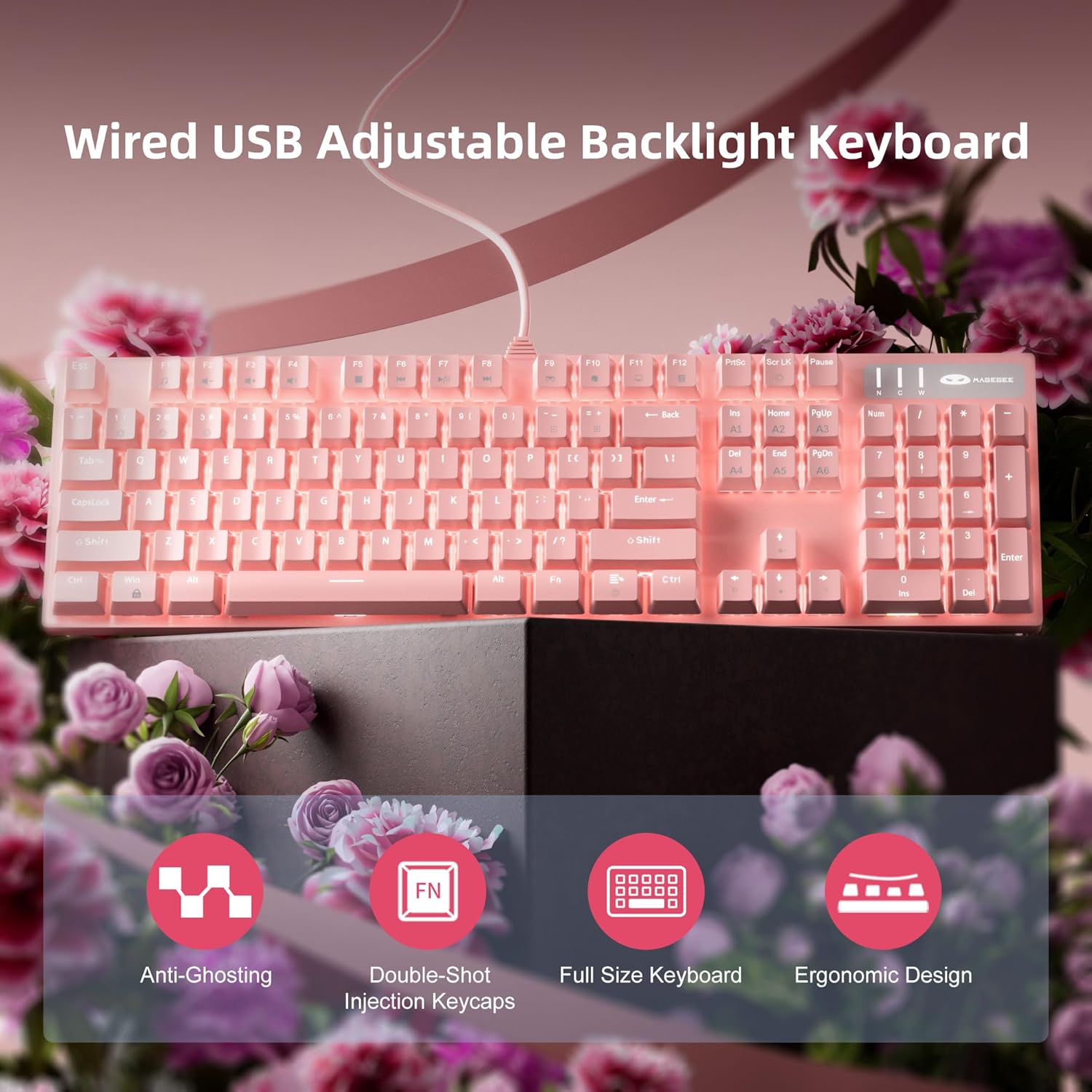
Foninio apšvietimo valdymas
The keyboard offers various backlight settings for customization:
- Sureguliuokite ryškumą: Paspauskite FN + Up Arrow Key norėdami padidinti foninio apšvietimo ryškumą, paspauskite FN + Down Arrow Key , kad sumažintumėte foninio apšvietimo ryškumą.
- Pakeiskite foninio apšvietimo režimą: The keyboard has 18 different backlight modes. Refer to the keyboard's function key combinations (e.g., FN + F1-F12, or specific keys) to cycle through these modes. Detailed mode switching instructions may vary; experimentation is encouraged.

Priežiūra
Tinkama priežiūra prailgins klaviatūros tarnavimo laiką ir išlaikys jos veikimą.
- Valymas: Klaviatūros paviršių nuvalykite minkšta, sausa šluoste. Gilesniam valymui naudokite suslėgtą orą, kad pašalintumėte dulkes ir šiukšles iš tarpų tarp klavišų dangtelių.
- Klaviatūros dangtelio nuėmimas: The double injection ABS keycaps are designed for durability. If you need to remove keycaps for cleaning or replacement, use a keycap puller to avoid damaging the switches. Gently pull straight up on the keycap.
- Išsiliejęs skystis: While the keyboard is designed to be splash-proof, avoid direct exposure to large amounts of liquid. In case of a spill, immediately disconnect the keyboard from your computer and allow it to dry completely before reconnecting.

Trikčių šalinimas
Jei kyla problemų dėl klaviatūros, išbandykite šiuos sprendimus:
| Problema | Galimas sprendimas |
|---|---|
| Klaviatūra nereaguoja |
|
| Foninis apšvietimas neveikia arba yra silpnas |
|
| Raktai neregistruojami arba renkami du kartus |
|
Specifikacijos
| Funkcija | Detalė |
|---|---|
| Gaminio matmenys | 17 x 5 x 1.5 colio |
| Prekės svoris | 2.74 svaro |
| Gamintojas | MageGee |
| Modelio numeris | Storm Pink |
| Ryšio technologija | USB |
| Klaviatūros aprašymas | Mechaninis |
| Rekomenduojami naudojimo būdai | Žaidimas |
| Ypatinga funkcija | Lighting, Multimedia Keyboard |
| Spalva | Rožinė |
| Raktų skaičius | 104 (viso dydžio) |
| Foninio apšvietimo spalvų palaikymas | RGB (Adjustable) |
| Stilius | Modernus |
| Pirmoji laisva data | 17 m. balandžio 2020 d |
Garantija ir palaikymas
MageGee products are built with quality and durability in mind. For specific warranty information, please refer to the warranty card included with your product or visit the official MageGee website. If you require technical assistance or have questions not covered in this manual, please contact MageGee customer support through their official channels.
Norėdami gauti daugiau informacijos ir produktų atnaujinimų, apsilankykite „MageGee“ parduotuvė „Amazon“ platformoje.


