Įvadas
Ačiū, kad pirkoteasing the Altec Lansing AL-5003 Multimedia DJ Trolly Speaker. This speaker is designed to deliver powerful audio for various applications, including parties and surround sound systems. Featuring wireless connectivity, a built-in trolley for portability, and multiple input options, the AL-5003 offers a versatile audio experience. Please read this manual carefully to ensure proper setup, operation, and maintenance of your speaker.
Svarbios saugos instrukcijos
- Read these instructions thoroughly before operating the speaker.
- Išsaugokite šį vadovą ateityje.
- Saugokite garsiakalbį nuo lietaus ar drėgmės.
- Neužblokuokite jokių ventiliacijos angų.
- Nemontuokite šalia jokių šilumos šaltinių, pvz., radiatorių, šilumokaičių, viryklių ar kitų įrenginių (įskaitant ampkeltuvai), kurie gamina šilumą.
- Saugokite maitinimo laidą, kad ant jo neužeitų ar nesuspaustų, ypač prie kištukų, patogių lizdų ir toje vietoje, kur jie išeina iš aparato.
- Naudokite tik gamintojo nurodytus priedus/priedus.
- Atjunkite šį įrenginį žaibuojant arba kai nenaudojate ilgą laiką.
- Visus techninės priežiūros darbus patikėkite kvalifikuotam techninės priežiūros personalui.
Pakuotės turinys
Patikrinkite pakuotę, ar joje yra šie daiktai:
- Altec Lansing AL-5003 Multimedia DJ Trolly Speaker
- Maitinimo laidas
- Nuotolinio valdymo pultas
- Vartotojo vadovas
- Auxiliary Cable (may vary by region)
Produktas baigtasview
The AL-5003 speaker features a robust design with integrated wheels and a handle for easy transport. It includes a powerful 10-inch speaker and a 1-inch tweeter, providing clear and dynamic sound. The control panel is located on the top of the unit, offering easy access to various functions.
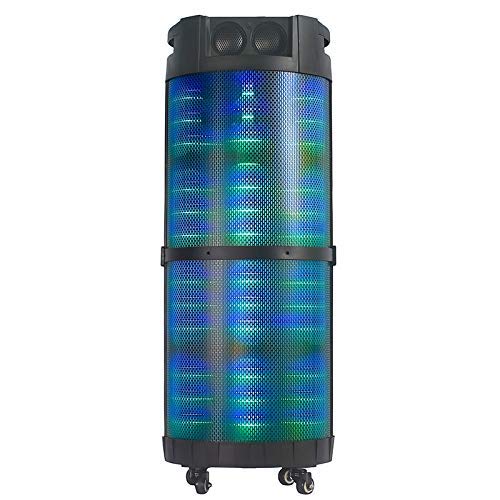
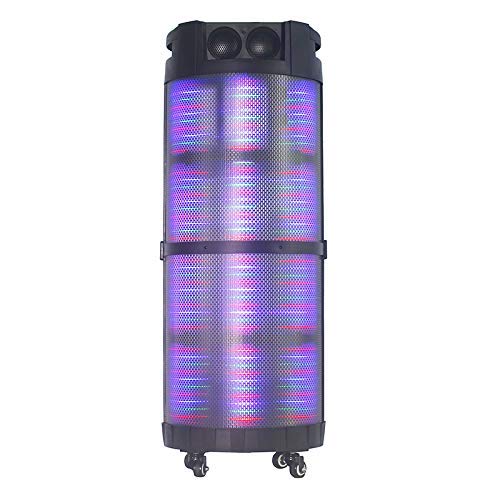
1 vaizdas: Priekyje view of the Altec Lansing AL-5003 speaker, showcasing its cylindrical design and illuminated grille. The speaker features a sturdy build with integrated wheels at the base for portability.
Valdymo skydas ir jungtys
The top panel of the speaker houses the main controls and input/output ports.
2 vaizdas: Iš viršaus į apačią view of the AL-5003 speaker, highlighting the control panel with various buttons and knobs, along with the top-mounted speakers. This view also shows the integrated handle for easy transport.
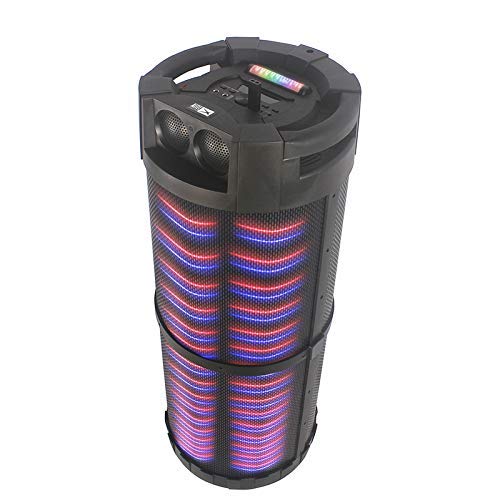
3 vaizdas: Kampuotas view of the AL-5003 speaker, providing a perspective of its overall structure, including the side grille and the top control area. The dynamic lighting effects are visible through the mesh.
Common controls include Power, Volume, Mode selection, Play/Pause, Track Skip, and inputs for USB, Auxiliary, and potentially Microphone (if available on the model).
Sąrankos instrukcijos
- Išpakavimas: Atsargiai išimkite garsiakalbį ir visus priedus iš pakuotės. Išsaugokite pakuotę būsimam transportavimui ar laikymui.
- Vieta: Place the speaker on a stable, flat surface. Ensure there is adequate ventilation around the unit. For optimal sound, position the speaker in a central location within the listening area.
- Maitinimo jungtis: Connect the provided power cord to the AC input on the speaker and then plug it into a standard wall outlet (AC 100-240V, 50/60Hz).
- Pradinis mokestis (jei taikoma): If the speaker has an internal battery (Lead Acid battery mentioned in specs), it is recommended to fully charge it before first use. The charging indicator light will typically show charging status.
- Maitinimas: Press the Power button on the control panel or remote control to turn on the speaker.
Naudojimo instrukcijos
1. „Bluetooth“ režimas
- Suaktyvinkite „Bluetooth“: Turn on the speaker. Press the "Mode" button on the control panel or remote until "Bluetooth" or "BT" is displayed (or indicated by a blue LED). The speaker will enter pairing mode, indicated by a flashing light or audible prompt.
- Susiejimas su įrenginiu: On your mobile device (smartphone, tablet, laptop), go to Bluetooth settings and enable Bluetooth. Ieškokite available devices. You should see "AL-5003" or "Altec Lansing" in the list. Select it to pair.
- Prisijungimo patvirtinimas: Once successfully paired, the speaker will emit a confirmation sound, and the Bluetooth indicator light will become solid.
- Atkūrimas: Start playing audio on your connected device. Use the speaker's volume controls or your device's volume controls to adjust the sound level. Use the Play/Pause, Next, and Previous buttons on the speaker or remote to control playback.
2. Auxiliary (AUX) Mode
- Prijunkite AUX kabelį: Insert one end of a 3.5mm auxiliary cable into the AUX input port on the speaker. Connect the other end to the headphone jack or audio output of your external audio device (e.g., MP3 player, laptop).
- Pasirinkite AUX režimą: Press the "Mode" button on the speaker or remote until "AUX" is displayed or indicated.
- Atkūrimas: Play audio from your connected device. Adjust volume using both the speaker's controls and your device's volume.
3. USB Playback Mode
- Įdėkite USB atmintinę: Įdėkite USB atmintinę, kurioje yra MP3 garso įrašų fileį garsiakalbio USB prievadą.
- Pasirinkite USB režimą: The speaker may automatically switch to USB mode. If not, press the "Mode" button until "USB" is displayed or indicated.
- Atkūrimas: Garsiakalbis automatiškai pradės leisti garsą files from the USB drive. Use the Play/Pause, Next, and Previous buttons to control playback.
4. Karaoke Function (if applicable)
If your AL-5003 model includes a microphone input, you can use it for karaoke:
- Prijunkite mikrofoną: Plug a wired microphone into the designated microphone input jack.
- Reguliuoti garsumą: Use the dedicated Microphone Volume knob (if present) to adjust the microphone's volume.
- Aido valdymas: Some models may have an Echo knob to add an echo effect to the microphone audio.
5. Nuotolinio valdymo pultas
The included remote control provides convenient access to all major functions:
- Galia: Turn the speaker On/Off.
- Režimas: Switch between Bluetooth, AUX, USB, and other available modes.
- Tūris +/-: Sureguliuokite pagrindinį garsumą.
- Leisti / pristabdyti: Pradėti arba pristabdyti atkūrimą.
- Ankstesnis Kitas: Pereiti prie ankstesnio arba kito takelio.
- EQ: Select different equalizer presets (if available).
- Nutildyti: Nutildyti arba įjungti garsą.
Priežiūra
- Valymas: Garsiakalbio išorę valykite minkšta, sausa šluoste. Nenaudokite skystų valiklių ar abrazyvinių medžiagų.
- Saugykla: Kai garsiakalbio nenaudojate ilgesnį laiką, laikykite jį vėsioje, sausoje vietoje, toliau nuo tiesioginių saulės spindulių ir ekstremalių temperatūrų.
- Akumuliatoriaus priežiūra: If the speaker has a built-in rechargeable battery, avoid fully discharging it frequently. For long-term storage, charge the battery to approximately 50-70% every few months to prolong its lifespan.
- Vėdinimas: Įsitikinkite, kad ventiliacijos angos nėra užblokuotos, kad išvengtumėte perkaitimo.
Trikčių šalinimas
| Problema | Galima priežastis | Sprendimas |
|---|---|---|
| Nėra galios | Power cord not connected; Power outlet not working; Speaker is off; Battery drained. | Ensure power cord is securely connected. Try a different outlet. Press the Power button. Charge the battery. |
| Nėra garso | Volume too low; Incorrect mode selected; Device not connected properly; Mute function active. | Increase volume on speaker and source device. Select the correct input mode (Bluetooth, AUX, USB). Reconnect device. Check if mute is active on remote. |
| „Bluetooth“ susiejimo sutrikimas | Speaker not in pairing mode; Device Bluetooth off; Speaker too far from device; Interference. | Ensure speaker is in Bluetooth pairing mode. Turn on Bluetooth on your device. Move device closer to speaker. Turn off other Bluetooth devices nearby. |
| USB atkūrimas neveikia | USB atmintinė netinkamai įdėta; nesuderinama file formatavimas; sugadintas USB diskas. | Įdėkite USB atmintinę iš naujo. Įsitikinkite, kad fileyra MP3 formatu. Pabandykite kitą USB atmintinę. |
| Nuotolinio valdymo pultas neveikia | Batteries drained; Obstruction between remote and speaker; Remote not pointed at sensor. | Replace remote control batteries. Remove any obstructions. Point remote directly at the speaker's IR sensor. |
Specifikacijos
| Funkcija | Detalė |
|---|---|
| Modelio pavadinimas | Altec Lansing AL-5003 Multimedia DJ Trolly Speaker |
| Garsiakalbio tipas | Erdvinis garsas |
| Ypatinga funkcija | Bevielis |
| Rekomenduojami naudojimo būdai | For Surround Sound Systems, Party |
| Suderinami įrenginiai | Gaming Console, Karaoke Machine, Laptop, MP3 Player, Smartphone, Tablet |
| Erdvinio garso kanalo konfigūracija | 1.0 |
| Kontrolės metodas | Nuotolinis |
| Belaidžio ryšio technologija | Bluetooth |
| Garsiakalbio dydis | 10 colių |
| Maitinimo šaltinis | Su laidu elektra |
| Aukštų dažnių garsiakalbio skersmuo | 1 colių |
| Suderinama su garso įvestimi | Pagalbinis, USB |
| Garsiakalbių prijungimas | Wired (for power), Wireless (Bluetooth) |
| Garso vatatage | 100 vatų |
| Baterijos elementų sudėtis | Švino rūgštis |
| Montavimo tipas | Grindų stovėjimas |
Garantija ir palaikymas
Altec Lansing products are manufactured to the highest quality standards. For information regarding warranty coverage, technical support, or service inquiries, please refer to the warranty card included with your product or visit the official Altec Lansing website. Please have your model number (AL-5003) and purchase details ready when contacting support.
Websvetainė: www.alteclansing.com (This is a generic link, actual link might vary by region)


