Svarbios saugos instrukcijos
Please read these instructions carefully before operating your Altec Lansing AL-5001 speaker and retain them for future reference. Following these guidelines will ensure safe operation and prolong the life of your device.
- Maitinimo šaltinis: Naudokite tik pateiktą maitinimo adapterį. Įsitikinkite, kad įtampatage matches the requirements specified on the speaker.
- Vanduo ir drėgmė: Do not expose this appliance to rain, moisture, dripping, or splashing. Do not place objects filled with liquids, such as vases, on the apparatus.
- Šiluma: Nemontuokite šalia jokių šilumos šaltinių, pvz., radiatorių, šilumokaičių, viryklių ar kitų įrenginių (įskaitant ampkeltuvai), kurie gamina šilumą.
- Vėdinimas: Užtikrinkite tinkamą vėdinimą. Neužblokuokite jokių ventiliacijos angų. Įrenkite pagal gamintojo instrukcijas.
- Valymas: Unplug this apparatus before cleaning. Clean only with a dry cloth.
- Aptarnavimas: Nebandykite patys atlikti šio gaminio techninės priežiūros. Visus techninės priežiūros darbus patikėkite kvalifikuotiems techninės priežiūros specialistams. Techninė priežiūra reikalinga, kai prietaisas yra kaip nors pažeistas, pavyzdžiui, pažeistas maitinimo laidas ar kištukas, išsiliejo skystis arba į jį įkrito daiktų, prietaisas buvo paveiktas lietaus ar drėgmės, neveikia normaliai arba buvo numestas.
- Baterijos sauga: This product contains a Lithium battery. Do not expose to excessive heat or direct sunlight. Dispose of batteries properly according to local regulations.
Pakuotės turinys
Patikrinkite, ar pakuotėje yra visi toliau išvardyti daiktai:
- Altec Lansing AL-5001 Multimedia DJ Trolley Speaker
- Vartotojo vadovas
- Maitinimo adapteris
- Nuotolinio valdymo pultas
- Belaidis mikrofonas
Produktas baigtasview
The Altec Lansing AL-5001 is a portable multimedia DJ trolley speaker designed for powerful audio output and versatile connectivity. It features a robust design with a pull rod and wheels for easy transport, integrated disco ball lighting, and multiple input options.

1 paveikslas: Priekyje view of the Altec Lansing AL-5001 speaker, showcasing the main speaker grille, control panel, and the disco ball light on top. The extendable handle is visible in its retracted position.
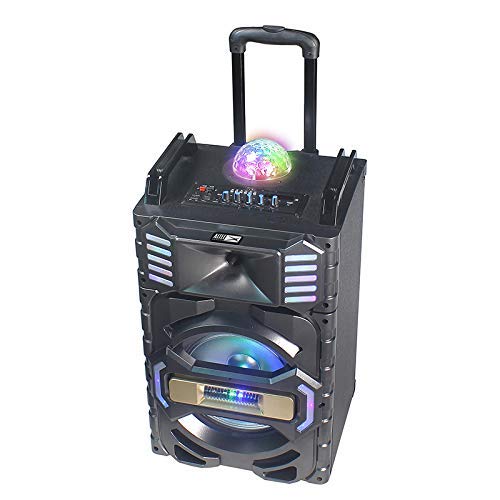
2 paveikslas: Kampuotas view of the Altec Lansing AL-5001 speaker, highlighting the side panels with integrated LED lights and the extendable trolley handle in an extended position for portability.
Key components include the main speaker unit, control panel with various buttons and knobs, input ports (USB, TF Card, AUX, Mic), and the built-in disco ball light.
Sąranka
- Išpakavimas: Atsargiai išimkite garsiakalbį ir visus priedus iš pakuotės. Išsaugokite pakuotę būsimam transportavimui ar laikymui.
- Vieta: Place the speaker on a stable, flat surface. Ensure there is adequate space around the speaker for proper ventilation.
- Maitinimo jungtis: Connect the provided power adapter to the DC IN port on the speaker and then plug it into a standard wall outlet. The speaker can operate directly from AC power or use its internal rechargeable battery.
- Pradinis įkrovimas: For first-time use, it is recommended to fully charge the speaker's internal lithium battery. The charging indicator will typically show the charging status and turn off or change color once fully charged.
Naudojimo instrukcijos
Maitinimo įjungimas/išjungimas
Locate the power button on the control panel. Press and hold it for a few seconds to turn the speaker ON or OFF. A power indicator light will illuminate when the speaker is on.
"Bluetooth" poravimas
- Įjunkite garsiakalbį. Jis automatiškai įsijungs „Bluetooth“ susiejimo režimu, ką parodys mirksintis LED indikatorius.
- Mobiliajame įrenginyje (išmaniajame telefone, planšetiniame kompiuteryje, nešiojamajame kompiuteryje) įjunkite „Bluetooth“ ir ieškokite galimų įrenginių.
- Select "AL-5001" from the list of devices.
- Kai garsiakalbis bus susietas, pasigirs patvirtinimo garsas ir „Bluetooth“ indikatoriaus lemputė pradės šviesti nuolat.
The maximum operating distance for Bluetooth connectivity is approximately 1 foot (0.3 meters).
USB/TF kortelės atkūrimas
- Insert a USB flash drive or a TF (MicroSD) card into the respective port on the control panel.
- The speaker will automatically detect the media and begin playing audio files. If not, press the 'Mode' button to switch to USB or TF Card mode.
- Use the 'Play/Pause', 'Next Track', and 'Previous Track' buttons on the control panel or remote control to manage playback.
AUX įvestis
- Prijunkite vieną 3.5 mm garso kabelio (nepridedamas) galą prie garsiakalbio AUX IN prievado.
- Connect the other end of the cable to the headphone jack or audio output of your external device (e.g., laptop, smartphone).
- Press the 'Mode' button on the speaker until 'AUX' mode is selected.
- Valdykite atkūrimą ir garsumą iš prijungto įrenginio.
FM radijas
- Norėdami perjungti į FM radijo režimą, paspauskite mygtuką „Režimas“.
- Press the 'Play/Pause' button once to initiate an automatic scan for FM stations. The speaker will save all found stations.
- Use the 'Next Track' and 'Previous Track' buttons to navigate between saved FM stations.
Mikrofono naudojimas
The AL-5001 includes a wireless microphone for karaoke or announcements.
- Ensure the wireless microphone has fresh batteries installed.
- Turn on the wireless microphone. It should automatically connect to the speaker.
- Adjust the microphone volume using the dedicated 'Mic Vol' knob on the speaker's control panel.
Disco Ball Light
The speaker features an integrated disco ball light. Locate the dedicated button on the control panel to turn the light ON or OFF, or to cycle through different light modes.
Nuotolinio valdymo pultas
The included remote control allows for convenient operation of the speaker from a distance. Functions include power, mode selection, volume control, track navigation, play/pause, and light control.
Priežiūra
Valymas
Always unplug the speaker from the power outlet before cleaning. Use a soft, dry, lint-free cloth to wipe the exterior surfaces. Do not use liquid cleaners, aerosols, or abrasive chemicals, as these may damage the finish or internal components.
Sandėliavimas
Kai garsiakalbio nenaudojate ilgesnį laiką, laikykite jį vėsioje, sausoje vietoje, toliau nuo tiesioginių saulės spindulių ir ekstremalių temperatūrų. Jei įmanoma, naudokite originalią pakuotę apsaugai.
Akumuliatoriaus priežiūra
To maintain the longevity of the internal lithium battery, avoid fully discharging it frequently. If storing for a long time, charge the battery to approximately 50-70% every few months.
Trikčių šalinimas
- Nėra galios:
- Ensure the power adapter is securely connected to both the speaker and a working wall outlet.
- Check if the speaker's internal battery is charged. Connect to power and try again. - Nėra garso:
- Increase the volume on both the speaker and your connected audio source.
- Ensure the correct input mode (Bluetooth, USB, AUX, FM) is selected.
- Check all audio cable connections for AUX mode. - „Bluetooth“ neprisijungia:
- Ensure the speaker is in Bluetooth pairing mode (flashing indicator).
– Išjunkite ir įjunkite „Bluetooth“ savo įrenginyje.
- Move your device closer to the speaker (within 1 foot).
- Forget the speaker from your device's Bluetooth list and try pairing again. - FM Radio Poor Reception:
- Reposition the speaker to a location with better signal reception.
- Ensure no large metal objects are obstructing the signal. - Mikrofonas neveikia:
- Ensure the wireless microphone is turned on and has fresh batteries.
- Adjust the 'Mic Vol' knob on the speaker.
Specifikacijos
| Modelis | AL-5001 |
| Prekės ženklas | Altec Lansing |
| Didžiausia garsiakalbių išėjimo galia | 50 vatų |
| Maitinimo šaltinis | Su laidu elektra |
| Ryšio technologija | AUX, USB, „Bluetooth“ |
| Palaiko Bluetooth technologiją | Taip |
| Maksimalus veikimo atstumas („Bluetooth“) | 1 Foot (0.3 meters) |
| Iš viso USB prievadų | 1 |
| Garso įvestis | Pagalbinis |
| Medžiaga | Plastikiniai, mediniai |
| Gaminio matmenys (IxPxH) | 35 x 35 x 64 cm |
| Prekės svoris | 9.95 kg |
| Baterijos įtrauktos | Taip |
| Baterijos elementų sudėtis | Ličio |
| Ypatingos savybės | Portable, In-built FM radio, Disco ball light |
| Suderinami įrenginiai | Nešiojamasis kompiuteris, išmanusis telefonas |
Garantija ir palaikymas
Altec Lansing products are manufactured to the highest quality standards. This product is covered by a limited warranty from the date of purchase. For specific warranty terms and conditions, please refer to the warranty card included with your product or visit the official Altec Lansing websvetainę.
For technical support, troubleshooting assistance, or service inquiries, please contact Altec Lansing customer support through their official channels. Contact information can typically be found on the product packaging or the official websvetainę.


