1. Produktas baigtasview
The j5create JCT425 is a wooden monitor stand designed to elevate your display to an ergonomic viewing height while providing integrated USB-C and HDMI docking capabilities. This device helps organize your workspace and expand connectivity for your computer or laptop.

Image 1.1: The j5create JCT425 monitor stand with a monitor, keyboard, and mouse, showcasing its ergonomic design and integrated hub.
2. Pakuotės turinys
Patikrinkite, ar pakuotėje yra visi reikalingi daiktai:
- Wooden Monitor Stand Top Panel
- Aluminum Legs (2 units)
- USB-C į USB-C laidas
- Assembly Screws and Hex Key
- Greito diegimo vadovas (šis vadovas)
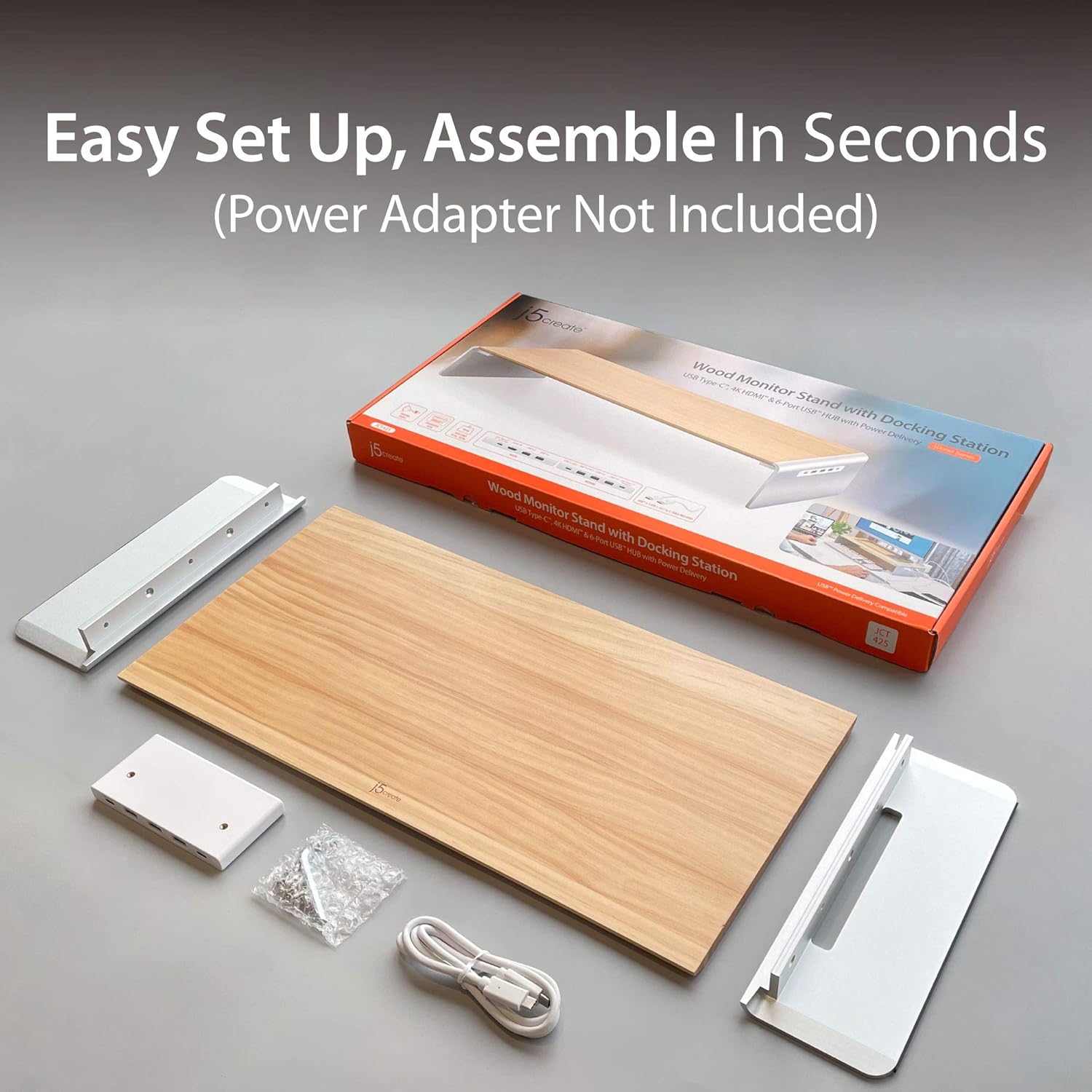
Image 2.1: Contents of the j5create JCT425 package, including the wooden top, aluminum legs, USB-C cable, and assembly hardware.
3. Sąranka ir diegimas
Follow these steps to assemble and connect your monitor stand:
- Surinkite stovą: Attach the two aluminum legs to the wooden top panel using the provided screws and hex key. Ensure the screws are tightened securely to prevent wobbling.
- Padėkite stovą: Place the assembled monitor stand on a stable, flat surface on your desk.
- Place Your Monitor: Carefully place your monitor, laptop, or TV on the wooden top panel of the stand. Ensure it is centered and stable. The stand supports up to 88 lbs (40 kg).
- Prijungti prie pagrindinio įrenginio: Use the included USB-C to USB-C cable to connect the monitor stand's USB-C upstream port (located on the back or side of the integrated hub) to a USB-C port on your computer or laptop. This connection enables the docking station features.
- Prijunkite išorinius įrenginius: Connect your USB devices (keyboard, mouse, external drives) to the available USB 3.0 ports on the stand.
- Prijunkite išorinį ekraną (neprivaloma): If using an external monitor, connect an HDMI cable from the stand's HDMI port to your external display.
- Maitinimo tiekimas (neprivaloma): If your host device supports USB-C Power Delivery, connect your laptop's USB-C power adapter to the stand's USB-C Power In port (if available and required for charging through the stand).
4. Naudojimo instrukcijos
The j5create JCT425 functions as both an ergonomic monitor riser and a multi-port docking station.
4.1. Ergonomic Monitor Riser
The stand elevates your monitor to a comfortable viewing height, which can help reduce neck and eye strain. The space underneath the stand can be used for keyboard, mouse, or other desk accessories, promoting a clutter-free workspace.

Image 4.1: The monitor stand in use, demonstrating its ability to organize a desk setup with a laptop, external monitor, and peripherals.
4.2. USB-C/HDMI Docking Station
The integrated hub provides various ports for expanded connectivity:
- USB 3.0 prievadai: Connect USB peripherals such as keyboards, mice, external hard drives, or USB flash drives. These ports offer high-speed data transfer.
- USB-C 3.1 prievadas: For connecting newer USB-C devices.
- 4K HDMI prievadas: Connect an external display to extend or mirror your computer's screen. Supports resolutions up to 4K.
- USB-C to PC/NB (Upstream Port): This port connects the stand to your computer, enabling all docking station functionalities.
- Up To PD 100W Power In (Optional): If your laptop requires power, connect your laptop's USB-C power adapter here to charge your laptop through the stand while using the hub.

4.2 pav.: Išsamus view of the USB-C hub ports on the j5create JCT425, labeling USB 3.0, USB-C 3.1, 4K HDMI, USB-C to PC/NB, and Power In ports.
5. Priežiūra ir priežiūra
To ensure the longevity and appearance of your j5create JCT425 monitor stand, follow these care guidelines:
- Valymas: Use a soft, dry cloth to wipe down the wooden and aluminum surfaces. For stubborn marks, a slightly damp Galima naudoti šluostę su švelniu muilu, po to nedelsiant nusausinti. Venkite abrazyvinių valiklių ar stiprių cheminių medžiagų.
- Medienos priežiūra: The wooden panel is handmade solid wood. Avoid prolonged exposure to direct sunlight or extreme humidity, which can cause warping or discoloration.
- Aluminum Care: The aluminum components have a polished finish. Avoid scratching the surface with sharp objects.
- Uosto priežiūra: Keep the USB and HDMI ports free of dust and debris. Use compressed air if necessary to clear any blockages.
6. Problemų sprendimas
If you encounter issues with your j5create JCT425, refer to the following common problems and solutions:
- Nėra vaizdo išvesties per HDMI:
- Ensure the USB-C cable from the stand is securely connected to your computer's USB-C port.
- Verify the HDMI cable is properly connected between the stand and your external display.
- Check your computer's display settings to ensure the external monitor is detected and configured (e.g., extended or mirrored).
- Try a different HDMI cable or external display to rule out component issues.
- USB Devices Not Recognized or Disconnecting:
- Ensure the USB-C cable connecting the stand to your computer is firmly seated.
- Try connecting the USB device to a different port on the stand.
- Connect the USB device directly to your computer to confirm it functions independently.
- If using high-power USB devices (e.g., external hard drives), ensure your computer's USB-C port provides sufficient power, or connect a power adapter to the stand's Power In port if applicable.
- Iš naujo paleiskite kompiuterį.
- Stand is Wobbly After Assembly:
- Re-check all assembly screws to ensure they are fully tightened.
- Įsitikinkite, kad stovas pastatytas ant visiškai lygaus ir stabilaus paviršiaus.
- Nėra maitinimo į nešiojamąjį kompiuterį:
- Verify that your laptop's USB-C power adapter is connected to the stand's 'Up To PD 100W Power In' port.
- Ensure your laptop supports USB-C Power Delivery through its connected USB-C port.
7. Specifikacijos
| Funkcija | Specifikacija |
|---|---|
| Modelio numeris | JCT425 |
| Medžiaga | Aliuminis, Mediena |
| Gaminio matmenys (I x P x A) | 22.83 x 11.02 x 1.57 colio (58 x 28 x 4 cm) |
| Prekės svoris | 4.69 svaro (2.13 kg) |
| Apkrova | 88.2 svaro (40 kg) |
| USB prievadai | Multiple USB 3.0, 1x USB-C 3.1 |
| Vaizdo išvestis | 1x HDMI (up to 4K resolution) |
| Maitinimo tiekimas | Up to 100W via USB-C Power In port (optional) |
| UPC | 847626003097 |

Image 7.1: Visual representation of the j5create JCT425's maximum load capacity of 40 kg / 88 lbs.
8. Garantija ir palaikymas
j5create products are designed for reliability and performance. For warranty information and technical support, please refer to the official j5create websvetainėje arba susisiekite tiesiogiai su jų klientų aptarnavimo tarnyba. Išsaugokite pirkimo kvitą garantiniams reikalavimams.
Palaikymas internetu: Aplankykite j5create Store on Amazon dėl produkto informacijos ir palaikymo išteklių.


