1. Įvadas
The Maxcom MM38D is a portable senior phone designed for ease of use, featuring large backlit keys, a clear 2.2-inch display, and essential communication functions. This manual provides comprehensive instructions for setting up, operating, and maintaining your device, ensuring you can utilize all its features effectively, including the dedicated SOS button, FM radio, and camera.
2. Saugos informacija
- Do not expose the phone to extreme temperatures, direct sunlight, or moisture.
- Naudokite tik originalias arba patvirtintas baterijas ir įkroviklius, kad išvengtumėte pažeidimų ir užtikrintumėte saugumą.
- Avoid dropping or subjecting the phone to severe impacts.
- Nebandykite patys ardyti ar taisyti įrenginio. Kreipkitės į įgaliotąjį techninės priežiūros personalą.
- Atsakingai utilizuokite baterijas ir įrenginį pagal vietinius reikalavimus.
3. Pakuotės turinys
Before using your Maxcom MM38D, please verify that all the following items are included in the package:
- Maxcom MM38D Phone
- Baterija
- Įkroviklis
- Vartotojo vadovas
4. Įrenginio išdėstymas
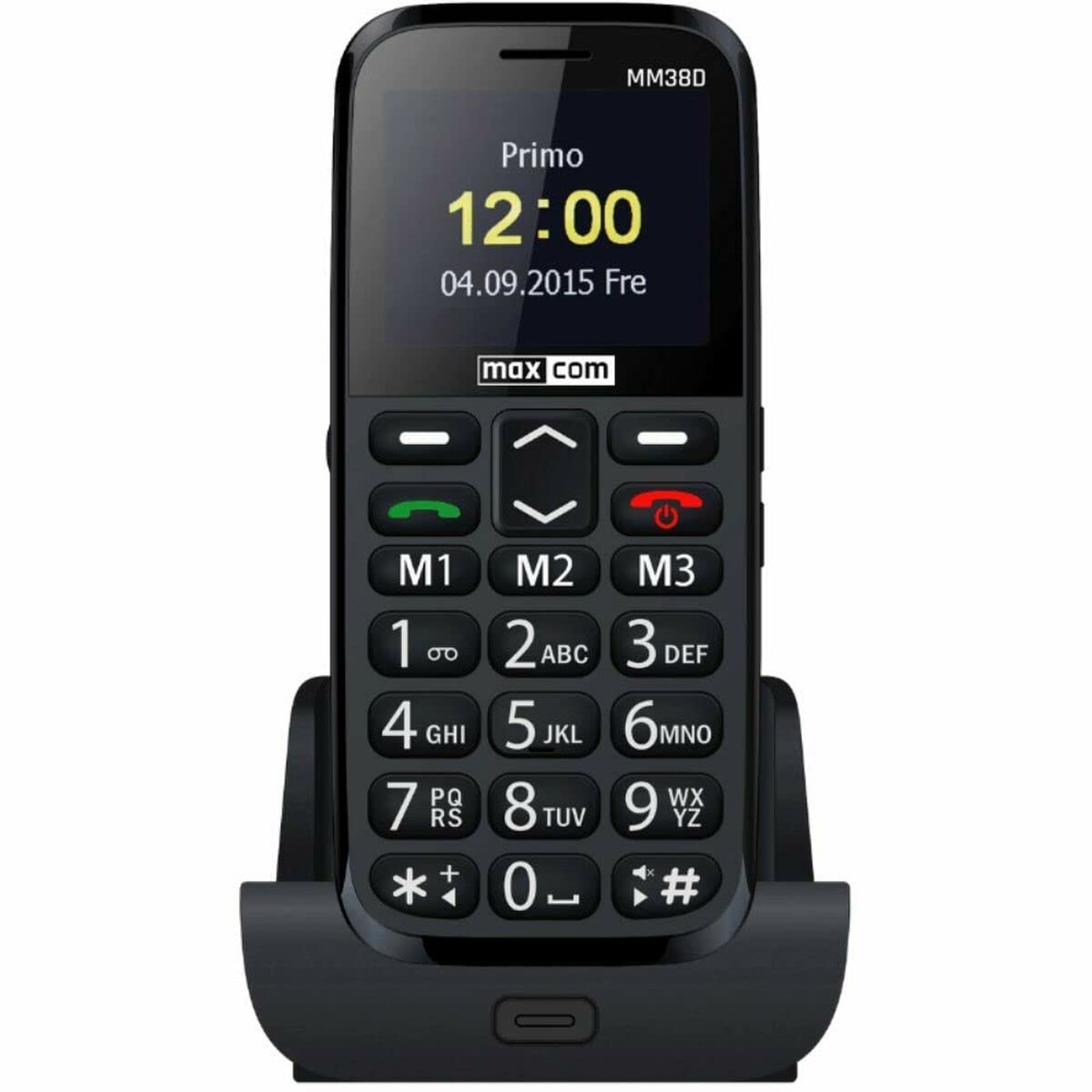
Familiarize yourself with the physical components of your Maxcom MM38D phone.
This image displays the rear panel of the Maxcom MM38D phone. Visible components include the camera lens in the upper left, a circular SOS button to its right, and a speaker grille with a grid pattern further to the right. The 'max com' logo is printed at the bottom.
Pagrindiniai komponentai:
- Ekranas: 2.2-inch color display for menus and information.
- Raidinė ir skaitmeninė klaviatūra: Large, backlit keys for dialing and text input.
- Naršymo mygtukai: Skirta naršyti meniu ir parinktyse.
- Call/End Call Buttons: Skambučiams inicijuoti ir baigti.
- SOS mygtukas: Located on the back for emergency calls and messages.
- Kamera: 2-megapixel camera on the rear.
- Žibintuvėlis: Integruotas šviesos šaltinis.
- Įkrovimo prievadas: Įkroviklio prijungimui.
- Ausinių lizdas: For connecting headphones (may also serve as FM antenna).
5. Sąranka
5.1. SIM kortelės įdėjimas
- Nuimkite galinį telefono dangtelį.
- Atsargiai išimkite bateriją.
- Locate the SIM card slot. Insert your 2G compatible SIM card into the slot, ensuring the gold contacts face downwards and the cut corner aligns with the slot's orientation.
- Švelniai stumkite SIM kortelę, kol ji spragtels į vietą.
5.2. Baterijos įdėjimas
- Align the battery's metal contacts with the contacts in the phone's battery compartment.
- Press the battery down gently until it fits securely.
- Uždėkite galinį dangtelį, užtikrindami, kad jis tvirtai užsifiksuotų vietoje.
5.3. Akumuliatoriaus įkrovimas
- Prijunkite įkroviklio laidą prie telefono įkrovimo prievado.
- Įjunkite įkroviklį į standartinį elektros lizdą.
- Ekrane esantis akumuliatoriaus indikatorius rodys įkrovimo būseną. Prieš pirmą kartą naudodami, leiskite telefonui visiškai įsikrauti.
5.4. Įjungimas/išjungimas
- Norėdami įjungti: Paspauskite ir palaikykite Maitinimas / skambučio pabaiga mygtuką, kol ekranas užsidegs.
- Norėdami išjungti: Paspauskite ir palaikykite Maitinimas / skambučio pabaiga button until the power-off options appear, then confirm.
6. Naudojimo instrukcijos
6.1. Pagrindinė navigacija
Naudokite Naršymo mygtukai (up, down, left, right) to move through menus and options. Press the central Gerai/Pasirinkti mygtuką, kad patvirtintumėte pasirinkimą.
6.2. Skambinimas ir skambučių priėmimas
- Norėdami paskambinti: Įveskite telefono numerį naudodami klaviatūrą ir paspauskite Skambinti mygtuką.
- Norėdami atsiliepti į skambutį: Kai suskamba telefonas, paspauskite Skambinti mygtuką.
- Norėdami baigti skambutį: Paspauskite Baigti skambutį mygtuką.
- Laisvų rankų funkcija: Activate the hands-free speaker during a call via the on-screen option.
6.3. Sending and Receiving Messages (SMS)
- Eikite į Žinutės meniu.
- Pasirinkite Rašyti žinutę or Nauja SMS.
- Įveskite pranešimą naudodami raidinę ir skaitmeninę klaviatūrą.
- Įveskite gavėjo numerį arba pasirinkite jį iš savo kontaktų.
- Paspauskite Siųsti.
6.4. SOS mygtuko naudojimas
The SOS button is a critical safety feature. To use it:
- Ensure emergency contacts are pre-programmed in the phone's settings (usually under SOS settings).
- Avarijos atveju paspauskite ir palaikykite SOS mygtukas telefono gale kelias sekundes.
- The phone will automatically call and send a pre-set emergency message to your designated contacts.
6.5. Kitos funkcijos
- FM radijas: Access the 'FM Radio' application from the main menu. Connect headphones to serve as an antenna for better reception.
- Žibintuvėlis: Activate the flashlight function through the menu or a dedicated shortcut key (refer to your phone's specific key assignments).
- Kamera: Open the 'Camera' application to take photos. The phone is equipped with a 2-megapixel camera.
- Kontaktai: Store up to 300 contacts. Access the 'Contacts' menu to add, edit, or search for entries.
- Kalendorius ir žadintuvas: Set reminders and multiple alarms through the 'Calendar' and 'Alarm' applications.
- Bluetooth: Enable Bluetooth in the 'Settings' menu to connect to compatible wireless headsets or other devices.
- Audio/Video Player: Leisti garso ir vaizdo įrašus files stored on the phone or a Micro SD card.
7. Priežiūra
- Valymas: Use a soft, dry, lint-free cloth to clean the phone's screen and body. Avoid using liquid cleaners or aerosols.
- Akumuliatoriaus priežiūra: To prolong battery life, avoid fully discharging the battery frequently. Do not leave the phone connected to the charger for extended periods after it is fully charged.
- Saugykla: Store the phone in a cool, dry place when not in use. Avoid dusty environments.
- Atsparumas vandeniui: The Maxcom MM38D is not water-resistant. Keep it away from liquids.
8. Problemų sprendimas
If you encounter issues with your Maxcom MM38D, refer to the following common problems and solutions:
| Problema | Sprendimas |
|---|---|
| Telefonas neįsijungia | Įsitikinkite, kad akumuliatorius įkrautas ir tinkamai įdėtas. Pabandykite įkrauti telefoną bent 30 minučių. |
| Negalima skambinti arba priimti skambučių | Check if the SIM card is properly inserted and activated. Verify network signal strength. Ensure you have sufficient credit or an active plan. |
| SOS mygtukas neveikia | Confirm that emergency contacts are set up in the SOS settings menu. Ensure the phone has network coverage. |
| Bloga garso kokybė skambučių metu | Check the call volume settings. Ensure the speaker and microphone are not obstructed. Move to an area with better network reception. |
| Baterija greitai išsikrauna | Sumažinkite ekrano ryškumą. Uždarykite nenaudojamas programas. Apribokite foninių duomenų naudojimą. Apsvarstykite galimybę pakeisti seną bateriją. |
9. Specifikacijos
| Funkcija | Specifikacija |
|---|---|
| Prekės ženklas | Maxcom |
| Modelis | MM38D |
| Operacinė sistema | Android 10.0 |
| Ekrano dydis | 2.2 colių |
| Kameros raiška | 2 megapikselio |
| Ryšys | Bluetooth, 2G GSM |
| Atminties saugykla | 1 GB |
| Spalva | Juoda |
| Ypatingos savybės | SOS button, FM Radio, Flashlight, Calendar, Audio/Video Player, Alarm, Hands-free function, Large backlit keys, 300-contact directory, Micro SD support |
10. Garantija ir palaikymas
For detailed warranty information, terms, and conditions, please refer to the warranty card or documentation included with your purchase. For technical support, product inquiries, or service requests, please visit the official Maxcom website or contact their customer service department using the contact information provided in your product packaging.


