1. Įvadas
This manual provides detailed instructions for the safe and efficient use of your Maxcom MM471 Senior Portable Phone. Designed with ease of use in mind, this device features large characters, big buttons, and an ergonomic design, making it ideal for seniors. Please read this manual thoroughly before operating your phone.

1 pav.: priekis view of the Maxcom MM471 Senior Portable Phone.
2. Sąranka
2.1 Pakuotės turinys
Įsitikinkite, kad pakuotėje yra visi daiktai:
- Maxcom MM471 Senior Portable Phone
- Baterija
- Įkrovimo adapteris
- Vartotojo vadovas
2.2 SIM kortelės ir akumuliatoriaus įdėjimas
The Maxcom MM471 supports dual SIM cards. Follow these steps to install your SIM card(s) and battery:
- Turn off the phone and disconnect it from any power source.
- Atsargiai nuimkite telefono galinį dangtelį.
- Įdėkite SIM kortelę (-es) į tam skirtą (-us) lizdą (-us) auksiniais kontaktais žemyn.
- Įdėkite bateriją, užtikrindami, kad kontaktai būtų tinkamai sulygiuoti.
- Uždėkite galinį dangtelį, kol jis spragtelėdamas tvirtai užsifiksuos.

2 pav.: Nugara view with battery and SIM card area.
2.3 Akumuliatoriaus įkrovimas
Prieš pirmą kartą naudodami, visiškai įkraukite telefono bateriją:
- Connect the charging adapter to the phone's charging port or place the phone in its charging dock.
- Įkiškite adapterį į maitinimo lizdą.
- Ekrane esantis akumuliatoriaus indikatorius rodys įkrovimo būseną.
- Visiškai įkrovę atjunkite įkroviklį.
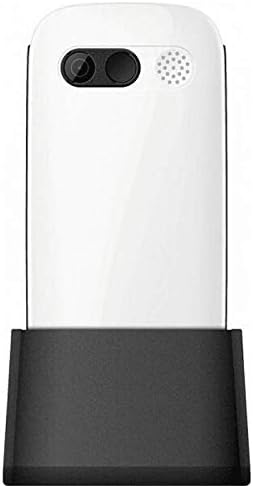
Figure 3: Phone in charging dock.
3. Naudojimo instrukcijos
3.1 Įjungimas / išjungimas
- Norėdami įjungti: Paspauskite ir palaikykite Maitinimas / skambučio pabaiga mygtuką, kol ekranas užsidegs.
- Norėdami išjungti: Paspauskite ir palaikykite Maitinimas / skambučio pabaiga button until the power-off options appear, then select 'Power Off'.
3.2 Skambinimas
- Pradiniame ekrane įveskite telefono numerį naudodami klaviatūrą.
- Paspauskite Skambinti mygtuką (žalias mygtukas), kad pradėtumėte skambutį.
- Norėdami baigti pokalbį, paspauskite Maitinimas / skambučio pabaiga mygtukas (raudonas mygtukas).
3.3 Skambučių priėmimas
- When a call comes in, the phone will ring and display the caller's number or name.
- Paspauskite Skambinti button (green button) to answer.
- Norėdami atmesti skambutį, paspauskite Maitinimas / skambučio pabaiga mygtukas (raudonas mygtukas).
3.4 Pranešimų siuntimas ir gavimas
- Pagrindiniame ekrane eikite į meniu „Žinutės“.
- Norėdami parašyti tekstinį pranešimą, pasirinkite „Naujas pranešimas“.
- Įveskite gavėjo numerį ir savo žinutę.
- Paspauskite „Siųsti“.
- Gautos žinutės bus rodomos jūsų „Gautųjų“ aplanke.
3.5 Kontaktų tvarkymas
The phonebook can store up to 300 names.
- Go to the 'Contacts' or 'Phonebook' menu.
- Select 'Add New Contact' to save a new number.
- Įveskite vardą ir telefono numerį, tada išsaugokite.
- To call a contact, select their name from the list and press the Skambinti mygtuką.
3.6 Bluetooth naudojimas
Norėdami prisijungti prie „Bluetooth“ įrenginių:
- Eikite į „Nustatymai“ > „Bluetooth“.
- Įjunkite „Bluetooth“.
- Pasirinkite „Ieškokite devices' to find available Bluetooth accessories.
- Select the desired device and pair them.
3.7 Žibintuvėlio naudojimas
Patogumui telefone yra įmontuotas žibintuvėlis.
- To turn on the flashlight, locate the dedicated flashlight button (if available) or access it through the 'Tools' menu.
- Press the button or select the option again to turn it off.
4. Priežiūra ir priežiūra
To ensure the longevity and optimal performance of your Maxcom MM471 phone, follow these maintenance guidelines:
- Valymas: Telefono paviršių valykite minkšta, sausa šluoste. Venkite skystų valiklių ar abrazyvinių medžiagų.
- Temperatūra: Nelaikykite telefono ilgą laiką itin aukštoje temperatūroje (karštyje ar šaltyje) arba tiesioginiuose saulės spinduliuose.
- Drėgmė: Keep the phone dry. Do not immerse it in water or expose it to high humidity.
- Saugykla: When not in use for a long time, store the phone in a cool, dry place with the battery partially charged.
- Poveikis: Venkite telefono numetimo ir stiprių smūgių.
5. Problemų sprendimas
Jei kyla problemų dėl telefono, dažniausiai pasitaikančias problemas ir sprendimus rasite toliau pateiktoje lentelėje:
| Problema | Galima priežastis | Sprendimas |
|---|---|---|
| Telefonas neįsijungia | Baterija išsikrovusi arba netinkamai įdėta. | Įkraukite bateriją. Įsitikinkite, kad baterija tinkamai įdėta. |
| Negalima skambinti arba priimti skambučių | No network signal, SIM card not inserted, or SIM card faulty. | Check network coverage. Reinsert SIM card(s). Contact your service provider. |
| Prasta skambučio kokybė | Weak network signal, interference. | Persikelkite į vietą, kurioje geresnis signalas. Venkite kliūčių. |
| Baterija greitai išsikrauna | Excessive usage, background applications, old battery. | Sumažinkite ekrano ryškumą. Uždarykite nenaudojamas programas. Jei baterija sena, apsvarstykite galimybę ją pakeisti. |
| Klaviatūra nereaguoja | Programinės įrangos triktis, fizinė žala. | Restart the phone. If the problem persists, contact support. |
6. Techninės specifikacijos
Key technical details of the Maxcom MM471 Senior Portable Phone:
- Modelis: MM471
- Prekinis ženklas: Maxcom
- Spalva: Baltas
- Ryšys: Bluetooth
- SIM kortelės palaikymas: Dvi SIM kortelės
- Telefonų knygos talpa: 300 vardų
- Pokalbio laikas: Iki 14 valandų
- Sąsaja: Fiziniai mygtukai
- Ypatingos savybės: Large characters, Big buttons, Ergonomic design, Speaker, Flashlight
7. Garantijos ir palaikymo informacija
For detailed warranty information, please refer to the warranty card included with your product or visit the official Maxcom website. For technical support or service inquiries, please contact your retailer or the manufacturer's customer service department.


