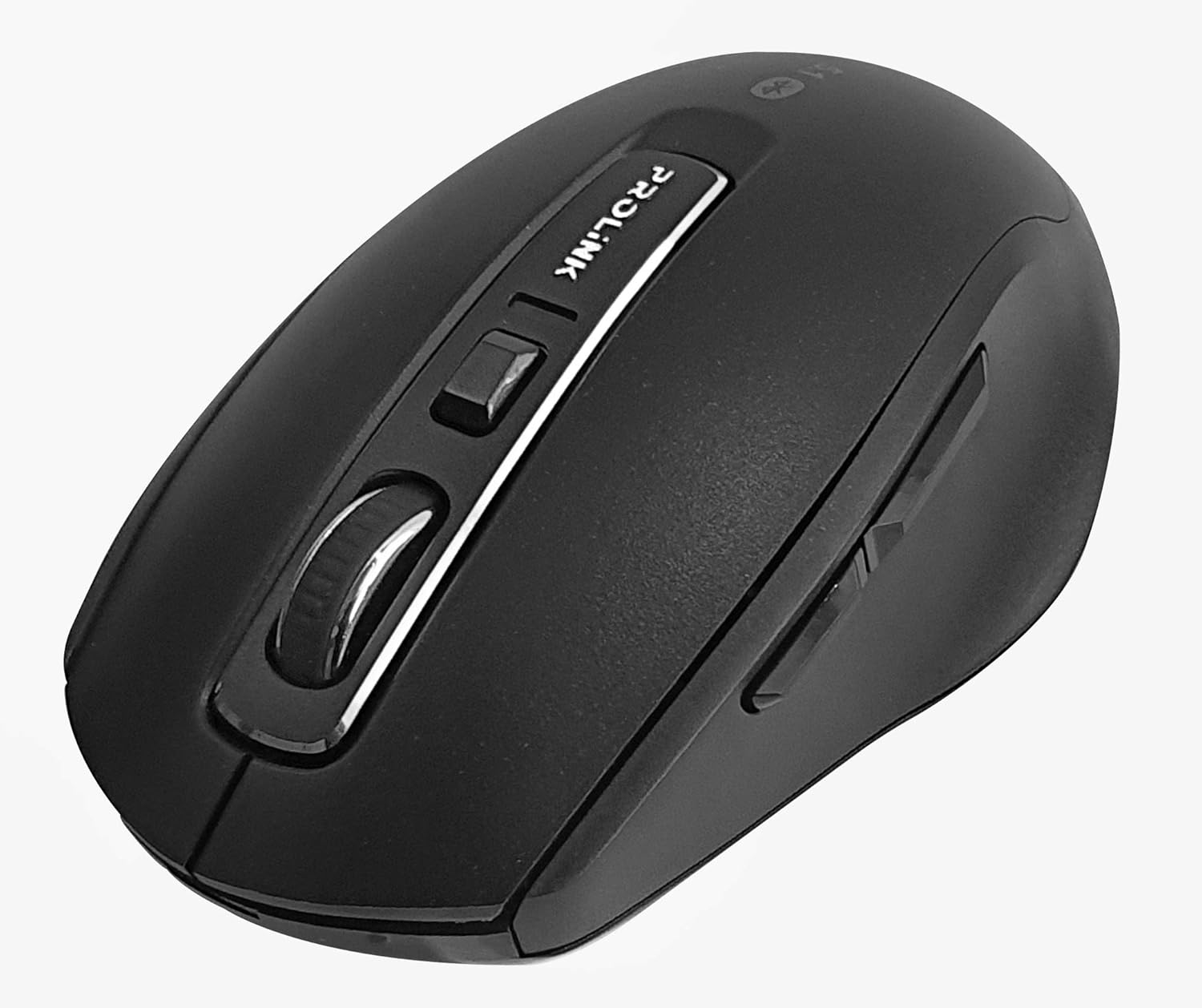
Vaizdas: Iš viršaus į apačią view of the Prolink PMB8502 Bluetooth Wireless Optical Mouse.
1. Įvadas ir pabaigaview
The Prolink PMB8502 Bluetooth Mouse is designed for seamless wireless control of your desktop, laptop, or tablet. It features Bluetooth 5.2 connectivity, an ergonomic design, and adjustable DPI settings for personalized comfort and precision. This manual provides detailed instructions for setup, operation, maintenance, and troubleshooting.
Pagrindinės funkcijos:
- Bluetooth 5.2 connectivity (backward compatible with 5.1/5.0/4.2/4.1/4.0)
- Up to 27 months battery life (based on supplied batteries)
- Reguliuojamas DPI: 800/1200/1600
- 6-button design including back and forward buttons
- Ergonomiškas dizainas patogiam naudojimui
- Operating range of up to 10 meters

Image: Prolink PMB8502 mouse highlighting its Bluetooth 5.2, battery life, DPI, and range features.
2. Pakuotės turinys
- Prolink PMB8502 Bluetooth Wireless Optical Mouse
- 1 x AA baterija (iš anksto įdiegta arba pridedama atskirai)
- Vartotojo vadovas (šis dokumentas)
3. Sąrankos instrukcijos
3.1. Akumuliatoriaus įdėjimas
- Raskite baterijų skyriaus dangtelį pelės apačioje.
- Švelniai pastumkite arba pakelkite dangtelį, kad atidarytumėte skyrių.
- Įdėkite vieną AA bateriją, užtikrindami, kad teigiamas (+) ir neigiamas (-) poliai teisingai sutaptų su žymėjimais skyriaus viduje.
- Uždėkite baterijų skyriaus dangtelį, kol jis spragtelėdamas tvirtai užsifiksuos.
3.2. „Bluetooth“ poravimas
Before pairing, ensure your device (computer, laptop, tablet) has Bluetooth enabled.
- Įjunkite pelę naudodami įjungimo / išjungimo jungiklį, esantį apačioje.
- Press and hold the Bluetooth 'Connect' button (usually located near the On/Off switch or within the battery compartment) for 3-5 seconds until the LED indicator on the mouse begins to flash, indicating it is in pairing mode.
- Įrenginyje eikite į „Bluetooth“ nustatymus.
- Ieškokite new devices. The mouse should appear as "Prolink PMB8502" or similar.
- Select the mouse from the list to complete the pairing process. The LED indicator on the mouse will stop flashing and remain solid for a few seconds, then turn off, indicating a successful connection.

Vaizdas: priekis view of the Prolink PMB8502 mouse, showing its ergonomic shape.
4. Naudojimo instrukcijos
4.1. Mygtukų funkcijos
- Kairysis paspaudimo mygtukas: Standartinis pasirinkimas ir aktyvinimas.
- Dešinysis pelės mygtuko paspaudimas: Pasiekia kontekstinius meniu.
- Slinkties ratukas: Ritina dokumentus ir web pages vertically. Can also be pressed for middle-click functionality.
- DPI reguliavimo mygtukas: Located below the scroll wheel. Press to cycle through DPI settings (800/1200/1600).
- Pirmyn mygtukas: Naviguoja pirmyn web naršyklės arba file tyrinėtojai.
- Atgal mygtukas: Naviguoja atgal web naršyklės arba file tyrinėtojai.
Vaizdas: Šoninė view of the Prolink PMB8502 mouse, illustrating the placement of the back and forward navigation buttons.
4.2. DPI reguliavimas
The mouse offers three DPI (Dots Per Inch) settings: 800, 1200, and 1600. Press the DPI button located below the scroll wheel to switch between these sensitivities. A higher DPI setting results in faster cursor movement across the screen.
4.3. Maitinimo valdymas
- Įjungimo / išjungimo jungiklis: To conserve battery life, turn off the mouse using the switch on its underside when not in use for extended periods.
- Automatinis miego režimas: The mouse automatically enters a sleep mode after more than 10 minutes of inactivity. To wake it up, simply move the mouse or click any button.
5. Priežiūra
5.1. Valymas
To clean the mouse, use a soft, dry, lint-free cloth. For stubborn dirt, slightly dampen the cloth with water or a mild cleaning solution. Avoid using harsh chemicals, abrasive cleaners, or spraying liquids directly onto the mouse.
5.2. Baterijos keitimas
When the mouse performance degrades or the LED indicator suggests low battery, replace the AA battery following the steps in Section 3.1. Dispose of used batteries responsibly according to local regulations.
6. Problemų sprendimas
- Mouse not connecting or erratic movement:
- Įsitikinkite, kad pelė įjungta.
- Patikrinkite akumuliatoriaus lygį ir, jei reikia, pakeiskite.
- Įsitikinkite, kad jūsų įrenginyje įjungtas „Bluetooth“.
- Try re-pairing the mouse with your device (refer to Section 3.2).
- Kad išvengtumėte problemų dėl atstumo, perkelkite pelę arčiau įrenginio.
- Įsitikinkite, kad nėra kitų stiprių belaidžių signalų, trukdančių „Bluetooth“ ryšiui.
- Cursor not moving smoothly:
- Nuvalykite optinį jutiklį pelės apačioje.
- Naudokite pelę ant švaraus, neatspindinčio paviršiaus.
- Sureguliuokite DPI nustatymą pagal savo pageidavimus.
- Mygtukai nereaguoja:
- Patikrinkite akumuliatoriaus lygį.
- Ensure the mouse is properly connected via Bluetooth.
- Paleiskite kompiuterį arba įrenginį iš naujo.
7. Specifikacijos
| Funkcija | Detalė |
|---|---|
| Mygtukai | 6 |
| Jutiklis | Optinis |
| DPI raiška | 800/1200/1600 DPI |
| Sąsaja | Bluetooth 5.2 (backward compatible with Bluetooth 5.1/5.0/4.2/4.1/4.0) |
| USB ataskaitų dažnis | 125 Hz |
| FPS | 2400 kartų/sek |
| Darbinė drėgmė | 30%RH - 95%RH |
| Darbinė temperatūra | -20°C - +60°C |
| Operacinė sistema | Windows 7 / 10 / 11, Mac OS 10.2 above |
| Matmenys (I x P x A) | 108 mm x 66.7 mm x 40.2 mm |
| Svoris | 69.2g (product only) |
| Baterijos tipas | 1 x AA baterija |

Image: Graphic displaying the technical specifications of the Prolink PMB8502 mouse.
8. Garantija ir palaikymas
The Prolink PMB8502 Bluetooth Wireless Optical Mouse typically comes with a 3 metų garantija from the date of purchase. Please refer to your purchase receipt or the official Prolink websvetainėje, kurioje rasite konkrečias jūsų regione taikomas garantijos sąlygas.
For technical support, troubleshooting assistance, or warranty claims, please visit the official Prolink website or contact their customer service department. Contact information can usually be found on the product packaging or the Prolink official websvetainę.
Internetiniai ištekliai:

Image: Prolink PMB8502 mouse with a "3 Year Warranty" label, indicating product assurance.


