Įvadas
Thank you for choosing the QNECT Smart Video Doorbell. This manual provides essential information for the proper installation, operation, and maintenance of your device. Please read it thoroughly before use to ensure optimal performance and safety.
The QNECT Smart Video Doorbell offers 1080P video resolution, IP65 weather resistance, night vision, two-way audio communication, and compatibility with smart home systems like Alexa and Google Home.
Sąranka ir diegimas
The QNECT Smart Video Doorbell is designed for straightforward installation. Ensure you have a stable Wi-Fi connection available at the installation location.
Pakuotės turinys
- QNECT Smart Video Doorbell
- Tvirtinimo priedai (varžtai, inkarai)
- Vartotojo vadovas
Fizinis montavimas
- Pasirinkite vietą: Select a suitable outdoor location near your door, ensuring a clear view and within Wi-Fi range. The device is IP65 rated, making it resistant to rain.
- Montavimas: Use the provided screws and anchors to securely mount the doorbell to the wall. Ensure it is positioned at an appropriate height for optimal viewing.

Vaizdas: priekis view of the QNECT Smart Video Doorbell, showing the camera lens, motion sensor, speaker grille, and illuminated doorbell button.
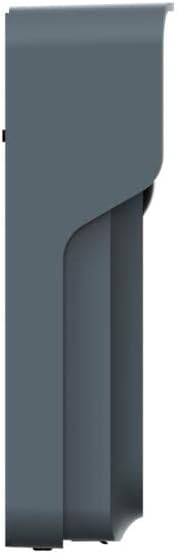
Paveikslėlis: Šoninis profesionalasfile of the QNECT Smart Video Doorbell, illustrating its slim design and mounting bracket.
Programos ryšys
- Download the QNECT App: Ieškokite the 'QNECT' app on your smartphone's app store (iOS or Android) and install it.
- Sukurti paskyrą: Atidarykite programėlę ir vykdykite ekrane pateikiamus nurodymus, kad sukurtumėte naują vartotojo paskyrą arba prisijunkite, jei ją jau turite.
- Pridėti įrenginį: In the app, select the option to add a new device. Follow the pairing instructions, which typically involve scanning a QR code on the doorbell or entering a device ID.
- Prisijunkite prie „Wi-Fi“: Configure the doorbell to connect to your home's 2.4GHz Wi-Fi network through the app.
Naudojimo instrukcijos
Tiesiogiai View ir dvipusis garsas
- When someone presses the doorbell, you will receive a notification on your smartphone via the QNECT app.
- Tap the notification to access a live video feed from the doorbell.
- Use the microphone and speaker icons within the app to engage in two-way communication with the visitor at your door, even when you are away from home.
Judesio aptikimas ir naktinis matymas
- The doorbell features a motion sensor that activates when someone approaches, triggering a recording and sending an alert to your phone.
- Equipped with an IR sensor and infrared LED, the doorbell provides clear night vision, ensuring visibility even in low-light conditions.
- The 140° wide-angle lens offers a broad view nuo jūsų slenksčio.
Saugojimo parinktys
Video recordings and event footage can be stored using two methods:
- Saugykla debesyje: Subscribe to the optional cloud storage service through the QNECT app for secure online storage of your recordings.
- „Micro SD“ kortelė: Insert a compatible micro SD card (not included) into the designated slot on the doorbell for local storage of recordings.
Išmaniųjų namų integracija
The QNECT Smart Video Doorbell is compatible with popular smart home platforms:
- Alexa: Connect your doorbell to Amazon Alexa to receive announcements when the doorbell is pressed or motion is detected, and view the live feed on compatible Echo Show devices.
- Pagrindinis „Google“ puslapis: Integrate with Google Home for similar functionalities, including notifications and live viewing on Google Nest Hub devices.
Priežiūra
- Valymas: Periodiškai nuvalykite kameros objektyvą ir durų skambučio išorę minkšta,amp šluoste dulkėms ir nešvarumams pašalinti. Venkite naudoti stiprių cheminių medžiagų ar abrazyvinių medžiagų.
- Firmware atnaujinimai: Ensure your doorbell's firmware is up to date through the QNECT app. Updates often include performance improvements and security enhancements.
- Baterijos patikrinimas: If your doorbell is battery-powered, monitor the battery level via the app and recharge or replace batteries as needed.
- „Wi-Fi“ ryšys: Regularly check the Wi-Fi signal strength in the app to ensure a stable connection for optimal performance.
Trikčių šalinimas
No Power/Doorbell Not Responding
- Check if the battery is charged or if the power connection is secure.
- Ensure the doorbell button is not stuck.
Poor Video Quality or Connectivity Issues
- Verify your Wi-Fi network is active and the signal strength at the doorbell's location is adequate.
- Ensure your router is broadcasting a 2.4GHz Wi-Fi signal, as the doorbell may not support 5GHz.
- Restart your Wi-Fi router and the doorbell.
- Move the doorbell closer to the router or consider a Wi-Fi extender.
Neveikia judesio aptikimas
- Check the motion detection settings in the QNECT app to ensure it is enabled and sensitivity is adjusted correctly.
- Įsitikinkite, kad nėra jokių kliūčių, blokuojančių jutiklio view.
Two-Way Audio Problems
- Check your smartphone's volume settings and ensure the app has microphone permissions.
- Ensure the doorbell's speaker and microphone are not obstructed.
Doorbell Not Connecting to Alexa/Google Home
- Ensure the doorbell is properly connected to the QNECT app and has a stable internet connection.
- Follow the specific linking instructions within the Alexa or Google Home app to connect third-party devices.
- Verify that your Alexa/Google Home devices are on the same network as the doorbell.
Specifikacijos
| Funkcija | Detalė |
|---|---|
| Modelio numeris | QNEP0007EUN |
| Gamintojas | QNECT |
| Matmenys | 21.2 x 10.2 x 4.8 cm |
| Svoris | 420 gramų |
| Maitinimo šaltinis | Maitinamas baterijomis |
| Baterijos tipas | Ličio jonų |
| Atsparumas oro sąlygoms | IP65 sertifikuota |
| Vaizdo raiška | 1080P |
| Viewing kampas | 140° |
| Naktinis matymas | IR Sensor and Infrared LED |
| Saugojimo parinktys | Cloud, Micro SD Card |
| Išmaniųjų namų suderinamumas | Alexa, „Google Home“ |
Garantija ir palaikymas
For warranty information, please refer to the documentation provided with your purchase or visit the official QNECT website. If you encounter any issues or require technical assistance, please contact QNECT customer support through their official channels.
Išsaugokite pirkimo įrodymą, kad galėtumėte kreiptis dėl garantijos.


