1. Įvadas
This manual provides essential instructions for the safe and efficient use of your LIFX Color Smart LED Bulb. The LIFX Color bulb offers a wide spectrum of colors and white tones, controllable via Wi-Fi without the need for a separate hub. It is designed to enhance your lighting experience with smart features and energy efficiency.

Image: The LIFX Color Smart LED Bulb alongside its product packaging, highlighting its features.
Pagrindinės funkcijos:
- Billions of Colors: Access a vast range of colors and a wide cool-to-warm white spectrum (1500K to 9000K).
- 800 liumenų ryškumas: Suteikia ample apšvietimas įvairiems nustatymams.
- E26 Edison Screw Base: Standard fitting for easy installation.
- „Wi-Fi“ ryšys: Connects directly to your 2.4GHz Wi-Fi network, no hub required.
- Valdymas balsu: Compatible with Alexa, Apple HomeKit/Siri, and Hey Google.
- Scheduling & Scenes: Customize lighting schedules and create personalized scenes.
2. Saugos informacija
Prašome perskaityti ir laikytis šių saugos nurodymų, kad išvengtumėte sužalojimų ar gaminio sugadinimo.
- Naudoti tik patalpose: This bulb is designed for indoor use in dry locations.
- Tinkamas montavimas: Prieš įdiegdami arba išimdami lemputę, įsitikinkite, kad maitinimas išjungtas.
- ttage Suderinamumas: Use only within the specified voltage range (AC 100-240V, 50/60 Hz).
- Venkite uždarų šviestuvų: Do not use in fully enclosed luminaires as this may reduce bulb life.
- Dimmer jungikliai: Do not use with standard dimmer switches. Dimming is controlled via the app or voice assistants.
- Šalinimas: Elektronines atliekas utilizuokite atsakingai, laikydamiesi vietinių taisyklių.
3. Pakuotės turinys
Your LIFX Color Smart LED Bulb package should contain the following:
- 1 x LIFX Color Smart LED Bulb (E26 Edison Screw)
4. Sąrankos vadovas
4.1 Fizinis įrengimas
- Ensure the power to the light fixture is turned off at the switch.
- Carefully screw the LIFX Color Smart LED Bulb into a standard E26 Edison screw socket. Do not overtighten.
- Turn the power back on at the switch. The bulb should illuminate with a default white light.

Image: A visual guide showing the three simple steps for setting up the LIFX bulb: screwing it into a lamp, downloading the app, and enjoying the light.
4.2 Programėlių atsisiuntimas ir Wi-Fi ryšys
- Download the official LIFX app from the Apple App Store or Google Play Store.
- Open the LIFX app and create an account or log in.
- Follow the in-app instructions to add your new LIFX bulb. This typically involves scanning a QR code on the bulb or its packaging and connecting to your home's 2.4GHz Wi-Fi network.
- Ensure your mobile device is connected to the 2.4GHz Wi-Fi network during the setup process.
4.3 Balso asistento integracija
The LIFX Color bulb is compatible with popular voice assistants. Follow the instructions within your preferred voice assistant's app to link your LIFX account.
- Amazon Alexa: Enable the LIFX skill in the Alexa app and discover devices.
- Apple HomeKit/Siri: Use the Home app on your iOS device to add the accessory.
- Hey Google: Link your LIFX account in the Google Home app.

Image: A collage of logos indicating compatibility with various smart home platforms and voice assistants.
5. Naudojimo instrukcijos
5.1 Controlling Color and Brightness
Use the LIFX app to adjust the bulb's color and brightness. The app features a color wheel and sliders for precise control.
- Open the LIFX app and select your bulb.
- Drag your finger across the color wheel to choose a desired color.
- Adjust the brightness slider to set the light intensity from 1% to 100%.
- For white light, select from the warm to cool white spectrum options.

Image: A smartphone displaying the LIFX app interface, featuring a color wheel for selecting light colors and adjusting brightness.
5.2 Valdymas balsu
Once integrated with a voice assistant, you can control your LIFX bulb using simple voice commands.
- „Alexa, įjunk šviesą svetainėje.“
- "Hey Google, set the kitchen light to blue."
- "Siri, dim the bedroom light to 50%."
- "Alexa, set the kitchen to 'Frozen'."

Image: A person in a kitchen interacting with a voice assistant to control the lighting, demonstrating hands-free operation.
5.3 Planavimas ir scenos
Automate your lighting to fit your daily routine or create custom ambiances.
- Tvarkaraščiai: In the LIFX app, set specific times for your lights to turn on/off, change color, or adjust brightness. For example, schedule lights to gradually brighten in the morning for a gentle wake-up or dim in the evening for winding down.
- Scenos: Create and save custom lighting configurations (e.g., "Movie Night," "Relax," "Party"). Activate these scenes with a single tap in the app or via voice command.
- Saugumas: Use scheduling to make it appear as if someone is home when you are away.

Paveikslėlis: Išorė view of a house at dusk, illustrating how scheduled lighting can provide added security by making it appear occupied.

Image: A person waking up in bed as a smart light gradually brightens, demonstrating the use of light as an alarm clock replacement.
6. Priežiūra
The LIFX Color Smart LED Bulb requires minimal maintenance.
- Valymas: Ensure the bulb is cool and the power is off before cleaning. Wipe with a soft, dry cloth. Do not use liquid cleaners or abrasive materials.
- Saugykla: If storing the bulb, keep it in its original packaging or a protective container in a cool, dry place.
7. Problemų sprendimas
If you encounter issues with your LIFX Color Smart LED Bulb, refer to the following common solutions:
| Problema | Galimas sprendimas |
|---|---|
| Bulb not connecting to Wi-Fi/App |
|
| Bulb is unresponsive or offline |
|
| Balso komandos neveikia |
|
8. Specifikacijos
Detailed technical specifications for the LIFX Color Smart LED Bulb (Model: L3A19LC08E26US):
| Funkcija | Detalė |
|---|---|
| Modelio pavadinimas | LIFX Color - 800 Lumens |
| Modelio numeris | L3A19LC08E26US |
| Šviesos tipas | LED |
| Lemputės formos dydis | A19 |
| Lemputės pagrindas | E26 |
| Ryškumas | 800 liumenų |
| Vattage Naudokite | 9.0W at full brightness |
| Kaitrinis ekvivalentas | 60W |
| ttage Diapazonas | AC 100-240V 50 / 60 Hz |
| Spalvos temperatūra | nuo 1500 iki 9000 tūkst |
| Spalvų perteikimo indeksas (CRI) | 80 |
| Spindulio kampas | 235° |
| Pritemdymas | Software dimming 1% - 100% |
| Wi-Fi | 2.4GHz (WPA, WPA2 Security) |
| Matmenys (P x A) | 2.36 in x 4.13 in (60mm x 105mm) |
| Medžiaga | Aliuminis, Plastikas |
| Vidutinis gyvenimas | 206,432 Hours (approx. 22.8 years) |
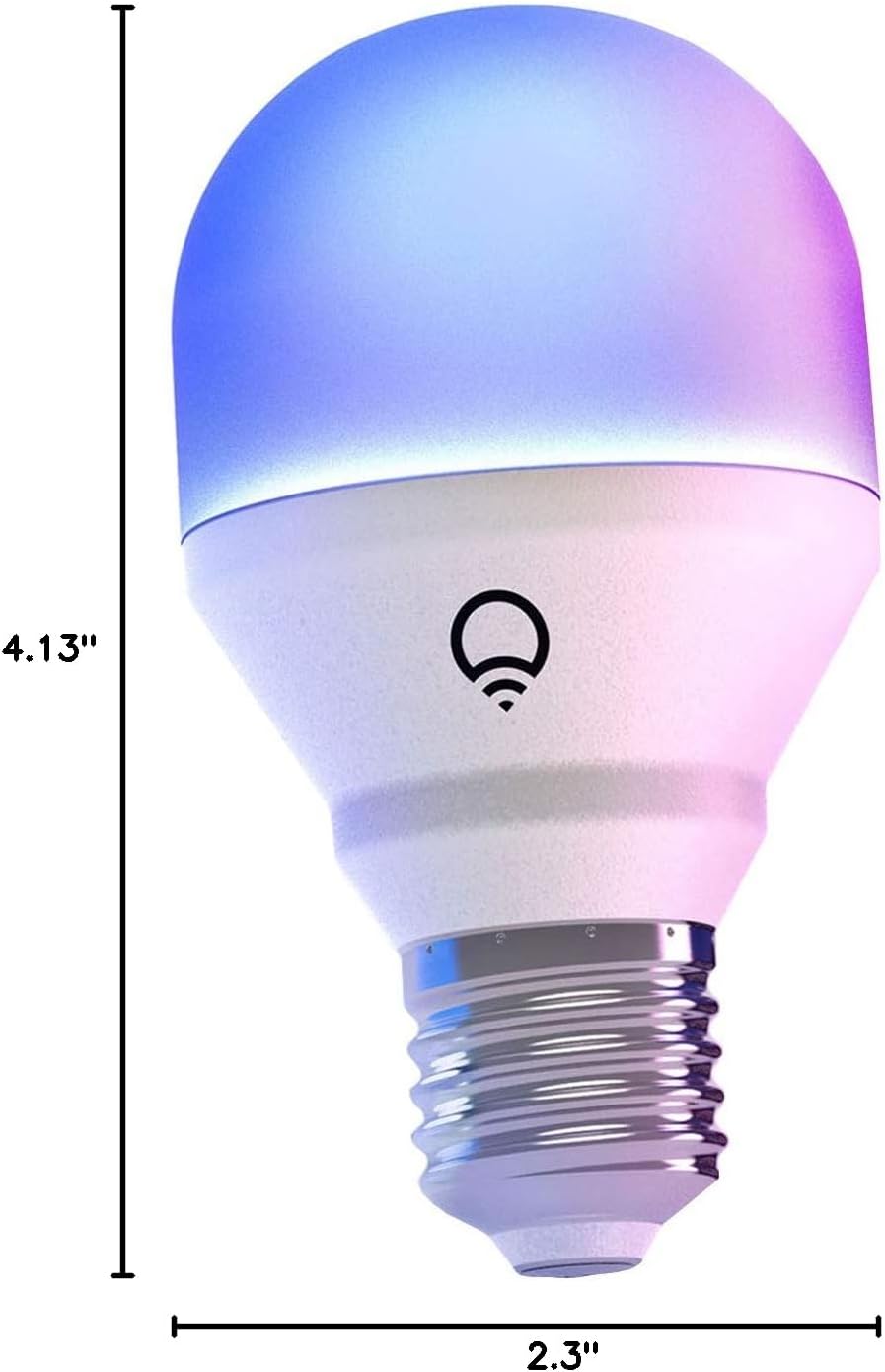
Image: A diagram illustrating the physical dimensions of the LIFX Color Smart LED Bulb.
9. Informacija apie garantiją
The LIFX Color Smart LED Bulb comes with a 2 metų garantija. Please retain your proof of purchase for warranty claims. For specific terms and conditions, refer to the official LIFX websvetainėje arba susisiekite su klientų aptarnavimo tarnyba.
10. Parama
Dėl papildomos pagalbos, techninės pagalbos ar view frequently asked questions, please visit the official LIFX support websvetainėje. Paprastai klientų aptarnavimo kontaktinę informaciją galite rasti jų svetainėje. websvetainę taip pat.
Internetiniai ištekliai:
- LIFX Official Websvetainė: www.lifx.com
- Support Section: Refer to the support or FAQ section on the official website for troubleshooting guides and contact options.


