1. Produktas baigtasview
This manual provides comprehensive instructions for the Retro-Bit Official Sega Saturn 2.4 GHz Wireless Controller. This controller is designed for use with Sega Saturn, Sega Genesis Mini, Nintendo Switch, PlayStation 3, PC, and Mac systems, offering a wireless gaming experience with classic control.

Image description: The Retro-Bit Official Sega Saturn 2.4 GHz Wireless Controller in white, shown with its packaging, a Sega Saturn port receiver, and a USB receiver.
2. Pakuotės turinys
- 1x Retro-Bit Official Sega Saturn 2.4 GHz Wireless Controller (White)
- 1x Sega Saturn Port Receiver
- 1x USB Port Receiver
- 1x saugojimo dėklas
- 1x 3.3ft Charging Cable

Image description: The Retro-Bit wireless controller neatly stored within its protective case, alongside both the Sega Saturn and USB receivers.
3. Sąrankos instrukcijos
3.1. Valdiklio įkrovimas
Connect the included 3.3ft charging cable to the controller's charging port and a USB power source. The LED indicator on the controller will show charging status. A full charge provides approximately 550 mAh of battery life.
3.2. Prisijungimas prie įrenginio
- Select the appropriate receiver: Use the Sega Saturn Port Receiver for Sega Saturn consoles or the USB Port Receiver for Sega Genesis Mini, Nintendo Switch, PlayStation 3, PC, and Mac.
- Insert the receiver: Plug the chosen receiver into the corresponding port on your gaming system or computer.
- Power on the controller: Press the HOME button on the controller to power it on. The controller will automatically attempt to pair with the receiver.
- Poravimas (jei reikia): If the controller does not connect automatically, press the pairing button on the receiver and then the HOME button on the controller simultaneously until the connection is established. The LED indicator on both the controller and receiver will become solid when successfully paired.

Vaizdo aprašymas: Stambus planas view of the Sega Saturn port receiver, which connects the wireless controller to a Sega Saturn console.
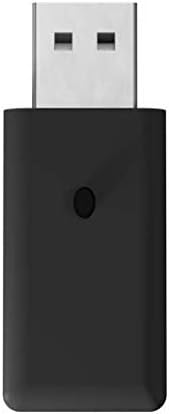
Vaizdo aprašymas: Stambus planas view of the USB port receiver, used to connect the wireless controller to various modern systems like PC, Mac, Switch, and PS3.
4. Valdiklio valdymas
4.1. Mygtukų išdėstymas ir funkcijos
The controller features a classic 6-button layout with a responsive D-Pad, HOME, SELECT, and START buttons, along with shoulder buttons (L, R, Z, Y, X, A, B, C).
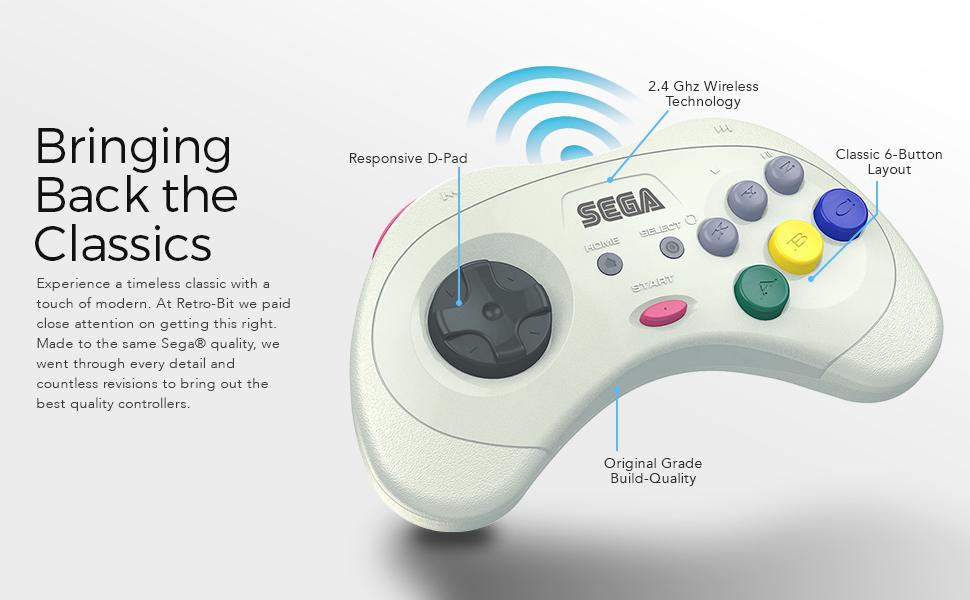
Image description: An annotated image of the Retro-Bit wireless controller highlighting its key features: Responsive D-Pad, 2.4 GHz Wireless Technology, Classic 6-Button Layout, and Original Grade Build-Quality.
4.2. Compatibility Modes
The controller automatically adapts to the connected system via the receiver.
- Sega Saturn: Full functionality for Sega Saturn games.
- Sega Genesis Mini: Compatible with the Sega Genesis Mini console.
- „Nintendo Switch“: Functions as a Pro Controller.
- „PlayStation 3“: Functions as a standard PS3 controller.
- PC/Mac: Recognized as a standard gamepad, compatible with most games supporting XInput or DirectInput.
4.3. Miego režimas
To conserve battery, the controller will enter sleep mode after 5 minutes of inactivity. Press any button to wake it up.
5. Priežiūra
- Valymas: Valdiklį valykite minkšta, sausa šluoste. Venkite abrazyvinių valiklių ar tirpiklių.
- Saugykla: Store the controller in its included storage case when not in use to protect it from dust and damage.
- Akumuliatoriaus priežiūra: Norėdami optimalaus baterijos veikimo laiko, venkite dažnai visiškai iškrauti valdiklį. Reguliariai jį įkraukite.
6. Problemų sprendimas
6.1. Valdiklis nereaguoja
- Įsitikinkite, kad valdiklis įkrautas.
- Verify the receiver is securely plugged into the device.
- Re-attempt the pairing process as described in the "Connecting to a Device" section.
- Check for interference from other 2.4 GHz wireless devices.
6.2. Ryšio problemos
- Ensure you are within the 30ft gaming range.
- Try a different USB port on your PC/Mac/PS3 if using the USB receiver.
- Ensure the correct receiver is used for your system.
6.3. Mygtukai neveikia tinkamai
- Test the controller on a different game or system to isolate the issue.
- Įsitikinkite, kad po mygtukais nėra įstrigusių šiukšlių.
7. Techninės specifikacijos
| Funkcija | Detalė |
|---|---|
| Modelio numeris | RB-SGA-048 |
| Ryšys | 2.4 GHz belaidis ryšys |
| Suderinamumas | Sega Saturn, Sega Genesis Mini, Switch, PS3, PC, Mac |
| Baterija | 550 mAh įkraunamas |
| Įkrovimo kabelis | 3.3ft USB |
| belaidis diapazonas | Iki 30 pėdų |
| Miego režimas | Po 5 minučių neveikimo |
| Pakuotės matmenys | 7.36 x 5.83 x 2.05 colio |
| Prekės svoris | 15.5 uncijos |
8. Garantija ir palaikymas
For warranty information and technical support, please refer to the official Retro-Bit websvetainėje arba susisiekite su jų klientų aptarnavimo tarnyba. Išsaugokite pirkimo įrodymą garantiniams reikalavimams.