Įvadas
Sveiki atvykę į savo naujojo prietaiso naudotojo vadovą KIDdesigns LOL SURPRISE Sing Along Karaoke BoomBox for Kids. This manual provides important information on how to set up, operate, and maintain your device. Please read it thoroughly before use to ensure proper functionality and safety.
The LOL SURPRISE Sing Along Karaoke BoomBox is designed to provide hours of musical fun for children. It features built-in music, LED flashing lights, and a working microphone, allowing kids to sing along to their favorite tunes or connect an external MP3 player for more song options. Its portable and durable design makes it suitable for both indoor and outdoor use.
Saugos informacija
Kad išvengtumėte sužalojimų ar įrenginio sugadinimo, laikykitės šių saugos priemonių:
- ĮSPĖJIMAS: Netinka vaikams iki 3 metų dėl smulkių detalių, kurios gali kelti užspringimo pavojų.
- Naudodami visada prižiūrėkite mažus vaikus.
- Saugokite prietaisą nuo vandens ar per didelės drėgmės.
- Nebandykite ardyti ar modifikuoti įrenginio.
- Use only the specified battery type (3 "AA" batteries). Ensure correct polarity when inserting batteries.
- Išimkite baterijas, jei prietaiso nenaudosite ilgesnį laiką.
- Saugokite prietaisą nuo šilumos šaltinių ir tiesioginių saulės spindulių.
Pakuotės turinys
Prašome patikrinti pakuotę, kad įsitikintumėte, jog yra visi reikalingi daiktai:
- LOL SURPRISE Sing Along Karaoke BoomBox Unit
- Mikrofonas
- Vartotojo vadovas (šis dokumentas)
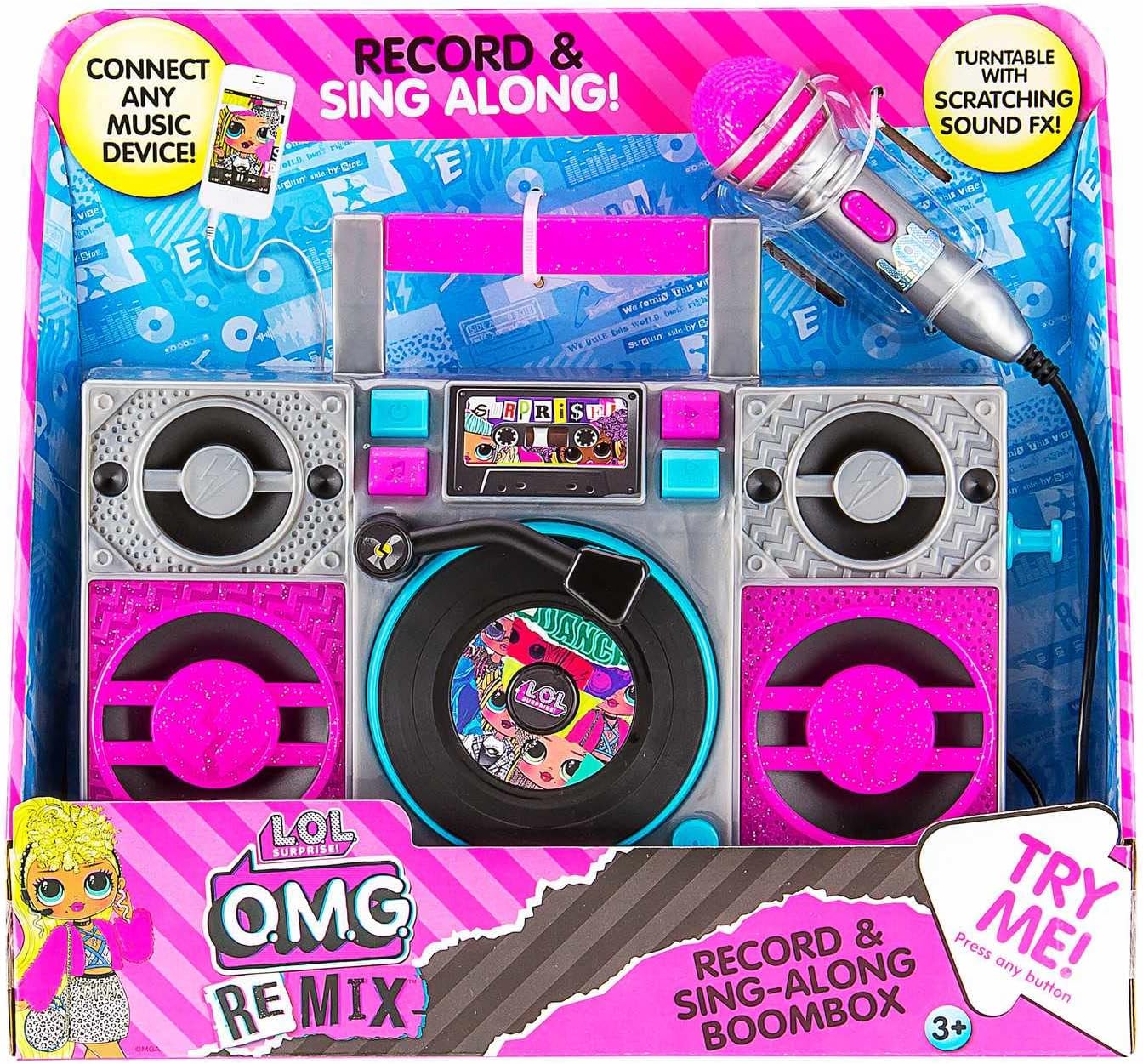
Image: The LOL SURPRISE Karaoke BoomBox as it appears in its retail packaging, highlighting its key features and included microphone.
Produktas baigtasview
Familiarize yourself with the different parts of your Karaoke BoomBox.

Vaizdas: priekis view of the Karaoke BoomBox, illustrating its various components including speakers, central controls, and the attached microphone.
- Rankena: Kad būtų lengviau pernešti.
- Garsiakalbiai: Output audio.
- Valdymo skydas / ekranas: For selecting modes and viewstatusą.
- Turntable (Decorative): Features scratching sound effects.
- Mikrofono įvestis: Connect the included microphone here.
- Mikrofonas: For singing along.
- Pagalbinė įvestis: Connect external audio devices (e.g., MP3 player, smartphone).
- Baterijų skyrius: Located on the back/bottom of the unit.
Sąranka
1. Akumuliatoriaus įdėjimas
The Karaoke BoomBox requires 3 "AA" batteries (not included).
- Locate the battery compartment on the back or bottom of the unit.
- Kryžminiu atsuktuvu atsukite baterijų skyriaus dangtelį.
- Insert 3 "AA" batteries, ensuring the correct polarity (+/-) as indicated inside the compartment.
- Uždėkite akumuliatoriaus skyriaus dangtelį ir pritvirtinkite jį varžtu.
2. Mikrofono prijungimas
Connect the included microphone to the microphone input jack on the unit.
Naudojimo instrukcijos
Maitinimo įjungimas/išjungimas
- To turn the unit ON, locate the Power button (usually on the front panel) and press it.
- To turn the unit OFF, press the Power button again.
Playing Built-in Music
- Once powered on, the unit may automatically start playing built-in music.
- Use the control buttons (e.g., Play/Pause, Next, Previous) on the front panel to navigate through the built-in songs.
Connecting an External Audio Device (MP3 Player/Smartphone)
You can connect your own music device to sing along to your favorite songs.

Image: The Karaoke BoomBox, showing the auxiliary input for connecting external audio devices like MP3 players or smartphones.
- Ensure the Karaoke BoomBox is powered on.
- Connect one end of a 3.5mm audio cable (not included) to the Auxiliary Input jack on the BoomBox.
- Connect the other end of the audio cable to the headphone jack or audio output of your MP3 player, smartphone, or other audio device.
- Start playing music on your connected device. The audio will now play through the BoomBox speakers.
- Adjust the volume on both your connected device and the BoomBox for optimal sound.
Mikrofono naudojimas
- Once the microphone is connected, simply speak or sing into it. Your voice will be amplified through the BoomBox speakers.
- Adjust the microphone volume if available on the unit, or control the overall volume.
LED mirksinčios lemputės
The unit features built-in LED flashing lights that activate during operation, adding to the karaoke experience.
Turntable Scratching Sound Effects
The decorative turntable on the front of the unit can be manually spun to produce fun scratching sound effects.
Priežiūra
- Valymas: Nuvalykite įrenginį minkštu, sausu skudurėliu. Nenaudokite abrazyvinių valiklių ar tirpiklių.
- Saugykla: Kai nenaudojate, laikykite įrenginį vėsioje, sausoje vietoje, apsaugotoje nuo tiesioginių saulės spindulių.
- Akumuliatoriaus priežiūra: Remove batteries if the unit will not be used for an extended period to prevent battery leakage.
Trikčių šalinimas
| Problema | Galima priežastis | Sprendimas |
|---|---|---|
| Įrenginys neįsijungia. | Baterijos išsikrovė arba įdėtos neteisingai. | Replace with new "AA" batteries, ensuring correct polarity. |
| Nėra garso iš garsiakalbių. | Volume is too low; external device not connected properly or volume too low. | Increase volume on the BoomBox and/or the connected external device. Ensure audio cable is fully inserted. |
| Mikrofonas neveikia. | Mikrofonas nėra iki galo prijungtas. | Ensure the microphone cable is securely plugged into the microphone input jack. |
| Iškraipytas garsas. | Volume too high; low batteries. | Lower the volume. Replace batteries if they are low. |
Specifikacijos
- Modelis: LOL SURPRISE Sing Along Karaoke BoomBox
- Prekinis ženklas: EKIDS
- Matmenys (P x P x A): 30.48 x 8.74 x 27.94 cm (12 x 3.44 x 11 colio)
- Svoris: 750 gramai (1.65 svaro)
- Rekomenduojamas amžius: 3 metai ir daugiau
- Maitinimo šaltinis: Maitinamas baterijomis
- Reikalingos baterijos: 3 x "AA" (not included)
- Ryšys: Pagalbinė įvestis (3.5 mm)
- Garsiakalbių skaičius: 1
- ttage: 4.5 voltų
- UPC: 092298950778
- Įtraukti komponentai: Karaoke BoomBox, Microphone
Garantija ir palaikymas
This product is manufactured by eKids. For warranty information or technical support, please refer to the contact information provided on the product packaging or visit the official eKids websvetainėje. Išsaugokite pirkimo kvitą kaip pirkimo įrodymą bet kokiems garantiniams prašymams.
Dėl papildomos pagalbos galite apsilankyti EKIDS Brand Store on Amazon.


