1. Produktas baigtasview
The Philips SRP5016/10 is a modern and elegant 6-in-1 universal remote control designed to simplify your home entertainment experience. It allows you to control up to six different devices, such as televisions, DTVs, DVRs, home theater systems, soundbars, and streaming devices. This remote features a learning function, enabling it to receive and store infrared codes from your original remote controls, providing comprehensive control over various brands and models.
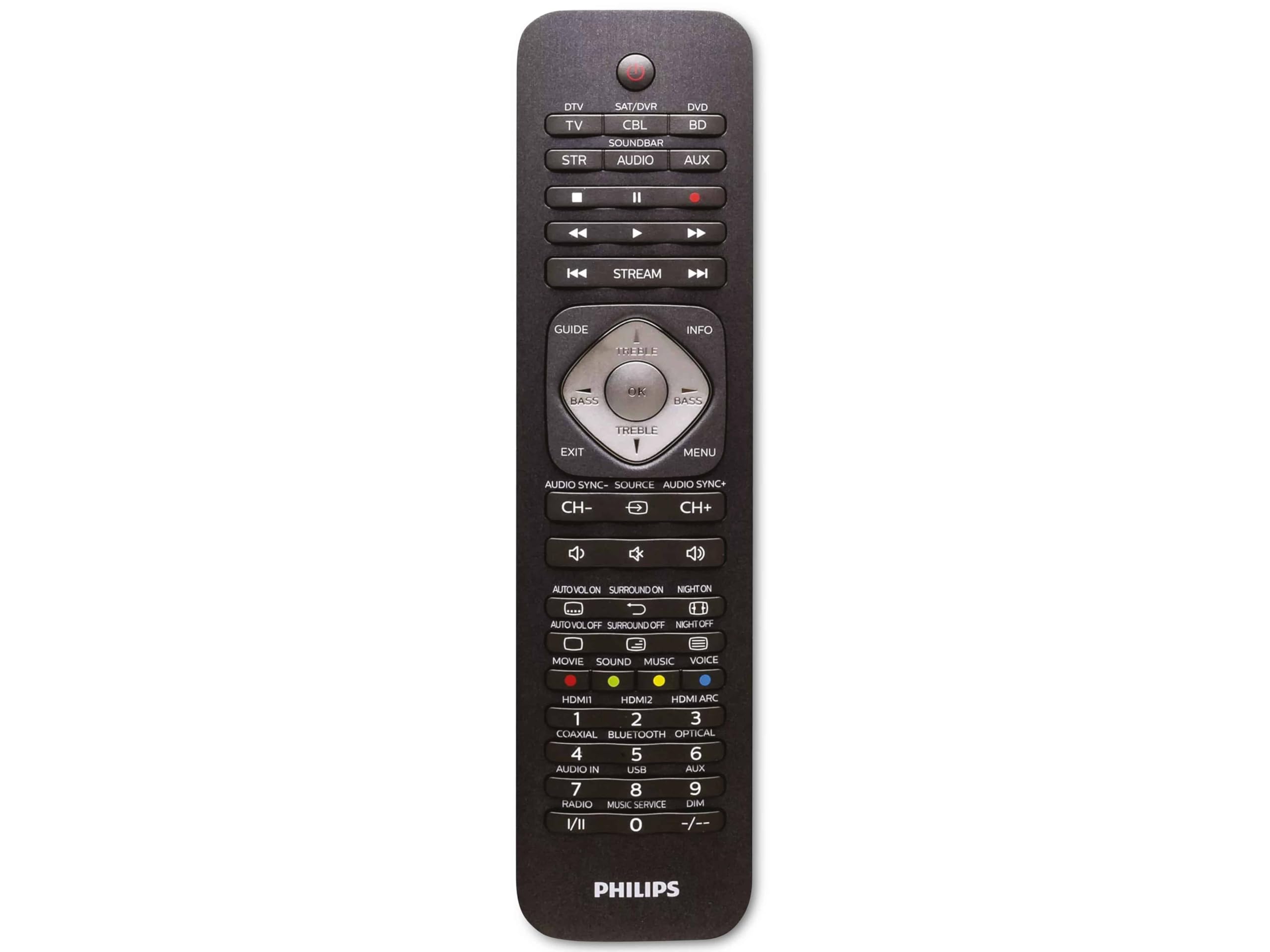
Image 1.1: Philips SRP5016/10 6-in-1 Universal Remote Control. This image displays the front view of the black universal remote control, highlighting its ergonomic design and button layout.
2. Sąranka
2.1. Akumuliatoriaus įdėjimas
- Atidarykite baterijų skyriaus dangtelį, esantį nuotolinio valdymo pulto gale.
- Įdėkite dvi AAA tipo baterijas, užtikrindami teisingą poliškumą (+ ir -), kaip nurodyta skyrelio viduje.
- Saugiai uždarykite akumuliatoriaus skyriaus dangtelį.
Pastaba: Baterijos neįskaičiuotos ir turi būti įsigytos atskirai.
2.2. Įrenginių programavimas
The Philips SRP5016/10 can be programmed using either direct code entry or the learning function.
2.2.1. Direct Code Entry (Recommended for common brands)
- Įjunkite įrenginį, kurį norite valdyti (pvz., televizorių, DVD grotuvą).
- Press and hold the desired device button on the universal remote (e.g., TV, DVD) for approximately 3 seconds until the device button lights up.
- Enter the 4-digit code for your device's brand (refer to the code list provided with your remote, if available, or search online for Philips universal remote codes).
- If the device turns off or responds, the code is correct. Press the device button again to save the code. If not, try the next code for your brand.
2.2.2. Learning Function (For devices not in the code list or advanced functions)
- Place the universal remote and your original remote control head-to-head, approximately 1-3 cm apart.
- Press and hold the desired device button on the universal remote (e.g., TV) for approximately 3 seconds until the device button lights up.
- Paspauskite ir palaikykite IŠMOKYTI button on the universal remote until the device button starts blinking.
- On your original remote, press the button you wish to teach (e.g., GALIA). The device button on the universal remote will blink rapidly and then stay solid, indicating successful learning.
- Repeat step 4 for all other buttons you wish to learn.
- Paspauskite IŠMOKYTI button again to exit learning mode.
3. Naudojimo instrukcijos
3.1. Selecting a Device
To control a specific device, press the corresponding device button (e.g., TV, DVD, SAT, AUX, GARSO BARAS, STRAUKAS) once. The selected device button will light up briefly to confirm your selection. You can then use the remote's buttons to control that device.
3.2. Pagrindinės funkcijos
- GALIA: Įjungia arba išjungia pasirinktą įrenginį.
- GAMAS +/-: Adjusts the volume of the selected audio device.
- KANALAS +/-: Changes channels on the selected TV or DTV device.
- Nutildyti: Nutildo garsą.
- SKAIČIŲ Mygtukai (0–9): Tiesioginiam kanalo įvedimui arba kitoms skaitinėms įvestims.
- NAVIGATION (Arrow buttons, OK): Meniu naršymui ir pasirinkimui.
4. Priežiūra
4.1. Baterijos keitimas
When the remote control's range decreases or buttons become unresponsive, it is time to replace the batteries. Follow the battery installation steps in Section 2.1. Always replace both AAA batteries simultaneously with new ones.
4.2. Valymas
Nuotolinio valdymo pultą valykite minkšta, sausa šluoste. Jei nešvarumai sunkiai įveikiami, šiek tiek nuvalykite.ampen the cloth with water or a mild cleaning solution. Avoid using abrasive cleaners, solvents, or alcohol, as these can damage the remote's surface or internal components.
5. Problemų sprendimas
- Neveikia nuotolinio valdymo pultas:
- Patikrinkite, ar baterijos įdėtos teisingai ir nėra išsikrovusios. Jei reikia, pakeiskite.
- Įsitikinkite, kad tarp nuotolinio valdymo pulto ir įrenginio nėra kliūčių.
- Verify that the correct device button (e.g., TV, DVD) is selected.
- Įrenginys nereaguoja į komandas:
- The device code may be incorrect. Try reprogramming the device using a different code from the code list or use the learning function.
- Ensure the remote's infrared emitter is pointed directly at the device's infrared receiver.
- Mokymosi funkcija neveikia:
- Ensure the original remote's batteries are fresh and it is functioning correctly.
- Make sure the remotes are positioned correctly (head-to-head, 1-3 cm apart) during the learning process.
- Try learning the button again. Some original remotes have weaker IR signals that require multiple attempts.
6. Specifikacijos
| Funkcija | Specifikacija |
|---|---|
| Prekės ženklas | Philips |
| Modelio pavadinimas | 6 viename |
| Modelio numeris | SRP5016/10 |
| Suderinami įrenginiai | Home Theater, DVD/Blu-ray Player, SoundBar, Television, Streaming Device |
| Ypatinga funkcija | Universal, Learning Function |
| Ryšio technologija | Infraraudonųjų spindulių |
| Maximum Number of Supported Devices | 6 |
| Valdiklio tipas | Mygtukų valdymas |
| Mygtukų skaičius | Not specified (typical universal remote layout) |
| Didžiausias diapazonas | 10 metrai |
| Maitinimo šaltinis | 2 x AAA baterijos (į komplektą neįeina) |
| Medžiagos tipas | Plastikiniai |
| Gaminio matmenys | 21.4 x 5.3 x 2.2 cm |
| Produkto svoris | 130 g |
7. Garantija ir palaikymas
For warranty information, please refer to the documentation provided at the time of purchase or contact your retailer. Philips offers customer support for their products. If you encounter issues that cannot be resolved using this manual, please visit the official Philips support websvetainėje arba susisiekite su klientų aptarnavimo tarnyba, kad gautumėte pagalbos.
Išsaugokite pirkimo įrodymą, kad galėtumėte kreiptis dėl garantijos.