1. Įvadas
Ačiū, kad pirkoteasing the BYINTEK R19 Portable 3D Smart LED DLP Projector. This manual provides essential information for the safe and efficient operation of your device. Please read it thoroughly before use and retain it for future reference.

Image 1.1: The BYINTEK R19 Portable 3D Smart LED DLP Projector.
2. Saugos informacija
Kad nesugadintumėte projektoriaus ir užtikrintumėte naudotojo saugumą, laikykitės šių saugos priemonių:
- Nežiūrėkite tiesiai į projektoriaus objektyvą, kai lamp yra įjungtas.
- Užtikrinkite tinkamą vėdinimą aplink projektorių, kad išvengtumėte perkaitimo.
- Saugokite projektorių nuo lietaus, drėgmės ar ekstremalių temperatūrų.
- Naudokite tik prie projektorijaus pridėtą maitinimo adapterį.
- Nestatykite projektoriaus ant nestabilių paviršių.
- Nebandykite patys ardyti ar taisyti projektoriaus. Kreipkitės į kvalifikuotus techninės priežiūros darbuotojus.
3. Pakuotės turinys
Patikrinkite, ar pakuotėje yra visi reikalingi daiktai:
- BYINTEK R19 Projector
- Nuotolinio valdymo pultas
- Maitinimo adapteris
- Vartotojo vadovas (šis dokumentas)
- HDMI kabelis (gali skirtis priklausomai nuo regiono / pakuotės)

Image 3.1: The BYINTEK R19 projector shown with its remote control.
4. Produktas baigtasview
4.1. Projektoriaus komponentai

Image 4.1: Diagram illustrating the projector's components and ports.
- Objektyvas: Projektuoja vaizdą ekrane.
- IR imtuvas: Priima signalus iš nuotolinio valdymo pulto.
- Speaker (4Ω 5W x2): Suteikia garso išvestį.
- Universal Bracket Hole (d=1/4 inch, 6mm): For mounting on tripods or ceiling mounts.
4.2. Įvesties / išvesties prievadai
- DC-in (19V): Maitinimo įvesties prievadas.
- USB1 / USB2: USB prievadai išorinėms laikmenoms arba periferiniams įrenginiams prijungti.
- HD-in: HDMI input for connecting video sources.
- Tinklas: Ethernet prievadas laidiniam interneto ryšiui.
- TF kortelė: Slot for TransFlash (MicroSD) cards.
- Audio-out: 3.5 mm garso lizdas išoriniams garsiakalbiams arba ausinėms.
- APIE: Audio/Video input port.
5. Sąranka
5.1. Įdėjimas
Position the projector on a stable, flat surface or mount it using the universal bracket hole. Ensure the projector is perpendicular to the projection surface for optimal image geometry. The throw distance determines the screen size:
- Throw Range: 30-300 colių
- Metimo atstumas: 1-6 metrai
- Approximately 2.15m for 84 inches, 2.5m for 100 inches, 3.1m for 120 inches, 3.86m for 150 inches.

Image 5.1: Illustration of throw distances for various screen sizes and different mounting methods (tabletop, tripod, ceiling).
5.2. Maitinimo prijungimas
Connect the supplied power adapter to the DC-in port (19V) on the projector and then plug it into a power outlet.
5.3. Pradinis įjungimas
Press the Power ON/OFF button on the projector or the remote control to turn on the device. The projector will boot into the Android OS interface.
5.4. Fokuso reguliavimas
Use the "Focus+" and "Focus-" buttons on the projector or the remote control to adjust the image clarity until it is sharp and clear on the screen.
6. Naudojimo instrukcijos
6.1. Nuotolinio valdymo funkcijos
The remote control allows for convenient navigation and control of the projector's features.

Image 6.1: The remote control for the BYINTEK R19, highlighting the one-button 3D switching function.
- Maitinimo mygtukas: Įjungia/išjungia projektorių.
- Naršymo skydelis (mygtukas „Gerai“): Meniu naršymui ir pasirinkimui.
- Atgal mygtukas: Grįžta į ankstesnį ekraną.
- Namų mygtukas: Grąžina į pagrindinę „Android“ OS sąsają.
- Garsumo mygtukai: Reguliuoja garso stiprumą.
- Focus Buttons: Adjusts image focus.
- 3D mygtukas: One-touch switching for 3D mode (DLP-LINK shutter 3D, TNB, SBSH).
6.2. Android OS Navigation
The projector runs on an Android operating system, providing access to various applications and settings. Use the remote control's navigation pad to browse the interface.
6.3. Prietaisų prijungimas
- HDMI (HD-in): Connect laptops, Blu-ray players, gaming consoles, or other HDMI-enabled devices.
- USB: Įkiškite USB atmintines medijos atkūrimui.
- TF kortelė: Įdėkite „MicroSD“ kortelę, kad galėtumėte atkurti medijos failus.
- „Wi-Fi“: Connect to a wireless network via the Android OS settings for internet access and online streaming.
- Belaidis ekrano bendrinimas: Utilize the built-in screen sharing feature to mirror content from compatible smartphones or PCs.
- APIE: Prijunkite senesnius įrenginius naudodami AV kabelį.
6.4. 3D Mode Activation
The BYINTEK R19 supports 3D content. To activate 3D mode, ensure you are playing compatible 3D content and press the dedicated 3D button on the remote control. The projector supports DLP-LINK shutter 3D, TNB (Top and Bottom), and SBSH (Side-by-Side Half) formats. Active shutter 3D glasses (not included) are required for view3D turinį.
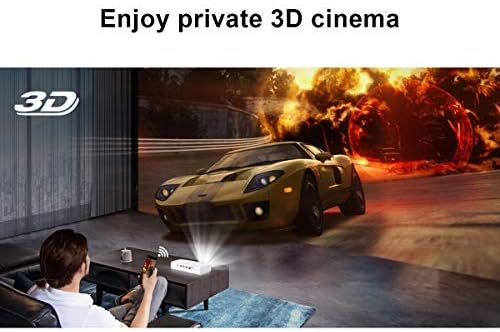
Image 6.2: A user experiencing a private 3D cinema with the BYINTEK R19 projector.
6.5. Screen Size and Usage
The projector can produce a large screen size up to 300 inches, offering an immersive viewing experience. It is suitable for various applications, including home theater, gaming, and presentations, particularly in dim light environments.

Image 6.3: Visual comparison demonstrating the large 300-inch projection size achievable with the BYINTEK R19, compared to a typical 50-inch television.

6.4 pav.: pvz.amples of the BYINTEK R19 projector in various settings, including business presentations, outdoor movie nights, home gaming, and home cinema.
7. Priežiūra
7.1. Objektyvo valymas
Švelniai nuvalykite projektoriaus objektyvą minkštu, nepūkuotu audiniu, specialiai skirtu optiniams paviršiams. Nenaudokite abrazyvinių valiklių ar tirpiklių.
7.2. C valymasasing
Nuvalykite projektorių casinminkštu, sausu skudurėliu. Įsisenėjusias dėmes šiek tiek nuvalykite.ampnuvalykite šluostę vandeniu, tada nedelsdami nusausinkite.
7.3. Sandėliavimas
When not in use for extended periods, store the projector in a cool, dry place, away from direct sunlight and excessive dust. Use the original packaging or a protective case if available.
8. Problemų sprendimas
| Problema | Galima priežastis | Sprendimas |
|---|---|---|
| Neprojektuojamas vaizdas | Power cable disconnected; Projector not powered on; Input source not selected. | Check power connection; Press power button; Select correct input source (HDMI, USB, etc.). |
| Vaizdas neryškus | Nenustatytas fokusavimas; projektorius per arti/per toli nuo ekrano. | Adjust focus using "Focus+" / "Focus-" buttons; Adjust projector distance. |
| Nėra garso | Volume too low; Muted; External speakers not connected properly. | Increase volume; Unmute; Check external speaker connection or use internal speakers. |
| Nuotolinio valdymo pultas neveikia | Batteries depleted; Obstruction between remote and IR receiver. | Pakeiskite baterijas; užtikrinkite, kad IR imtuvas būtų matomas tiesiogiai. |
| Wi-Fi ryšio problemos | Neteisingas slaptažodis; Maršrutizatorius per toli; Tinklo trukdžiai. | Verify password; Move projector closer to router; Check for network interference. |
9. Specifikacijos
| Funkcija | Detalė |
|---|---|
| Prekės ženklas | BYINTEK |
| Modelis | R19 |
| Ekrano technologija | LED, DLP |
| Gimtoji raiška | 1920 x 1080 (Full HD) |
| Didžiausia palaikoma skiriamoji geba | 3840 x 2160 (4K) |
| Formos faktorius | Nešiojami |
| Ypatingos savybės | Portable, 3D-Ready, Wi-Fi Ready, Android OS |
| Metimo diapazonas | 30-300 colių |
| Metimo atstumas | 1-6 metrai |
| Montavimo tipas | Tabletop Mount (also tripod/ceiling compatible) |
| Spalva | Baltas |
| Valdiklio tipas | Nuotolinio valdymo pultas |
| Suderinami įrenginiai | Laptop, Smartphone, Gaming Console, Blu-ray Player |
| Prekės svoris | 7.94 g (Note: This weight appears unusually low and may be a data entry error in the source specifications.) |
| Pakuotės matmenys | 16.93 x 12.1 x 7.09 cm |
10. Garantija ir palaikymas
For information regarding warranty coverage, technical support, or service inquiries, please refer to the warranty card included with your product or visit the official BYINTEK websvetainėje. Išsaugokite pirkimo kvitą kaip pirkimo įrodymą.


