1. Įvadas
The YABER V3 Mini Bluetooth Projector is designed to provide a versatile and high-quality viewing experience for home entertainment and outdoor use. Featuring native 1280x720p resolution with 1080P support, a 6000:1 contrast ratio, and an advanced German LED light source, it delivers clear and accurate images. This projector also includes Bluetooth 5.0 for wireless audio connectivity and supports wireless screen mirroring via Anycast or Chromecast (adapters sold separately).
2. Kas yra dėžutėje
- YABER V3 Mini Bluetooth Projector
- HDMI kabelis
- Maitinimo laidas
- Vartotojo vadovas
- AV kabelis
- Lęšių valymo šluostė
- Nuotolinio valdymo pultas (baterijos neįtrauktos)
3. Produkto ypatybės
- Native 720P & 1080P Supported: Offers a native resolution of 1280x720 pixels, supporting up to 1080P input for clear images.
- Didelis kontrasto santykis: Features a 6000:1 contrast ratio for enhanced image depth and detail.
- Bluetooth 5.0 ryšys: Allows wireless connection to Bluetooth headsets, speakers, and Airpods for enhanced audio.
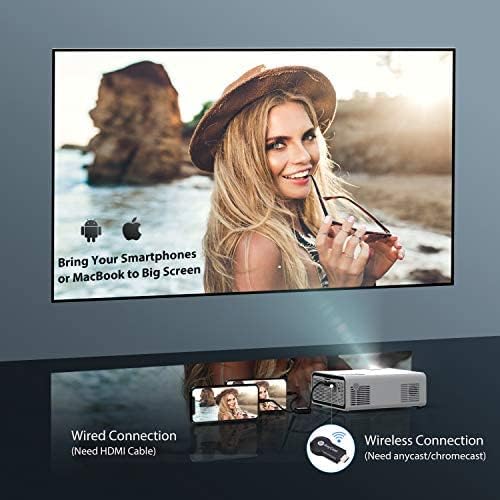
- Belaidis ekrano atspindėjimas: Supports Anycast and Chromecast for mirroring content from smartphones and other devices (adapters required).
- Priartinimo funkcija: Adjusts image size from 100% to 50% using the remote control without moving the projector.
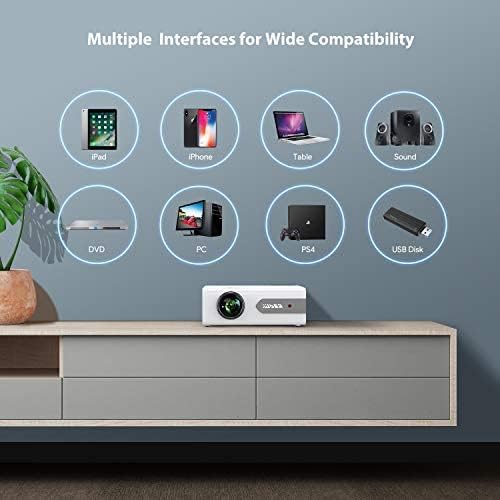
- Kelios sąsajos: Equipped with HDMI, USB, VGA, AV, and Audio ports for wide compatibility with various devices.
- HIFI stereo garsas: Built-in dual stereo speakers with an SRS sound system provide a good auditory experience.
- Pažangi aušinimo sistema: Designed to minimize lamp power consumption and extend lamp tarnavimo laikas iki 100,000 XNUMX valandų.


4. Sąranka
4.1 Pradinis išdėstymas
Place the projector on a stable, flat surface or mount it to the ceiling. Ensure there is adequate ventilation around the projector to prevent overheating. The projection distance and screen size can be adjusted based on your viewaplinką.

4.2 Maitinimo jungtis
Connect the power cord to the projector's power input and then plug it into a power outlet.
4.3 Maitinimo įjungimas/išjungimas
Norėdami įjungti arba išjungti įrenginį, paspauskite projektoriaus arba nuotolinio valdymo pulto maitinimo mygtuką.
5. Naudojimo instrukcijos
5.1 Fokusavimas ir trapecijos korekcija
Adjust the focus ring on the projector lens until the image is clear. Use the keystone correction feature (manual or digital, if available) to correct any trapezoidal distortion of the image.
5.2 Įvesties šaltinio pasirinkimas
Use the 'Source' button on the remote or projector to select the desired input source (HDMI, USB, VGA, AV).
5.3 Bluetooth ryšys
To connect to a Bluetooth audio device:
- Ensure your Bluetooth speaker or headset is in pairing mode.
- Eikite į projektoriaus „Bluetooth“ nustatymus.
- Pasirinkite savo įrenginį iš galimų įrenginių sąrašo, kurį norite susieti.
- Once connected, audio will play through the Bluetooth device.
Pastaba: The V3 mini projector supports Bluetooth output devices (speakers, headphones) but does not connect to phones/pads via Bluetooth for mirroring. Turn off Bluetooth when not in use to avoid potential issues.
5.4 Belaidis ekrano veidrodinis atspindėjimas
The YABER V3 supports wireless screen mirroring from iOS and Android devices using an external Anycast or Chromecast dongle (purchased separately). Connect the dongle to an HDMI port and follow the dongle's instructions for mirroring.
5.5 Mastelio keitimo funkcija
To adjust the image size without moving the projector, use the zoom function via the remote control. This allows you to shrink the image from 100% down to 50%.
5.6 Naudojimo scenarijai
The YABER V3 projector is suitable for various applications:
- Namų kinas: Enjoy movies and shows on a large screen.
- Žaidimai: Connect gaming consoles for an immersive experience.
- Outdoor Movies: Perfect for backyard movie nights in dark environments.

6. Priežiūra
6.1 Objektyvo valymas
Regularly clean the projector lens using the provided lens cleaning cloth or a soft, lint-free cloth. Avoid using abrasive cleaners or harsh chemicals.
6.2 Oro filtro valymas
Check and clean the air filter periodically to ensure proper airflow and prevent dust buildup, which can affect performance and lamp gyvenimą.
6.3 Lamp Gyvenimas
Projektoriaus LED lamp has a lifespan of up to 100,000 hours. Proper maintenance, including adequate ventilation and cleaning, helps maximize its longevity.
7. Problemų sprendimas
- Nefotografuoti:
- Patikrinkite, ar maitinimo laidas yra tvirtai prijungtas.
- Įsitikinkite, kad pasirinktas teisingas įvesties šaltinis.
- Verify that the connected device (e.g., TV Stick, PC) is powered on and outputting a signal.
- Adjust focus and keystone.
- Nėra garso:
- Patikrinkite projektoriaus ir prijungto įrenginio garsumo nustatymus.
- Jei naudojate „Bluetooth“, įsitikinkite, kad įrenginys tinkamai suporuotas ir prijungtas.
- If using an external speaker via AUX, ensure the cable is fully inserted.
- Some content (e.g., certain streaming services) may have audio format incompatibilities; try a different source or content.
- Neryškus vaizdas:
- Sureguliuokite fokusavimo žiedą ant objektyvo.
- Įsitikinkite, kad projektoriaus paviršius yra lygus, o projektorius stabilus.
- Išvalykite projektoriaus objektyvą.
- Nuotolinio valdymo pultas neveikia:
- Pakeiskite nuotolinio valdymo pulto baterijas.
- Įsitikinkite, kad tarp nuotolinio valdymo pulto ir projektoriaus IR imtuvo nėra jokių kliūčių.
- Perkaitimas:
- Užtikrinkite tinkamą vėdinimą aplink projektorių.
- Clean the air filter and vents to remove dust.
- Avoid operating in excessively hot environments.
8. Specifikacijos
| Modelio numeris | V3 |
| Ekrano raiška | Native 1280 x 720 (Supports 1080P) |
| Kontrasto santykis | 6000:1 |
| Krašto santykis | 16:9 / 4:3 |
| Šviesos šaltinis | LED |
| Lamp Gyvenimas | Iki 100,000 valandų |
| Ryšio technologija | 3.5mm Jack, Bluetooth, HDMI, USB, VGA, AV |
| Bluetooth versija | 5.0 |
| Gaminio matmenys | 8.19 x 6.61 x 3.07 colio |
| Prekės svoris | 2.2 svaro |
| Rekomenduojami naudojimo būdai | Home Cinema, Gaming, Business (not recommended for professional presentations) |
9. Garantija ir palaikymas
YABER provides a 6-month return policy and 3-year repair service for the V3 Mini Bluetooth Projector. Lifetime professional technical support is also available. For any issues or inquiries, please contact YABER customer service.


