1. Įvadas
This manual provides comprehensive instructions for the safe and effective operation, maintenance, and troubleshooting of the RS PRO RSDS 1052 DL+ Digital Storage Oscilloscope. Please read this manual thoroughly before using the device to ensure proper functionality and to prevent damage or injury.
The RS PRO RSDS 1052 DL+ is a versatile 2-channel digital storage oscilloscope with a 50 MHz bandwidth, designed for precise signal analysis. It features a 7-inch TFT LCD display for clear waveform visualization and supports various measurement parameters and mathematical operations.
2. Saugos informacija
Always adhere to the following safety precautions to prevent electric shock, fire, or damage to the instrument.
- Maitinimo šaltinis: Įsitikinkite, kad osciloskopas prijungtas prie maitinimo šaltinio, kurio įtampa neviršija nurodytos ribos.tage range (100-240V AC, 50/60Hz).
- Įžeminimas: The instrument must be properly grounded to prevent electric shock. Do not defeat the grounding plug.
- Aplinka: Operate the oscilloscope in a dry, well-ventilated area, away from direct sunlight, high temperatures, and excessive dust.
- Zondai: Use only probes supplied or recommended by RS PRO. Ensure probes are correctly rated for the voltage matuojamas.
- Priežiūra: Visus techninės priežiūros darbus patikėkite kvalifikuotiems techninės priežiūros darbuotojams. Nebandykite atidaryti prietaiso.asing unless explicitly instructed.
- Saugos kategorija: This device is rated CAT I, CAT II. Observe all safety warnings on the device and in this manual.
3. Produktas baigtasview ir komponentai
Šiame skyriuje pateikiama pabaigaview of the RS PRO RSDS 1052 DL+ oscilloscope and its main components.
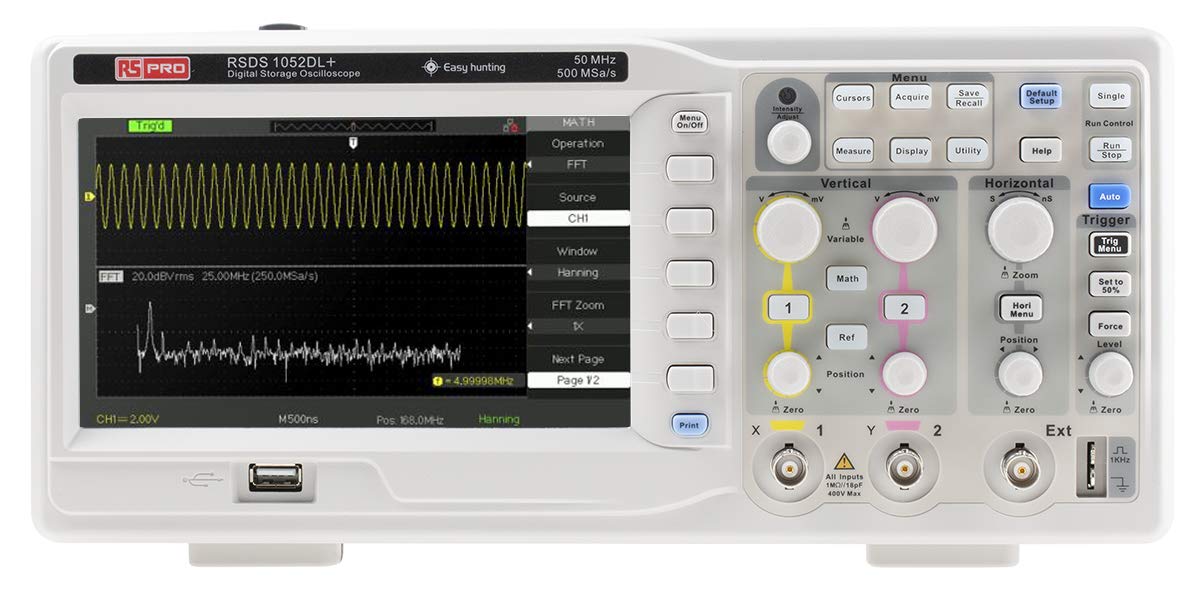
3.1 pav.: priekis View of the Oscilloscope. This image shows the front panel of the RS PRO RSDS 1052 DL+ oscilloscope, highlighting the 7-inch TFT LCD display, control knobs, function buttons, and input connectors for channels 1 and 2. The screen displays a typical waveform and FFT analysis.

3.2 pav.: Kampinis View of the Oscilloscope. This image provides an angled perspective of the RS PRO RSDS 1052 DL+ oscilloscope, showcasing its compact design and integrated handle for portability. The side ventilation grilles are also visible.

3.3 pav.: galinis View of the Oscilloscope. This image displays the rear panel of the RS PRO RSDS 1052 DL+ oscilloscope, featuring the power input, USB device port, USB host port, LAN port, and Pass/Fail output. Safety warnings and product labels are also visible.
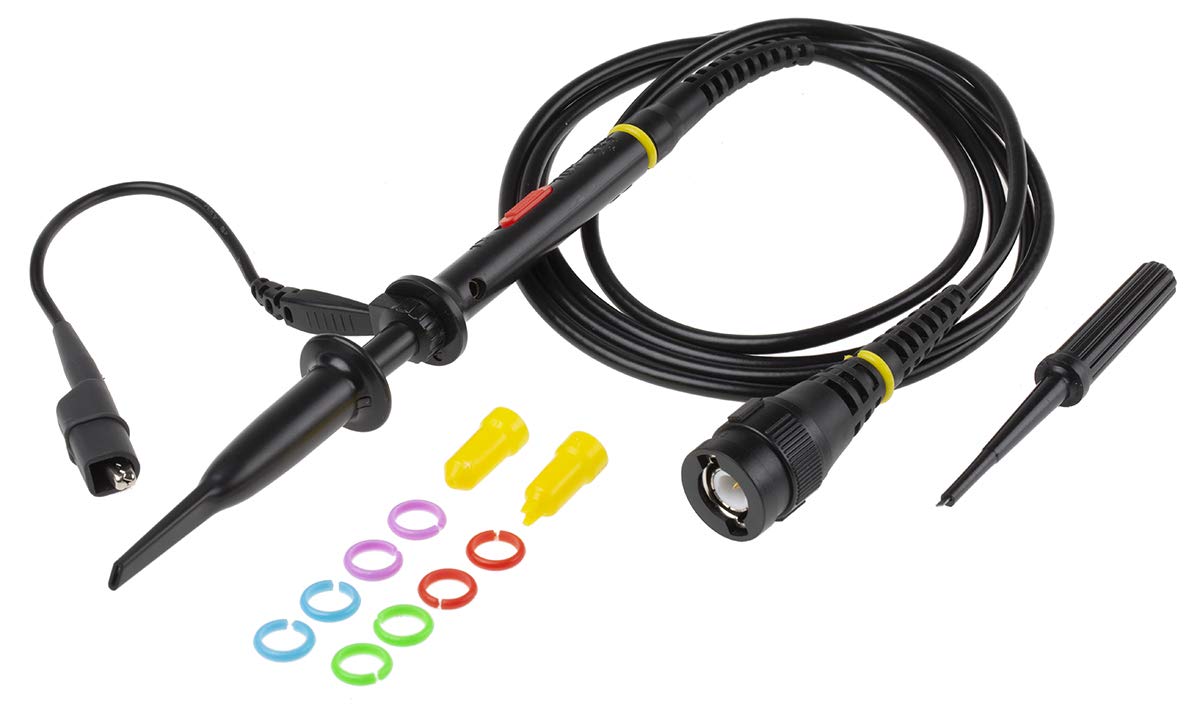
Figure 3.4: Oscilloscope Probe and Accessories. This image shows a passive oscilloscope probe (1:1/10:1) along with various accessories, including colored rings for channel identification and probe tip covers. These are essential for connecting signals to the oscilloscope.

Figure 3.5: Power Plugs and Probe Tip. This image displays an assortment of power plugs (EU, UK, US types) that may be included with the oscilloscope, along with a specialized probe tip. These ensure compatibility with various power outlets and provide versatility for measurements.
3.1 Pridedami priedai
The RS PRO RSDS 1052 DL+ typically includes the following accessories:
- Passive Probe 1:1/10:1 (x2)
- USB kabelis
- Greitos pradžios vadovas
- Kokybės sertifikatas
- Maitinimo laidas (priklausomai nuo regiono)
- CD (including User Manual and EasyScopeX software)
4. Sąranka
4.1 Išpakavimas ir patikrinimas
- Atsargiai išimkite osciloskopą ir visus priedus iš pakuotės.
- Inspect the instrument for any signs of physical damage during transit. If damage is found, contact your supplier immediately.
- Verify that all included accessories listed in Section 3.1 are present.
4.2 Maitinimo jungtis
- Įsitikinkite, kad maitinimo jungiklis galiniame skydelyje yra IŠJUNGTOJE padėtyje.
- Connect the provided power cord to the AC input on the rear panel of the oscilloscope.
- Plug the other end of the power cord into a grounded AC power outlet. The oscilloscope supports 100-240V AC, 50/60Hz.
4.3 Zondo prijungimas ir kompensavimas
- Connect the BNC connector of the passive probe to one of the input channels (CH1 or CH2) on the front panel.
- Attach the probe tip to the probe compensation output (usually a square wave test signal) on the front panel.
- Adjust the compensation trimmer on the probe until the displayed square wave is flat-topped, without overshoot or undershoot. This ensures accurate measurements.
5. Naudojimo instrukcijos
5.1 Pagrindinės operacijos
- Maitinimo įjungimas/išjungimas: Press the power button on the front panel to turn the oscilloscope on or off.
- Automatinė sąranka: Paspauskite Auto mygtuką, kad automatiškai sureguliuotumėte vertikalius, horizontalius ir trigerio nustatymus, kad būtų rodomas stabilus bangos formos vaizdas.
- Vertikalūs valdikliai: Naudokite VOLTS/DIV knob to adjust the vertical scale (voltage per division) and the POZICIJA knob to move the waveform vertically.
- Horizontalūs valdikliai: Naudokite SEC/DIV knob to adjust the horizontal scale (time per division) and the POZICIJA rankenėlę, kad bangos forma būtų perkelta horizontaliai.
- Trigerio valdikliai: Sureguliuokite LYGIS knob to set the trigger threshold. The trigger ensures a stable display of repetitive waveforms.
5.2 Išplėstinės funkcijos
- Matavimo funkcijos: Paspauskite Išmatuoti button to access automatic measurement parameters such as Vpp, Vmax, Vmin, Freq, Period, etc.
- Matematinės funkcijos: Paspauskite Matematika button to perform mathematical operations on waveforms (e.g., Add, Subtract, Multiply, Divide, FFT).
- Storage and Recall: Naudokite Išsaugoti/Atšaukti buttons to save waveform data, setups, or screenshots to internal memory or a USB drive.
- USB jungtis: Connect a USB drive to the front panel USB host port for data storage. Use the rear USB device port to connect the oscilloscope to a PC for data transfer and control via EasyScopeX software.
6. Priežiūra
6.1 Valymas
- Prieš valydami atjunkite maitinimo laidą.
- Naudokite minkštą, damp cloth with mild detergent to clean the exterior of the instrument.
- Nenaudokite abrazyvinių valiklių ar tirpiklių, kurie gali pažeisti plastikines dalis.
- Įsitikinkite, kad į instrumentą nepateko skysčio.
6.2 Kalibravimas
The oscilloscope is factory calibrated. For optimal performance, periodic calibration by qualified personnel is recommended, typically every 12-24 months, depending on usage and environmental conditions.
6.3 Saugykla
When not in use for extended periods, store the oscilloscope in a dry, dust-free environment, away from extreme temperatures and humidity.
7. Problemų sprendimas
Šiame skyriuje pateikiami dažniausiai pasitaikančių problemų, su kuriomis galite susidurti, sprendimai.
| Problema | Galima priežastis | Sprendimas |
|---|---|---|
| Nėra galios | Power cord disconnected; Power switch off; Blown fuse | Check power cord connection; Turn power switch on; Contact service for fuse replacement. |
| Nerodoma bangos forma | Input signal too small/large; Incorrect vertical/horizontal settings; Trigger not set correctly; Probe not connected | Adjust VOLTS/DIV and SEC/DIV; Use Auto Setup; Adjust trigger level; Ensure probe is connected and compensated. |
| Nestabili bangos forma | Incorrect trigger settings; No trigger source selected | Adjust trigger level and mode; Select appropriate trigger source (e.g., CH1, CH2, Ext). |
| Iškraipyta bangos forma | Probe compensation incorrect; Probe damaged; Input overloaded | Perform probe compensation; Try a different probe; Check input signal ampplatuma. |
If the problem persists after attempting these solutions, please contact RS PRO customer support.
8. Specifikacijos
Key technical specifications for the RS PRO RSDS 1052 DL+ Digital Storage Oscilloscope:
- Analoginiai kanalai: 2
- Oscilloscope Type: Skaitmeninė saugykla
- Pralaidumas: 50 MHz
- Realiu laiku Sample Įvertinkite: Up to 500 MSa/s
- Atminties gylis: 32 Kpts
- Ekrano tipas: TFT LCD
- Ekrano dydis: 7 colio (800 x 480 pikselių)
- Vertikalus jautrumas: 2mV/div to 10V/div
- Time Base Range: 10ns/div iki 50s/div
- Maitinimas: Mains operated (100-240V AC, 50/60Hz)
- Svoris: 2.5 kg
- Saugos kategorija: CAT I, CAT II
- Sąsajos: RS232, USB Host, USB Device, LAN
9. Garantija ir palaikymas
RS PRO products are manufactured to high standards and are typically covered by a manufacturer's warranty. Please refer to the warranty card included with your product or visit the official RS PRO websvetainėje, kurioje pateikiamos išsamios garantijos sąlygos.
For technical support, service, or inquiries regarding your RS PRO RSDS 1052 DL+ oscilloscope, please contact RS PRO customer service through their official channels. Contact information can usually be found on the RS PRO websvetainėje arba kartu su produktu pateiktoje dokumentacijoje.
RS PRO oficialus Websvetainė: https://uk.rs-online.com/web/


