1. Įvadas
This manual provides detailed instructions for the UbiBot CO2 Probe, a high-precision environmental sensor designed for comprehensive monitoring of CO2, temperature, and humidity. It is compatible with UbiBot GS1-A1RS, GS1-AETH1RS, and SP1 devices, offering seamless integration into the UbiBot ecosystem.

Figure 1: UbiBot CO2 Probe main unit with its connection cable.
2. Produkto ypatybės
- Advanced Measurement Range: CO2 detection from 0 to 40,000ppm, temperature range of -10°C to 60°C, and humidity from 0 to 100% RH, for comprehensive environmental monitoring.
- Išskirtinis tikslumas: Ensures precise CO2 readings within ±(50ppm+5%) at 400-2000ppm, temperature accuracy of ±0.8°C in optimal conditions, and humidity accuracy up to ±6% RH, offering reliable data for critical decisions.
- Designed for UbiBot Ecosystem: Exclusively compatible with UbiBot GS1-A1RS, GS1-AETH1RS, and SP1 devices. Integrates seamlessly for enhanced CO2 monitoring in diverse environments.
- Flexible Communication Options: Features RS485 output with MODBUS RTU protocol, adjustable baud rates for versatile connectivity, and supports a broad communication range up to 1200 meters.
- Energy Efficient & Durable: Operates on a DC5/12V power supply with a low standby current of 20mA. Built with strong protective performance and first-grade lightning protection for longevity in harsh conditions.
3. Sąranka ir diegimas
The UbiBot CO2 Probe is designed for easy integration with compatible UbiBot devices. Follow these steps for setup:
- Prijunkite zondą: Connect the CO2 probe to a compatible UbiBot device (e.g., GS1-A1RS, GS1-AETH1RS, or SP1) using the provided connection cable. Ensure a secure connection.
- Įjunkite įrenginį: Ensure your UbiBot device is powered on. The CO2 probe draws power from the main device.
- Programėlės mobiliesiems sąranka: Use the UbiBot mobile application to scan the QR code on your UbiBot device. This will link the device and its connected CO2 probe to your UbiBot cloud account.
- Vieta: Position the CO2 probe in the environment you wish to monitor. Consider areas such as homes, animal breeding facilities, greenhouses, or factories for optimal CO2, temperature, and humidity readings.

Figure 2: The CO2 Probe is compatible with various UbiBot GS1 and SP1 series devices.

Figure 3: The probe sends data to the UbiBot cloud, enabling alerts on connected devices.
4. Naudojimo instrukcijos
Once set up, the UbiBot CO2 Probe continuously monitors environmental conditions and sends data to the UbiBot cloud platform. You can access and manage this data remotely.
- Nuotolinis stebėjimas: View real-time and historical data for CO2, temperature, and humidity via the UbiBot mobile app or desktop application. The platform allows you to monitor multiple sensors from anywhere in the world.
- Data Analysis and Visualization: The UbiBot platform provides tools for data analysis and visualization, allowing you to track trends and identify anomalies.
- Įspėjimai ir pranešimai: Configure custom alert thresholds for any monitored metric. If a reading goes outside the preset range, you will receive notifications via email, voice call, in-app push notifications, or SMS messages.
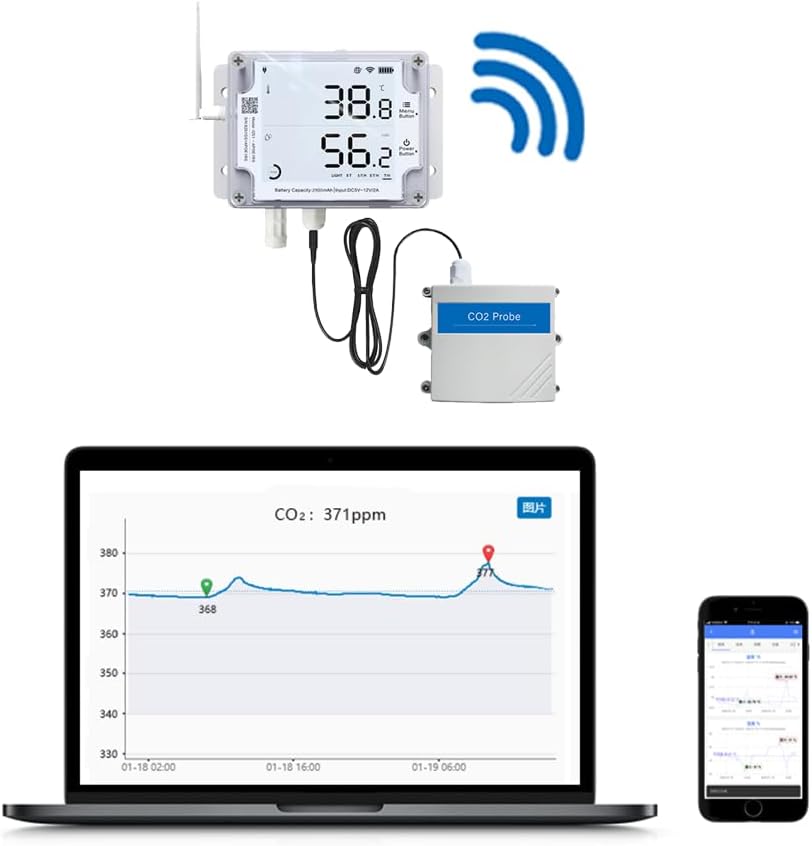
Figure 4: Real-time data from the CO2 Probe can be viewed and analyzed on the UbiBot platform.

Figure 5: The CO2 Probe is suitable for a wide range of applications, including residential, agricultural, and industrial settings.
Understanding UbiBot Monitoring (Video)
Video 1: This video explains how UbiBot sensors detect environmental measurements, synchronize real-time data via WiFi, 4G Cellular, or Ethernet to the UbiBot cloud platform, and how users can view and manage data via smartphone or desktop application for remote monitoring. It also highlights the various types of environmental data UbiBot can monitor, including air temperature, humidity, light intensity, soil temperature & moisture, carbon dioxide, EC, pH value, and wind speed, and its wide range of applications in cold storage, warehouses, labs, pharmaceuticals, medical, agriculture, and industrial fields.
5. Specifikacijos
| Atributas | Vertė |
|---|---|
| Prekės ženklas | UbiBot |
| Stilius | Pramoninis |
| Maitinimo šaltinis | Battery Powered (from main device) |
| Spalva | white and gray |
| Prekės svoris | 120 gramų (apie 4.2 uncijos) |
| Signalizacija | Audible (via connected UbiBot device) |
| Darbinė drėgmė | 0-100 percent RH |
| Viršutinės temperatūros įvertinimas | 60 laipsniai Celsijaus |
| Prekių skaičius | 1 (probe unit) |
| Gamintojas | cloudforce |
| UPC | 797153355209 |
| Dalies numeris | CFCO2-AB3-U |
| Gaminio matmenys | 3.94 x 3.94 x 2.36 colio |
| Prekės modelio numeris | CO2 jutiklis |
| Storis | 6 centimetras |
| Įtraukti komponentai | connection cable and probe body |
| Baterijos įtrauktos? | Nr |
| Reikalingos baterijos? | Nr |
6. Pagalba ir papildoma informacija
For additional support, troubleshooting, or detailed product information, please visit the official UbiBot website or contact their customer service. You can also refer to the UbiBot Brand Store on Amazon for more products and resources.
- UbiBot Brand Store: Visit UbiBot Store


