Įvadas
This manual provides essential information for the safe and efficient use of your Lenovo ThinkPad X1 Extreme Gen 3 laptop. Please read this manual thoroughly before operating your device to ensure optimal performance and longevity. Keep this manual for future reference.
Sąranka
Išpakavimas ir pirminė apžiūra
Atsargiai išimkite visus komponentus iš pakuotės. Patikrinkite, ar yra visi pakavimo sąraše išvardyti elementai ir ar jie nepažeisti. Jei kokių nors elementų trūksta arba jie pažeisti, nedelsdami susisiekite su pardavėju.

1 pav.: priekis view of the Lenovo ThinkPad X1 Extreme Gen 3 laptop.
Maitinimo prijungimas
Connect the power adapter to the laptop's power input port and then to a wall outlet. The battery will begin charging automatically. It is recommended to fully charge the battery before initial use.
First Boot and Operating System Setup
Paspauskite maitinimo mygtuką, kad įjungtumėte nešiojamąjį kompiuterį. Vykdykite ekrane pateikiamus nurodymus, kad užbaigtumėte „Windows 10 Pro“ sąranką, įskaitant kalbos pasirinkimą, tinklo ryšį ir vartotojo paskyros kūrimą.
Nešiojamojo kompiuterio valdymas
Keyboard and TrackPoint
The ThinkPad X1 Extreme Gen 3 features a full-size keyboard and a TrackPoint pointing device for precise cursor control. The TrackPoint is located in the center of the keyboard, with corresponding buttons below the spacebar.
Jutiklinės dalies naudojimas
The multi-touch touchpad supports various gestures for navigation, including scrolling, zooming, and switching applications. Refer to Windows settings for customizing touchpad gestures.
Išorinių įrenginių prijungimas
Your laptop is equipped with multiple ports for connecting peripherals. These include USB ports, an HDMI port, and a headphone/microphone combo jack. Refer to the specifications section for a complete list of ports.
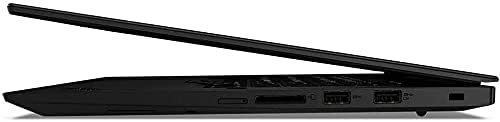
2 pav.: šonas view illustrating the connectivity ports of the laptop.
Priežiūra
Nešiojamojo kompiuterio valymas
Šiek tiek naudokite minkštą, be pūkelių šluostę dampened with water or a screen cleaner to clean the display. For the keyboard and chassis, use a soft cloth. Avoid harsh chemicals or abrasive materials.
Akumuliatoriaus priežiūra
To maximize battery life, avoid extreme temperatures and store the laptop with a partial charge if not used for extended periods. Periodically discharge and recharge the battery fully.
Programinės įrangos atnaujinimai
Regularly check for and install operating system and driver updates to ensure optimal performance, security, and compatibility.
Trikčių šalinimas
Bendros problemos ir sprendimai
- Nešiojamasis kompiuteris neįsijungia: Ensure the power adapter is securely connected and the battery is charged. Try holding the power button for 10-15 seconds to perform a hard reset.
- Ekranas tuščias: Check if the laptop is in sleep mode. Press any key or the power button to wake it up. Verify external display connections if applicable.
- Lėtas veikimas: Close unnecessary applications. Check for background processes consuming high resources. Ensure sufficient free disk space.
- „Wi-Fi“ ryšio problemos: Restart your router and modem. Check network settings on the laptop. Ensure Wi-Fi drivers are up to date.
Dėl sudėtingesnių problemų kreipkitės į „Lenovo“ palaikymo tarnybą websvetainėje arba susisiekite su klientų aptarnavimo tarnyba.
Specifikacijos
| Funkcija | Detalė |
|---|---|
| Modelio pavadinimas | „ThinkPad X1 Extreme Gen 3“ |
| Procesorius | Intel Core i5-10210U Quad Core (1.6GHz-4.2GHz) |
| Operacinė sistema | Windows 10 Pro 64bit English |
| Vaizdo plokštė | NVIDIA GeForce GTX 1650 Ti |
| Ekranas | 15.6" Full HD IPS 250nits Anti-Glare (1920 x 1080) |
| RAM | 32 GB DDR4 |
| Kietasis diskas | 1 GB SSD |
| Bevielis | 802.11 AC Wireless with Bluetooth 5.0 |
| Klaviatūra | Single Pointing Non-backlit Keyboard, English |
| Prekės svoris | 4.24 svaro |
| Gaminio matmenys | 14.2 x 9.7 x 0.7 colio |
| Spalva | Juoda |
| Ypatinga funkcija | Pirštų atspaudų skaitytuvas |
Garantija ir palaikymas
Informacijos apie garantiją ieškokite prie gaminio pridėtoje garantijos kortelėje arba apsilankykite oficialioje „Lenovo“ pagalbos svetainėje. website. Technical support and service options are available through Lenovo's customer service channels.
„Lenovo“ palaikymas Websvetainė: support.lenovo.com


