1. Įvadas
Ačiū, kad pirkoteasing the Muse M-885 DBT Micro System. This comprehensive user manual provides detailed instructions for the setup, operation, and maintenance of your new audio system. The M-885 DBT is a versatile micro system featuring a Bluetooth speaker, LCD screen, DAB+ and FM PLL radio, CD player, alarm clock, sleep function, and various audio controls including treble, bass, and volume. It also includes 2 USB ports, an auxiliary input, AUX-IN cable, 2 RCA jacks, a remote control, antenna, and an AC adapter. Please read this manual thoroughly before using the device to ensure proper and safe operation.
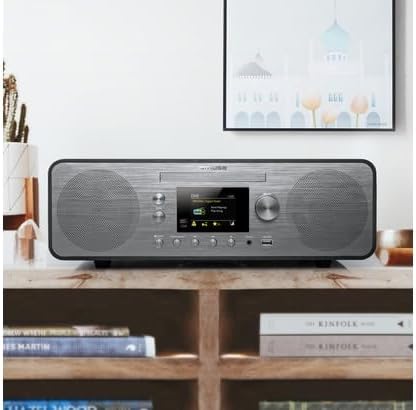
Figure 1.1: The Muse M-885 DBT Micro System placed on a wooden shelf in a home environment.
2. Saugos informacija
Norėdami užtikrinti saugų darbą ir išvengti žalos, laikykitės šių saugos priemonių:
- Saugokite įrenginį nuo lietaus ar drėgmės, kad išvengtumėte gaisro ar elektros smūgio.
- Neužblokuokite jokių ventiliacijos angų. Montuokite pagal gamintojo instrukcijas.
- Nemontuokite šalia jokių šilumos šaltinių, pvz., radiatorių, šilumokaičių, viryklių ar kitų įrenginių (įskaitant ampkeltuvai), kurie gamina šilumą.
- Saugokite maitinimo laidą, kad ant jo neužeitų ar nesuspaustų, ypač prie kištukų, patogių lizdų ir toje vietoje, kur jie išeina iš aparato.
- Naudokite tik gamintojo nurodytus priedus/priedus.
- Atjunkite šį įrenginį žaibuojant arba kai nenaudojate ilgą laiką.
- Visus techninės priežiūros darbus patikėkite kvalifikuotam techninės priežiūros personalui. Techninė priežiūra reikalinga, kai aparatas buvo kaip nors pažeistas, pvz., pažeistas maitinimo laidas arba kištukas, į aparatą išsiliejo skystis ar įkrito daiktai, aparatas buvo paveiktas lietaus ar drėgmės, neveikia normaliai. , arba buvo numestas.
3. Pakuotės turinys
Patikrinkite, ar pakuotėje yra visi toliau išvardyti daiktai:
- Muse M-885 DBT Micro System Unit
- Nuotolinio valdymo pultas
- Kintamos srovės adapteris
- FM/DAB+ Antenna Cable (75-Ohm)
- AUX-IN Cable (3.5 mm)
- Vartotojo vadovas (šis dokumentas)

Figure 3.1: Main unit with CD tray open and included accessories: remote control, power adapter, and antenna cable.
4. Produktas baigtasview
The Muse M-885 DBT Micro System is designed for a rich audio experience with multiple connectivity options.

Figure 4.1: Front panel of the Muse M-885 DBT, highlighting the central display, control knobs, buttons, and stereo speakers.
Pagrindinės funkcijos:
- DAB+/FM PLL Radio: Enjoy high-quality digital and analog radio broadcasts with 20 FM and 20 DAB preset stations.
- CD grotuvas: Play your entire CD collection effortlessly.
- Bluetooth ryšys: Stream audio wirelessly from your mobile devices (smartphones, tablets, laptops).
- USB atkūrimas: Two USB ports for playing MP3 files iš USB atmintinių.
- Pagalbinė įvestis: Connect external audio devices via the 3.5mm AUX-IN jack.
- LCD ekranas: Clear 2.8-inch LCD/TFT display for easy navigation and information.
- Alarm Clock & Sleep Function: Integrated alarm and sleep timer for convenience.
- Garso valdikliai: Adjustable Bass & Treble, Loudness Control, and Preset EQ options.
- Išėjimo galia: 80 Watts for powerful stereo sound.
- Real Wood Casing: Features an elegant real wood housing.

Figure 4.2: Visual representation of key features such as Bluetooth streaming, real wood casing, strong bass with passive membrane, and PLL radio with 20 FM + 20 DAB presets.

Figure 4.3: Dimensional drawing of the Muse M-885 DBT, showing length (420mm), height (139mm), and depth (212mm).
5. Sąranka
5.1 Išpakavimas ir įdėjimas
- Atsargiai išimkite įrenginį ir visus priedus iš pakuotės.
- Place the micro system on a stable, flat surface, away from direct sunlight, heat sources, and moisture. Ensure adequate ventilation around the unit.
5.2 Antenos prijungimas
For optimal DAB+ and FM radio reception, connect the supplied antenna cable to the "ANTENNA" jack on the rear of the unit. Extend the antenna fully and position it for the best signal.
5.3 Maitinimo jungtis
- Connect the AC power adapter to the "DC IN" jack on the rear of the micro system.
- Plug the other end of the power adapter into a standard wall outlet (AC 100-240V, 50/60Hz).
- Įrenginys persijungs į budėjimo režimą.
5.4 Nuotolinio valdymo pulto baterijų įdėjimas
Nuotolinio valdymo pultui reikalingos 2 x AA baterijos (nepridedamos).
- Atidarykite nuotolinio valdymo pulto gale esantį baterijų skyriaus dangtį.
- Įdėkite 2 AA tipo baterijas, užtikrindami teisingą poliškumą (+ ir -).
- Uždarykite akumuliatoriaus skyriaus dangtelį.
6. Naudojimo instrukcijos
6.1 Maitinimo įjungimas/išjungimas
Paspauskite GALIA mygtuką priekiniame skydelyje arba nuotolinio valdymo pulte, kad įjungtumėte arba išjungtumėte įrenginį (budėjimo režimas).
6.2 Šaltinio pasirinkimas
Paspauskite ŠALTINIS button repeatedly on the front panel or remote control to cycle through available modes: DAB+, FM, CD, USB, Bluetooth, AUX.
6.3 Garsumo valdymas
Pasukite TOMAS rankenėlę priekiniame skydelyje arba naudokite VOL + / VOL- nuotolinio valdymo pulto mygtukai, norėdami reguliuoti garsumo lygį.
6.4 DAB+ radijo veikimas
- Pasirinkite DAB+ režimą naudodami ŠALTINIS mygtuką.
- The unit will automatically scan for available DAB+ stations upon first use.
- Naudokite PRESET/SCAN mygtukus arba PASIRINKTI knob to navigate through the station list.
- Paspauskite PASIRINKTI to confirm your station choice.
- To save a preset: Press and hold the NUSTATYMAS mygtuką, naudokite PASIRINKTI rankenėlę, kad pasirinktumėte iš anksto nustatytos nuostatos numerį, tada paspauskite PASIRINKTI vėl išsaugoti.
6.5 FM radijo veikimas
- Pasirinkite FM režimą naudodami ŠALTINIS mygtuką.
- Paspauskite ir palaikykite PRESET/SCAN mygtuką, kad automatiškai nuskaitytumėte ir išsaugotumėte galimas FM stotis.
- Naudokite PRESET/SCAN mygtukus arba PASIRINKTI knob to navigate through saved presets or manually tune.
- To save a preset: Press and hold the NUSTATYMAS mygtuką, naudokite PASIRINKTI rankenėlę, kad pasirinktumėte iš anksto nustatytos nuostatos numerį, tada paspauskite PASIRINKTI vėl išsaugoti.
6.6 CD atkūrimas
- Pasirinkite CD režimą naudodami ŠALTINIS mygtuką.
- Gently insert a CD into the CD slot with the label side facing up. The CD will load automatically.
- Naudokite PALEISTI / PAUZĖ, STOP, PRALEIDIMAS PIRMYN/ATGAL mygtukai, skirti valdyti atkūrimą.
6.7 USB atkūrimas
- Insert a USB flash drive into one of the USB ports on the front panel.
- Pasirinkite USB režimą naudodami ŠALTINIS mygtuką.
- Įrenginys automatiškai aptiks ir pradės groti suderinamus MP3 failus. files.
- Naudokite atkūrimo valdymo mygtukus (PALEISTI / PAUZĖ, STOP, PRALEIDIMAS PIRMYN/ATGAL) to manage your music.
6.8 „Bluetooth“ susiejimas ir atkūrimas
- Pasirinkite „Bluetooth“ režimą naudodami ŠALTINIS button. The display will show "PAIRING" or "BLUETOOTH".
- Įjunkite „Bluetooth“ savo mobiliajame įrenginyje (išmaniajame telefone, planšetiniame kompiuteryje ir kt.) ir ieškokite galimų įrenginių.
- Select "M-885 DBT" from the list of devices. Once paired, the unit will confirm the connection.
- Start playing music on your connected device. Audio will stream wirelessly to the micro system.
6.9 AUX-IN jungtis
- Connect one end of the supplied 3.5mm AUX-IN cable to the Aux in jack on the front panel of the micro system.
- Kitą laido galą prijunkite prie išorinio garso įrenginio ausinių lizdo arba garso išvesties.
- Pasirinkite AUX režimą naudodami ŠALTINIS mygtuką.
- Leiskite garsą iš išorinio įrenginio.
6.10 Alarm Clock and Sleep Function
Refer to the detailed instructions in the full manual for setting the alarm time, alarm source (radio/CD/USB), and activating the sleep timer. These functions are typically accessed via the SIGNALAS ir MIEGAS buttons on the remote control or through the system menu.
6.11 Audio Settings (EQ, Bass, Treble, Loudness)
Access the audio settings through the MENIU button on the front panel or remote control. You can adjust:
- Iš anksto nustatytas EQ: Select from various equalizer presets (e.g., Flat, Rock, Pop, Jazz, Classic).
- Žemieji / aukštieji dažniai: Manually adjust bass and treble levels to your preference.
- Garsumo valdymas: Enhance bass and treble at low volume levels.
7. Priežiūra
7.1 Įrenginio valymas
- Prieš valydami, visada ištraukite įrenginį iš maitinimo lizdo.
- Išoriniams paviršiams valyti naudokite minkštą, sausą šluostę.
- Nenaudokite abrazyvinių valiklių, vaško ar tirpiklių, nes jie gali pažeisti apdailą.
7.2 CD objektyvo priežiūra
To ensure optimal CD playback, avoid touching the CD lens. If the lens becomes dirty, use a specialized CD lens cleaner disc.
7.3 Saugykla
Jei prietaisas ilgesnį laiką nebus naudojamas, atjunkite jį nuo elektros lizdo ir laikykite vėsioje, sausoje vietoje.
8. Problemų sprendimas
Prieš kreipdamiesi į klientų aptarnavimo tarnybą, peržiūrėkite toliau pateiktą lentelę, kurioje pateikiamos dažniausiai pasitaikančios problemos ir jų sprendimai.
| Problema | Galima priežastis | Sprendimas |
|---|---|---|
| Nėra galios | Maitinimo laidas netinkamai prijungtas. | Įsitikinkite, kad maitinimo laidas tvirtai įjungtas į įrenginį ir sieninį lizdą. |
| Nėra garso | Garsumas per mažas arba nutildytas. Pasirinktas neteisingas šaltinis. | Increase volume. Press the SOURCE button to select the correct input. |
| Prastas radijo priėmimas | Antenna not properly connected or positioned. Interference from other devices. | Adjust the antenna position. Move the unit away from other electronic devices. |
| CD negroja | Kompaktinis diskas įdėtas neteisingai arba nešvarus / subraižytas. | Re-insert CD with label side up. Clean the CD. Try another CD. |
| „Bluetooth“ susiejimas nepavyksta | Bluetooth not enabled on device. Unit not in pairing mode. Device too far. | Ensure Bluetooth is on and unit is in pairing mode. Move device closer (within 10m). |
| USB atkūrimo problemos | USB drive not formatted correctly or unsupported file tipo. | Ensure USB drive is FAT32 formatted and contains MP3 files. Try another USB drive. |
9. Specifikacijos
| Funkcija | Aprašymas |
|---|---|
| Modelio numeris | M-885 DBT |
| Prekės ženklas | MŪZA |
| Spalva | Tamsiai Pilka |
| Ryšys | Bluetooth, pagalbinis (3.5 mm), USB |
| Suderinami įrenginiai | Nešiojamasis kompiuteris, išmanusis telefonas, planšetinis kompiuteris |
| Maitinimo šaltinis | Wired Electric (AC Power Adapter) |
| Išėjimo galia | 80 vatų |
| Garsiakalbio tipas | Stereo |
| Matmenys (I x P x A) | 42 x 21.2 x 13.9 cm (16.5 x 8.3 x 5.5 colio) |
| Prekės svoris | 3.5 kilogramų (7.7 svarai) |
| Nuotolinio valdymo pulto baterijos | 2 x AA (Alkaline, not included) |
| Kilmės šalis | Kinija |
10. Garantija ir palaikymas
For warranty information and technical support, please refer to the warranty card included with your product or visit the official MUSE websvetainėje. Išsaugokite pirkimo kvitą kaip pirkimo įrodymą bet kokiems garantiniams prašymams.
Gamintojas: MŪZA
Atsarginių dalių prieinamumas: Informacija nepasiekiama.
Programinės įrangos atnaujinimai garantuojami iki: Informacija nepasiekiama.
Note: Product specifications and design are subject to change without prior notice for improvement.