1. Įvadas
This manual provides detailed instructions for the setup, operation, maintenance, and troubleshooting of your Sceptre Curved 27" FHD 1080p Gaming Monitor. Please read this manual thoroughly before using your monitor to ensure proper functionality and safety.

Image: Sceptre Curved 27" FHD 1080p Gaming Monitor in a typical desk setup.
2. Pakuotės turinys
Verify that all items listed below are included in your package. If any items are missing or damaged, please contact Sceptre customer support.
- Sceptre Curved 27" FHD 1080p Gaming Monitor
- Monitoriaus stovas (pagrindas ir svirtis)
- HDMI kabelis
- Power Supply and Adapter
- „Philips“ atsuktuvas
- Screws and Hardware Kit
- Vartotojo vadovas
- Warranty Information and Customer Service Card

Vaizdas: Viršview of all items included in the Sceptre monitor package, including the monitor, stand components, cables, tools, and documentation.
3. Surinkimas
Norėdami surinkti monitoriaus stovą, atlikite šiuos veiksmus:
- Attach the metal stand arm to the plastic base. Align the tabs and gently twist until secure.
- Use the provided Philips head screwdriver and the designated base screw to fasten the stand arm to the base.
- Sulygiuokite surinktą stovą su tvirtinimo taškais monitoriaus gale.
- Insert the two remaining Philips head screws into the designated holes on the monitor's back and tighten them securely.
- Place the plastic cover over the screws on the stand arm.

Image: The Sceptre Curved 27" monitor with its dimensions labeled, showing the curved screen and the stand.
4. Jungtys
The monitor features various ports for connectivity. Ensure proper connection for optimal performance.
- DC in: Čia prijunkite maitinimo adapterį.
- Garso išvestis: Prijunkite išorinius garsiakalbius arba ausines.
- Garso įvestis: Connect an audio source for the built-in speakers.
- VGA: Connect to a computer's VGA port. Supports up to 75Hz refresh rate.
- HDMI 1.4 (x2): Connect to devices with HDMI output. Supports up to 75Hz refresh rate.
- Kensington Security Lock: For securing the monitor.
Vaizdas: Išsamus view of the monitor's rear panel, highlighting the DC IN, Audio In/Out, VGA, and two HDMI 1.4 ports.
5. Naudojimo instrukcijos
The On-Screen Display (OSD) menu allows you to adjust various monitor settings. Use the buttons on the back of the monitor to navigate.
OSD meniu naršymas
- Greita pradžia: Adjust basic settings like preset modes, aspect ratio, source, volume, Blue Light Shift, and Adaptive Sync.
- Paveikslėlis: Fine-tune image settings including brightness, contrast, DCR, aspect ratio, and sharpness.
- Spalva: Adjust color temperature, gamma, tint, saturation, and Blue Light Shift.
- Sistema: Configure overdrive, Adaptive Sync, sleep mode, language, OSD position, timer, transparency, mute, and factory reset.
Video: A user demonstrates the Sceptre monitor's OSD menu, showing navigation through settings like volume and input source while displaying gameplay.
6. Ekrano funkcijos
- 1500R išlenktas ekranas: The 1500R curvature immerses you into the content, providing a comfortable viewpatirtį.
- 100Hz atnaujinimo dažnis: Experience smoother visuals with a refresh rate of up to 100Hz, reducing screen tearing.
- 98 % sRGB: Offers a wider color gamut for deeper and more accurate colors.
- Mėlynos šviesos poslinkis: Reduces blue light emission to protect your eyes from fatigue and strain during extended use.
- Adaptyvusis sinchronizavimas: Sinchronizuoja monitoriaus atnaujinimo dažnį su vaizdo plokštės kadrų dažniu, kad būtų išvengta ekrano trūkčiojimo ir mirgėjimo.
- FPS-RTS Game Modes: Pre-set display modes optimized for First Person Shooter (FPS) and Real-Time Strategy (RTS) games.
- Integruoti garsiakalbiai: Integrated speakers provide audio without needing external devices.

Image: Visual representation of the 1500R curvature, highlighting its immersive design.

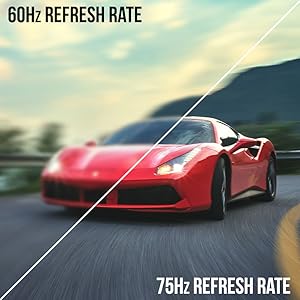
Image: A side-by-side comparison demonstrating the visual smoothness of 75Hz refresh rate versus 60Hz.

Image: A visual comparison highlighting the enhanced color accuracy of 98% sRGB compared to a conventional display.

Image: Split-screen view demonstrating the visual enhancements provided by FPS and RTS game modes.
7. Priežiūra
Norėdami užtikrinti monitoriaus ilgaamžiškumą ir optimalų veikimą, laikykitės šių valymo nurodymų:
- Prieš valydami visada atjunkite maitinimo laidą.
- Šiek tiek naudokite minkštą, be pūkelių šluostę dampnuplaukite vandeniu arba švelniu, neabrazyviniu valikliu.
- Venkite naudoti alkoholio, amoniako ar abrazyvinių valiklių, nes jie gali pažeisti ekrano paviršių.
- Gently wipe the screen and exterior surfaces. Do not spray cleaner directly onto the screen.
8. Problemų sprendimas
If you encounter any issues with your monitor, refer to the following common solutions:
- Nėra galios: Įsitikinkite, kad maitinimo laidas yra tvirtai prijungtas prie monitoriaus ir veikiančio maitinimo lizdo. Patikrinkite maitinimo adapterį ir lizdą.
- Nėra paveiksliuko: Verify that the video cable (HDMI or VGA) is securely connected to both the monitor and your computer/device. Ensure the correct input source is selected in the OSD menu.
- Mirgantis / iškreiptas vaizdas: Check the video cable for damage. Try a different cable or port. Ensure your graphics card drivers are up to date. Adjust refresh rate settings in your device's display settings.
- Nėra garso: Check the volume settings in the OSD menu and on your connected device. Ensure external speakers are properly connected if used.
- Mygtukai nereaguoja: Perform a factory reset through the OSD menu if accessible.
For further assistance, please refer to the full user manual or contact Sceptre customer support.
9. Specifikacijos
| Funkcija | Specifikacija |
|---|---|
| Ekrano dydis | 27 colių |
| Rezoliucija | 1920 x 1080 (Full HD 1080p) |
| Atnaujinimo dažnis | Up to 100Hz (75Hz via HDMI/VGA) |
| Kreivumas | 1500R |
| Reagavimo laikas | 3 ms (GtG) |
| Skydelio tipas | VA |
| Ryškumas | 280 nitų |
| Spalvų gama | 98% sRGB |
| Vaizdo įrašų įėjimai | 2 HDMI 1.4, 1 VGA |
| Garso prievadai | Audio In, Audio Out |
| Garsiakalbiai | Įmontuotas |
| VESA kalnas | 100 mm x 100 mm |
| Matmenys (IxPxH) | 15.09 x 19.97 x 7.02 colio |
| Svoris | 5.5 svaro |
10. Žaidimų patirtis
The Sceptre Curved 27" monitor is designed to enhance your gaming experience with its high refresh rate, low response time, and immersive curvature.
Vaizdo įrašas: oficialus „Sceptre“ vaizdo įrašo pristatymasasing various gaming monitors, including the Curved 27" model, highlighting their features and performance in gaming scenarios.
For optimal gaming performance, ensure your device's display settings match the monitor's capabilities (e.g., 1920x1080 resolution at 75Hz).
11. Garantija ir palaikymas
Your Sceptre monitor comes with a 1 metų ribota gaminio garantija. For detailed terms and conditions, please refer to the included warranty information card in your package.
For technical support, troubleshooting, or warranty claims, please contact Sceptre Customer Service. Contact information is provided on the customer service card included with your monitor.


