1. Įvadas
This user manual provides comprehensive instructions for the installation, operation, and maintenance of the CANARE KP-H15F-I AV Outlet Modern Plate. This product is designed to provide a clean and organized connection point for audio-visual signals, specifically converting VGA to BNC connections within a wall-mounted plate system. Please read this manual thoroughly before installation and use to ensure proper functionality and safety.
2. Produkto ypatybės
- Designed for AV outlet modern plate systems.
- Equipped with a durable metal frame for secure installation.
- Features a VGA female connector for input.
- Includes BNC female connectors for output, facilitating VGA to BNC signal conversion.
- Ivory color finish to blend with standard wall plates.
3. Pakuotės turinys
Please verify that all items listed below are present in your package. If any items are missing or damaged, please contact your retailer.
- CANARE KP-H15F-I AV Outlet Modern Plate (1 unit)
- Integrated VGA female to BNC female cable assembly (1 unit)
- Metal mounting frame (1 unit)
Note: Product images may show usage examples or additional accessories not included with the standard package. Only items explicitly listed above are part of the product package.
4. Sąranka ir diegimas
The CANARE KP-H15F-I is designed for integration into standard wall-mounted AV outlet systems. Professional installation is recommended.
Diegimo žingsniai:
- Pirmiausia sauga: Before beginning installation, ensure that power to the installation area is turned off at the circuit breaker to prevent electrical shock.
- Paruoškite sieninę dėžę: Ensure you have a standard electrical wall box or low-voltage mounting bracket installed in the desired location.
- Prijunkite kabelius:
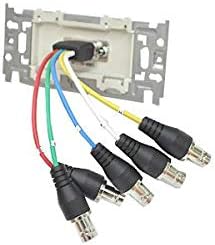
4.1 pav.: galinis view of the AV outlet plate with BNC cables connected. This image illustrates the five BNC female connectors on the rear of the plate, designed to receive BNC cables from your AV source.
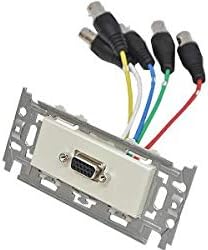
4.2 pav.: priekis view of the AV outlet plate with VGA and BNC cables connected. This image shows the VGA female port on the front for connecting a VGA cable, and the BNC cables extending from the rear.
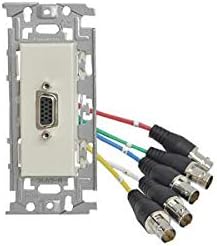
4.3 pav.: Kampinis priekis view of the AV outlet plate, highlighting the VGA port and the connected BNC cables. This perspective provides a clearer view of the overall assembly.
Connect the BNC cables from your AV source (e.g., projector, monitor) to the corresponding BNC female connectors on the rear of the KP-H15F-I plate. Ensure a secure connection for each cable. The VGA female port on the front of the plate will connect to your VGA display device.
- Sumontuokite plokštę: Carefully push the plate assembly into the wall box, ensuring no cables are pinched. Secure the plate to the wall box using the provided screws through the metal mounting frame.
- Attach Faceplate (Optional): If using a decorative faceplate (not included), attach it over the installed KP-H15F-I plate.
- Atkurti maitinimą: Once installation is complete, restore power to the circuit.
5. Operacija
The CANARE KP-H15F-I AV Outlet Modern Plate is a passive adapter designed to facilitate signal conversion and routing. Once properly installed and connected, its operation is straightforward:
- Connect your VGA source (e.g., computer, laptop) to the VGA female port on the front of the wall plate using a standard VGA cable.
- Ensure that the BNC cables connected to the rear of the plate are properly routed to your BNC-compatible display device (e.g., projector, monitor).
- Power on your source and display devices. The signal should be transmitted through the plate.
No additional configuration or power is required for the plate itself.
6. Priežiūra
The CANARE KP-H15F-I AV Outlet Modern Plate requires minimal maintenance to ensure long-term performance.
- Valymas: To clean the surface of the plate, gently wipe with a soft, dry cloth. For stubborn marks, a slightly damp cloth with mild soap can be used, followed by a dry cloth. Do not use abrasive cleaners, solvents, or harsh chemicals, as these may damage the finish.
- Patikrinimai: Periodically inspect the connections to ensure they remain secure. If the plate is in an area with high traffic or vibration, check for any loosening of the mounting screws.
- Aplinkos sąlygos: Avoid exposing the plate to extreme temperatures, high humidity, or direct sunlight, which can degrade materials over time.
7. Problemų sprendimas
If you encounter issues with your CANARE KP-H15F-I AV Outlet Modern Plate, refer to the table below for common problems and their solutions.
| Problema | Galima priežastis | Sprendimas |
|---|---|---|
| No video signal on display. |
|
|
| Poor video quality (e.g., blurry, distorted). |
|
|
| Plate feels loose in the wall. |
|
|
8. Specifikacijos
Key technical specifications for the CANARE KP-H15F-I AV Outlet Modern Plate:
| Atributas | Detalė |
|---|---|
| Modelio numeris | KP-H15F-I |
| Produkto tipas | AV Outlet Modern Plate with VGA to BNC Conversion |
| Jungtys | 1x VGA Female (front), 5x BNC Female (rear) |
| Rėmo medžiaga | Metalas |
| Spalva | Dramblio kaulas |
| ASIN | B08GLGX399 |
| Pirmoji laisva data | 27 m. rugpjūčio 2020 d |
9. Saugos informacija
Kad išvengtumėte sužalojimų ar gaminio sugadinimo, laikykitės šių saugos priemonių:
- Always disconnect power before installing or servicing the plate to avoid electrical shock.
- Do not attempt to modify or disassemble the product. Unauthorized modifications may void the warranty and pose safety risks.
- Keep the product away from water, moisture, and excessive heat.
- Užtikrinkite tinkamą vėdinimą aplink montavimo vietą.
- Šis gaminys skirtas naudoti tik patalpose.
10. Garantija ir palaikymas
Information regarding specific warranty terms and customer support contact details for the CANARE KP-H15F-I is not provided in the available product data. For warranty claims or technical assistance, please refer to the documentation included with your purchase or contact the retailer or manufacturer directly.


