1. Įvadas
This manual provides detailed instructions for the IPEGA PG-SW023 Bluetooth Wireless Game Controller. This versatile controller is designed to enhance your gaming experience across multiple platforms, including N-S consoles, PlayStation 3 (PS3), Android devices, and personal computers running Windows 7, 8, or 10.
Prieš naudodami gaminį, atidžiai perskaitykite šį vadovą, kad užtikrintumėte tinkamą veikimą ir maksimaliai išnaudotumėte jo funkcijas.
2. Produkto ypatybės
- Kelių platformų suderinamumas: Suitable for gaming on N-S consoles, PS3, Android devices, and PCs (Windows 7/8/10).
- Patobulinta žaidimų patirtis: Supports vibration feedback and a six-axis gyroscope function for immersive gameplay and precise control.
- Customizable Macro Function: Rear buttons can be configured as common keys or combination keys for simplified actions.
- Continuous TURBO Function: Features a dedicated TURBO button for rapid-fire actions, compatible with N-S Pro gamepads.
- Ergonomiškas dizainas: Engineered for comfort during extended gaming sessions, fitting securely in the palm.

Image: The IPEGA PG-SW023 Wireless Game Controller highlighting its key features: two vibrating motors, six-axis design, high-sensitive buttons, and Turbo function.
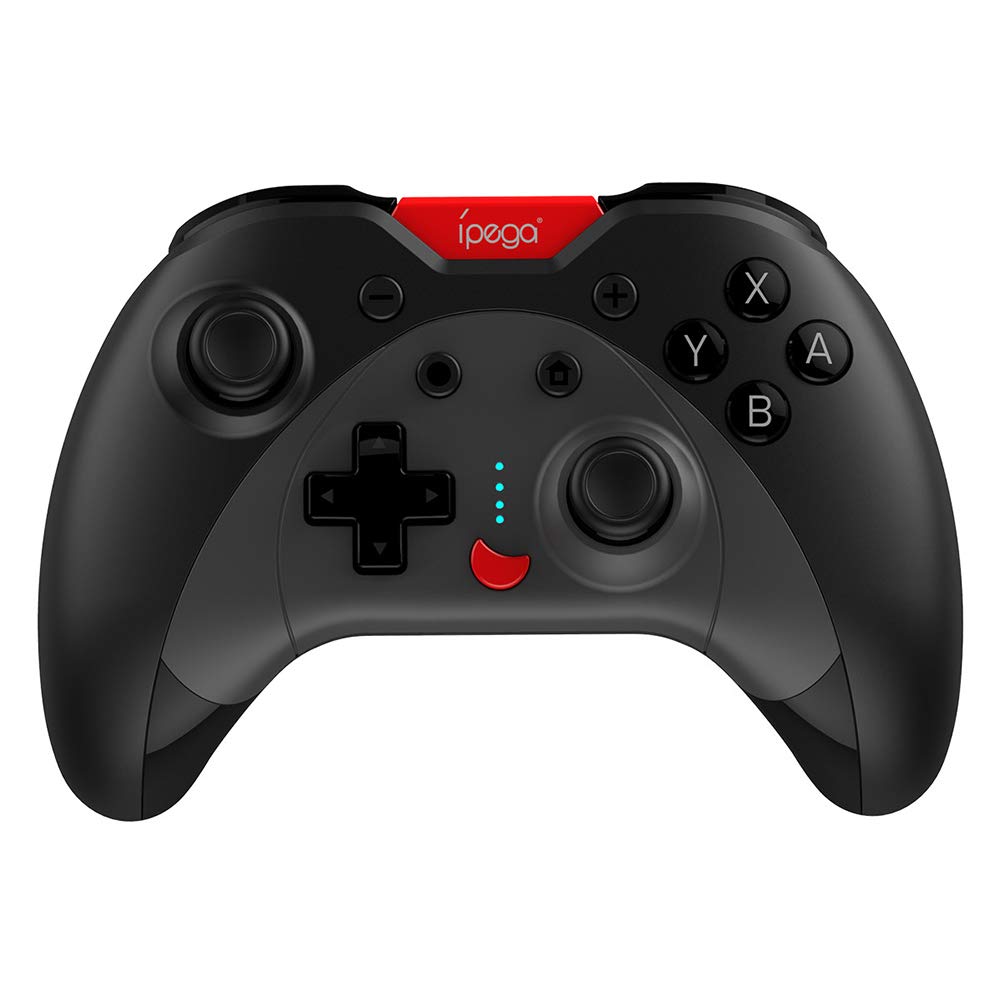
Image: A green IPEGA PG-SW023 controller illustrating its built-in six-axis gyroscope design for improved body feeling and accurate targeting.
3. Pakuotės turinys
Prašome patikrinti, ar pakuotėje yra visi reikalingi daiktai:
- 1 x IPEGA PG-SW023 Wireless Game Controller
- 1 x Type-C įkrovimo laidas
- 1 x Vartotojo vadovas
4. Specifikacijos
| Funkcija | Specifikacija |
|---|---|
| Prekės ženklas | Ipega |
| Modelis | PG-SW023 |
| Spalvų parinktys | Black, Green, Blue, Yellow |
| Veiklos ttage | DC 3.7V |
| Veikimo srovė | <30mA |
| Statinė srovė | <20uA |
| Nepertraukiamas žaidimo laikas | apytiksliai 15 valandas |
| Įvesties tomastage/srovė | DC 5V/500mA |
| Įkrovimo laikas | apytiksliai 2 valandas |
| Bluetooth versija | 3.0 |
| Perdavimo atstumas | ≤8 metrai |
| Baterijos talpa | 400 mAh |
| Gaminio matmenys | 15 x 10 x 5.5 cm (5.91 x 3.94 x 2.17 colio) |
| Produkto svoris | Apytiksliai 215 g (7.58 uncijos) |
| Suderinami įrenginiai | N-S Console, PS3, Android, PC (Win 7/8/10) |
| Ryšys | Belaidis ryšys („Bluetooth“) |
| Maitinimo šaltinis | Maitinamas baterijomis |
5. Sąranka
5.1 Valdiklio įkrovimas
- Connect the provided Type-C charging cable to the controller's charging port.
- Kitą laido galą prijunkite prie USB maitinimo šaltinio (pvz., kompiuterio, USB sieninio adapterio).
- The indicator lights on the controller will show charging status. Once fully charged (approx. 2 hours), the lights will indicate completion or turn off.
5.2 Susiejimas su įrenginiais
The pairing method varies slightly depending on the device. Ensure the controller is sufficiently charged before attempting to pair.

Image: A blue IPEGA PG-SW023 controller positioned in front of a Nintendo Switch, PlayStation 3, and a laptop, illustrating its multi-platform compatibility.
5.2.1 Pairing with N-S Console
- On your N-S console, go to the HOME Menu.
- Pasirinkite „Valdikliai“ > „Keisti rankeną / tvarką“.
- Press and hold the pairing button on the IPEGA controller (refer to controller diagram for exact location) until the indicator lights begin to flash rapidly.
- The console will detect the controller. Once paired, the indicator light will become solid.
5.2.2 Pairing with PS3
- Connect the controller to the PS3 console using the Type-C cable.
- Paspauskite valdiklio mygtuką HOME.
- Once recognized, you can disconnect the cable and the controller should remain paired wirelessly.
5.2.3 Susiejimas su „Android“ įrenginiais
- Įgalinkite „Bluetooth“ savo „Android“ įrenginyje.
- On the controller, press and hold the Android pairing button combination (refer to controller diagram or quick start guide for specific button combination, usually 'A' + HOME or 'X' + HOME) until the indicator lights flash rapidly.
- On your Android device, search for new Bluetooth devices and select 'IPEGA PG-SW023' (or similar name) from the list.
- Suporavus, valdiklio indikatoriaus lemputė ims šviesti nuolat.
5.2.4 Pairing with PC (Windows 7/8/10)
- Įsitikinkite, kad jūsų kompiuteryje įjungtas „Bluetooth“ ryšys.
- Go to 'Settings' > 'Devices' > 'Bluetooth & other devices' and click 'Add Bluetooth or other device'.
- Pasirinkite „Bluetooth“.
- On the controller, press and hold the PC pairing button combination (refer to controller diagram or quick start guide for specific button combination, usually 'L1' + HOME or 'Y' + HOME) until the indicator lights flash rapidly.
- Select 'IPEGA PG-SW023' (or similar name) from the list of available devices on your PC.
- Suporavus, valdiklio indikatoriaus lemputė ims šviesti nuolat.
6. Naudojimo instrukcijos
6.1 Pagrindinės mygtukų funkcijos
The controller features standard gaming buttons including directional pad, analog sticks, action buttons (A, B, X, Y), shoulder buttons (L1, R1), and triggers (L2, R2). Specific button mapping may vary by game and platform.

Image: Hands comfortably gripping a black IPEGA PG-SW023 controller, showcasing its ergonomic design for comfortable and convenient use.
6.2 TURBO funkcija
The TURBO function allows for continuous rapid input of a selected button. This can be useful in games requiring fast, repeated button presses.
- To activate TURBO: Press and hold the desired action button (e.g., A, B, X, Y) and then press the TURBO button simultaneously. The button will now continuously input as long as it's held down.
- To deactivate TURBO: Repeat the same process (press the action button and TURBO button simultaneously).

Image: A yellow IPEGA PG-SW023 controller with its prominent TURBO button, shown with a Nintendo Switch console, illustrating the auto-fire feature.
6.3 Makro funkcija
The macro function allows you to assign a sequence of button presses or a single common button to the programmable rear buttons. This can simplify complex in-game actions.
- Refer to the specific instructions provided in the quick start guide or on the manufacturer's website for detailed steps on programming macro buttons, as this process can vary.
6.4 Vibration and Gyroscope
The controller features dual motors for vibration feedback, providing tactile sensations that correspond to in-game events. The built-in six-axis gyroscope allows for motion control in supported games, offering a more immersive and precise aiming experience.

Image: A blue IPEGA PG-SW023 controller in use, with visual cues indicating its double motor vibrating design for immersive feedback during gameplay.
7. Priežiūra
Proper care will extend the life of your controller:
- Valymas: Valdiklį valykite minkšta, sausa šluoste. Jei nešvarumai sunkiai įveikiami, šiek tiek nuvalykite.ampNuvalykite šluostę vandeniu arba švelniu valymo tirpalu. Venkite stiprių cheminių medžiagų.
- Saugykla: Laikykite valdiklį vėsioje, sausoje vietoje, apsaugotoje nuo tiesioginių saulės spindulių ir ekstremalių temperatūrų.
- Venkite poveikio: Nenumeskite ir nedarykite stipraus smūgio valdiklio, nes tai gali pažeisti vidinius komponentus.
- Skysčio ekspozicija: Keep the controller away from liquids. If it comes into contact with liquid, power it off immediately and allow it to dry completely before attempting to use it again.
8. Problemų sprendimas
If you encounter issues with your IPEGA PG-SW023 controller, try the following solutions:
- Valdiklis neprisijungia:
- Įsitikinkite, kad valdiklis yra visiškai įkrautas.
- Patikrinkite, ar jūsų įrenginyje įjungtas „Bluetooth“.
- Pabandykite iš naujo susieti valdiklį vadovaudamiesi savo įrenginio sąrankos instrukcijomis.
- Move the controller closer to the device to ensure it is within the 8-meter transmission range.
- Iš naujo paleiskite valdiklį ir žaidimų įrenginį.
- Mygtukai nereaguoja:
- Check if the controller is properly connected and paired.
- Test the controller with another game or application to rule out software-specific issues.
- Įsitikinkite, kad po mygtukais nėra įstrigusių šiukšlių.
- Vibracija neveikia:
- Verify that the game or system settings have vibration enabled.
- Kai kurie žaidimai gali nepalaikyti vibracijos grįžtamojo ryšio.
- Trumpas baterijos veikimo laikas:
- Prieš naudodami įsitikinkite, kad valdiklis yra visiškai įkrautas.
- Battery life can vary based on usage intensity (e.g., continuous vibration).
- Venkite įkrauti labai karštoje ar šaltoje aplinkoje.
9. Garantija ir palaikymas
For warranty information, technical support, or service inquiries regarding your IPEGA PG-SW023 Bluetooth Wireless Game Controller, please refer to the product packaging or contact the manufacturer directly through their official websvetainėje arba klientų aptarnavimo kanaluose. Išsaugokite pirkimo kvitą kaip pirkimo įrodymą bet kokiems garantiniams prašymams.


