1. Produktas baigtasview
The Sharp Digital Clock is designed for simplicity and convenience, featuring a clear green LED display and dual USB FastCharge ports for charging your devices. It includes an alarm function and a battery backup system to retain settings during power outages.

1 pav.: priekis view of the Sharp Digital Clock, highlighting the large green LED display and dual USB charging ports.
2. Sąrankos vadovas
2.1 Maitinimo jungtis
Connect the provided power adapter to the DC IN jack located at the back of the clock. Plug the other end into a standard electrical outlet. The display will illuminate, and the clock will be ready for time setting.
2.2 Akumuliatoriaus atsarginė kopija (pasirenkama)
For battery backup functionality, which retains time and alarm settings during a power outage, install two (2) AAA batteries (not included) into the battery compartment located on the bottom of the unit. During battery backup, the display will go blank to conserve power, but settings will be preserved.
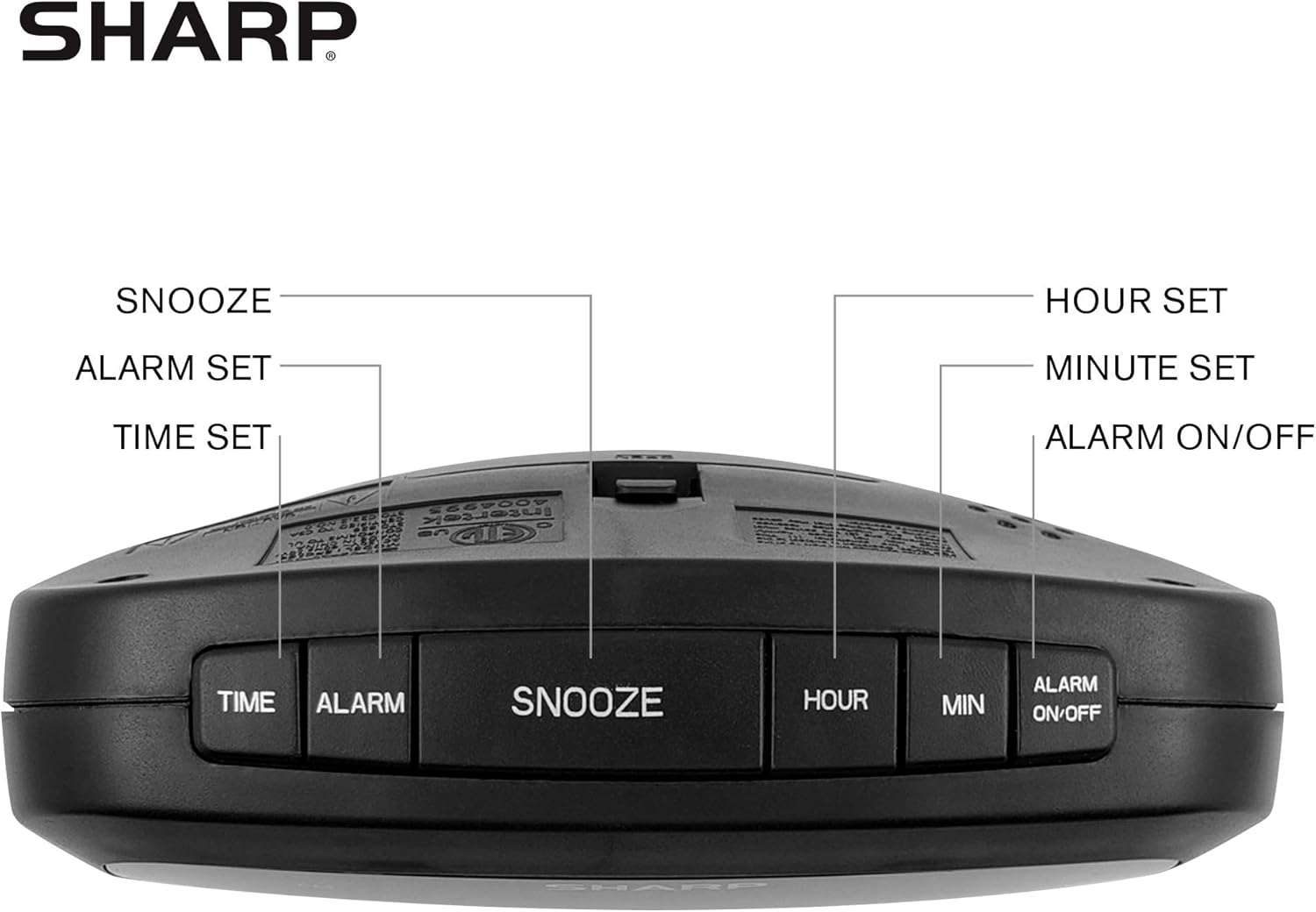
Figure 2: Underside of the clock with the battery compartment visible, requiring 2 AAA batteries for backup.
3. Naudojimo instrukcijos
The clock features intuitive top-mounted buttons for easy operation.

Figure 3: Top panel of the clock with clearly labeled buttons for time, alarm, snooze/dimmer, hour, minute, and alarm on/off.
3.1 Laiko nustatymas
- Paspauskite ir palaikykite LAIKAS mygtuką, kol pradės mirksėti valandų skaitmenys.
- Paspauskite VALANDA button to adjust the hour. Pay attention to the PM indicator if setting a PM time.
- Paspauskite MIN mygtuką norėdami sureguliuoti minutes.
- Paspauskite LAIKAS dar kartą paspauskite mygtuką, kad patvirtintumėte ir išsaugotumėte laiką.
3.2 Signalizacijos nustatymas
- Paspauskite ir palaikykite SIGNALAS mygtuką, kol pradės mirksėti žadintuvo valandų skaitmenys.
- Paspauskite VALANDA mygtuką, norėdami reguliuoti žadintuvo valandą.
- Paspauskite MIN mygtuką, kad sureguliuotumėte žadintuvo minutes.
- Paspauskite SIGNALAS button again to confirm and save the alarm time.
- Norėdami įjungti arba išjungti žadintuvą, paspauskite ALARM ON / OFF mygtuką. Kai žadintuvas aktyvus, ekrane užsidegs žadintuvo indikatoriaus lemputė.
3.3 Snaudimo ir pritemdymo funkcija
- Kai suskamba žadintuvas, paspauskite didelį SNOZUOTAS/REŽIMUOTOJAS mygtuką, kad laikinai kelioms minutėms nutildytumėte žadintuvą.
- To adjust the brightness of the green LED display, repeatedly press the SNOZUOTAS/REŽIMUOTOJAS button when the alarm is not sounding. Cycle through bright, medium, and low brightness settings.
3.4 Using the USB Charging Ports
The clock is equipped with two 2 AMP USB charging ports on the front, allowing you to conveniently charge your smartphone or other USB-powered devices directly from the clock.

Figure 4: The clock demonstrating its dual USB charging capability with two smartphones connected.
- Simply connect your device's USB charging cable to one of the USB ports on the front of the clock.
- Ensure your device is compatible with 2 AMP charging for optimal speed.
4. Priežiūra
To ensure the longevity and proper functioning of your Sharp Digital Clock, follow these simple maintenance guidelines:
- Valymas: Wipe the clock with a soft, dry cloth. Do not use abrasive cleaners, waxes, or solvents as they may damage the finish.
- Vieta: Laikrodį pastatykite ant stabilaus, lygaus paviršiaus, atokiau nuo tiesioginių saulės spindulių, šilumos šaltinių ir per didelės drėgmės.
- Baterijos keitimas: If using the battery backup, replace the AAA batteries annually or when the clock consistently loses time during power interruptions.
5. Problemų sprendimas
| Problema | Galima priežastis | Sprendimas |
|---|---|---|
| Laikrodžio ekranas tuščias. | Jokios jėgos ar galiostage. | Ensure the power adapter is securely plugged into the clock and a working electrical outlet. If there was a power outage, check if backup batteries are installed and functional. |
| Signalizacija neskamba. | Alarm not set or not activated. | Verify that the alarm time is correctly set and that the alarm indicator light is visible on the display (press ALARM ON/OFF). |
| USB prievadai nėra skirti įkrovimo įrenginiams. | Device incompatibility or faulty cable. | Ensure your device is compatible with USB charging. Try a different USB cable. Confirm the clock is powered on. |
| Ekranas per ryškus/tamsus. | Reikia pakoreguoti ryškumo nustatymą. | Press the SNOOZE/DIMMER button repeatedly to cycle through brightness levels (bright, medium, low). |
6. Gaminio specifikacijos
- Prekinis ženklas: Aštrus
- Modelis: B08H3STVWG
- Ekrano tipas: Digital Green LED
- Maitinimo šaltinis: Su laidu elektra
- Baterijos atsarginė kopija: 2 x AAA baterijos (į komplektą neįeina)
- USB prievadai: 2 x 2 AMP USB FastCharge Ports
- Gaminio matmenys: 5.95 colio pločio x 2.3 colio aukščio
- Prekės svoris: 9.59 uncijos
- Spalva: Žalia Led
- Medžiaga: Plastikiniai
- UPC: 049353005089
7. Garantija ir palaikymas
This Sharp Digital Clock comes with a limited warranty. For detailed warranty information, product support, or to purchase accessories, please visit the official Sharp websvetainėje arba susisiekite su jų klientų aptarnavimo tarnyba. Taip pat galite apsilankyti „Sharp“ parduotuvė „Amazon“ svetainėje.
Prašome išsaugoti pirkimo kvitą garantiniams reikalavimams.


