1. Įvadas
The EPEVER Tracer-BN Series MPPT solar charge controller is designed for solar power systems, featuring advanced Maximum Power Point Tracking (MPPT) technology. This manual provides essential instructions for the Tracer3215BN model, ensuring efficient and safe operation of your solar charging system. It is suitable for 12V/24V battery systems and supports a maximum PV input voltage iš 150V.

Vaizdas: priekis view of the EPEVER MPPT Charge Controller Tracer3215BN.
2. Saugos instrukcijos
Observe the following safety guidelines during installation and operation to prevent damage to the controller or injury:
- Ensure proper wiring polarity for all connections (PV, battery, load).
- Do not exceed the maximum PV input voltage iš 150VDC.
- Connect the battery first before connecting solar panels or loads.
- The controller features multiple electronic protections, including:
- PV trumpojo jungimo apsauga
- PV pervoltage signalizacijos apsauga
- PV current limiting protection
- PV atvirkštinio poliškumo apsauga
- Akumuliatoriaus perkrovos apsauga
- Akumuliatoriaus apsauga nuo išsikrovimo
- Baterijos atvirkštinio poliškumo apsauga
- Apsauga nuo perkrovos
- Apsauga nuo trumpojo jungimo
- Apsauga nuo perkaitimo
- Install the controller in a well-ventilated area to ensure adequate heat dissipation.
- Avoid exposing the controller to direct sunlight, moisture, or corrosive environments.
3. Produkto ypatybės
The Tracer3215BN controller incorporates advanced features for optimal solar system performance:
- Pažangi MPPT technologija: High tracking efficiency (≥ 99.5%) and peak conversion efficiency (98%).
- Fast Tracking: Ultra-fast tracking speed and accurate Maximum Power Point (MPP) recognition.
- Wide MPP Operating Voltage Diapazonas: Adapts to various solar panel configurations.
- PV Current Limiting: Reliable automatic PV current limiting function.
- Patvarus dizainas: Die-cast aluminum housing for excellent heat dissipation and extended lifespan.
- Suderinamumas su baterijomis: Supports Sealed, Gel, Flooded, and User-defined battery types. Includes battery temperature compensation.
- Flexible Load Control: Multiple load working modes: Manual Control, Light ON/OFF, Light On+Timer, and Time Control.
- Duomenų stebėjimas: Real-time energy statistics and data monitoring.
- Bendravimas: RS485 port with industrial standard MODBUS open architecture for communication with MT50, APP, or PC software.
- Programinės įrangos atnaujinimas: Supports firmware upgrades for future enhancements.

Image: Visual summary of the Tracer-BN series features.
4. Components and Ports Identification
Familiarize yourself with the controller's external components and connection ports:
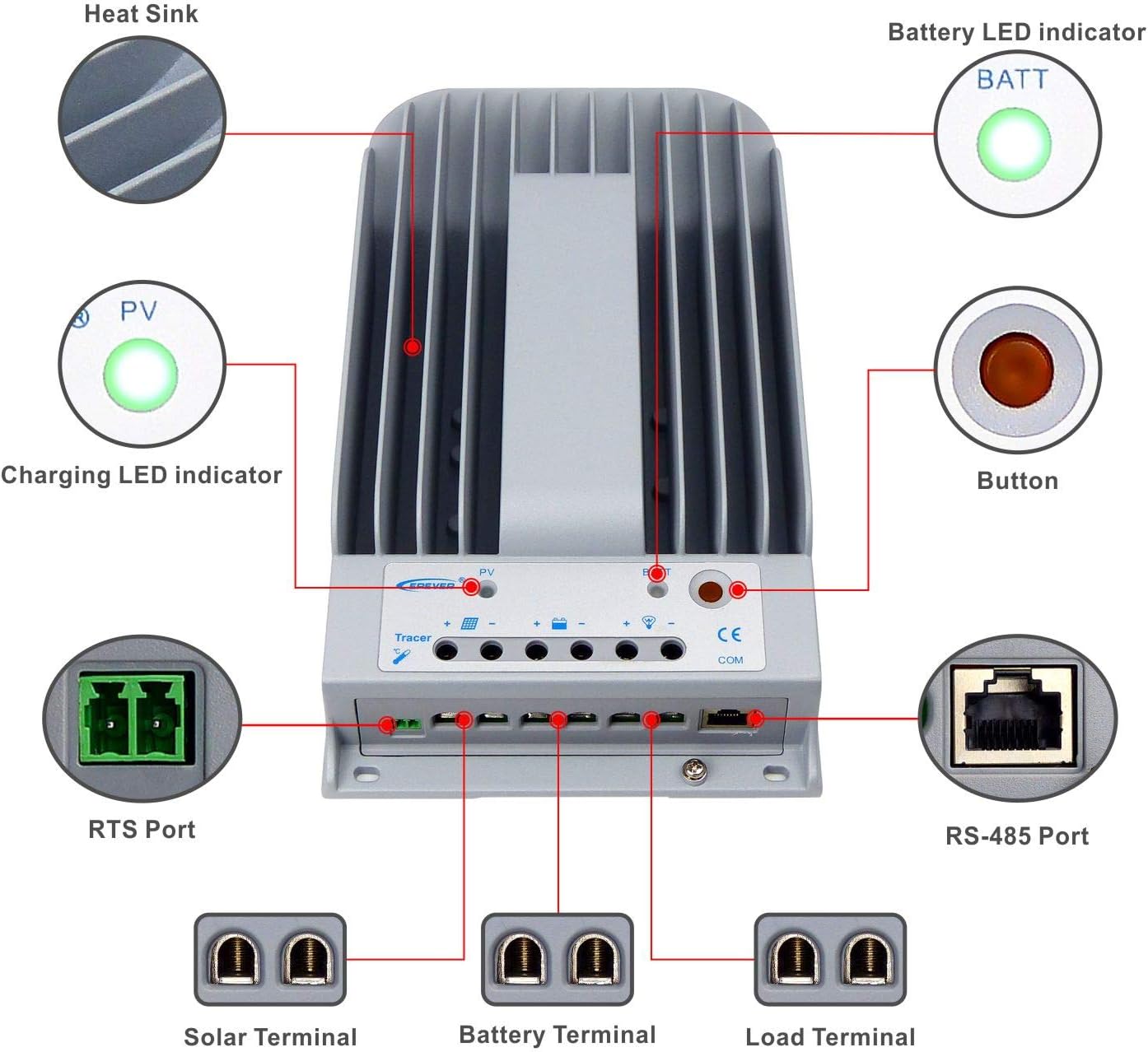
Image: Labeled diagram of the controller's external features.
| Prekė | Vardas | Prekė | Vardas |
|---|---|---|---|
| 1 | Šilumos kriauklė | 6 | Pakrovimo terminalas |
| 2 | Įkrovimo LED indikatorius | 7 | RS-485 prievadas |
| 3 | RTS prievadas | 8 | Mygtukas |
| 4 | Saulės energijos terminalas | 9 | Baterijos LED indikatorius |
| 5 | Baterijos gnybtas |
Paaiškinimas:
- RTS Port (3): Connection for a Remote Temperature Sensor to remotely detect battery temperature.
- RS-485 Port (7): Used to monitor the controller via PC and update controller software using an RS485 (RJ45 Interface) connection.
5. Sąranka ir diegimas
Follow these steps for proper installation of your Tracer3215BN controller:
- Montavimas: Mount the controller vertically on a flat surface in a well-ventilated indoor area, away from direct sunlight, high temperatures, and moisture. Ensure sufficient space around the heat sink for air circulation. The mounting dimensions are 130mm x 204mm with Φ4.7 mounting holes.
- Wiring Order: Connect the system components in the following sequence to ensure safety and proper operation:
- Step 1: Connect the Battery: Connect the battery to the controller's battery terminals. Ensure correct polarity. The controller will detect the system voltage (12V/24V auto work).
- Step 2: Connect the Solar Panel: Connect the solar panel array to the controller's solar terminals. Ensure correct polarity.
- Step 3: Connect the Load: Connect the DC load to the controller's load terminals. Ensure correct polarity.
- Kabelio dydis: Use appropriate cable sizes. For the Tracer3215BN, a power cable size of 6AWG (16mm²) is recommended.
- Įžeminimas: The controller features common negative grounding. Ensure proper grounding according to local electrical codes.
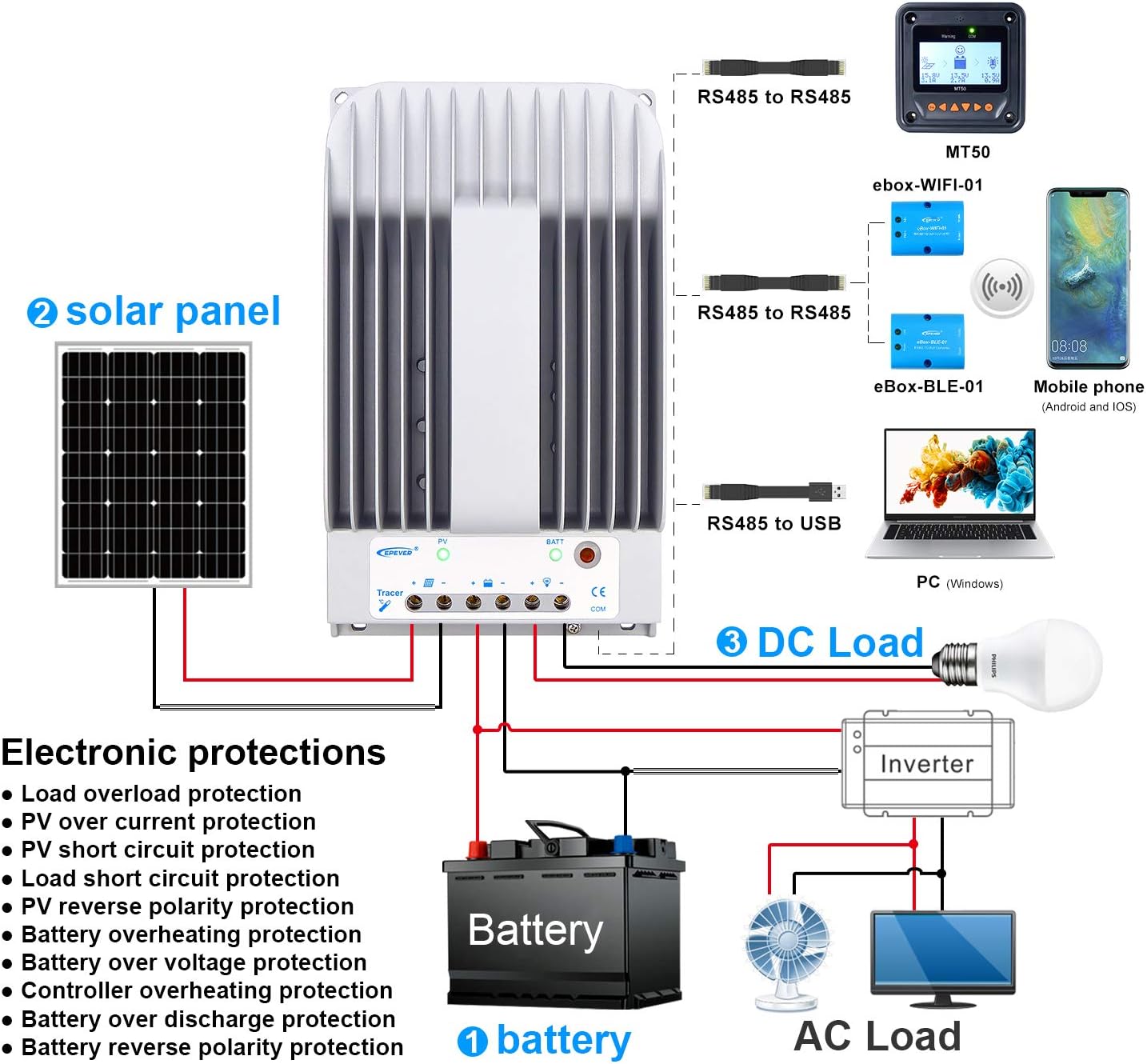
Image: Wiring diagram illustrating connections for battery, solar panel, and DC load.

Image: Controller dimensions for mounting reference.
6. Naudojimo instrukcijos
Once installed, the controller operates automatically. However, you can configure settings and monitor performance:
- Baterijos tipo pasirinkimas: The controller supports Sealed, Gel, Flooded, and User-defined battery types. Select the appropriate type through the controller's interface (if available) or via external monitoring tools (MT50, APP, PC software) to ensure correct charging parameters.
- Apkrovos darbo režimai: Configure the DC load output behavior using the available modes:
- Rankinis valdymas: Turn the load ON/OFF manually.
- Šviesos įjungimas/išjungimas: Apkrova ĮJUNGIAMA sutemus ir IŠJUNGIAMA auštant.
- Light On+Timer: Apkrova įsijungia sutemus ir lieka įjungta nustatytą laiką.
- Laiko kontrolė: Load operates during specified time periods.
- Monitoring and Configuration: Use the optional MT50 remote meter, mobile application, or PC software connected via the RS485 port to monitor real-time data, view energy statistics, and adjust parameters.
7. Priežiūra
Regular maintenance ensures the longevity and optimal performance of your charge controller:
- Patikrinkite jungtis: Periodically check all wiring connections (PV, battery, load) for tightness and corrosion. Loose connections can cause overheating and damage.
- Švarus valdiklis: Keep the controller's exterior clean and free from dust and debris. Ensure the heat sink fins are clear for effective cooling.
- Vėdinimas: Verify that the installation area remains well-ventilated and free from obstructions that could impede airflow around the controller.
- Stebėti našumą: Regularly check the controller's display or monitoring software for any error codes or unusual readings.
- Baterijos būklė: Ensure your battery bank is properly maintained according to the battery manufacturer's guidelines.
8. Problemų sprendimas
If you encounter issues with your Tracer3215BN controller, consider the following:
- Nėra įkrovimo:
- Check PV panel connections and ensure correct polarity.
- Patikrinkite PV įvesties tūrįtage is within the controller's operating range (Max 150VDC).
- Ensure sufficient sunlight on the solar panels.
- Įkrovimas neveikia:
- Patikrinkite apkrovos jungtis ir užtikrinkite teisingą poliškumą.
- Patikrinkite akumuliatoriaus tūrįtage yra virš mažo tūriotagatjungimo slenkstis.
- Check the selected load working mode.
- Ensure the load current does not exceed the rated discharge current (30A).
- Valdiklio perkaitimas:
- Užtikrinkite tinkamą vėdinimą aplink valdiklį.
- Reduce the load or PV input if consistently operating at maximum capacity in high ambient temperatures.
- Klaidų kodai: Refer to the controller's display or monitoring software for specific error codes and consult the EPEVER official documentation for their meaning and resolution.
9. Techninės specifikacijos
Key technical data for the Tracer3215BN MPPT Charge Controller:

Paveikslėlis: Išsamios techninės specifikacijos lentelė.
| Parametras | Vertė |
|---|---|
| Nominal System Voltage | 12VDC / 24VDC Auto work |
| Nominali įkrovimo srovė | 30A |
| Nominali iškrovimo srovė | 30A |
| Maks. Saulės įvesties ttage | 150VDC |
| Maksimali PV įvesties galia (12 V baterija) | 390W |
| Maksimali PV įvesties galia (24 V baterija) | 780W |
| Self-consumption (12V) | ≤60mA |
| Self-consumption (24V) | ≤30mA |
| Montavimo matmenys | 130 mm x 204 mm |
| Montavimo angos dydis | Φ4.7 |
| Maitinimo kabelis | 6AWG (16 mm²) |
| Matmenys | 281 mm x 160 mm x 60 mm |
| Svoris | 2.3 kg |
| Darbo aplinkos temperatūra | -35 ℃ ~ +55 ℃ |
| Santykinė drėgmė | ≤95% (N.C.) |
| Aptvaras | IP30 |
| Įžeminimas | Bendras neigiamas |
| Ryšio uostas | RS485 / RJ45 Interface |
10. Informacija apie garantiją
For detailed warranty terms and conditions, please refer to the product packaging, the official EPEVER website, or contact your authorized dealer. Warranty coverage typically includes defects in materials and workmanship under normal use.
11. Parama
Should you require technical assistance, have questions regarding installation, operation, or troubleshooting, please contact:
- EPEVER Customer Service: Refer to the official EPEVER websvetainė, kurioje rasite kontaktinius duomenis.
- Authorized Sales Agent: GolandCentury (as mentioned in product information).
When contacting support, please have your product model (Tracer3215BN) and any relevant error codes or observations ready.


