1. Įvadas
Thank you for choosing the LOXJIE D30 Audio DAC and Headphone Amplifier. This device is designed to deliver high-fidelity audio performance, featuring an ES9068AS DAC chip, XMOS for advanced digital audio processing, and support for PCM up to 32bit/768kHz, MQA, and DSD512. It also includes Bluetooth 5.0 with APT-X for wireless connectivity and is JAS Hi-Res certified. This manual provides essential information for setting up, operating, and maintaining your D30 unit.
2. Saugos instrukcijos
- Do not disassemble or modify the unit. Unauthorized modifications may result in electric shock or product malfunction.
- Saugokite įrenginį nuo vandens, drėgmės ar per didelės drėgmės.
- Avoid placing the unit near heat sources, direct sunlight, or in poorly ventilated areas.
- Use only the specified power adapter and cables provided with the unit.
- Užtikrinkite tinkamą vėdinimą aplink įrenginį, kad išvengtumėte perkaitimo.
- Saugokite įrenginį nuo stiprių magnetinių laukų.
- Unplug the power cord during lightning storms or when unused for extended periods.
3. Pakuotės turinys
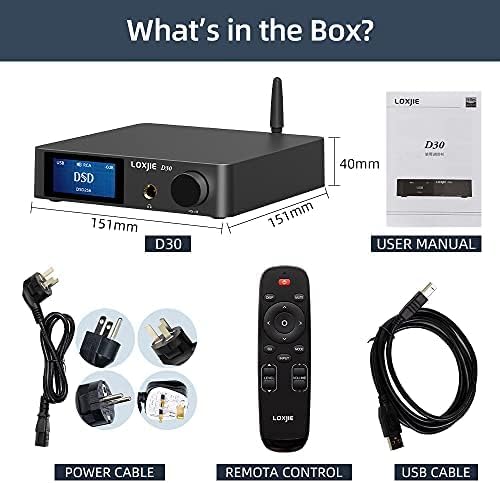
Vaizdo aprašymas: Pridėtinė view of the LOXJIE D30 Audio DAC and Headphone Amplifier package contents. It shows the D30 unit, a user manual, a remote control, a power cable with various international plug adapters, and a USB cable.
- LOXJIE D30 Unit
- Nuotolinio valdymo pultas
- Power Cable with Adapters
- USB kabelis
- Vartotojo vadovas
4. Produktas baigtasview
4.1 Priekinis skydelis

Vaizdo aprašymas: Priekinis kampas view of the LOXJIE D30 Audio DAC and Headphone Amplifier. The front panel features a digital display showing "USB DSD DSD256", a 6.35mm headphone jack, and a multi-function knob labeled "VOL/MENU". An antenna is visible on the top right.
- Ekranas: Rodo dabartinę įvestį, sample rate, volume level, and menu options.
- 6.35 mm ausinių išvestis: Ausinėms prijungti.
- Multi-function Knob (VOL/MENU):
- Pasukite norėdami reguliuoti garsumą.
- Press to enter/exit menu.
- Rotate in menu to navigate options.
- Paspauskite, kad patvirtintumėte pasirinkimą.
4.2 Galinis skydelis
Vaizdo aprašymas: A rear-angle view of the LOXJIE D30 Audio DAC and Headphone Amplifier. The rear panel features various input and output ports including RCA (L/R) inputs, Coaxial input, Optical input, USB input, SW OUT (subwoofer output), RCA (L/R) line outputs, speaker terminals (Right/Left), and a power input with a switch. A Bluetooth antenna is also visible.
- RCA (K/D) įėjimai: Analoginiams garso šaltiniams.
- Koaksialinė įvestis: Skaitmeniniams garso šaltiniams.
- Optinė įvestis: Skaitmeniniams garso šaltiniams.
- USB įvestis: For connecting to a computer (PCM 32bit/768kHz, DSD512).
- SW OUT: Žemųjų dažnių garsiakalbio išvestis.
- RCA (L/R) Line Outputs: Prijungimui prie išorinio ampkeltuvai arba maitinami garsiakalbiai.
- Speaker Terminals (Right/Left): Skirta pasyviųjų garsiakalbių prijungimui.
- „Bluetooth“ antena: For wireless Bluetooth 5.0 connectivity.
- Power Input & Switch: For connecting the power cable and turning the unit on/off.
5. Sąranka
- Maitinimo jungtis: Connect the provided power cable to the D30's power input and then to a wall outlet. Ensure the power switch is in the OFF position before connecting.
- Antenos montavimas: Screw the Bluetooth antenna firmly into its connector on the rear panel.
- Garso šaltinio jungtis:
- USB: Connect a USB cable from your computer to the D30's USB input. Install necessary drivers if prompted by your operating system.
- Optinis/koaksialinis: Connect your digital audio source (e.g., CD player, TV) to the corresponding Optical or Coaxial input.
- Bluetooth: Ensure the antenna is connected. Select Bluetooth input on the D30, then pair with your device (see Operating Instructions).
- RCA įvestis: Prijunkite analoginius garso šaltinius naudodami RCA kabelius.
- Išvesties jungtis:
- Ausinės: Plug your 6.35mm headphones into the front panel jack.
- Garsiakalbiai/Ampgyvybingesnis: Connect passive speakers to the speaker terminals or an external amplifier/powered speakers to the RCA Line Outputs.
- Žemų dažnių garsiakalbis: Connect a subwoofer to the SW OUT port.
- Maitinimas: Flip the power switch on the rear panel to the ON position. The display will light up.
6. Naudojimo instrukcijos
- Įvesties pasirinkimas: Press the multi-function knob or use the remote control to cycle through available inputs (USB, Optical, Coaxial, Bluetooth, RCA).
- Garsumo valdymas: Rotate the multi-function knob or use the volume buttons on the remote control to adjust the output volume. The volume for headphone and line outputs are independent and will switch automatically when changing output modes.
- Išvesties režimo perjungimas: The D30 automatically switches between headphone output and line output when headphones are plugged in or removed.
- „Bluetooth“ susiejimas:
- Select Bluetooth input on the D30.
- On your source device (e.g., smartphone), search for Bluetooth devices and select "LOXJIE D30".
- Once paired, the display will show "BT Connected".
- To clear Bluetooth pairing history, navigate to the setup menu and select "BT Clear".
- Menu Navigation (EQ, Treble, Bass, Color):
- Press the multi-function knob to enter the setup menu.
- Rotate the knob to navigate through options like "Output", "EQ", "Treble", "Bass", "Color", etc.
- Press the knob to select an option. Rotate again to adjust the value or setting.
- Press and hold the knob to exit the menu.
- MQA/DSD Playback: The D30 supports MQA full decoding and DSD512 playback via compatible inputs (e.g., USB). Ensure your source software is configured for MQA/DSD output.
7. Priežiūra
- Prietaisą valykite minkštu, sausu skudurėliu. Nenaudokite abrazyvinių valiklių ar tirpiklių.
- Laikykite įrenginį švarų nuo dulkių ir šiukšlių.
- Įsitikinkite, kad visos jungtys yra saugios ir nėra korozijos.
8. Problemų sprendimas
| Problema | Galima priežastis | Sprendimas |
|---|---|---|
| Nėra galios | Maitinimo laidas neprijungtas; Maitinimo jungiklis išjungtas | Check power cable connection; Turn on power switch |
| Nėra garso išvesties | Incorrect input selected; Volume too low; Output device not connected or faulty | Select correct input; Increase volume; Check connections to headphones/speakers |
| Bluetooth ryšio problemos | Device not paired; Out of range; Interference | Ensure D30 is in Bluetooth mode and discoverable; Re-pair device; Move closer to D30; Clear BT history |
| Iškreiptas garsas | Šaltinio garso kokybė; Neteisingas sample rate; Cable issues | Check source audio; Verify sample rate settings; Replace cables if necessary |
9. Specifikacijos
| Funkcija | Detalė |
|---|---|
| DAC lustas | ESS ES9068AS |
| USB suderinamumas | PCM 32bit/768kHz, DSD512 |
| MQA Support | Full MQA decoding (Optical and Coaxial inputs) |
| Bluetooth versija | 5.0 with APT-X HD (up to 24bit/48kHz) |
| Išėjimai | 6.35mm Headphone Jack, RCA Line Out, SW Out, Speaker Terminals |
| THD+N | As low as 0.0001% (-120dB) |
| Prekės svoris | 1.03 kilogramų (2.26 svarai) |
| Matmenys | 10.71 x 9.29 x 3.03 colių (pakuotė) |
| Maitinimo šaltinis | AC Power (via adapter) |
| Išėjimo vattage | 165 Watts (for speaker output) |
10. Garantija ir palaikymas
LOXJIE products are designed and manufactured to the highest quality standards. For warranty information, technical support, or service inquiries, please refer to the warranty card included in your package or visit the official LOXJIE websvetainėje. Išsaugokite pirkimo kvitą kaip pirkimo įrodymą.


