
1. Įvadas
The TP-Link USB Type-C to Gigabit Ethernet Adapter (UE300C) provides fast and reliable wired connectivity for your USB-C enabled devices. This compact and portable adapter delivers network speeds up to 1 Gbps, ideal for high-bandwidth activities such as streaming HD videos, transferring large files, online gaming, and video conferencing. It offers broad compatibility across various operating systems and devices, ensuring a stable and efficient internet connection when Wi-Fi is insufficient or unavailable.
2. Produkto ypatybės
- High-Speed USB-C Ethernet Adapter: Instantly converts your device's USB-C port into a 10/100/1000 Mbps RJ45 Ethernet port for a stable wired connection.
- USB-C 3.0 for Faster, More Stable Connections: Experience full Gigabit Ethernet performance over your laptop’s USB-C 3.0 port. (To achieve 1Gbps, use CAT6 or higher Ethernet cables).
- Ultra-Compact and Foldable Design: Measuring just 2.8 x 1.0 x 0.6 inches, the UE300C is lightweight and features a foldable USB-C connector for easy portability and storage.
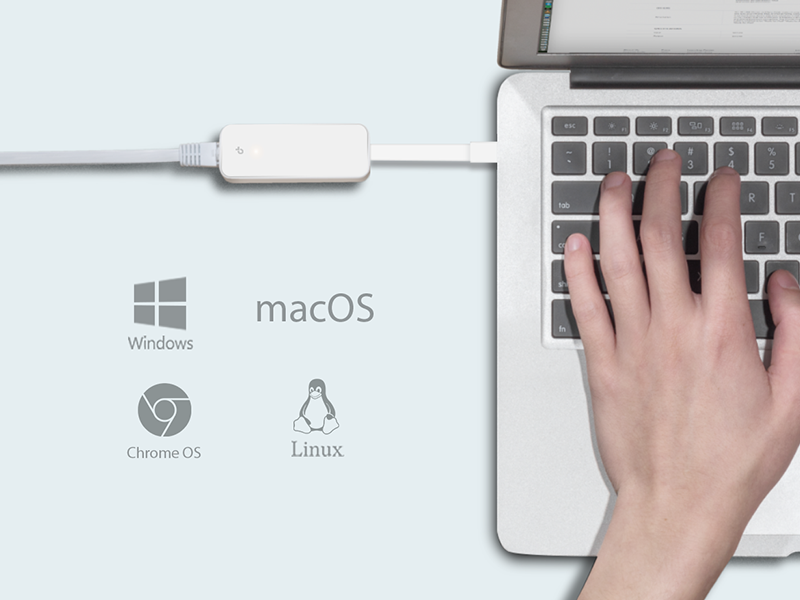
- Plug and Play: No driver installation is required for Windows 11/10/8.1/8/7, macOS (10.9 and later), Chrome OS, and Linux (Ubuntu). Simply connect and use.
- Platus įrenginių suderinamumas: Works seamlessly with most USB-C devices, including MacBook Pro/Air, iPad Pro, Dell XPS, Surface Laptop, Chromebook, Asus ZenBook, and Lenovo ThinkPad X1 Carbon/Yoga series.
- Kibernetinio saugumo įsipareigojimas: Designed and maintained with advanced security as a core requirement, adhering to the U.S. Cybersecurity and Infrastructure Security Agency’s (CISA) Secure-by-Design pledge.

Image: The compact and foldable design of the TP-Link UE300C adapter, held in a hand.
3. Pakuotės turinys
- 1 x USB Type-C to RJ45 Gigabit Ethernet Network Adapter UE300C
- 1 x Vartotojo vadovas
4. Sąrankos vadovas
- Prisijunkite prie įrenginio: Plug the USB-C connector of the UE300C adapter into an available USB-C port on your laptop, tablet, or smartphone.
- Prijunkite Ethernet kabelį: Insert an Ethernet cable (CAT6 or higher recommended for optimal Gigabit speeds) from your router, modem, or network switch into the RJ45 port on the UE300C adapter.
- Automatinis atpažinimas: For most modern operating systems (Windows 11/10/8.1/8/7, macOS 10.9 and later, Chrome OS, and Linux Ubuntu), the adapter is plug-and-play and will be recognized automatically without requiring driver installation.
- Tvarkyklės diegimas (jei reikia): If your operating system is older or does not automatically recognize the adapter, please visit the official TP-Link support websvetainę, kurioje galite atsisiųsti ir įdiegti atitinkamas tvarkykles.
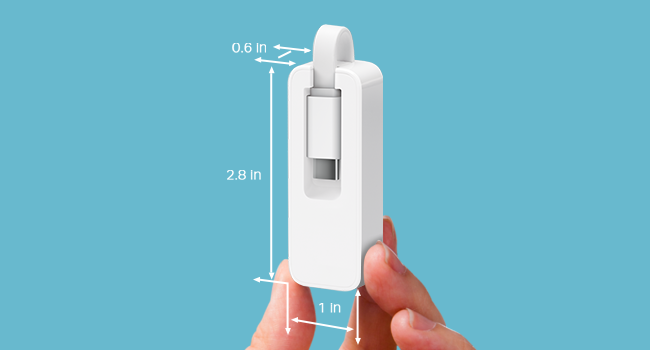
Image: A diagram illustrating the connection points of the TP-Link UE300C adapter, highlighting the USB-C connector and the Gigabit Ethernet port.
5. Naudojimo instrukcijos
Once the adapter is connected to your device and an active Ethernet cable, it will automatically establish a wired network connection. The adapter supports data transfer rates up to 1 Gigabits Per Second, providing a stable and fast connection for all your online activities. A small LED indicator on the adapter may illuminate or flash to confirm active network status and data transmission.

Image: The TP-Link UE300C adapter connected to a laptop via its USB-C port, with an Ethernet cable plugged into the adapter.
6. Suderinamumas
The TP-Link UE300C is designed for broad compatibility with various devices and operating systems:
- Operacinės sistemos: Windows 11/10/8.1/8/7, macOS (version 10.9 and later for plug-and-play functionality), Chrome OS, and Linux (Ubuntu).
- Suderinami įrenginiai: Laptops such as MacBook Pro/Air (2017-2020 models and newer), Dell XPS, Surface Laptop, Chromebook, Asus ZenBook, Lenovo ThinkPad X1 Carbon, Yoga 720/910/920. Also compatible with tablets like iPad Pro and various smartphones equipped with a USB-C port.
Paveikslėlis: Iliustracijų demonstravimasasing the universal compatibility of the TP-Link UE300C adapter with a range of devices including PCs, Macs, and tablets.
7. Problemų sprendimas
Nėra interneto ryšio:
- Įsitikinkite, kad USB-C jungtis yra visiškai įkišta į jūsų įrenginio prievadą.
- Verify the Ethernet cable is securely connected to both the adapter and your router/modem.
- Check if your router/modem is functioning correctly and providing internet access.
- Restart your computer and network devices.
- If using an older operating system, confirm that the necessary drivers are installed from the TP-Link support websvetainę.
Lėtas ryšio greitis:
- Ensure you are using a CAT6 or higher Ethernet cable to achieve Gigabit speeds.
- Verify your internet service plan supports Gigabit speeds.
- Test your internet speed directly from your router/modem to rule out ISP issues.
- Įsitikinkite, kad jūsų įrenginio USB-C prievadas palaiko USB 3.0 arba naujesnę versiją, kad užtikrintumėte optimalų našumą.
Ethernet Cable Difficult to Remove:
- Press down firmly on the release tab of the RJ45 connector while gently pulling the cable out. Avoid forcing the cable to prevent damage to the port or cable.
8. Specifikacijos
| Funkcija | Detalė |
|---|---|
| Gaminio matmenys | 2.8 x 1 x 0.64 colio |
| Prekės svoris | 0.64 uncijos (0.04 svaro) |
| Modelio numeris | UE300C |
| Techninės įrangos sąsaja | C tipo USB |
| Spalva | Baltas |
| Duomenų nuorodos protokolas | Gigabit Ethernet |
| Duomenų perdavimo sparta | 1 gigabitas per sekundę |
| UPC | 840030701511 |
| Gamintojas | TP-Link |
| Pirmoji laisva data | 11 m. rugpjūčio 2020 d |
9. Priežiūra
To ensure the longevity and optimal performance of your TP-Link UE300C adapter, follow these maintenance guidelines:
- Valymas: Adapterį laikykite švarų ir be dulkių. Valymui naudokite minkštą, sausą šluostę. Venkite skystų valiklių.
- Saugykla: Store the adapter in a cool, dry place when not in use. The foldable USB-C connector helps protect it during transport and storage.
- Aplinkos sąlygos: Saugokite adapterį nuo ekstremalių temperatūrų, tiesioginių saulės spindulių ar didelės drėgmės.
- Tvarkymas: Do not attempt to disassemble or repair the adapter yourself. Unauthorized modifications may void your warranty.
10. Garantija ir palaikymas
The TP-Link USB C to Ethernet Adapter (UE300C) typically comes with a 2-year warranty. For detailed warranty terms, technical support, or further assistance, please refer to the official TP-Link website or contact their customer service using the information below:
TP-Link palaikymas:
- Telefonas: (866) 225-8139
- Websvetainė: myproducts.tp-link.com/us
- El. paštas: support.USA@tp-link.com
11. Produktų vaizdo įrašai
Ethernet to USB-C for Faster, Reliable Speeds
Video demonstrating how the TP-Link USB-C to Ethernet adapter provides faster and more reliable internet speeds compared to Wi-Fi.
Review of the TP-Link Ethernet to USB-C Adapter
Išsamią review highlighting the features and performance of the TP-Link USB-C to Ethernet adapter.
Speed Test with TP-Link USB-C Ethernet Adapter
A video demonstrating a speed test using the TP-Link USB-C to Ethernet adapter, showcasing jo našumą.
Baigėsiview of the USB to Ethernet Connector
ir baigtaview of the TP-Link USB to Ethernet connector, discussing its functionality and benefits.


