Įvadas
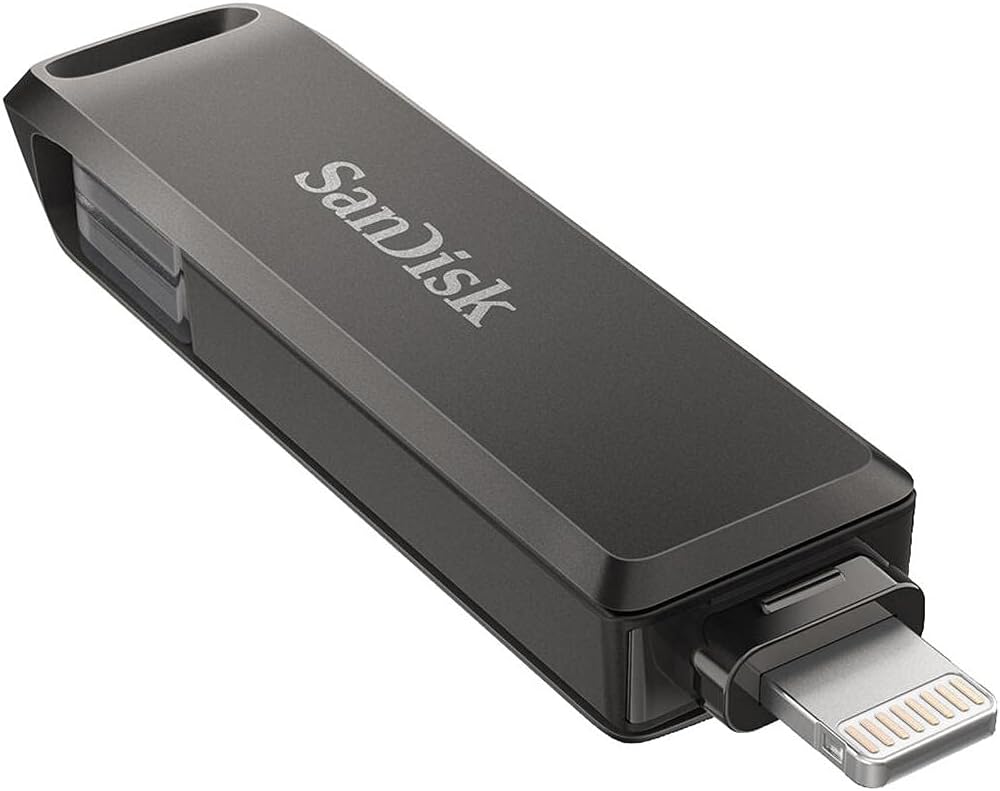
The SanDisk iXpand Flash Drive Luxe is a versatile 2-in-1 storage solution designed for seamless file transfer and backup between your iPhone, iPad Pro, Mac computer, and other USB Type-C devices, including Android phones. This all-metal casing flash drive offers 256GB of storage, providing ample space to free up memory on your mobile devices and securely store your important photos, videos, documents, and contacts.
This manual provides essential instructions for setting up, operating, and maintaining your iXpand Flash Drive Luxe to ensure optimal performance and data security.
Produktas baigtasview
The iXpand Flash Drive Luxe features a dual-connector design, incorporating both a Lightning connector for Apple devices and a USB Type-C connector for broader compatibility. Its robust metal construction ensures durability, while the compact design makes it highly portable.

Sąranka
- Atsisiųskite „iXpand Drive“ programėlę: For iPhone and iPad users, the iXpand Drive app is required for full functionality. Download it from the App Store. For Android devices, the iXpand Drive app is generally not required, but On-The-Go (OTG) support is necessary.
- Prisijunkite prie savo įrenginio:
- For iPhone/iPad (Lightning Connector): Gently slide out the Lightning connector and insert it into your iPhone or iPad's charging port.
- For USB Type-C Devices (Android, Mac, PC): Gently slide out the USB Type-C connector and insert it into your device's USB-C port.
- Pradinis pripažinimas: Upon first connection, your device may prompt you to open or download the iXpand Drive app. Follow the on-screen instructions to proceed.

Naudojimo instrukcijos
- Automatic Backup (iOS only): Within the iXpand Drive app settings, you can enable automatic backup for your iPhone photos, videos, and contacts. Once enabled, the drive will automatically back up new content whenever it is connected to your device.
- vadovas File Pervedimas:
- Open the iXpand Drive app (iOS) or your device's file manager (Android/PC/Mac).
- Eikite į files you wish to transfer from your device to the iXpand drive, or vice versa.
- Pasirinkite norimą files and choose the option to copy or move them to the iXpand drive.
- Vietos atlaisvinimas: After successfully transferring files to the iXpand drive, you can safely delete them from your mobile device to free up storage space.
- Slaptažodžio apsauga: „iXpand Drive“ programėlė palaiko slaptažodžio apsaugą jūsų files across compatible devices (iOS 13+, Mac OS X v10.9+, Windows 7/8/10). This feature helps secure your sensitive data.


Priežiūra
- Fizinė priežiūra: Keep the flash drive clean and free from dust and debris. Avoid exposing it to extreme temperatures or moisture. The all-metal casing provides durability, but proper handling is recommended.
- Jungties apsauga: Utilize the swivel design to protect the connectors when not in use. The integrated keyring hole allows for secure attachment to prevent loss.
- Programinės įrangos atnaujinimai: Regularly check for updates to the iXpand Drive app to ensure compatibility and access to the latest features and security enhancements.

Trikčių šalinimas
- Įrenginys neatpažintas: Ensure the flash drive is fully inserted into the device's port. For iOS devices, verify that the iXpand Drive app is installed and updated. For Android devices, confirm that your device supports USB On-The-Go (OTG).
- App Crashing/Issues: If the iXpand Drive app is crashing or not functioning correctly, try restarting your device and the app. Ensure the app is updated to the latest version. Refer to SanDisk support for known app issues or upcoming changes (e.g., app retirement/replacement mentioned in some reviews).
- Mažas perdavimo greitis: Transfer speeds can vary based on file size, device performance, and other factors. Ensure your device is not running too many background applications.
- Suderinamumas: For specific device compatibility, refer to the SanDisk Support website's iXpand compatibility page.
Specifikacijos
| Funkcija | Specifikacija |
|---|---|
| Prekės ženklas | SanDisk |
| Modelio pavadinimas | iXpand Flash Drive Luxe |
| Prekės modelio numeris | SDIX70N-256G-GN6NE |
| Atminties talpa | 256 GB |
| Ryšio technologija | USB |
| Aparatinės įrangos ryšio technologija | Žaibas, USB C tipo |
| Techninės įrangos sąsaja | USB 3.0 |
| Skaitymo greitis | 84 megabaitų per sekundę |
| Rašymo greitis | 80 MB/s |
| Spalva | Pilka |
| Prekės svoris | 0.16 uncijos |
| Prekės matmenys PxPxA | 1.97 x 0.61 x 0.34 colio |
| Aparatinės įrangos platforma | „Mac“, asmeninis kompiuteris |
| Ypatinga funkcija | Dviguba USB jungtis |
Garantija ir palaikymas
For detailed warranty information, technical support, and the latest compatibility lists, please visit the official SanDisk Support website. You can find specific pages for iXpand compatibility and dual-drive USB-C devices to ensure your product functions correctly with your hardware.
SanDisk regularly updates its software and support resources. Checking the official website is recommended for the most current information.


