Įvadas
The EPOS Expand 80T is a premium, scalable Bluetooth speakerphone designed for conference calls with up to 16 in-room participants. It features six adaptive, beamforming microphones for clear voice pickup and a high-quality speaker for natural sound reproduction. This manual provides essential information for setting up, operating, and maintaining your device.

Image: EPOS Expand 80T speakerphone, showcasing its sleek black and silver design from an angled top-down perspective.
Kas yra dėžutėje
Patikrinkite, ar pakuotėje yra visi komponentai:
- EPOS Expand 80T Speakerphone
- USB-C laidas
- BTD 800 USB dongle
- Universalus maitinimo blokas
- USB-C į USB-A adapteris
- Saugos vadovas
- Greitas vadovas
- Atitikties lapas

Image: The underside of the EPOS Expand 80T, illustrating the integrated cable management system and connection ports.
Produktas baigtasview
The Expand 80T features intuitive touch controls and a robust design suitable for various meeting environments.

Vaizdas: priekis view of the EPOS Expand 80T speakerphone, highlighting the control panel and speaker grille.
Pagrindinės funkcijos:
- Adaptive Microphones: Six beamforming microphones isolate voices and reduce ambient noise.
- Superior Speaker: Delivers rich, natural sound for clear communication.
- Ryšys: Bluetooth and USB-C for versatile connection options.
- Sertifikuota „Microsoft Teams“: Optimized for seamless integration with Microsoft Teams.
- Keičiamas: Suitable for up to 16 in-room participants.

Vaizdas: Stambus planas view of the EPOS Expand 80T's touch controls and the EPOS brand logo, showing the detailed texture of the speaker grille.
Sąranka
1. Maitinimo prijungimas
- Connect the universal power supply unit to the speakerphone's power input.
- Plug the power supply into a wall outlet. The device will power on automatically.
2. USB Connection (PC/Soft Phone)
- Connect the supplied USB-C cable to the speakerphone.
- Connect the other end of the USB-C cable to your computer's USB-C port. If your computer only has USB-A ports, use the provided USB-C to USB-A adapter.
- The speakerphone will be recognized as an audio device by your operating system.
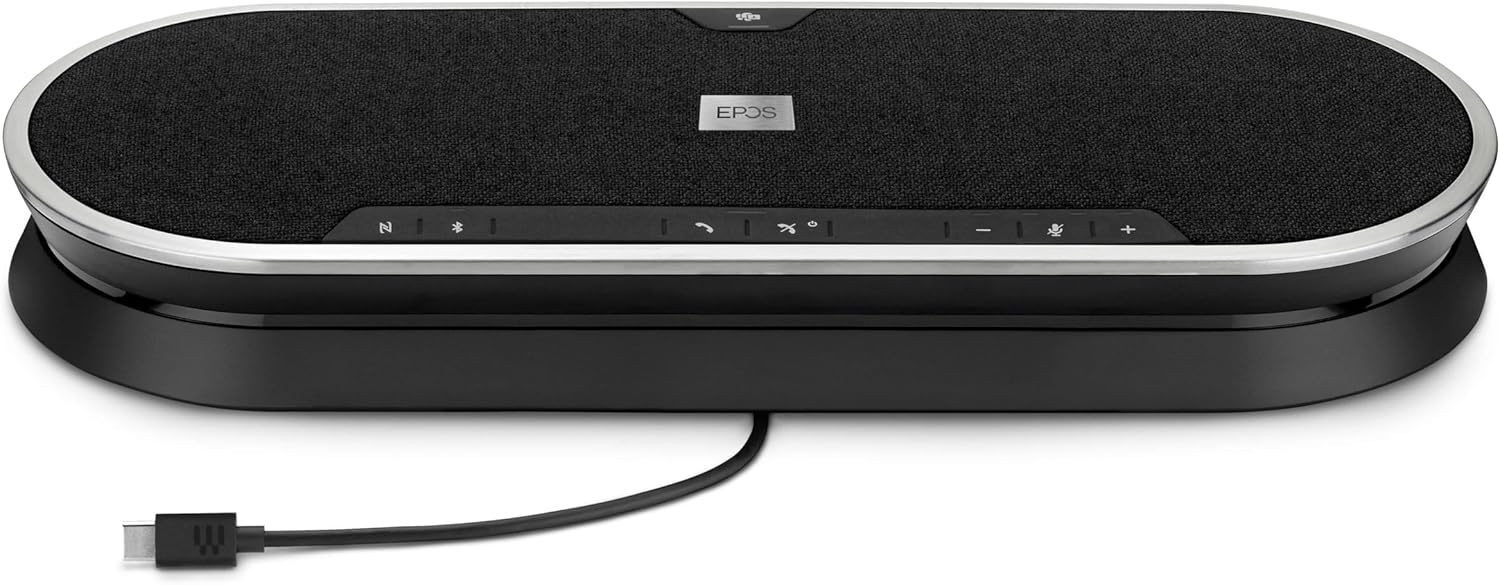
Image: The EPOS Expand 80T speakerphone with its USB-C cable connected, ready for wired communication.
3. Bluetooth Pairing (Mobile Phone/Tablet)
- Press and hold the Bluetooth button on the speakerphone until the LED indicator flashes blue. This indicates pairing mode.
- On your mobile phone or tablet, go to Bluetooth settings and select "EPOS Expand 80T" from the list of available devices.
- Prijungus LED indikatorius ims šviesti mėlynai.
4. Using the BTD 800 USB Dongle
- Plug the BTD 800 USB dongle into a USB port on your computer.
- The dongle will automatically pair with the Expand 80T. The LED on the dongle will turn solid blue when connected.
- This provides a dedicated, optimized Bluetooth connection for your PC.
Garsiakalbio valdymas
The EPOS Expand 80T features touch-sensitive controls for easy management of calls and audio.

Paveikslėlis: Šoninis profesionalasfile of the EPOS Expand 80T speakerphone, showcasing its slim design and subtle curves.
Skambučių valdymas:
- Atsiliepti / Baigti skambutį: Bakstelėkite Skambinti mygtuką.
- Nutildyti / įjungti mikrofoną: Bakstelėkite Nutildyti button. The LED will indicate mute status.
- Garsumo didinimas / sumažinimas: Bakstelėkite + or - mygtukai.
- „Microsoft Teams“ mygtukas: Bakstelėkite Komandos button to launch Microsoft Teams or bring it to the foreground (when connected to a PC with Teams installed).
Garso atkūrimas:
- When connected via Bluetooth or USB, the Expand 80T can play audio from your connected device.
- Use the volume controls on the speakerphone or your connected device to adjust playback volume.
Priežiūra
To ensure the longevity and optimal performance of your EPOS Expand 80T, follow these maintenance guidelines:
- Valymas: Garsiakalbio telefono paviršių valykite minkštu, sausu skudurėliu. Nenaudokite skystų valiklių ar abrazyvinių medžiagų.
- Saugykla: Laikykite prietaisą vėsioje, sausoje vietoje, apsaugotoje nuo tiesioginių saulės spindulių ir ekstremalių temperatūrų.
- Venkite drėgmės: The device is not waterproof. Keep it away from liquids and high humidity.
- Kabelio priežiūra: Handle cables gently. Avoid sharp bends or excessive pulling.
Trikčių šalinimas
If you encounter issues with your EPOS Expand 80T, refer to the following common solutions:
- Nėra galios:
- Ensure the power supply is securely connected to both the speakerphone and a working wall outlet.
- Patikrinkite, ar maitinimo lizdas veikia.
- Nėra garso / prasta garso kokybė:
- Verify that the speakerphone is selected as the default audio output/input device in your computer's sound settings or conferencing application.
- Adjust the volume on both the speakerphone and your connected device.
- If using Bluetooth, ensure the device is within range (up to 10 meters) and there are no obstructions.
- Try reconnecting the USB cable or re-pairing the Bluetooth device.
- Mikrofonas neveikia:
- Ensure the microphone is not muted on the speakerphone or in your conferencing software.
- Check microphone input settings on your computer or device.
- Bluetooth atjungimas:
- Move the speakerphone closer to the connected device.
- Remove any potential sources of interference (e.g., other wireless devices).
- Forget the device in your phone/PC's Bluetooth settings and re-pair.
Specifikacijos
| Modelio pavadinimas | IŠPLĖSTI 80T |
| Prekės modelio numeris | 1000203 |
| Prekės ženklas | EPOS |
| Ryšio technologija | Bluetooth, USB |
| Belaidžio ryšio technologija | Bluetooth |
| Bluetooth diapazonas | 10 metrai |
| Didžiausias diapazonas | 30 Meters (for certain connections, e.g., with BTD 800 dongle) |
| Garsiakalbio tipas | Multimedia or Conference |
| Didžiausia garsiakalbio išėjimo galia | 80 vatų |
| Garso išvesties režimas | Stereo |
| Ypatinga funkcija | Built-in Microphone, USB connectivity, Universal, Speakerphone |
| Suderinami įrenginiai | Mobile phone, Desk phone, PC / Soft phone, Tablet |
| Kontrolės metodas | Palieskite |
| Gaminio matmenys (IxPxH) | 12.4 colio x 4.7 colio x 1.8 colio (31.5 cm x 11.9 cm x 4.6 cm) |
| Prekės svoris | 2.19 svaro (apie 0.99 kg) |
| Maitinimo šaltinis | Su laidu elektra |
| Įtraukti komponentai | USB-C cable, BTD 800 USB dongle, power supply unit (universal), USB-C to USB-A adapter, safety guide, quick guide, compliance sheet |
Garantija ir palaikymas
The EPOS Expand 80T comes with a manufacturer's warranty. For specific warranty terms and conditions, please refer to the included safety guide or visit the official EPOS websvetainę.
For technical support, troubleshooting assistance, or to inquire about replacement parts, please contact EPOS customer support through their official channels. Keep your product model number (1000203) and proof of purchase readily available when seeking support.
Daugiau informacijos ir palaikymo išteklių galite rasti adresu EPOS Store on Amazon.


