1. Įvadas
This manual provides essential information for the safe and efficient operation of your iFFALCON 40F2A 40-inch Full HD Android Smart LED TV. Please read these instructions thoroughly before using the television and retain them for future reference.
The iFFALCON 40F2A is a 40-inch Full High Definition (1920x1080) Smart LED TV powered by Android, offering a rich entertainment experience with built-in Google Assistant, HDR10 support, and integrated streaming services.

Vaizdas: priekis view of the iFFALCON 40F2A 40-inch Full HD Android Smart LED TV.
2. Sąranka
2.1 Išpakavimas ir pakuotės turinys
Atsargiai išimkite televizorių iš pakuotės. Įsitikinkite, kad yra visi komponentai:
- 1 x iFFALCON 40F2A LED TV
- 1 x stalo stovas
- 1 x Naudotojo vadovas (šis dokumentas)
- 1x garantinis talonas
- 1x nuotolinio valdymo pultas
- 2x AAA baterijos
2.2 Stovo montavimas
Jei naudojate stalo stovą:
- Padėkite televizorių ekranu žemyn ant minkšto, lygaus paviršiaus, kad nepažeistumėte.
- Suderinkite stovo laikiklius su varžtų skylėmis televizoriaus apačioje.
- Pritvirtinkite stovą, naudodami pateiktus varžtus.
- Atsargiai pakelkite televizorių į vertikalią padėtį ant stabilaus, lygaus paviršiaus.
2.3 Tvirtinimas prie sienos (pasirinktinai)
For wall mounting, consult a professional installer and refer to the wall mount kit's instructions. Ensure the wall mount is compatible with the TV's VESA mounting pattern.
2.4 Išorinių įrenginių prijungimas
Connect your external devices (e.g., set-top box, gaming console, Blu-ray player) to the TV's ports. The TV features HDMI, USB, VGA, and Headphone ports.
- HDMI: Didelės raiškos garsui ir vaizdui.
- USB: Skirta USB atminties įrenginiams prijungti.
- Ethernet: Laidinio interneto ryšiui.
- Ausinės: Garso išvesčiai į ausines.
2.5 Maitinimo prijungimas ir pradinė sąranka
- Į nuotolinio valdymo pultą įdėkite pateiktas AAA baterijas.
- Prijunkite maitinimo laidą prie televizoriaus, o tada – prie elektros lizdo.
- Norėdami įjungti televizorių, paspauskite nuotolinio valdymo pulto maitinimo mygtuką.
- Vykdykite ekrane pateikiamus nurodymus, kad atliktumėte pradinę sąranką, įskaitant kalbos pasirinkimą, tinklo ryšį („Wi-Fi“ arba eterneto) ir prisijungimą prie „Google“ paskyros.
3. Televizoriaus valdymas
3.1 Nuotolinio valdymo pulto funkcijos
The remote control provides access to all TV functions. It includes dedicated buttons for popular streaming services like Netflix, Amazon Prime Video, and Zee5, as well as a Google Assistant button for voice commands.

Image: The iFFALCON 40F2A Smart Remote Control, highlighting the Google Assistant and Netflix hotkey buttons.
3.2 „Android TV“ sąsaja
Navigate the Android TV interface using the remote's directional pad and OK button. The home screen displays recommended content, installed applications, and settings.

Image: The Android TV home screen on the iFFALCON 40F2A, showing various apps and features.
3.3 „Google“ padėjėjas
Press the Google Assistant button on your remote and speak into the microphone to control your TV, search for content, get answers, and manage smart home devices.
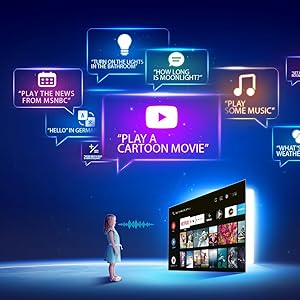
Image: Illustration of using Google Assistant voice commands with the TV.
3.4 Srautinio perdavimo programos
Access a wide range of pre-installed streaming applications such as Netflix, Amazon Prime Video, YouTube, Disney+Hotstar, Zee5, and more. Additional apps can be downloaded from the Google Play Store.

Image: The iFFALCON 40F2A displaying various streaming application logos.
3.5 Įtaisytasis „Chromecast“.
Use the built-in Chromecast feature to cast content from your compatible smartphone, tablet, or computer directly to your TV screen.

Image: A smartphone casting content to the iFFALCON 40F2A TV via Chromecast.
4. Savybės
4.1 Full HD Display with HDR10
Experience clear and vibrant visuals with Full HD (1920x1080) resolution. HDR10 support enhances contrast and color accuracy, providing a more dynamic picture.

Image: A side-by-side comparison of a scene without HDR10 and with HDR10, showing enhanced detail and color.
4.2 Micro Dimming
Micro Dimming analyzes video content in hundreds of separate zones to adjust brightness and darkness independently, improving contrast and picture quality.

Image: A comparison showing a city skyline without Micro Dimming and with Micro Dimming, highlighting improved contrast.
4.3 iPQ Engine
The iPQ Engine intelligently processes image quality, optimizing brightness, color range, and other visual parameters for a superior viewpatirtį.

Image: Visual representation of the iPQ Engine's high brightness precision and intelligent color range control technologies.
4.4 „Dolby Audio“
Enjoy immersive sound with Dolby Audio. The TV features 20 Watts speakers (10W + 10W) for clear and powerful audio output.

Image: Graphic illustrating the 10W + 10W Dolby Audio speakers for enhanced sound.
4.5 Slim Design
The iFFALCON 40F2A features a sleek and slim design, allowing it to blend seamlessly into any living space.

Image: A hand demonstrating the slim profile of the iFFALCON TV.
5. Priežiūra
5.1 Ekrano valymas
Švelniai nuvalykite ekraną minkštu, nepūkuotu skudurėliu. Jei dėmės sunkiai įveikiamos, šiek tiek nuvalykite.ampNuvalykite šluostę vandeniu arba specializuotu ekrano valikliu. Venkite naudoti stiprias chemines medžiagas ar abrazyvines medžiagas.
5.2 Televizoriaus korpuso valymas
Wipe the TV's frame and stand with a soft, dry cloth. Do not use liquid cleaners directly on the TV.
5.3 Bendroji priežiūra
- Venkite televizoriaus tiesioginių saulės spindulių ar ekstremalių temperatūrų.
- Užtikrinkite tinkamą vėdinimą aplink televizorių, kad jis neperkaistų.
- Atjunkite televizorių nuo elektros tinklo žaibuojant arba kai jis bus nenaudojamas ilgesnį laiką.
6. Problemų sprendimas
Jei kyla problemų dėl televizoriaus, žr. toliau pateiktas dažniausiai pasitaikančias problemas ir sprendimus:
| Problema | Galima priežastis | Sprendimas |
|---|---|---|
| Nėra galios | Atjungtas maitinimo laidas; problema su maitinimo lizdu | Check power cord connection; Try a different outlet; Press power button on TV/remote |
| Nėra vaizdo, bet yra garsas | Neteisingas įvesties šaltinis; Atsilaisvinęs HDMI/AV kabelis | Select correct input source; Reconnect cables securely |
| Nėra garso, bet vaizdas yra | Volume muted or too low; Audio cable issue | Unmute or increase volume; Check audio settings; Reconnect audio cables |
| Nuotolinio valdymo pultas neveikia | Išsikrovusios baterijos; Kliūtis; Nuotolinio valdymo pultas nesuporuotas | Replace batteries; Remove obstructions; Re-pair remote if necessary |
| Nepavyksta prisijungti prie „Wi-Fi“. | Neteisingas slaptažodis; Maršrutizatoriaus problema; Televizorius per toli nuo maršrutizatoriaus | Patikrinkite slaptažodį; paleiskite maršrutizatorių iš naujo; perkelkite televizorių arčiau arba naudokite eternetą |
| Programėlės veikia lėtai arba užstringa | Insufficient memory; Network issue; App malfunction | Close unused apps; Check internet connection; Clear app cache/data or reinstall app |
Jei problema išlieka ir išbandžius šiuos sprendimus, susisiekite su klientų aptarnavimo tarnyba.
7. Specifikacijos
Detailed technical specifications for the iFFALCON 40F2A Smart LED TV:

Image: Diagram showing the dimensions of the iFFALCON 40F2A TV.
| Funkcija | Specifikacija |
|---|---|
| Prekės ženklas | iFFALCON |
| Modelis | 40F2A |
| Ekrano dydis | 40 colių (102 cm) |
| Ekrano technologija | LED, A+ klasės skydelis |
| Rezoliucija | „Full HD“ (1920 x 1080 pikselių) |
| Atnaujinimo dažnis | 60 Hz |
| Reagavimo laikas | 8.5 milisekundės |
| Viewing kampas | 178 laipsnių |
| Vaizdo kraštinių santykis | 16:09 |
| Vaizdo kontrasto santykis | 5000:1 |
| Operacinė sistema | Android |
| Įdiegtos RAM atminties dydis | 1 GB |
| Skaitmeninės atminties talpa | 8 GB |
| Grafikos koprocesorius | Mali470x2 |
| Garso išvestis | 20 Watts (Dolby Audio) |
| Ryšio technologija | Ethernet, HDMI, USB, Wi-Fi, Bluetooth |
| Techninės įrangos sąsaja | HDMI, Headphone, USB, VGA |
| Iš viso USB prievadų | 1 |
| Maitinimo šaltinis | AC |
| Vattage | 75 Watts (On-mode power consumption) |
| Gaminio matmenys (IxPxH) | 90.5 x 18.5 x 57.7 cm (su stovu) |
| Prekės svoris | 6.1 kg |
| Baterijos | 2 AAA baterijos (pridedamos nuotolinio valdymo pultui) |
8. Garantija ir palaikymas
8.1 Informacija apie garantiją
Your iFFALCON 40F2A TV comes with a 1 metų garantija from the date of purchase. Please refer to the included Warranty Card for detailed terms and conditions. Retain your purchase receipt as proof of purchase for warranty claims.
8.2 Pagalba klientams
For technical assistance, service requests, or any inquiries regarding your iFFALCON TV, please contact the manufacturer's customer support. Contact details can typically be found on the warranty card or the official iFFALCON websvetainę.


