1. Įvadas
This manual provides comprehensive instructions for the safe and efficient use of your Sonim XP3 XP3800 flip phone. Designed for durability and reliable communication, the XP3 XP3800 is a rugged 4G LTE device built to withstand challenging environments.
1.1. Pakuotės turinys
Patikrinkite, ar jūsų prekės pakuotėje yra visi šie daiktai:
- Sonim XP3 XP3800 Flip Phone
- Įkraunama ličio jonų baterija
- Įkrovimo laidas (USB-C)
- Sieninis adapteris
- Greitos pradžios vadovas

1.1 pav.: priekis view of the Sonim XP3 XP3800 flip phone in its closed state, displaying the external screen with current time and network status.
2. Darbo pradžia
2.1. Pradinė sąranka
Before using your Sonim XP3 XP3800, ensure the battery is charged and the SIM card is properly installed. The phone is designed for use with Verizon's 4G LTE network.
2.2. Baterijos ir SIM kortelės įdėjimas
- Nuimkite akumuliatoriaus dangtelį: Locate the latch or screws on the back of the phone and carefully open the battery cover.
- Įdėkite SIM kortelę: Locate the SIM card slot. Align your Verizon Nano-SIM card with the slot's orientation and gently push it in until it clicks into place. The Sonim XP3 XP3800 supports a single SIM card.
- Įdėkite bateriją: Align the battery contacts with the phone's terminals and place the battery into its compartment.
- Pakeiskite akumuliatoriaus dangtelį: Securely close the battery cover, ensuring it is latched or screwed tightly to maintain the phone's rugged integrity.
2.1 pav. Įvairūs views of the Sonim XP3 XP3800, illustrating its design and the location of the battery cover on the rear.
2.3. Įjungimas ir išjungimas
- Norėdami įjungti: Press and hold the Power/End Call button (usually red) until the Sonim logo appears on the screen.
- Norėdami išjungti: Press and hold the Power/End Call button. Select "Power Off" from the options that appear on the screen.
3. Pagrindinės operacijos
3.1. Skambinimas ir skambučių priėmimas
- Skambinimas:
- Open the flip phone.
- Įveskite telefono numerį naudodami klaviatūrą.
- Norėdami pradėti skambutį, paspauskite žalią skambinimo mygtuką.
- Skambučio priėmimas:
- Kai suskamba telefonas, atidarykite dangtelį arba paspauskite žalią skambinimo mygtuką, kad atsilieptumėte.
- Norėdami baigti skambutį, paspauskite raudoną mygtuką „Baigti skambutį“.
3.2. Žinučių siuntimas
- Pagrindiniame ekrane eikite į meniu „Žinutės“.
- Pasirinkite „Naujas pranešimas“ arba „Sukurti pranešimą“.
- Įveskite gavėjo telefono numerį arba pasirinkite jį iš kontaktų.
- Įveskite pranešimą naudodami klaviatūrą.
- Paspauskite „Siųsti“.
3.3. Fotoaparato naudojimas
The Sonim XP3 XP3800 is equipped with a camera for capturing photos and videos.
- Pagrindiniame meniu pasirinkite „Kamera“.
- Kadruokite kadrą naudodami ekraną.
- Press the designated camera button or the center navigation key to take a picture.
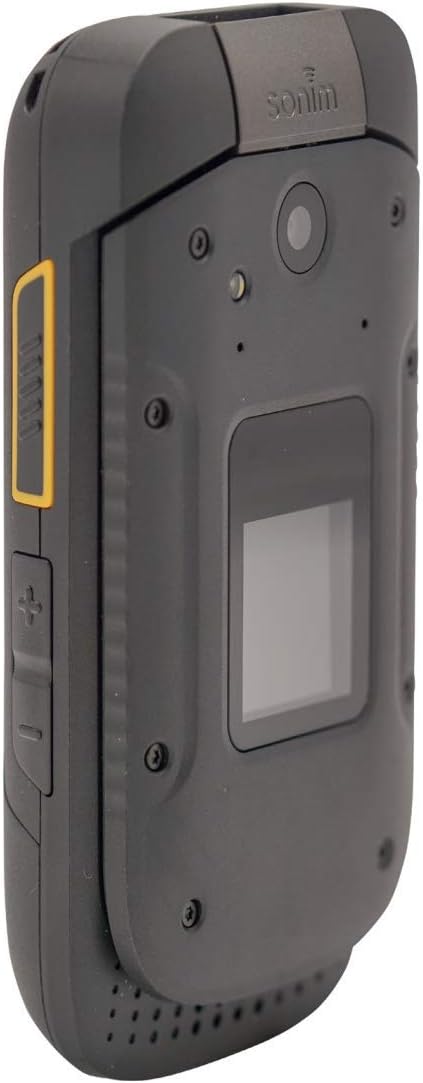
3.1 pav.: šonas view of the Sonim XP3 XP3800, highlighting the camera lens and the external display.
3.4. Phone Navigation
Navigate through menus and options using the directional keypad and the center selection button.
- Krypties klavišai: Use the Up, Down, Left, and Right keys to move through menu items.
- Centrinis raktas: Paspauskite centrinį klavišą, kad pasirinktumėte elementą arba patvirtintumėte veiksmą.
- Minkštieji klavišai: The keys directly below the screen (left and right) perform functions indicated by the text above them, which change depending on the current screen.
- Garsumo klavišai: Located on the side of the phone, these adjust call volume and media playback volume.

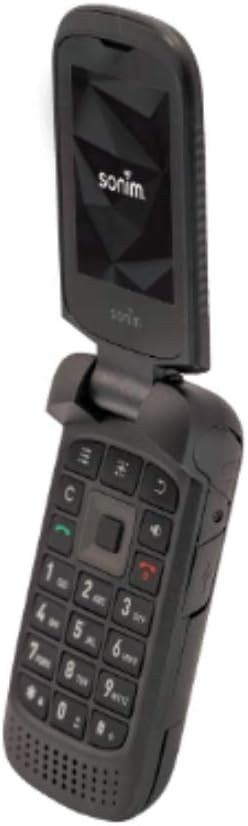
3.2 pav.: Atidaryti view of the Sonim XP3 XP3800, displaying the internal screen and the full alphanumeric keypad for navigation and input.
4. Pagrindinės savybės
The Sonim XP3 XP3800 is engineered with specific features to meet the demands of challenging environments:
- Military Standard Durability: Built to military specifications, making it highly resistant to drops, dust, and water.
- Tvirtas dizainas: Ideal for construction workers and individuals in demanding professions, offering enhanced protection against impacts.
- 4G LTE ryšys: Ensures fast and reliable communication on the Verizon network.
- Ilgai veikianti baterija: Designed for extended use, reducing the need for frequent recharging.
- Fizinė klaviatūra: Large, tactile buttons for easy operation even with gloves.
5. Priežiūra
Proper maintenance ensures the longevity and optimal performance of your Sonim XP3 XP3800.
- Valymas: Naudokite minkštą, damp cloth to wipe the phone's exterior. Avoid harsh chemicals or abrasive materials. Ensure all ports are closed before cleaning with moisture.
- Saugykla: Telefoną laikykite vėsioje, sausoje vietoje, toliau nuo tiesioginių saulės spindulių ir ekstremalių temperatūrų.
- Akumuliatoriaus priežiūra: Avoid fully discharging the battery frequently. For long-term storage, charge the battery to about 50% and remove it from the device if possible.
- Uosto apsauga: Keep the USB-C charging port and headphone jack covers securely closed when not in use to prevent dust and water ingress.
6. Problemų sprendimas
This section addresses common issues you might encounter with your Sonim XP3 XP3800.
| Problema | Galima priežastis | Sprendimas |
|---|---|---|
| Telefonas neįsijungia. | Low or no battery charge; battery not properly installed. | Kraukite akumuliatorių bent 30 minučių. Įsitikinkite, kad akumuliatorius tinkamai įdėtas. |
| Negalima skambinti arba priimti skambučių. | No network signal; SIM card not installed or faulty; account issues. | Check signal strength. Reinstall SIM card. Contact Verizon customer service. |
| Kamera neveikia. | Programinės įrangos triktis; fizinė žala. | Restart the phone. If the issue persists, contact Sonim support. |
| Prasta garso kokybė skambučių metu. | Weak signal; speaker/microphone obstruction. | Persikelkite į vietą, kurioje geresnis signalas. Išvalykite garsiakalbio / mikrofono angas. |
7. Specifikacijos
Detailed technical specifications for the Sonim XP3 XP3800:
| Funkcija | Detalė |
|---|---|
| Modelio numeris | XP3 XP3800 |
| Matmenys | 2.3 x 1.1 x 4.4 colio |
| Prekės svoris | 6.9 uncijos (6.88 uncijos) |
| Baterija | 1 ličio jonų baterija (pridedama) |
| Operacinė sistema | Android |
| CPU modelis | Snapdragon |
| Rezoliucija | 320 x 240 |
| Belaidis nešiklis | Verizon |
| Korinio ryšio technologija | 4G |
| Spalva | Juoda |
| Belaidžio tinklo technologija | LTE |
| SIM kortelių lizdų skaičius | Viena SIM kortelė |
| Gamintojas | Sonimas |
| Pasiekiama pirmoji data | 15 m. lapkričio 2019 d |
8. Palaikymas ir garantija
For technical assistance, product support, or warranty inquiries, please contact Sonim customer service. Refer to the official Sonim website or the quick start guide included in your package for the most current contact information and warranty details.
Svarbus teisinis atsakomybės apribojimas: Use your phone safely and conform to any legal requirements regarding the use of cellular phones.


