1. Įvadas
Thank you for choosing the REDPINGUO Digital Indoor Thermometer Hygrometer. This device is designed to provide accurate and real-time measurements of indoor temperature and humidity, helping you maintain a comfortable and healthy living environment. Please read this manual carefully before use to ensure proper operation and longevity of your device.
2. Produktas baigtasview
The REDPINGUO Digital Indoor Thermometer Hygrometer features a large LCD display for easy readability, showing time, temperature, and humidity. It is designed for various indoor applications, from bedrooms to greenhouses.

Figure 2.1: Two REDPINGUO Digital Thermometer Hygrometers (Black and White models).

Figure 2.2: Device displaying temperature and humidity, highlighting its role in monitoring environmental conditions for health.
Pagrindinės funkcijos:
- Large, clear LCD display (8.1 x 7.1 cm) for easy reading.
- Displays temperature in Celsius only.
- High accuracy: 2-5% RH and 1°C.
- Fast refresh rate: Data updates every 20 seconds.
- Integrated clock with AM/PM indicator.
- Versatile placement options: tabletop stand or wall-mount with double-sided stickers.
- Powered by 1 CR2032 battery (included).
3. Sąranka
3.1 Akumuliatoriaus įdėjimas
- Suraskite akumuliatoriaus skyrių įrenginio gale.
- Atidarykite skyriaus dangtelį.
- Insert one CR2032 battery, ensuring the correct polarity (+/-). The positive (+) side should face upwards.
- Saugiai uždarykite akumuliatoriaus skyriaus dangtelį.
3.2 Įdėjimo parinktys
The device offers two convenient placement methods:
- Stalinis stovas: Utilize the integrated stand on the back of the device to place it on any flat surface, such as a desk, shelf, or countertop.
- Montavimas ant sienos: Use the provided double-sided adhesive stickers to attach the device to a wall or other vertical surface, such as a refrigerator. Ensure the surface is clean and dry before applying the stickers.

Figure 3.1: Available mounting options for the device.
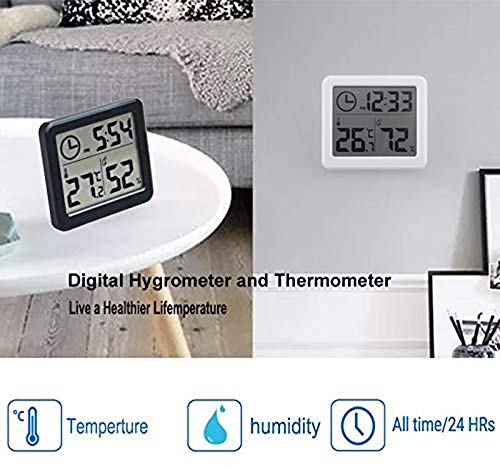
3.2 pav. Pvzamples of device placement on a table and mounted on a wall.
4. Naudojimo instrukcijos
4.1 Ekranas baigtasview
Dideliame LCD ekrane rodoma ši informacija:
- Laikas: Shown in 12-hour format with AM/PM indicator.
- Temperatūra: Displayed in Celsius (°C) only.
- Drėgmė: Rodoma kaip proctage (%).

4.1 pav. Išsamus view of the LCD display and comfort level indicators.
4.2 Laiko nustatymas
Norėdami pakoreguoti laiką:
- Locate the 'Adjust time' button, typically on the side or back of the device (refer to Figure 4.1).
- Press and hold the 'Adjust time' button until the hour digits start flashing.
- Press the 'Adjust time' button repeatedly to cycle through the hours.
- Once the correct hour is set, wait a few seconds, and the minute digits will start flashing.
- Press the 'Adjust time' button repeatedly to cycle through the minutes.
- After setting the minutes, wait a few seconds for the setting to be saved, and the display will return to normal operation.
4.3 Reading Temperature and Humidity
The device automatically measures and displays the current indoor temperature and humidity. Readings are updated approximately every 20 seconds to provide current environmental data.
Pastaba: Temperature is displayed exclusively in Celsius (°C). The device does not support Fahrenheit (°F) display.
4.4 Comfort Level Indicators
The device may provide visual indicators for humidity comfort levels:
- DŽIOVAS: Drėgmė žemiau 30 %
- KOMFORTAS: Drėgmė nuo 30% iki 60%
- Šlapias: Drėgmė virš 60 %
5. Priežiūra
5.1 Akumuliatoriaus keitimas
When the display becomes dim or stops functioning, it is time to replace the CR2032 battery. Follow the battery installation steps in Section 3.1.
5.2 Valymas
Norėdami išvalyti įrenginį, švelniai nuvalykite ekraną irasing with a soft, dry cloth. Do not use abrasive cleaners, solvents, or immerse the device in water, as this can damage the electronic components.
6. Problemų sprendimas
- Nėra ekrano arba ekranas pritemdytas:
Check if the battery is installed correctly with the correct polarity. Replace the CR2032 battery if it is depleted. - Netikslūs rodmenys:
Ensure the device is placed in a stable environment, away from direct sunlight, heat sources, or strong drafts, which can affect readings. Allow the device a few minutes to stabilize after placement or battery change. - Time not setting:
Ensure you are pressing and holding the 'Adjust time' button long enough to enter setting mode. Follow the steps in Section 4.2 carefully. - Įrenginys nereaguoja:
Remove the battery, wait for 30 seconds, and then reinsert it to perform a soft reset.
7. Specifikacijos
| Funkcija | Specifikacija |
|---|---|
| Modelio numeris | Temp-BW |
| Ekrano tipas | LCD |
| Ekrano dydis | Maždaug 8.1 x 7.1 cm (3.2 x 2.8 colio) |
| Temperatūros vienetas | Celsius (°C) only |
| Temperatūros tikslumas | ±1°C |
| Drėgmės tikslumas | ±2-5 % santykinis drėgnis |
| Duomenų atnaujinimo dažnis | Kas 20 sekundžių |
| Maitinimo šaltinis | 1 x CR2032 baterija (pridedama) |
| Gaminio matmenys | 18.1 x 9 x 2.2 cm (pakuotės matmenys) |
| Svoris | 140 gramų (pakuotės svoris) |
| Gamintojas | YOUDUO |

Figure 7.1: LCD Display Dimensions.
8. Garantija ir palaikymas
For warranty information and customer support, please refer to the documentation provided with your purchase or visit the official REDPINGUO websvetainėje. Išsaugokite pirkimo kvitą kaip pirkimo įrodymą bet kokiems garantiniams prašymams.


