Įvadas
Welcome to the user manual for your new Astro Men's Digital Watch, model A9916-PPHB. This guide provides comprehensive instructions on how to set up, operate, and maintain your watch to ensure optimal performance and longevity. Please read this manual carefully before using your watch.
Produktas baigtasview ir mygtukų funkcijos
Your Astro digital watch features a clear display and intuitive button controls for various functions.
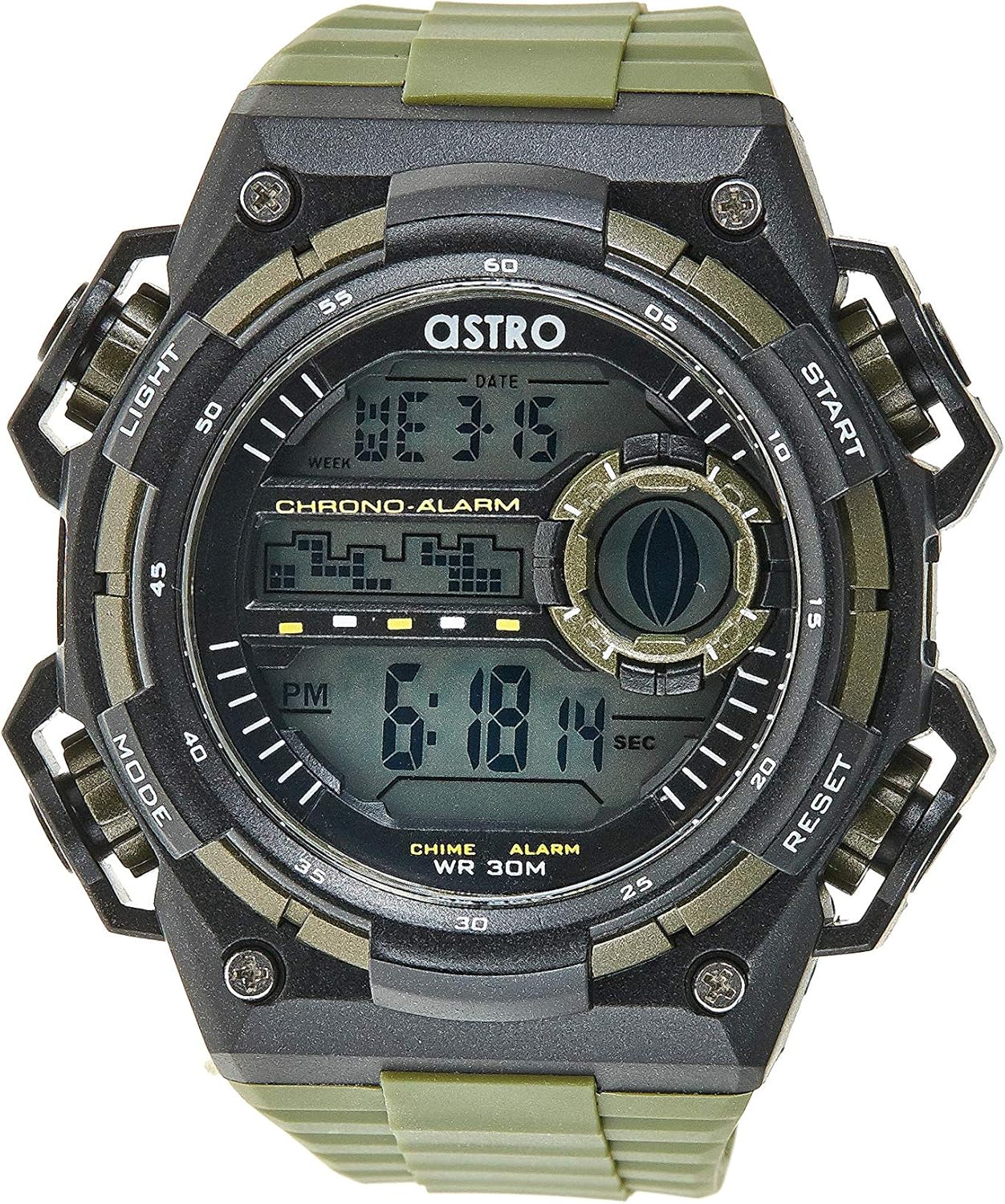
1 pav.: priekis View of the Watch. This image displays the watch face, highlighting the digital display and the four primary control buttons: LIGHT (top left), MODE (bottom left), START (top right), and RESET (bottom right). The display shows the time, day of the week, and date, along with indicators for chronograph and alarm functions.

2 pav.: šonas View of the Watch. Šis paveikslėlis suteikia profesionalumofile view of the watch, clearly showing the placement and design of the "LIGHT" and "MODE" buttons on the left side of the watch case. These buttons are essential for navigating through the watch's functions and activating the backlight.

3 pav.: Nugara View of the Watch. This image shows the reverse side of the watch, featuring the stainless steel case back secured by four screws. The durable olive green plastic strap, with its buckle closure, is also visible, indicating the watch's robust construction.
Mygtukų funkcijos:
- LIGHT mygtukas (viršuje kairėje): Activates the backlight for viewing the display in low-light conditions.
- MODE mygtukas (apačioje kairėje): Cycles through different modes: Time Display, Alarm Setting, Chronograph (Stopwatch), and Date Setting.
- START mygtukas (viršuje dešinėje): Used to start/stop the chronograph, adjust values during setting, or activate the alarm.
- Mygtukas „RESET“ (apačioje dešinėje): Used to reset the chronograph, confirm settings, or switch between 12/24-hour format.
Sąranka ir pradinė konfigūracija
1. Išpakavimas ir apžiūra
Upon receiving your watch, carefully unbox it and inspect for any visible damage. Ensure all components, including the watch and any accompanying documentation (like the guarantee card), are present.

Figure 4: Watch Packaging and Guarantee Card. This image shows the watch's protective tin packaging and the included guarantee card, which is important for warranty claims.
2. Laiko ir datos nustatymas
- Įprastame laiko rodymo režime paspauskite REŽIMAS Tris kartus paspauskite mygtuką , kad įjungtumėte laiko nustatymo režimą. Pradės mirksėti sekundžių skaitmenys.
- Paspauskite RESET mygtuką, kad perjungtumėte nustatymus: Sekundės → Valanda → Minutė → Mėnuo → Data → Savaitės diena.
- Kol mirksi skaitmuo, paspauskite PRADĖTI mygtuką, kad padidintumėte reikšmę. Laikykite nuspaustą PRADĖTI mygtuką, kad greitai perjungtumėte skaitmenis.
- Kai visi nustatymai bus sureguliuoti, paspauskite REŽIMAS mygtuką, kad išeitumėte iš nustatymo režimo ir grįžtumėte į įprastą laiko rodymo režimą.
3. 12/24-Hour Format Selection
Įprastu laiko rodymo režimu paspauskite RESET mygtuką, norėdami perjungti 12 valandų (su indikatoriumi „AM“ / „PM“) ir 24 valandų formatus.
Naudojimo instrukcijos
1. Signalizavimo funkcija
- Įprastame laiko ekrane paspauskite REŽIMAS vieną kartą, kad įjungtumėte žadintuvo režimą. Bus rodomas žadintuvo laikas.
- Paspauskite RESET button to select the hour or minute to set. The selected digit will flash.
- Paspauskite PRADĖTI mygtuką, kad sureguliuotumėte mirksintį skaitmenį.
- Norėdami įjungti / išjungti žadintuvą, paspauskite PRADĖTI mygtuką, kai įjungtas žadintuvo režimas (be mirksinčių skaitmenų). Ekrane pasirodys / išnyks žadintuvo piktograma.
- Paspauskite REŽIMAS mygtuką, kad grįžtumėte į įprastą laiko rodymą.
2. Sveikiurly varpelis
Norėdami įjungti arba išjungti hourly chime (which beeps at the top of every hour):
- Žadintuvo režime paspauskite RESET mygtuką, kad perjungtumėte hourly chime on/off. A chime icon will appear/disappear on the display.
3. Chronografas (chronometras)
- Įprastame laiko ekrane paspauskite REŽIMAS button twice to enter the Chronograph mode. The display will show "00:00:00".
- Paspauskite PRADĖTI mygtuką, kad pradėtumėte laiko matavimą.
- Paspauskite PRADĖTI dar kartą paspauskite mygtuką, kad pristabdytumėte laiko matavimą.
- Paspauskite RESET button while paused to reset the chronograph to "00:00:00".
- Paspauskite REŽIMAS mygtuką, kad grįžtumėte į įprastą laiko rodymą.
4. Foninio apšvietimo funkcija
Paspauskite ŠVIESA button (top left) at any time to illuminate the display for a few seconds, making it visible in dark environments.
Priežiūra ir priežiūra
1. Laikrodžio valymas
Kad laikrodis visada atrodytų kuo puikiausiai, reguliariai jį valykite minkštu, sausu skudurėliu. Jei nešvarumai sunkiai įveikiami, naudokite šiek tiek sausą šluostę.amp Galima naudoti šluostę, po kurios nedelsiant nusausinkite. Venkite naudoti stiprias chemines medžiagas ar abrazyvines medžiagas.
2. Water Resistance (WR 30M)
Your Astro watch is water resistant up to 30 meters (3 ATM). This means it is suitable for daily use and can withstand splashes or brief immersion in water, such as during hand washing or light rain. It is NOT suitable for showering, swimming, diving, or any water sports. Do not operate buttons when the watch is wet.
3. Baterijos keitimas
When the display becomes dim or functions become erratic, it may be time to replace the battery. Battery replacement should ideally be performed by a qualified watch technician to ensure proper sealing and water resistance integrity.
Trikčių šalinimas
| Problema | Galima priežastis | Sprendimas |
|---|---|---|
| Ekranas tuščias arba blankus. | Senka baterija. | Pakeiskite bateriją. |
| Laikas neteisingas. | Laikas nustatytas neteisingai arba netyčia paspaustas mygtukas. | Norėdami iš naujo nustatyti laiką, žr. skyrių „Laiko ir datos nustatymas“. |
| Mygtukai nereaguoja. | Watch may be in a frozen state or battery is extremely low. | Try pressing all buttons simultaneously for a few seconds to reset. If problem persists, replace battery. |
| Signalizacija neskamba. | Signalizacija neįjungta. | Ensure the alarm icon is displayed on the screen. Refer to "Alarm Function" section. |
Specifikacijos
- Modelio numeris: A9916-PPHB
- Ekrano tipas: Skaitmeninis
- Dirželio medžiaga: Plastikiniai
- Korpuso medžiaga: Plastic / Stainless Steel Back
- Atsparumas vandeniui: 30 metrų (3 bankomatai)
- Funkcijos: Time (12/24-hour), Date, Day, Alarm, Hourly Chime, Chronograph, Backlight
- Gamintojas: Astro
Garantija ir palaikymas
Your Astro A9916-PPHB watch comes with a manufacturer's guarantee. Please refer to the included guarantee card (Figure 4) for specific terms and conditions of your warranty. Keep your purchase receipt and guarantee card in a safe place as proof of purchase.
For technical support, warranty claims, or any inquiries not covered in this manual, please contact your retailer or the official Astro customer service channel as indicated on your guarantee card or product packaging.


