Įvadas
This manual provides detailed instructions for the safe and efficient operation of your KORAD KWR103 Programmable DC Power Supply. Please read this manual thoroughly before using the device to ensure proper functionality and to prevent damage or injury. The KWR103 is a versatile programmable DC power supply offering a wide range of voltage and current outputs, including 60V/15A/300W, designed for various testing and application needs.
Svarbi saugos informacija
Always observe the following safety precautions to prevent electric shock, injury, or damage to the device:
- Ensure the power supply is connected to a grounded AC outlet with the correct voltage.
- Nenaudokite įrenginio šlapioje arba damp sąlygas.
- Neatidarykite casing; viduje nėra dalių, kurias galėtų aptarnauti vartotojas. Techninę priežiūrą patikėkite kvalifikuotiems darbuotojams.
- Verify correct polarity and voltage/current settings before connecting to any load.
- Venkite trumpojo jungimo išėjimo gnybtuose.
- Disconnect power before making or changing connections.
- Užtikrinkite tinkamą vėdinimą aplink įrenginį, kad jis neperkaistų.
Produktas baigtasview
The KORAD KWR103 is a high-precision programmable DC power supply. Familiarize yourself with its components:
Priekinis skydelis

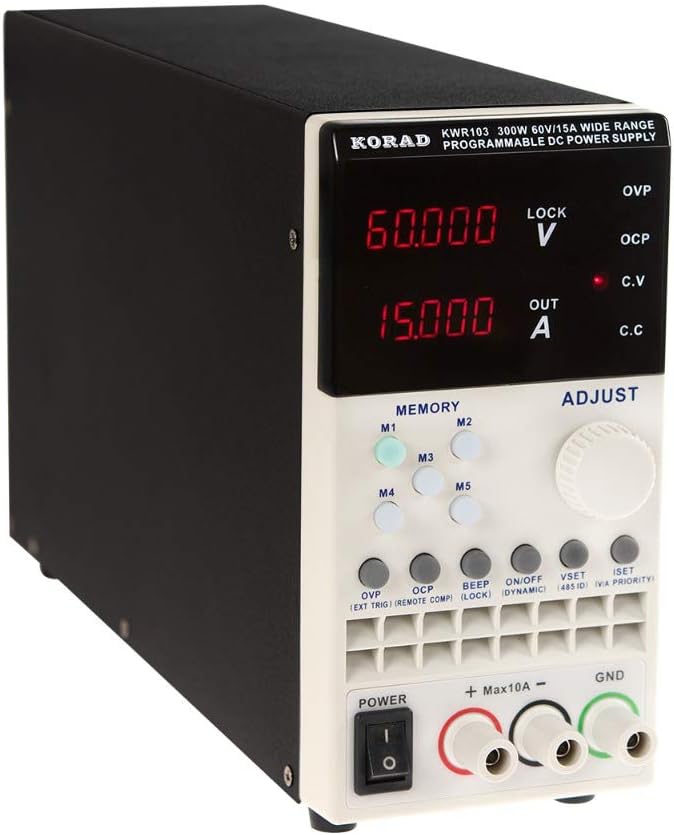
1 paveikslas: Front panel of the KORAD KWR103, showing the display, control buttons, adjustment knob, and output terminals.
- Ekranas: Digital readouts for voltage (V) ir srovė (A).
- Memory Buttons (M1-M5): For saving and recalling preset voltage ir dabartinės vertės.
- Reguliavimo rankenėlė: Rotary encoder for precise adjustment of voltage ir srovė.
- Funkciniai mygtukai: OVP, OCP, BEEP, ON/OFF, VSET, ISET, V/A PRIORITY for various settings and controls.
- Išvesties gnybtai: Positive (+), Negative (-), and Ground (GND) connections. Max 10A output directly from front terminals.
- Maitinimo jungiklis: Pagrindinis įrenginio maitinimo valdiklis.
Galinis skydelis

2 paveikslas: Rear panel of the KORAD KWR103, featuring power input, communication ports, and sense terminals.
- Kintamosios srovės įvestis: Skirtas pagrindiniam maitinimo laidui prijungti.
- Saugiklio laikiklis: Sudėtyje yra apsauginis saugiklis.
- Sense Terminals (SENSE TRIG IN+): For remote sensing to compensate for voltage kritimas per apkrovos laidus.
- RS485 terminalai: RS485 ryšiui.
- USB prievadas: For computer control and communication.
- RS232 prievadas: Nuosekliajam ryšiui.
- LAN prievadas: For network communication and control.
Pridedami priedai
3 paveikslas: The KORAD KWR103 power supply shown with its standard accessories, including power cord, output cables, USB cable, RS232 cable, and software CD.
Your KWR103 package typically includes:
- KORAD KWR103 Programmable DC Power Supply Unit
- Kintamosios srovės maitinimo laidas
- Output Test Leads (Red/Black)
- USB ryšio kabelis
- RS232 ryšio kabelis
- Software CD (for PC control)
- Vartotojo vadovas (šis dokumentas)
Sąranka
- Išpakavimas: Atsargiai išimkite maitinimo šaltinį ir visus priedus iš pakuotės. Patikrinkite, ar nėra kokių nors pažeidimų.
- Vieta: Place the unit on a stable, level surface with adequate ventilation. Ensure no vents are obstructed.
- Maitinimo jungtis:
- Įsitikinkite, kad priekiniame skydelyje esantis maitinimo jungiklis yra IŠJUNGTOJE padėtyje.
- Connect the supplied AC power cord to the AC power input on the rear panel.
- Kitą kintamosios srovės maitinimo laido galą prijunkite prie įžeminto elektros lizdo.
- Įkrovimo jungtis:
- Connect the red output test lead to the positive (+) terminal and the black output test lead to the negative (-) terminal on the front panel.
- Connect the other ends of the test leads to your load, ensuring correct polarity. For currents exceeding 10A, use the rear output terminals (if available on your specific model) or thicker gauge wires directly to the internal terminals, following safety guidelines.
- Tiksliam tūriuitage regulation at the load, especially with long cables or high currents, connect the remote sense wires (SENSE TRIG IN+) from the rear panel directly across your load.
- Communication Interface Connection (Optional):
- USB: Connect the USB cable from the rear panel to your computer.
- RS232: Connect the RS232 cable from the rear panel to your computer's serial port or a USB-to-serial adapter.
- LAN: Connect an Ethernet cable from the rear panel to your network router or switch.
- Install the provided software drivers and control application from the included CD or manufacturer's websvetainę.
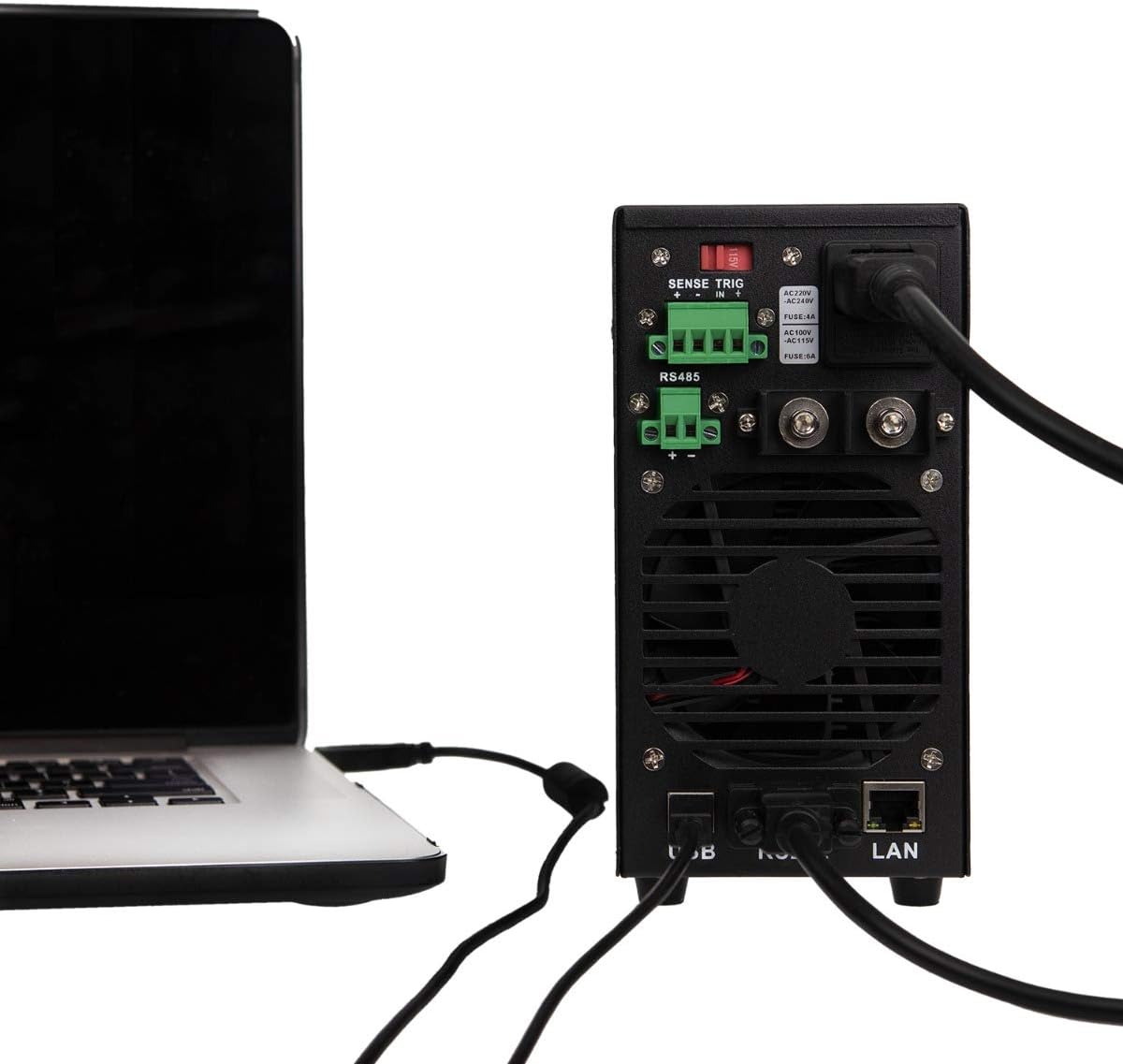
4 paveikslas: Example of the KORAD KWR103 rear panel connected to a laptop, illustrating USB and LAN connections for remote control.
Naudojimo instrukcijos
- Maitinimas: Flip the power switch on the front panel to the ON position. The display will illuminate.
- Nustatymas Voltage ir dabartinė:
- Paspauskite VSET mygtuką, norėdami įvesti ttage setting mode. The voltage display will flash.
- Pasukite Sureguliuokite rankenėlę norint nustatyti norimą garsumątage. Press the knob to move between digits for fine adjustment.
- Paspauskite ISET button to enter current setting mode. The current display will flash.
- Pasukite Sureguliuokite rankenėlę to set the desired current limit. Press the knob to move between digits.
- Paspauskite VSET or ISET again to exit setting mode, or wait a few seconds for it to exit automatically.
- Išvesties valdymas:
- Nustačius ttage and current, press the ĮJUNGTA/IŠJUNGTA button to enable the output. The "OUT" indicator will light up.
- Paspauskite ĮJUNGTA/IŠJUNGTA again to disable the output.
- Memory Functions (M1-M5):
- Išsaugoti nustatymus: Nustatykite norimą tūrįtage and current. Press and hold one of the M1-M5 buttons until a beep sounds, indicating the settings are saved.
- Nustatymų atkūrimas: Trumpai paspauskite vieną iš M1-M5 buttons to recall the saved settings.
- Per ttage Protection (OVP) and Over Current Protection (OCP):
- Paspauskite OVP button to set the over-voltage protection limit. Use the Sureguliuokite rankenėlę.
- Paspauskite OCP button to set the over-current protection limit. Use the Sureguliuokite rankenėlę.
- These functions automatically shut down the output if the set limits are exceeded, protecting the load and the power supply.
- Nuotolinio valdymo pultas:
- Once the communication drivers and software are installed, you can control the power supply via USB, RS232, or LAN.
- Refer to the software manual for detailed instructions on using the PC control application.
Priežiūra
- Valymas: Prieš valydami atjunkite maitinimo šaltinį nuo kintamosios srovės lizdo. Išorę nuvalykite minkšta, sausa šluoste. Nenaudokite abrazyvinių valiklių ar tirpiklių.
- Vėdinimas: Ensure the ventilation openings are clear of dust and debris. Periodically clean the fan intake/exhaust areas.
- Saugiklio keitimas: If the unit does not power on, the fuse may need replacement.
- Atjunkite kintamosios srovės maitinimo laidą.
- Locate the fuse holder on the rear panel.
- Carefully remove the fuse holder and replace the fuse with one of the same type and rating (e.g., FUSE: 4A for AC220V, FUSE: 6A for AC110V).
- Reinsert the fuse holder and reconnect the AC power.
Trikčių šalinimas
| Problema | Galima priežastis | Sprendimas |
|---|---|---|
| Įrenginys neįsijungia. | Nėra kintamosios srovės maitinimo; Perdegęs saugiklis; Išjungtas maitinimo jungiklis. | Check AC power connection; Replace fuse (see Maintenance); Ensure power switch is ON. |
| Nėra išėjimo tūriotage/dabartinis. | Output disabled; OVP/OCP triggered; Incorrect settings; Loose connections. | Press ON/OFF button; Check OVP/OCP settings; Verify voltage/current settings; Secure output connections. |
| ttage/Current unstable. | Poor load connection; Remote sense not used or incorrectly connected; Overheating. | Check load connections; Use remote sense for critical applications; Ensure adequate ventilation. |
| Nuotolinio valdymo pultas neveikia. | Incorrect cable; Driver not installed; Software configuration error. | Verify correct USB/RS232/LAN cable; Install drivers; Check software settings and communication parameters. |
Specifikacijos
| Parametras | Vertė |
|---|---|
| Modelis | KWR103 |
| Išėjimas ttage | 0-60V |
| Išėjimo srovė | 0-15A |
| Išėjimo galia | 300W |
| ttage Rezoliucija | 1mV |
| Dabartinė rezoliucija | 1 mA |
| Sąsajos | LAN, USB, RS232, RS485 |
| Apsaugos funkcijos | OVP (daugiau nei tomastage apsauga), OCP (apsauga nuo viršsrovės), OTP (apsauga nuo perkaitimo) |
| Prekės svoris | 11.29 svaro (apie 5.12 kg) |
| Pakuotės matmenys | 16.14 x 11.22 x 7.68 colio (apytiksliai 41 x 28.5 x 19.5 cm) |
| Aušinimo būdas | Oras |
Garantija ir palaikymas
For warranty information and technical support, please refer to the documentation included with your purchase or contact KORAD customer service. Keep your purchase receipt as proof of purchase for warranty claims.
For the latest drivers, software, and additional support resources, please visit the official KORAD websvetainę.