1. Įvadas
This manual provides comprehensive instructions for the One For All URC4912 Sony TV Replacement Remote Control. Designed to function identically to your original Sony TV remote, the URC4912 offers immediate compatibility with all Sony TV models (LCD, LED, Plasma) without requiring any setup. It also includes a learning feature for personalized customization of functions.
2. Sąranka
2.1 Baterijų įdėjimas
The URC4912 remote control requires two AA batteries (not included). Follow these steps to install them:
- Nuotolinio valdymo pulto gale raskite baterijų skyriaus dangtelį.
- Norėdami atidaryti, stumkite dangtelį žemyn arba paspauskite fiksatorių.
- Įdėkite dvi AA baterijas, užtikrindami, kad teigiamas (+) ir neigiamas (-) poliai teisingai sutaptų su žymėjimais skyriaus viduje.
- Uždėkite baterijų skyriaus dangtelį, stumdami jį atgal į vietą, kol jis tvirtai užsifiksuos.
Pastaba: Visada naudokite naujas baterijas, o senas baterijas utilizuokite atsakingai.
2.2 Initial Setup (No Configuration Required)
The One For All URC4912 remote control is pre-programmed for all Sony televisions. No setup or programming is required. Simply insert the batteries, and the remote is ready for immediate use with your Sony TV.
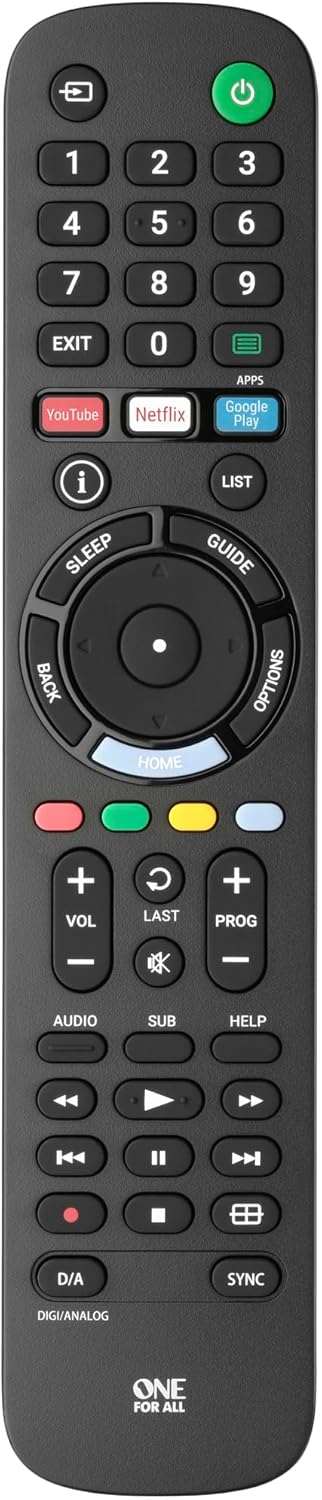
1 vaizdas: priekis view of the One For All URC4912 remote control. This image displays the remote's layout, including number buttons, navigation pad, volume and channel controls, and dedicated app buttons for services like YouTube and Netflix.
3. Nuotolinio valdymo pulto valdymas
3.1 Pagrindinės funkcijos
The URC4912 remote provides all standard functions found on an original Sony TV remote:
- Maitinimo mygtukas: Įjungia arba išjungia televizorių.
- Skaičių mygtukai (0–9): Tiesioginiam kanalų pasirinkimui.
- Garsumo didinimas / sumažinimas (+/-): Reguliuoja televizoriaus garsumą.
- Channel Up/Down (PROG +/-): Keičia televizijos kanalus.
- Nutildymo mygtukas: Nutildo televizoriaus garsą.
- Navigacijos skydelis (aukštyn, žemyn, kairėn, dešinėn, gerai): Meniu naršymui ir pasirinkimui.
- Atgal mygtukas: Grįžta į ankstesnį ekraną arba meniu.
- Namų mygtukas: Accesses the TV's main home screen or smart TV interface.
3.2 Specific Sony Functions
This remote supports common Sony-specific functions, including:
- Teatras: Activates or deactivates Theatre mode.
- i-Manual: Accesses the TV's electronic instruction manual.
- Parinktys: Rodo kontekstines dabartinio ekrano parinktis.
3.3 Learning Feature
The URC4912 remote includes a learning feature, allowing you to copy functions directly from your original remote control. This is useful for any specific functions not pre-programmed or for personalizing button assignments.
- Place the URC4912 remote and your original remote on a flat surface, facing each other, with their IR emitters approximately 1-2 inches apart.
- On the URC4912, press and hold the NUSTATYMAS button (if available, or refer to the full manual for specific button combination to enter learning mode) until the LED indicator blinks twice and then stays lit.
- Press the button on the URC4912 that you wish to program. The LED will blink rapidly.
- On your original remote, press and hold the corresponding function button until the URC4912's LED blinks twice to confirm successful learning.
- Pakartokite 3 ir 4 veiksmus su visais kitais mygtukais, kuriuos norite programuoti.
- Norėdami išeiti iš mokymosi režimo, paspauskite NUSTATYMAS mygtuką dar kartą. Šviesos diodas išsijungs.
Note: If the LED shows a long blink, the learning was unsuccessful. Try again, ensuring both remotes are stable and the original remote's batteries are fresh.

2 paveikslas: Kampinis view of the One For All URC4912 remote control, highlighting its ergonomic design and button placement for easy access to various functions.
4. Priežiūra
Kad užtikrintumėte nuotolinio valdymo pulto ilgaamžiškumą ir optimalų veikimą:
- Valymas: Wipe the remote with a soft, dry cloth. Do not use abrasive cleaners or liquids.
- Baterijos keitimas: Replace batteries when the remote's response becomes sluggish or the LED indicator (if present) signals low power. Always replace both batteries simultaneously.
- Saugykla: Nuotolinio valdymo pultą laikykite sausoje vietoje, toliau nuo tiesioginių saulės spindulių ir ekstremalių temperatūrų.
5. Problemų sprendimas
| Problema | Sprendimas |
|---|---|
| Nuotolinio valdymo pultas nereaguoja. |
|
| Kai kurie mygtukai neveikia. |
|
| Learning feature fails. |
|
6. Specifikacijos
| Prekės ženklas | Vienas už visus |
| Modelis | URC4912 |
| Suderinami įrenginiai | Television (All Sony TV types: LCD, LED, Plasma) |
| Ypatingos savybės | Infrared, Learning Function |
| Prekių skaičius | 1 |
| Baterijos tipas | 2 x AA baterijos (į komplektą neįeina) |
| Gaminio matmenys | 19.5 x 4.4 x 2.5 cm |
| Prekės svoris | 100 g |
7. Informacija apie garantiją
For detailed warranty information regarding your One For All URC4912 remote control, please refer to the official One For All websvetainėje arba garantijos kortelėje, pridėtoje prie pirkinio. Garantijos sąlygos ir nuostatos gali skirtis priklausomai nuo regiono.
8. Parama
Should you require further assistance, technical support, or have questions not covered in this manual, please visit the official One For All support website or contact their customer service. You can often find FAQs, additional guides, and contact information on their brand page:


