1. Įvadas
Thank you for choosing the Crenova Laminator Machine FNL001. This device is designed to protect and preserve your documents, photos, and other materials with a clear, durable laminated finish. This manual provides essential information for the safe and efficient operation, maintenance, and troubleshooting of your laminator. Please read it thoroughly before first use and keep it for future reference.
2. Saugos instrukcijos
To ensure safe operation and prevent damage to the laminator or injury, please observe the following safety precautions:
- Prieš naudodami mašiną, perskaitykite visas instrukcijas.
- Keep the laminator away from water or other liquids. Do not operate with wet hands.
- Do not touch the hot parts of the machine during or immediately after use.
- Unplug the laminator from the power outlet when not in use or before cleaning.
- Užtikrinkite tinkamą vėdinimą aplink įrenginį veikimo metu.
- Keep out of reach of children and pets. Adult supervision is required if children are near the device.
- Į aparatą nekiškite jokių kitų daiktų, išskyrus laminavimo maišelius.
- Use only laminating pouches recommended for this type of machine.
3. Produktas baigtasview
The Crenova Laminator FNL001 features a compact design with essential controls for efficient lamination.
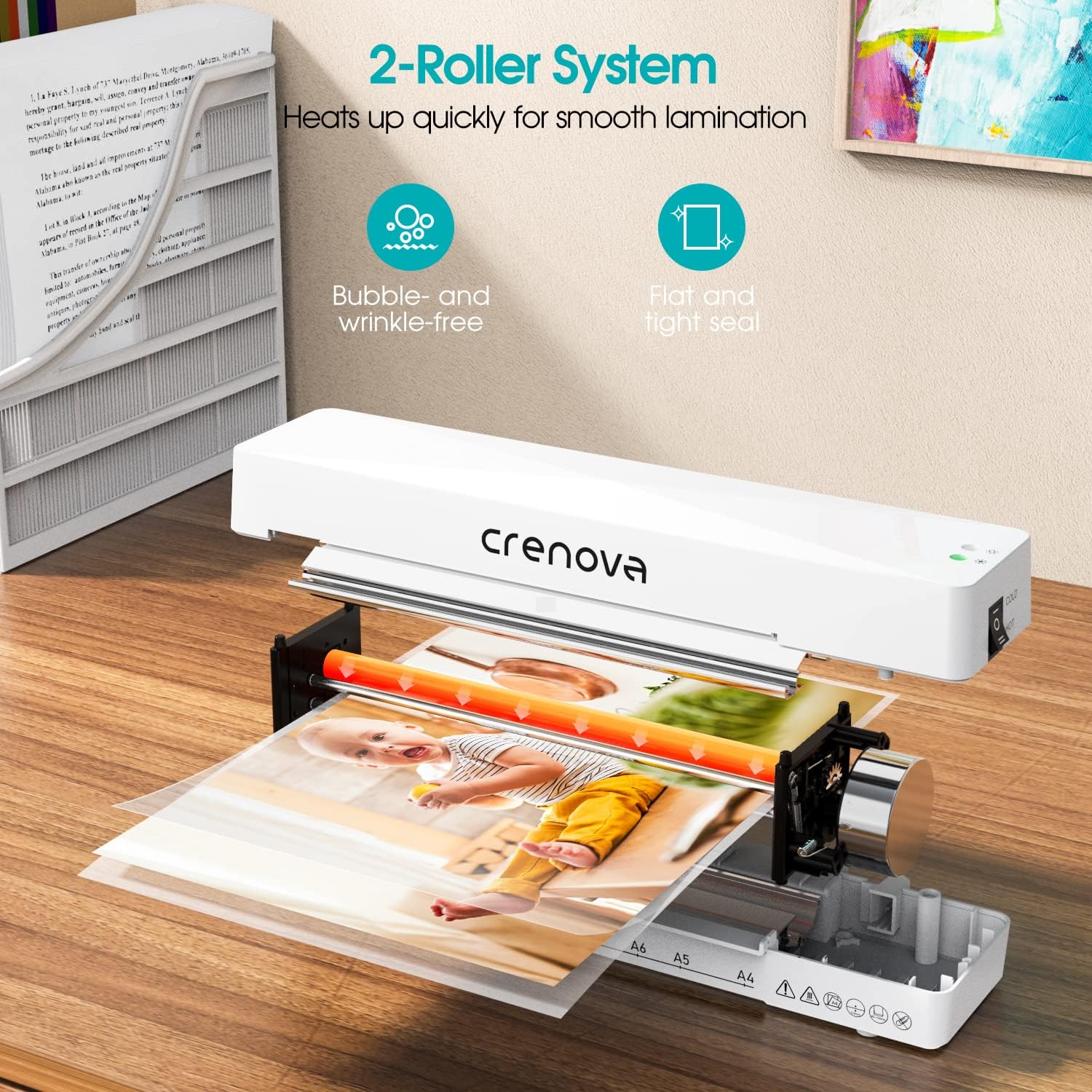
Vaizdo aprašymas: Vidinis view of the Crenova laminator, highlighting its 2-roller system designed for smooth lamination. The image shows a document being fed through the rollers, illustrating the heating process.
- Maitinimo / režimo jungiklis: Selects between OFF, COLD, and HOT lamination modes.
- Indikatoriaus lemputė: Illuminates to show power status and readiness for lamination.
- Document Inlet: Kur įdedami laminavimo maišeliai.
- Document Outlet: Where laminated documents exit.
- Jam Release Lever (ABS): Used to clear misfed or jammed pouches.
4. Sąranka
- Unpack the laminator and remove all packaging materials.
- Place the laminator on a flat, stable, and heat-resistant surface.
- Ensure there is enough space around the machine for proper ventilation and for documents to exit freely.
- Prijunkite maitinimo laidą į standartinį elektros lizdą.
5. Naudojimo instrukcijos
Norėdami sėkmingai laminuoti, atlikite šiuos veiksmus:

Vaizdo aprašymas: A four-panel image illustrating the simple operation of the Crenova laminator. Panel 1 shows switching to HOT or COLD. Panel 2 shows the mode indicator turning green. Panel 3 shows inserting the pouch straight into the inlet. Panel 4 shows the pouch auto-exiting the outlet.
- 1 veiksmas: pasirinkite režimą. Switch the power button to either KARŠTA or ŠALTA mode, depending on your laminating pouch and document type. For most standard documents, use HOT mode. Cold lamination is suitable for heat-sensitive materials or self-adhesive pouches.
- Step 2: Wait for Readiness. If using HOT mode, allow the machine to preheat. The mode indicator light will turn žalias when the laminator is ready for use. This typically takes a few minutes.
- Step 3: Prepare Document. Place your document inside a laminating pouch, ensuring it is centered and there is an even border around the edges. Do not overload the pouch.
- Step 4: Insert Pouch. Insert the sealed edge of the laminating pouch straight into the document inlet. The machine will automatically feed the pouch through. Do not force the pouch or insert it at an angle.
- Step 5: Retrieve Laminated Document. The laminated document will exit from the rear outlet. Allow it to cool on a flat surface before handling to ensure a smooth, flat finish.
The Crenova Laminator supports various document sizes up to A4 (230mm / 9 inches wide).

Vaizdo aprašymas: The Crenova laminator positioned next to various paper sizes (A4, A5, A6, A7) with their dimensions, illustrating the machine's capability to laminate documents up to 230mm (9 inches) wide.

Vaizdo aprašymas: A visual representation of the Crenova A4 laminator's versatility, showing it can laminate various document types such as certificates, photos, and menus.
6. Priežiūra
- Valymas: Always unplug the laminator and allow it to cool completely before cleaning. Wipe the exterior with a soft, dry cloth. Do not use abrasive cleaners or solvents.
- Saugykla: Store the laminator in a clean, dry, and cool place when not in use.
- Volelio valymas: Periodiškai per laminatorių perbraukite valymo lapelį (galima įsigyti atskirai), kad nuo volelių pašalintumėte klijų likučius.
7. Problemų sprendimas
Jei kyla problemų dėl laminatoriaus, žr. šias dažniausiai pasitaikančias problemas ir sprendimus:
Paper Jam Release

Vaizdo aprašymas: A three-panel image demonstrating the paper jam release process. Panel 1 shows switching the laminator off. Panel 2 shows pushing and holding the ABS lever. Panel 3 shows pulling the jammed pouch out.
- Step 1: Switch Off. Immediately turn off the laminator using the power switch.
- Step 2: Engage Release Lever. Locate the ABS (Anti-Blocking System) jam release lever, usually on the side or back of the machine. Push and hold this lever.
- Step 3: Remove Pouch. While holding the lever, carefully pull the misfed or jammed pouch straight out from the inlet or outlet.
- Release the lever and allow the machine to cool before attempting further lamination.
Kiti klausimai
- Prasta laminavimo kokybė (pūslai, raukšlės):
- Ensure the laminator has fully preheated (green indicator light).
- Use appropriate pouch thickness for the machine and document.
- Insert the pouch straight and centered.
- Do not laminate multiple items in one pouch if they are too small or unevenly spaced.
- Mašina neįsijungia:
- Patikrinkite, ar maitinimo laidas tvirtai įjungtas tiek į laminatorių, tiek į sieninį lizdą.
- Patikrinkite, ar maitinimo lizdas veikia.
8. Specifikacijos
| Prekės ženklas | Krenova |
| Modelio numeris | FNL001 |
| Prekės svoris | 1.94 svaro |
| Pakuotės matmenys | 13.54 x 6.3 x 3.11 colio |
| Max Lamination Width | 230mm (A4) |
| Volelių sistema | 2 ritinėlių sistema |
| Laminavimo režimai | Karštas ir Šaltas |
| ASIN | B08QMMSNBF |
| Pasiekiama pirmoji data | 3 m. rugsėjo 2025 d |
9. Garantija ir palaikymas
For detailed warranty information, please refer to the warranty card included with your product packaging or visit the official Crenova websvetainę.
If you require technical assistance or have questions not covered in this manual, please contact Crenova customer support. Contact details can typically be found on the manufacturer's websvetainėje arba produkto pakuotėje.


