1. Įvadas
This instruction manual provides essential information for the safe and effective use of your Sans HEPA 13 Air Purifier. Please read this manual thoroughly before operating the device and retain it for future reference. Your Sans Air Purifier is designed to improve indoor air quality by filtering out various airborne particles and odors, contributing to a healthier living environment.
2. Svarbi saugos informacija
- Prieš valydami, atlikdami techninę priežiūrą arba kai nenaudojate oro valytuvo, visada atjunkite jį nuo elektros tinklo.
- Nenaudokite įrenginio su pažeistu laidu ar kištuku. Jei laidas ar kištukas pažeisti, kreipkitės į klientų aptarnavimo tarnybą.
- Keep the air purifier away from water or wet surfaces. Do not immerse the device in water or other liquids.
- Ensure proper ventilation around the device. Do not block air inlets or outlets.
- Nekiškite jokių daiktų į ventiliacijos angas.
- Šis prietaisas nėra skirtas naudoti asmenims (įskaitant vaikus), kurių fizinės, jutimo ar psichikos negalios arba neturintys patirties ir žinių, nebent už jų saugumą atsakingas asmuo juos prižiūrėtų arba instruktuotų, kaip naudoti prietaisą.
- Vaikus reikia prižiūrėti, kad jie nežaistų su prietaisu.
3. Produktas baigtasview
The Sans HEPA 13 Air Purifier is engineered to deliver clean air efficiently and quietly. It features a multi-stage filtration system and smart technology for optimal performance.
Pagrindinės funkcijos:
- Aprėptis: Cleans air in spaces up to 1560 sq. ft. per hour.
- Multi-Stage Filtravimas: Includes a pre-filter, medical-grade HEPA 13 filter, activated carbon filter, and internal UV-C light.
- Particle Removal: Removes over 99.9% of particles down to 0.1 microns, including pollutants, allergens, dust, dander, harmful chemicals, gases, and odors.
- Išmanioji technologija: Equipped with precise sensors to measure air quality (AQI) and automatically adjust fan settings.
- Oro kokybės ekranas: Easy-to-read display provides real-time insight into your space's air quality.
- Whisper Quiet Sleep Mode: Operates silently and turns off display lights for undisturbed sleep.

Figure 3.1: Sans HEPA 13 Air Purifier with packaging.
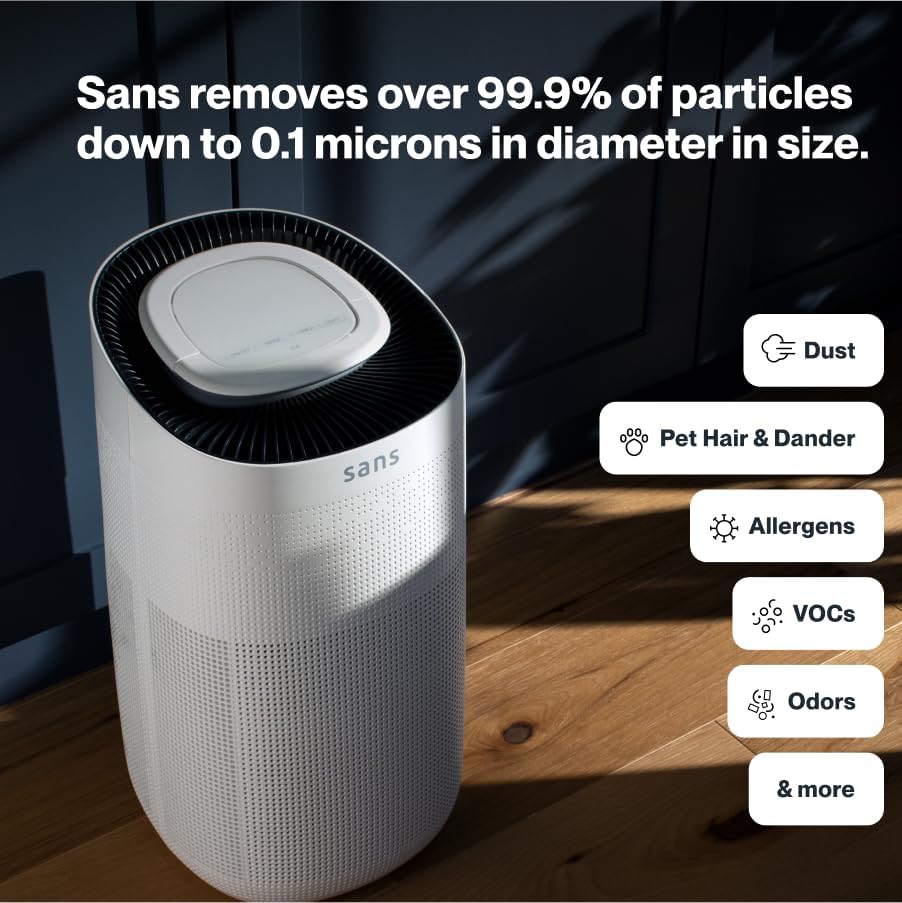
Figure 3.2: Illustration of the air purifier's effectiveness against various airborne particles.
Filtravimo sistema:
The Sans Air Purifier utilizes a comprehensive four-stage filtravimo procesas:
- Išankstinis filtras: Captures larger particles such as dust, pet hair, and dander.
- HEPA-13 filtras: A medical-grade filter that traps smoke, ash, PM2.5, and PM10 particles.
- Aktyvintos anglies filtras: Neutralizes chemicals, odors, and gases.
- Internal UV-C Light: Acts as a final layer of defense against airborne pathogens.
4. Sąranka
- Išpakuoti: Atsargiai išimkite oro valytuvą iš pakuotės.
- Filtro diegimas: Ensure all filters are correctly installed and any protective packaging is removed. Refer to Section 6: Maintenance for detailed filter replacement instructions.
- Vieta: Place the air purifier on a flat, stable surface, ensuring adequate space (at least 6 inches) around all sides for optimal airflow. Avoid placing it directly against walls or furniture.
- Maitinimo jungtis: Prijunkite maitinimo laidą į standartinį elektros lizdą.

4.1 pav.: Tinkamas oro valytuvo išdėstymas gyvenamojoje erdvėje.
5. Naudojimo instrukcijos
The control panel on top of the air purifier allows for easy operation and monitoring.

Figure 5.1: Control panel with SmartPure Display and buttons.
Valdymo skydelio funkcijos:
- Įjungimo mygtukas (⏻): Paspauskite norėdami įjungti arba išjungti įrenginį.
- Režimo mygtukas (⏚): Cycles through fan speeds (Low, Medium, High) and Auto Mode.
- Sensor Mode (⌕): Displays PM2.5 or VOC levels.
- Laikmačio mygtukas (◷): Nustato veikimo laiką (pvz., 2 val., 4 val., 8 val.).
- Šviesos mygtukas (💡): Turns the ambient light On or Off.
- Miegojimo rezimas: Activates quiet operation and turns off display lights for minimal disturbance.
Oro kokybės indikatorius:
The ambient light ring and digital display provide real-time air quality feedback:
- Mėlyna šviesa: Indicates clean air.
- Red/Purple Light: Indicates dirty air, and the unit will increase fan speed in Auto Mode to clean the air.
- Skaitmeninis ekranas: Shows the Air Quality Index (AQI) or specific pollutant levels (PM2.5, VOC). Lower numbers indicate cleaner air.
Video 5.1: Demonstration of Sans Air Purifier features and operation, including fan speed and air quality indicator.
6. Priežiūra
Regular maintenance ensures optimal performance and longevity of your Sans Air Purifier.
Filtro keitimas:
The Sans filter is designed for approximately three months of continuous use (24/7). A light on the control panel will illuminate to indicate when the filter needs to be changed.
- Išjungti: Ištraukite oro valytuvą iš maitinimo lizdo.
- Prieigos filtras: Press down on the release button on the back of the machine to open the filter compartment cover.
- Pašalinti seną filtrą: Gently pull out the used filter.
- Įterpti naują filtrą: Place the new Sans filter into the compartment, ensuring it is seated correctly.
- Uždaryti skyrių: Reattach the filter compartment cover until it clicks securely into place.
- Iš naujo nustatyti filtro indikatorių: After replacing the filter, press and hold the filter reset button (usually indicated by a filter icon) on the control panel for 3-5 seconds until the indicator light turns off.
Video 6.1: Step-by-step guide on how to change the Sans Air Purifier filter.
Išorės valymas:
Oro valytuvo išorę nuvalykite minkštu, sausu skudurėliu. Nenaudokite abrazyvinių valiklių ar tirpiklių.
7. Problemų sprendimas
If you encounter any issues with your Sans Air Purifier, refer to the following common problems and solutions:
| Problema | Galima priežastis | Sprendimas |
|---|---|---|
| Įrenginys neįsijungia. | Power cord not securely plugged in; no power from outlet. | Patikrinkite maitinimo laido jungtį; pabandykite įjungti į kitą lizdą. |
| Oro srautas silpnas arba triukšmingas. | Filter is dirty or blocked; air inlets/outlets are obstructed. | Replace the filter (see Section 6); ensure no obstructions around the unit. |
| Air quality reading (AQI) is consistently high. | High levels of pollutants in the environment; sensor is dirty. | Ensure the unit is running in Auto or High mode; clean the air quality sensor (refer to manufacturer's guide for sensor location). |
| Filter replacement indicator remains on after changing filter. | Filtro indikatorius neatstatytas. | Press and hold the filter reset button for 3-5 seconds. |
If the problem persists after attempting these solutions, please contact Sans customer support.
8. Specifikacijos
- Prekinis ženklas: Sans
- Modelis: HEPA 13 Air Purifier
- Spalva: Baltas
- Gaminio matmenys: 10" gylio x 11.5" pločio x 20" aukščio (10 x 11.5 x 20 colių)
- Svoris: 14 svaro
- Grindų ploto aprėptis: 1560 Square Feet (per hour)
- Sertifikatai: CARB sertifikuota, ETL sertifikuota, FCC sertifikuota
- Pirmas prieinamas: 5 m. sausio 2021 d
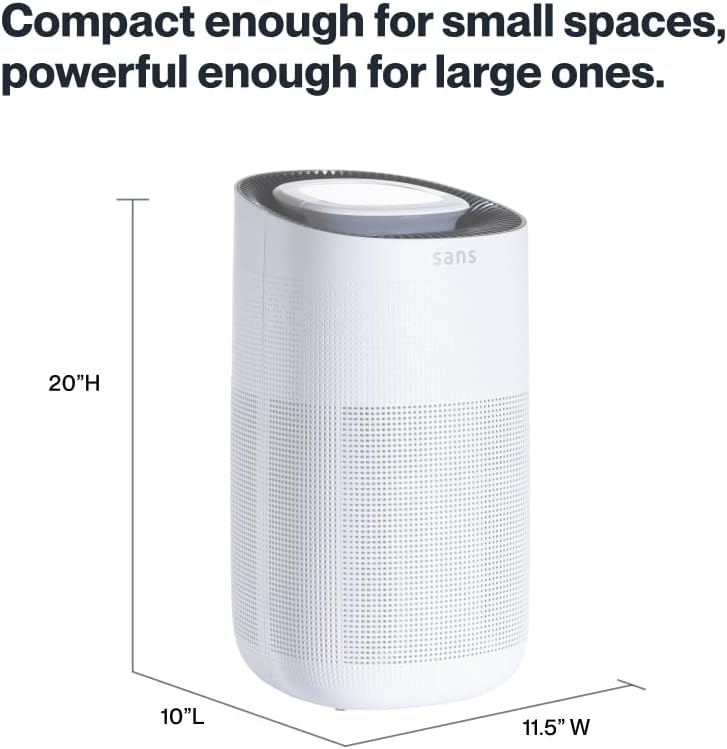
Figure 8.1: Sans Air Purifier dimensions.
9. Garantija ir palaikymas
For warranty information, product support, or to purchase replacement filters, please visit the official Sans Home Wellness website or contact their customer service directly. Details regarding available protection plans can also be found through authorized retailers.


