1. Įvadas
The Lepro PR902103-US Smart Table Lamp offers versatile lighting solutions for your home. This LED touch lamp features RGB color changing capabilities, tunable warm to cool white light, and dimmable brightness. It is designed for seamless integration with smart home ecosystems, supporting both Amazon Alexa and Google Assistant for voice control, as well as control via a dedicated mobile application. This manual provides comprehensive instructions for setup, operation, and maintenance.

Figure 1: Lepro Smart Table Lamp šouasing its app control interface.
2. Kas yra dėžutėje
Įsitikinkite, kad pakuotėje yra visi komponentai:
- 1 x Lepro Smart Table Lamp (Model: PR902103-US)
- 1 x 4.9 ft USB Cable
- 1x maitinimo adapteris
- 1 x Naudotojo vadovas (šis dokumentas)
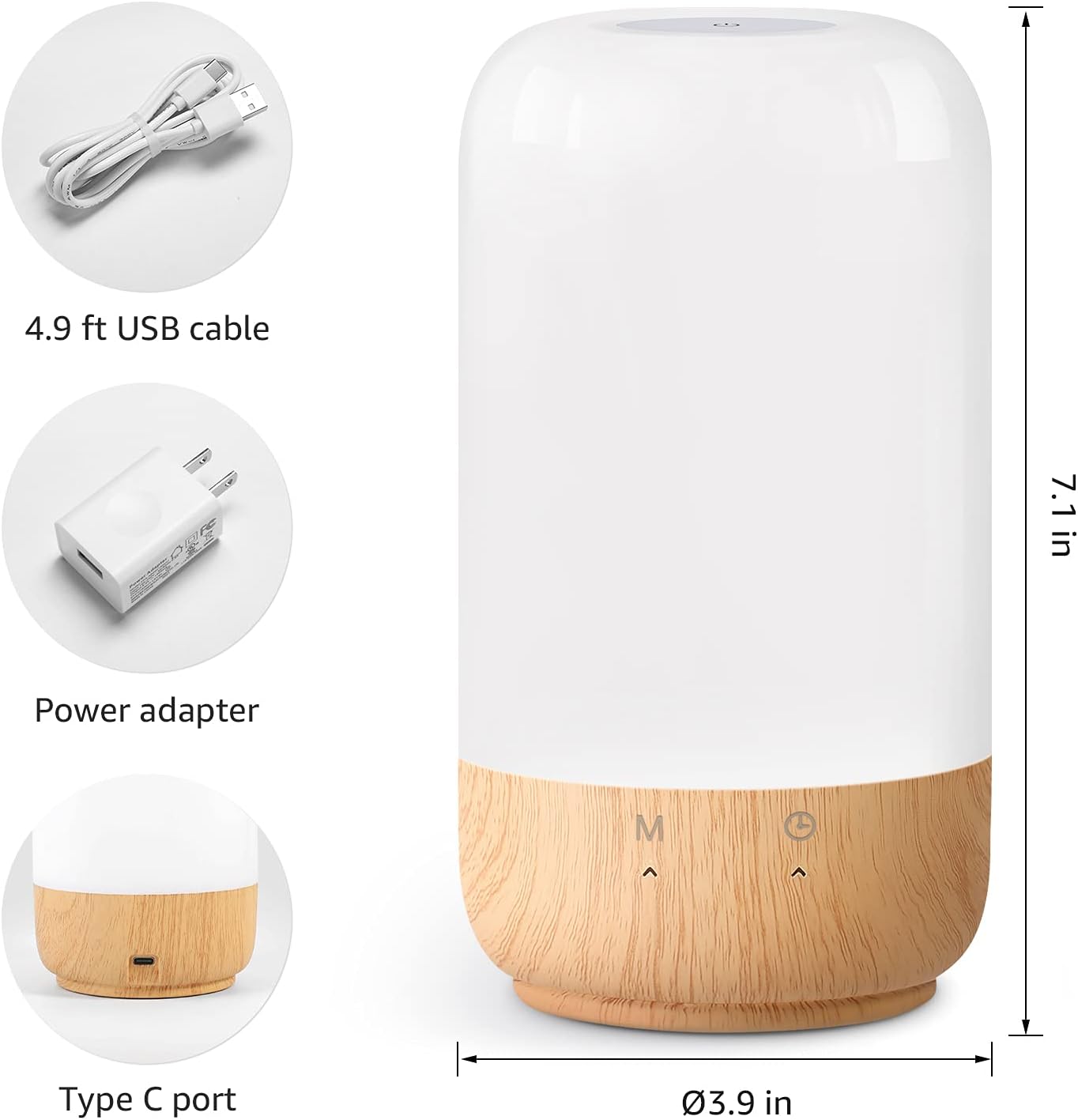
2 pav.: Į komplektą įtraukti komponentai ir gaminio matmenys.
3. Sąranka
Follow these steps to set up your Lepro Smart Table Lamp:
- Maitinimo jungtis: Prijunkite pateiktą USB kabelį prie lamp's Type-C port and the power adapter. Plug the power adapter into a standard wall outlet. The lamp apšvies.
- Programos atsisiuntimas: Download the 'Lepro LampUX' app from your mobile device's App Store (iOS) or Google Play Store (Android).
- Paskyros registracija: Open the 'Lepro LampUX' app and register a new account or log in if you already have one.
- Įrenginio susiejimas:
- Programėlėje palieskite „Pridėti įrenginį“ arba piktogramą „+“.
- Select 'Table Lamp' from the lighting category.
- Įsitikinkite, kad lamp is powered on. Long press the timer button on the lamp's base for at least 5 seconds until the indicator light blinks rapidly.
- Confirm the indicator light is blinking rapidly in the app and proceed.
- Select your 2.4 GHz Wi-Fi network and enter the password. (Note: The lamp only supports 2.4 GHz Wi-Fi networks. If your router is 5 GHz, please set it to 2.4 GHz during setup.)
- The app will begin adding the device. Once successfully added, you can rename your lamp kad būtų lengviau identifikuoti.
Video 1: Detailed steps on how to set up your Lepro Smart Lamp using the mobile application.
4. Naudojimo instrukcijos
The Lepro Smart Table Lamp can be controlled via touch, the mobile app, or voice commands.
4.1. Palieskite Valdikliai
- Maitinimo įjungimas/išjungimas: Short press the power button (marked 'M') on the lampbazė.
- Ryškumo reguliavimas: Slide your finger along the left side of the lamp's base to adjust brightness.
- Spalvų keitimas (RGB): Slide your finger along the right side of the lamp's base to cycle through RGB colors.
- Režimo jungiklis: Short press the timer button (clock icon) to switch between white light modes (warm white, cool white) and RGB color mode.
4.2. Mobile App Controls
The 'Lepro LampUX' app provides comprehensive control over your lamp:
- Brightness & Color Temperature: Adjust the brightness level and select color temperatures from 2700K (warm white) to 5700K (cool white).
- RGB spalvų pasirinkimas: Choose from 16 million colors using the color wheel in the app.
- Scenos: Select from pre-set scenes like 'Night', 'Read', 'Meeting', 'Leisure', or customize your own scenes with specific colors and effects.
- Timer & Wake-up: Nustatykite tvarkaraščius lamp to turn on/off automatically. Utilize the 'Sunrise Simulation' feature to gradually increase light for a gentle wake-up.

Figure 3: Mobile application interface for controlling lamp nustatymus.

4 paveikslas: lamp's timer and wake-up functions in use.
4.3. Valdymas balsu
The Lepro Smart Table Lamp is compatible with Amazon Alexa and Google Assistant. To enable voice control:
- Užtikrinkite savo lamp is successfully paired with the 'Lepro LampUX' app.
- Atidarykite „Amazon Alexa“ arba „Google Home“ programėlę.
- Eikite į skyrių „Įgūdžiai ir žaidimai“ („Alexa“) arba „Veikia su „Google“ („Google Home“).
- Ieškokite and enable the 'Lepro LampUX' skill/service.
- Link your 'Lepro LampUX' account with your Alexa/Google account.
- Susieję galite naudoti balso komandas, pvz.:
- „Alexa, įjunk [Lamp Vardas].
- "Hey Google, set [Lamp Pavadinimas] iki šiltos baltos spalvos.“
- „Alexa, pakeisk [Lamp Name] to blue."
- "Hey Google, dim [Lamp Name] to 50%."

Figure 5: Voice control integration with Amazon Alexa.
Video 2: Demonstration of the Lepro Smart Table Lamp working with Alexa and Google Home.
5. Priežiūra
To ensure the longevity and optimal performance of your Lepro Smart Table Lamp, please follow these maintenance guidelines:
- Valymas: Prieš valydami atjunkite maitinimą. Nuvalykite minkšta, sausa šluoste.amp's surface. Avoid using abrasive cleaners, solvents, or harsh chemicals, as these may damage the finish or electronic components.
- Saugykla: Jei saugote lamp ilgesnį laiką, užtikrinkite, kad jis būtų švarus ir sausas. Laikykite jį vėsioje, sausoje vietoje, toliau nuo tiesioginių saulės spindulių ir ekstremalių temperatūrų.
- Tvarkymas: Tvarkykite lamp atsargiai. Venkite jo numesti ir stipriai sutrenkti.
6. Problemų sprendimas
If you encounter issues with your Lepro Smart Table Lamp, žr. šias dažniausiai pasitaikančias problemas ir sprendimus:
| Problema | Galima priežastis | Sprendimas |
|---|---|---|
| Lamp neįsijungia. | Nėra maitinimo. | Patikrinkite, ar maitinimo adapteris yra tvirtai prijungtas prie maitinimo lizdo.amp and the wall outlet. Ensure the outlet is functional. |
| Nepavyksta prisijungti prie „Wi-Fi“. | Incorrect Wi-Fi band (5 GHz). Neteisingas slaptažodis. Silpnas Wi-Fi signalas. | Ensure your Wi-Fi network is 2.4 GHz. Verify the Wi-Fi password. Move the lamp closer to your router. |
| Balso valdymas neveikia. | Skill not enabled/linked. Incorrect device name. | Ensure the 'Lepro LampUX' skill is enabled and linked in your Alexa/Google Home app. Use the exact device name configured in the app. |
| Lamp yra nereaguojantis. | Laikinas programinės įrangos triktis. | Atjunkite lamp from the power outlet for 10 seconds, then plug it back in to perform a soft reset. |
7. Specifikacijos
| Funkcija | Detalė |
|---|---|
| Prekės ženklas | Lepro |
| Modelio numeris | PR902103-US |
| Gaminio matmenys | 3.9 "D x 3.9" P x 7.1" A |
| Prekės svoris | 1.19 svaro |
| Medžiaga | Plastikiniai, mediniai |
| Šviesos šaltinio tipas | LED |
| Vattage | 7 vatų |
| Ryškumas | 350 liumenų |
| Šviesios spalvos | RGB + CCT (Tunable White 2700-5700K) |
| Kontrolės metodas | App, Touch, Voice (Alexa, Google Assistant) |
| Ryšys | Tik 2.4 GHz belaidis internetas |
| Naudojimas viduje / lauke | Vidinis |
8. Garantija ir palaikymas
Lepro products are designed and manufactured to the highest quality standards. For warranty information and technical support, please refer to the contact details provided on the product packaging or visit the official Lepro websvetainėje. Išsaugokite pirkimo kvitą kaip pirkimo įrodymą garantiniams reikalavimams.


