Įvadas
This manual provides detailed instructions for the installation, operation, maintenance, and troubleshooting of the ADVANTECH PS8-500FATX-GB 80+ Gold Flex ATX Power Supply. This power supply unit (PSU) is designed to deliver stable and efficient power to your system, featuring 500W output with 3.3V, 5V, 12V, and -12V outputs, and RoHS compliance.
Saugos informacija
Please read all safety instructions carefully before installing or operating the power supply. Failure to follow these instructions may result in electric shock, fire, or damage to the product and connected equipment.
- Ensure the power supply is disconnected from the AC power source before installation or maintenance.
- Neatidarykite maitinimo šaltinio c.asing. Didelis tūristagViduje esantys komponentai kelia elektros smūgio pavojų.
- Maitinimo šaltinį įrenkite gerai vėdinamoje vietoje, kad jis neperkaistų.
- Use only the cables provided or approved by ADVANTECH for this power supply.
- Šis gaminys skirtas naudoti tik patalpose.
Pakuotės turinys
Patikrinkite, ar pakuotėje yra visi reikalingi daiktai:
- ADVANTECH PS8-500FATX-GB Power Supply Unit
- Kintamosios srovės maitinimo laidas
- Tvirtinimo varžtai
- Vartotojo vadovas (šis dokumentas)
Sąranka ir diegimas
Follow these steps to properly install the power supply into your system:
- Paruoškite savo sistemą: Ensure your computer system is powered off and disconnected from the AC outlet. Open the computer case.
- Išimkite seną maitinimo šaltinį (jei taikoma): Disconnect all cables from the old power supply. Unscrew and remove the old PSU from the chassis.
- Įdiekite naują maitinimo šaltinį: Carefully place the ADVANTECH PS8-500FATX-GB into the power supply bay of your computer case. Ensure the fan is facing the correct direction for optimal airflow (usually facing down or out of the case). Secure the PSU with the provided mounting screws.
- Prijunkite pagrindinius maitinimo kabelius:
- Connect the 20+4 pin ATX main power connector to the motherboard.
- Connect the 4+4 pin EPS/ATX 12V connector to the motherboard CPU power socket.
- Prijunkite periferinius kabelius: Connect SATA power connectors to hard drives, SSDs, and optical drives. Connect PCIe power connectors to graphics cards if required. Connect Molex connectors to other peripherals as needed.
- Kabelių valdymas: Tvarkingai išvedžiokite laidus, kad pagerintumėte oro cirkuliaciją ir pagerintumėte estetiką.
- Uždarykite korpusą ir prijunkite kintamosios srovės maitinimą: Close your computer case. Connect the AC power cord to the power supply and then to a wall outlet or surge protector.
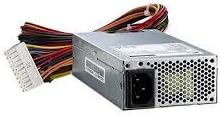
1 vaizdas: The ADVANTECH PS8-500FATX-GB 500W Flex ATX Power Supply, showing its compact form factor and various power connectors. This image illustrates the physical appearance of the unit and its attached cabling.
Naudojimo instrukcijos
Once installed, operating the power supply is straightforward:
- Maitinimas: After connecting all necessary cables and the AC power cord, press the power button on your computer case. The power supply will automatically provide power to your system.
- Išjungti: Shut down your computer through the operating system. The power supply will enter a low-power state. For complete power disconnection, switch off the power supply's main switch (if present) or unplug the AC power cord.
- Stebėjimas: Modern motherboards and operating systems often provide tools to monitor power supply voltages. Refer to your motherboard manual for details.
Priežiūra
Tinkama priežiūra užtikrina jūsų maitinimo šaltinio ilgaamžiškumą ir optimalų veikimą:
- Dulkių valymas: Periodically clean the power supply fan and vents to prevent dust buildup, which can impede airflow and cause overheating. Use compressed air for this purpose, ensuring the system is powered off and unplugged.
- Kabelio apžiūra: Regularly check all power cables for any signs of wear, fraying, or damage. Replace damaged cables immediately.
- Aplinkos sąlygos: Maitinimo šaltinį naudokite nurodytose temperatūros ir drėgmės ribose. Venkite ekstremalių sąlygų.
Trikčių šalinimas
Jei kyla problemų dėl maitinimo šaltinio, žr. šias dažniausiai pasitaikančias problemas ir sprendimus:
| Problema | Galima priežastis | Sprendimas |
|---|---|---|
| Sistema neįsijungia. |
|
|
| Sistema įsijungia, bet iš karto išsijungia. |
|
|
| Neįprasti garsai iš maitinimo bloko. |
|
|
If the problem persists after trying these solutions, contact ADVANTECH customer support for further assistance.
Specifikacijos
| Funkcija | Detalė |
|---|---|
| Modelis | PS8-500FATX-GB |
| Prekės ženklas | ADVANTECH |
| Formos faktorius | Flex ATX |
| Išėjimo vattage | 500 vatų |
| Efektyvumo įvertinimas | 80+ Gold |
| Išėjimas ttages | 3.3V, 5V, 12V, -12V |
| Jungties tipas | ATX (20+4 pin, 4+4 pin EPS/ATX 12V, SATA, PCIe, Molex) |
| Atitiktis | RoHS |
| Prekės svoris | 12.99 svaro |
| Gamintojas | Advantech Co |
| ASIN | B08SMRH5V8 |
| UPC | 040048829683 |
Garantija ir palaikymas
ADVANTECH products are designed for reliability and performance. For warranty information and technical support, please refer to the official ADVANTECH websvetainėje arba susisiekite su klientų aptarnavimo skyriumi.
- Oficialus Websvetainė: www.advantech.com
- Klientų aptarnavimas: Žr. oficialios svetainės skiltį „Susisiekite su mumis“ webregioninės pagalbos informacijos svetainėje.
Išsaugokite pirkimo įrodymą, kad galėtumėte kreiptis dėl garantijos.


