1. Įvadas
This manual provides essential information for the safe and efficient operation of your DOOGEE S97 Pro Rugged Smartphone. Please read it thoroughly before using your device.

Image 1.1: The DOOGEE S97 Pro Rugged Smartphone, showcasindėl tvirto dizaino ir ekrano.
2. Įrenginys baigtasview
The DOOGEE S97 Pro is a rugged smartphone designed for durability and performance. Key features include:
- Operacinė sistema: Android 11
- Procesorius: Helio G95 Octa Core 2.1GHz 12nm
- Atmintis: 8 GB RAM + 128 GB ROM
- Baterija: 8500mAh Super Battery with 33W Fast Charging and 10W Wireless Charging
- Ekranas: 5.71-inch Corning Gorilla Glass
- Galinė kamera: Samsung 48MP AI Main Camera (48MP + 8MP + 2MP + 2MP)
- Priekinė kamera: 16 MP
- Ypatingos savybės: 40m Rangefinder, IP68 Waterproof, Dustproof, Shockproof, NFC Support
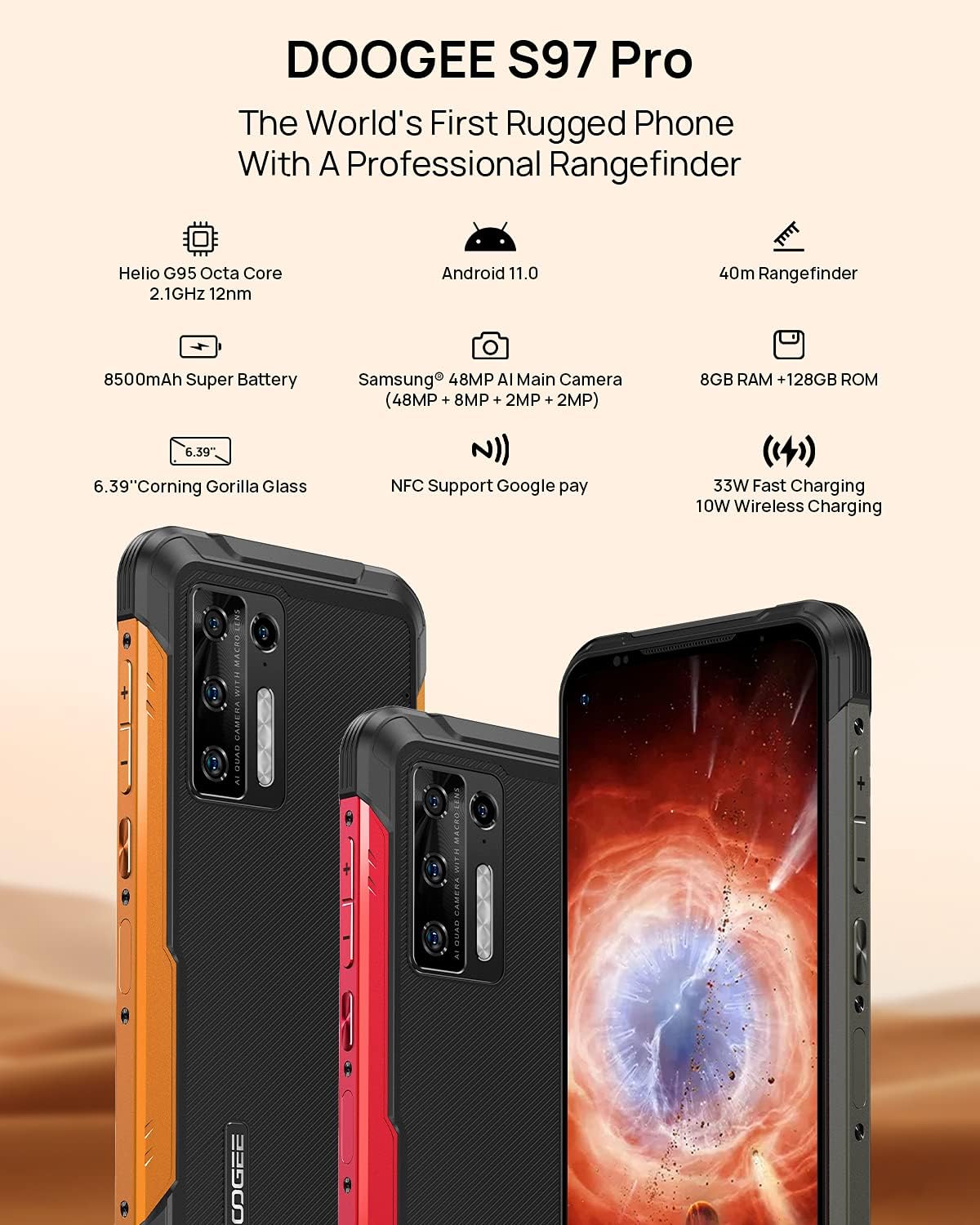
Image 2.1: Visual representation of the DOOGEE S97 Pro's main features, including processor, battery, camera, and display.
3. Sąranka
3.1 SIM kortelės montavimas
- Suraskite SIM kortelės dėklą savo įrenginio šone.
- Norėdami atidaryti dėklą, naudokite pateiktą SIM kortelės išstūmimo įrankį.
- Carefully place your Nano SIM card(s) into the designated slots. Ensure proper orientation.
- Gently push the SIM card tray back into the device until it is flush with the body.
Pastaba: This device supports specific frequency bands. Please verify compatibility with your network carrier before use. The DOOGEE S97 Pro does not support certain CDMA network carriers such as Verizon, Sprint, Xfinity, and TracFone.
3.2 Pradinis įjungimas
- Press and hold the Power button located on the side of the device until the DOOGEE logo appears.
- Vykdykite ekrane pateikiamus nurodymus, kad atliktumėte pradinę sąranką, įskaitant kalbos pasirinkimą, „Wi-Fi“ ryšį ir „Google“ paskyros nustatymą.
4. Naudojimo instrukcijos
4.1 Pagrindinė navigacija
- Back Function: Swipe from the left or right edge of the screen towards the center.
- Pagrindinis ekranas: Braukite aukštyn iš ekrano apačios, kad grįžtumėte į pagrindinį ekraną.
- Naujausios programos: Swipe up from the bottom of the screen and hold briefly to view recent applications. Swipe left or right along the very bottom of the screen to scroll through recent apps.
- Programėlių stalčius: The device does not feature a traditional app drawer. All installed applications are displayed on the home screen. Additional home screens are automatically added to the right as more apps are installed.
4.2 Kameros naudojimas
The DOOGEE S97 Pro is equipped with a versatile camera system:
- Galinė kamera: 48MP main sensor, 8MP ultra-wide angle, 2MP portrait, and 2MP macro lens.
- Priekinė kamera: 16 MP asmenukėms ir vaizdo skambučiams.
To access the camera, tap the Camera icon on your home screen. Select desired modes (Photo, Video, Portrait, Macro, etc.) from the interface.

4.1 paveikslėlis: Stambus planas view of the Samsung 48MP AI Quad Rear Camera system on the DOOGEE S97 Pro.
4.3 Rangefinder Functionality
The integrated 40m laser rangefinder allows for precise distance measurements. To use:
- Locate and open the 'Rangefinder' application on your device.
- Select the desired measurement mode (Length, Area, Volume, Pythagoras).
- Follow the on-screen instructions to aim the laser and take measurements.

Image 4.2: Screenshots of the DOOGEE S97 Pro's 40m Rangefinder application interface, showing various measurement modes.
4.4 Akumuliatoriaus valdymas
The DOOGEE S97 Pro features an 8500mAh battery. To optimize battery life and charging:
- Įkrovimas laidiniu būdu: Use the provided USB Type-C cable and a compatible 33W fast charger for optimal charging speed.
- Belaidis įkrovimas: The device supports 10W wireless charging. Place the phone on a compatible wireless charging pad.
- Akumuliatoriaus optimizavimas: Access battery settings to manage app power usage and enable power-saving modes.

Image 4.3: Illustration of the DOOGEE S97 Pro's 8500mAh Super Battery and charging capabilities.
4.5 Patvarumo savybės
The S97 Pro is built to withstand harsh environments:
- IP68 reitingas: Apsaugo nuo dulkių patekimo ir panardinimo į vandenį iki 1.5 metro gylio 30 minučių.
- Atsparus smūgiams: Designed to resist drops and impacts.
- „Corning Gorilla Glass“ stiklas: Enhances screen durability against scratches and minor impacts.

Image 4.4: Demonstrations of the DOOGEE S97 Pro's waterproof, dustproof, and shockproof capabilities.
Video 4.5: An official video from DOOGEE showcasing the rugged features and capabilities of the S59 Pro smartphone.
4.6 „Android 11“ operacinė sistema
The device runs on Android 11, offering enhanced privacy controls, improved notification management, and a streamlined user experience.

Image 4.6: Visual representation of the Android 11 operating system interface on the DOOGEE S97 Pro.
5. Priežiūra
5.1 Įrenginio valymas
Due to its waterproof design, the DOOGEE S97 Pro can be cleaned with water. Ensure all ports are securely closed before rinsing. Use a soft, damp šluoste ekranui ir korpusui valyti. Venkite stiprių cheminių medžiagų ar abrazyvinių medžiagų.
5.2 Programinės įrangos naujiniai
Reguliariai tikrinkite, ar yra programinės įrangos atnaujinimų, ir juos įdiekite, kad užtikrintumėte optimalų našumą, saugumą ir prieigą prie naujų funkcijų. Eikite į Nustatymai > Sistema > Sistemos naujinimas , kad patikrintumėte, ar yra galimų atnaujinimų.
6. Problemų sprendimas
Jei kyla problemų dėl įrenginio, žr. šiuos įprastus sprendimus:
- Įrenginys nereaguoja: Paspauskite ir palaikykite maitinimo mygtuką maždaug 10–15 sekundžių, kad priverstumėte įrenginį paleisti iš naujo.
- Tinklo ryšio problemos: Verify your SIM card is correctly inserted. Check network settings (Nustatymai > Tinklas ir internetas > Mobilusis tinklas). Paleiskite įrenginį iš naujo.
- Įkrovimo problemos: Ensure the USB cable and charger are securely connected and undamaged. Try a different charger or cable. For wireless charging, ensure the phone is correctly positioned on the charging pad.
- Fingerprint Sensor Inaccuracy: Įsitikinkite, kad jūsų pirštas švarus ir sausas. Iš naujo užregistruokite pirštų atspaudus Nustatymai > Sauga > Pirštų atspaudai.
- Lėtas našumas: Close unused applications. Clear cache (Nustatymai > Programėlės ir pranešimai > Žr. visas programas > [Programėlės pavadinimas] > Atmintis ir talpykla > Išvalyti talpyklą). Consider a factory reset as a last resort (Nustatymai > Sistema > Atstatyti parinktys > Ištrinti visus duomenis (atkurti gamyklinius)).
7. Specifikacijos
| Funkcija | Detalė |
|---|---|
| Gaminio matmenys | 6.41 x 3.19 x 0.63 colio |
| Prekės svoris | 12 uncijos (340 gramų) |
| Operacinė sistema | Android 11.0 |
| RAM | 8 GB (Note: Product data shows 4GB RAM, but images and title indicate 8GB. This manual uses 8GB as per prominent product claims.) |
| Atminties talpa | 128 GB |
| Ekrano dydis | 5.71 colių |
| Baterijos talpa | 8500 milijonųamp Hours (Note: Product data shows 10050 mAh, but images and title indicate 8500 mAh. This manual uses 8500 mAh as per prominent product claims.) |
| Belaidžio ryšio technologijos | Mobilusis ryšys, „Wi-Fi“ |
| Korinio ryšio technologija | LTE |
| Jungties tipas | C tipo USB |
| Žmogaus sąsajos įvestis | Mygtukai |
| Kas yra dėžutėje | USB kabelis |
For detailed specifications, please refer to the product packaging or the official DOOGEE websvetainę.

Image 7.1: The DOOGEE S97 Pro highlighting its 8GB RAM and 128GB ROM, powered by a Helio G95 Octa Core processor.
8. Garantija ir palaikymas
Your DOOGEE S97 Pro smartphone is covered by a manufacturer's warranty. Please refer to the warranty card included in your product packaging for specific terms and conditions, including warranty duration and coverage details.
For technical support, product inquiries, or service requests, please visit the official DOOGEE websvetainėje arba susisiekite su jų klientų aptarnavimo skyriumi. Kontaktinę informaciją paprastai galite rasti DOOGEE svetainėje. websvetainėje arba produkto pakuotėje.


