1. Svarbios saugos instrukcijos
Prieš naudodami prietaisą, atidžiai perskaitykite visas instrukcijas. Išsaugokite šį vadovą ateičiai.
- Elektros sauga: Įsitikinkite, kad ttagPrieš prijungdami, patikrinkite, ar ant prietaiso nurodytas e atitinka jūsų vietinį elektros tinklą. Nenaudokite su pažeistu laidu ar kištuku.
- Vieta: Place the dehumidifier on a stable, level surface. Maintain adequate clearance around the unit for proper airflow (at least 20 cm from walls or furniture). Do not block air inlets or outlets.
- Vandens tvarkymas: Always empty the water tank before moving the unit. Do not drink the collected water.
- Refrigerant Gas (R290): This appliance contains R290 refrigerant gas. R290 is a flammable gas. Handle with care and ensure the appliance is not damaged during transport or installation. Do not attempt to service the unit yourself if you suspect a refrigerant leak.
- Vaikai ir augintiniai: Laikykite prietaisą vaikams ir naminiams gyvūnams nepasiekiamoje vietoje. Prižiūrėkite vaikus, kad jie nežaistų su prietaisu.
- Valymas: Prieš valydami ar atlikdami bet kokią techninę priežiūrą, atjunkite maitinimo šaltinį.
2. Produktas baigtasview
2.1 Komponentai
- Valdymo skydelis
- Air Inlet (rear)
- Air Outlet (top/front)
- Water Collection Tank (front/bottom)
- Removable Air Filter (side/rear)
- Casters for easy movement
2.2 Valdymo skydas

Vaizdas: Viršus view valdymo pulto.
Valdymo skydelyje yra skaitmeninis ekranas ir jutikliniai mygtukai įvairioms funkcijoms atlikti:
- Maitinimo mygtukas: Įjungia arba išjungia įrenginį.
- Drėgmės ekranas: Shows the current ambient humidity level and the set target humidity.
- Drėgmės nustatymo mygtukai: Adjust the desired humidity level.
- Ventiliatoriaus greičio mygtukas: Selects fan speed (if available).
- Laikmačio mygtukas: Nustato 24 valandų laikmatį automatiniam veikimui.
- Pilno vandens indikatorius: Illuminates when the water tank is full, triggering automatic shut-off.
3. Sąranka
3.1 Išpakavimas
Carefully remove the dehumidifier from its packaging. Retain the packaging materials for future storage or transport. Check for any signs of damage. If the unit appears damaged, do not operate it and contact customer support.
3.2 Įdėjimas
For optimal performance, place the dehumidifier in a central location within the room. Ensure the room size does not exceed 25 square meters for effective dehumidification.
- Place the unit on a firm, level surface to prevent vibrations and ensure proper water collection.
- Allow at least 20 cm of space around the air inlet and outlet to ensure unrestricted airflow.
- Venkite įrenginio statyti šalia šilumos šaltinių arba tiesioginiuose saulės spinduliuose.
3.3 Maitinimo jungtis
Plug the power cord into a grounded electrical outlet. Ensure the outlet meets the power requirements of the dehumidifier (210W, 240V).
4. Naudojimo instrukcijos
4.1 Maitinimo įjungimas/išjungimas
Press the Power button on the control panel to turn the dehumidifier on or off. The unit will start operating in its default mode or resume previous settings.
4.2 Norimo drėgmės lygio nustatymas
The dehumidifier features a humidity sensor that detects the ambient humidity. Use the humidity setting buttons to adjust your desired humidity level. The unit will operate until this level is reached, then cycle on and off to maintain it. Recommended humidity levels are typically between 40% and 60%.
4.3 Laikmačio funkcijos naudojimas
Press the Timer button to set the 24-hour timer. This allows you to program the unit to turn on or off automatically after a set number of hours, providing flexible operation.
4.4 Vandens rezervuarų valdymas
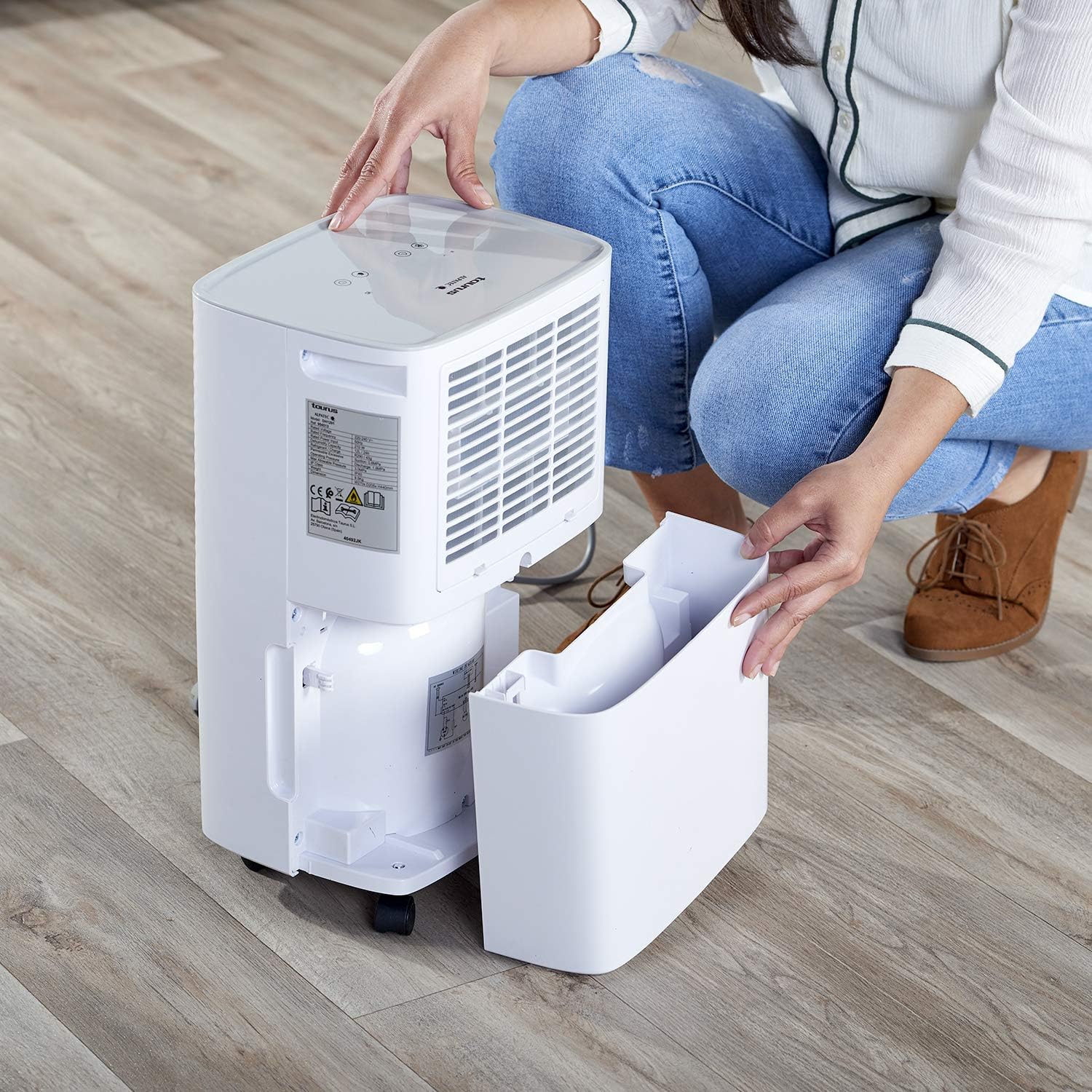
Image: Removing the water collection tank.
- Pilno vandens indikatorius: The dehumidifier has a 2.5-liter water tank. When the tank is full, the Water Full Indicator light will illuminate, and the unit will automatically shut off to prevent overflow.
- Bako ištuštinimas: Carefully pull out the water tank from the front of the unit. Dispose of the collected water. Reinsert the empty tank firmly until it clicks into place. The unit will resume operation.
- Nuolatinis drenažas: For continuous operation without needing to empty the tank, connect a drainage hose (not included) to the continuous drainage outlet (usually located at the back or side of the unit). Ensure the hose is sloped downwards to allow gravity drainage into a suitable receptacle.
5. Priežiūra
5.1 Oro filtro valymas

Image: Removing the air filter for cleaning.
Regular cleaning of the air filter is essential for efficient operation.
- Išjunkite oro sausintuvą ir atjunkite jį nuo maitinimo lizdo.
- Locate the air filter cover (typically on the side or rear of the unit) and remove it.
- Carefully pull out the air filter.
- Nuplaukite filtrą šiltu muiluotu vandeniu arba išsiurbkite, kad pašalintumėte dulkes ir šiukšles.
- Kruopščiai išskalaukite ir leiskite filtrui visiškai išdžiūti ore prieš vėl įdėdami.
- Place the dry filter back into its slot and secure the cover.
5.2 Įrenginio išorės valymas
Nuvalykite sausintuvo išorę minkšta, damp šluoste. Nenaudokite abrazyvinių valiklių, tirpiklių ar stiprių cheminių medžiagų, nes jos gali pažeisti paviršių.
5.3 Automatic Defrost Control
The dehumidifier is equipped with an automatic defrost function. If frost builds up on the evaporator coils, the unit will temporarily stop dehumidifying and run the fan to melt the frost. This is a normal operation and ensures efficient performance in cooler environments.
6. Problemų sprendimas
Prieš kreipdamiesi į klientų aptarnavimo tarnybą, review šios dažniausios problemos ir sprendimai:
| Problema | Galima priežastis | Sprendimas |
|---|---|---|
| Įrenginys neįsijungia | Nėra maitinimo; Maitinimo laidas neįjungtas; Vandens bakas pilnas arba netinkamai įdėtas. | Patikrinkite maitinimo jungtį; Ištuštinkite vandens bakelį ir tinkamai jį įstatykite. |
| Nėra sausinimo arba mažas efektyvumas | Air filter clogged; Room temperature too low; Air inlet/outlet blocked; Desired humidity level already reached. | Clean the air filter; Ensure room temperature is above 5°C; Clear obstructions; Lower the desired humidity setting. |
| Water Full Indicator is on, but tank is not full | Water tank not correctly positioned; Float switch malfunction. | Remove and reinsert the water tank firmly; If problem persists, contact support. |
| Neįprastas triukšmas veikimo metu | Įrenginys ne ant lygaus paviršiaus; Vidinio komponento problema. | Ensure unit is on a flat, stable surface; If noise is excessive or persistent, discontinue use and contact support. |
7. Specifikacijos
7.1 Techniniai duomenys
| Funkcija | Detalė |
|---|---|
| Prekės ženklas | Jautis |
| Modelio numeris | 954513000 (PLEASANT) |
| Spalva | Baltas |
| Matmenys (I x P x A) | 34.5 x 20 x 10 cm |
| Svoris | 9.5 kilogramo |
| Vandens rezervuaro talpa | 2.5 litrai |
| Sausinimo galimybė | Iki 12 litrų per 24 valandas |
| Galia | 210 vatų |
| ttage | 240 V |
| Medžiaga | Plastikiniai |
| Energijos klasė | A iki G |
| Rekomenduojamas grindų plotas | Iki 25 kvadratinių metrų |
| Ypatingos savybės | Humidity level detector, 24h timer, R290 refrigerant gas, Easy maintenance, Washable filters, Automatic defrost |
8. Garantija ir palaikymas
This product is covered by a manufacturer's warranty. Please refer to the warranty card included with your purchase or contact your retailer for specific warranty terms and conditions. For technical support, spare parts, or service inquiries, please contact the Taurus customer service department or your local distributor. Information regarding spare parts availability is not provided in this manual.


