Įvadas
The ZIPRO Dash Rowing Machine is designed to provide an effective and smooth full-body workout in the comfort of your home. Featuring a magnetic braking system, it offers quiet operation and adjustable resistance levels to suit individual training needs. The integrated training computer is compatible with the iConsole+ mobile application, allowing for wireless control via Bluetooth from your smartphone or tablet. Additionally, it supports the Kinomap application for enhanced training experiences. The computer tracks essential workout data such as time, stroke count, calorie consumption, and heart rate (with the included Polar telemetry band), displaying them on its LCD screen. Its foldable design ensures convenient storage.

Image: The ZIPRO Dash Foldable Rowing Machine, showcasing its sleek black design with green accents, magnetic resistance unit, and comfortable seat on a sturdy rail.
Svarbi saugos informacija
Please read all instructions carefully before assembling and using the ZIPRO Dash Rowing Machine. Keep this manual for future reference.
- Prieš pradėdami bet kokią mankštos programą, pasitarkite su gydytoju.
- Naudodami mašiną, vaikus ir gyvūnus laikykite toliau nuo mašinos.
- Irklavimo treniruoklį pastatykite ant lygaus, stabilaus paviršiaus, palikdami pakankamai vietos aplink jį.
- Prieš kiekvieną naudojimą patikrinkite, ar mašina nėra atsilaisvinusi arba susidėvėjusi. Nenaudokite, jei pažeista.
- Sporto metu avėkite tinkamą sportinę avalynę ir drabužius.
- Neviršykite maksimalaus 135 kg (297 svarų) naudotojo svorio.
- Naudokite mašiną tik pagal paskirtį, kaip aprašyta šioje instrukcijoje.
- Nedelsdami nutraukite pratimą, jei jaučiate silpnumą, galvos svaigimą ar skausmą.
Pakuotės turinys
Carefully unpack all components and ensure you have received the following parts:
- Main Frame Assembly (with magnetic resistance unit and console mount)
- Sėdynės bėgis
- Stumdoma sėdynė
- Priekinis stabilizatorius
- Galinis stabilizatorius
- Footrests (2)
- Vairas
- Training Computer (LCD display)
- Polar T34 Telemetry Heart Rate Band
- Aparatūros rinkinys (varžtai, poveržlės, veržlės, įrankiai)
- Vartotojo vadovas
Jei trūksta kokių nors dalių arba jos pažeistos, nedelsdami susisiekite su klientų aptarnavimo tarnyba.
Surinkimas ir nustatymas
Assembly typically takes 30-60 minutes. It is recommended to have two people for assembly. Ensure all parts are present before beginning.
- Pritvirtinkite stabilizatorius: Securely attach the front and rear stabilizers to the main frame using the provided bolts and tools. Ensure the stabilizing pads are properly aligned.
- Install Seat Rail: Connect the seat rail to the main frame. Make sure it is firmly attached and aligned.
- Sėdynės tvirtinimas: Slide the seat onto the seat rail. Verify that the ball bearings allow for smooth movement.
- Attach Footrests: Secure the two footrests to the main frame. Ensure they are stable and the straps are adjustable.
- Prijunkite vairą: Attach the handlebar to the pulling strap/chain mechanism.
- Įdiekite konsolę: Mount the training computer onto its designated holder. Insert the included batteries (AA Mignon cells). Connect any necessary cables from the main unit to the console.
- Galutinis patikrinimas: Before first use, double-check all bolts and connections to ensure they are tight and secure. Test the rowing motion and resistance adjustment.
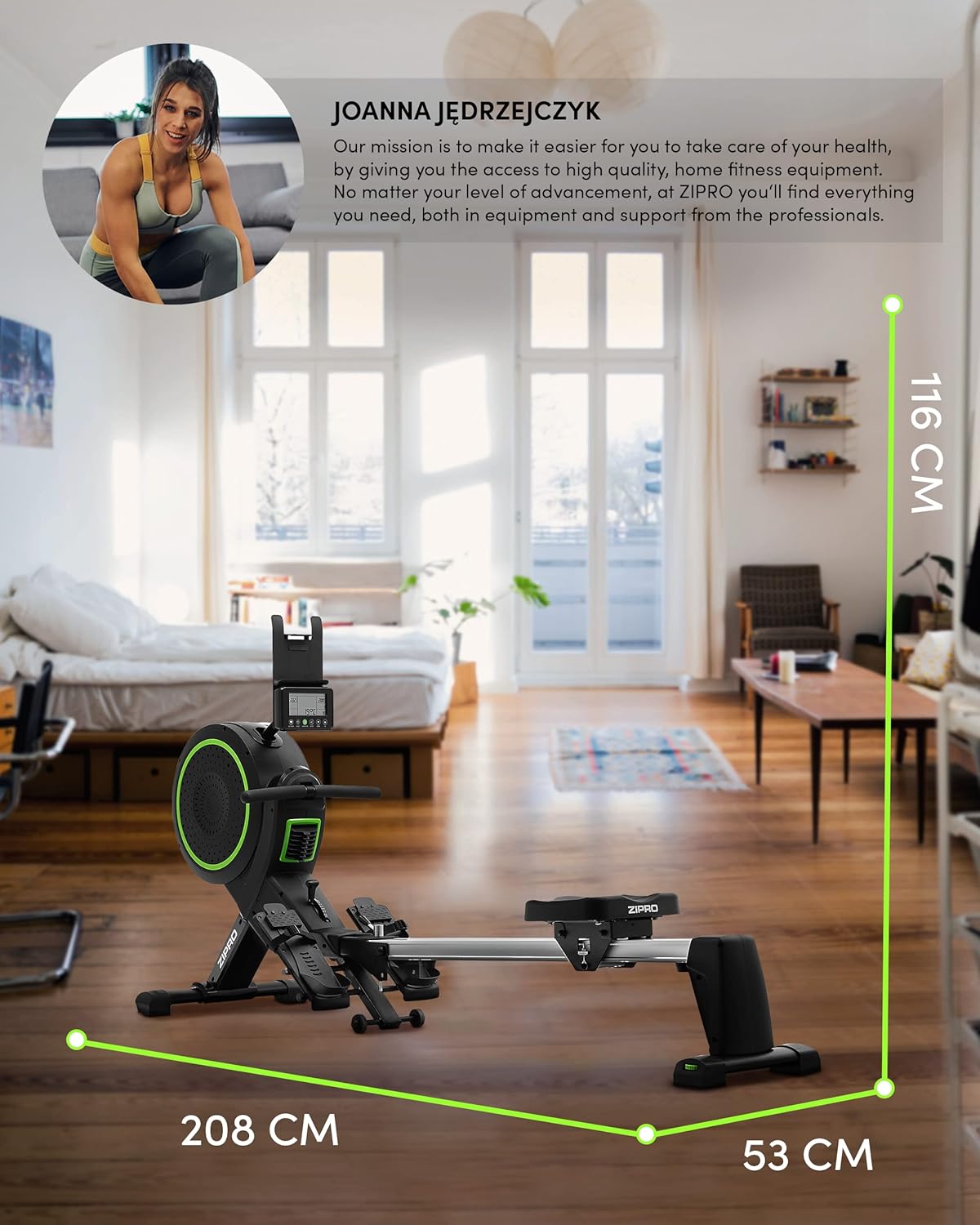
Image: Diagram showing the dimensions of the ZIPRO Dash Rowing Machine (208 cm length, 53 cm width, 116 cm height), useful for planning placement.
Naudojimo instrukcijos
Konsolės įjungimas
The LCD training computer powers on automatically when you begin rowing or press any button. It is powered by AA batteries (included).

Vaizdas: Stambus planas view of the ZIPRO Dash Rowing Machine's LCD console, showing various workout metrics and control buttons.
Atsparumo reguliavimas
The ZIPRO Dash features an 8-step magnetic resistance system. To adjust the resistance, locate the resistance knob or lever on the main unit (often near the fan/flywheel housing). Turn the knob clockwise to increase resistance and counter-clockwise to decrease it. Choose a level that challenges you appropriately for your fitness level.
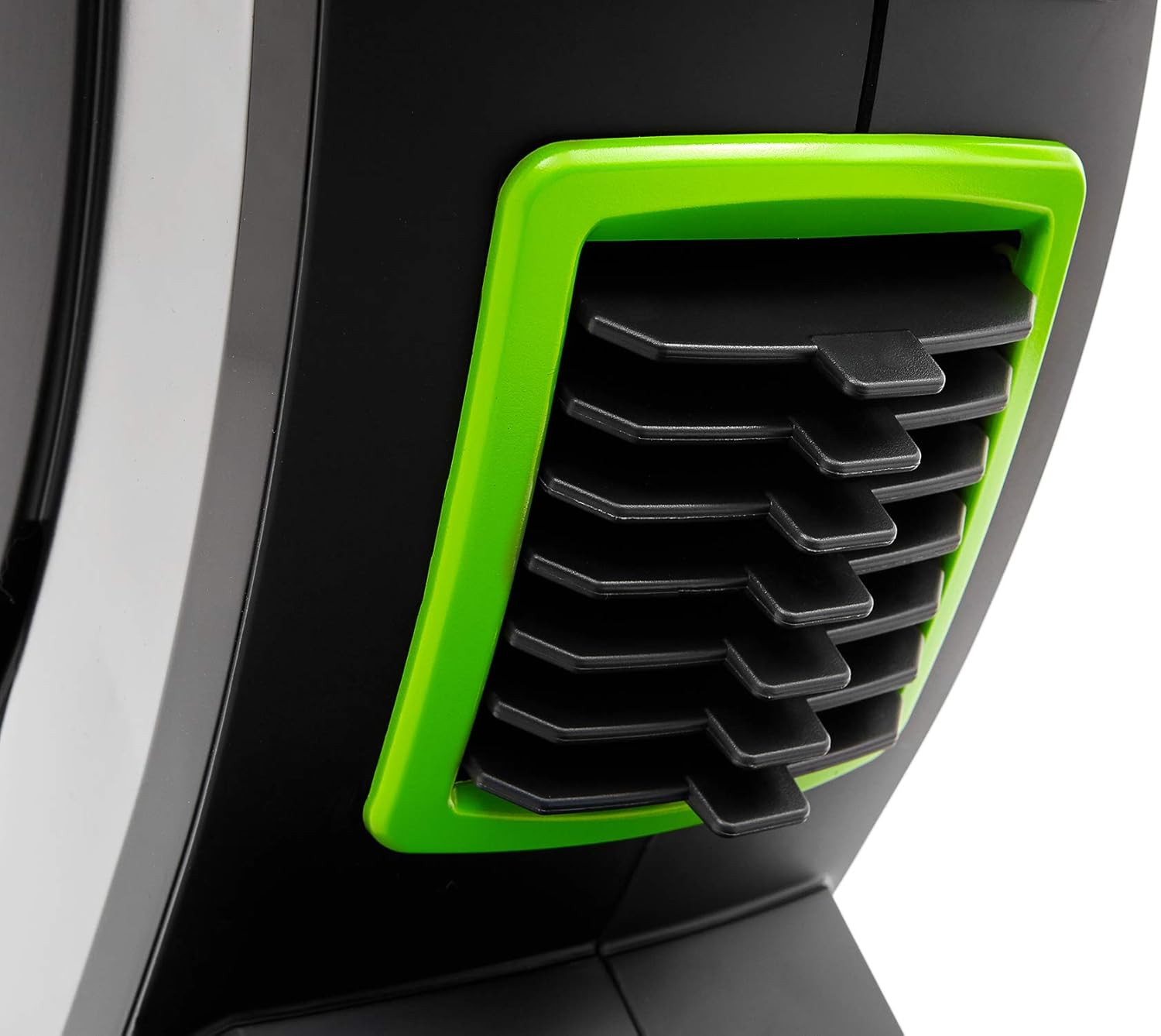
Image: Detail of the resistance adjustment mechanism on the ZIPRO Dash Rowing Machine, showing the numbered settings.
Treniruočių kompiuterio naudojimas
The LCD display shows various workout metrics:
- LAIKAS: Jūsų treniruotės trukmė.
- INSTRUKCIJAS: Total number of strokes performed.
- KALORIJOS: Apskaičiuotos sudegintos kalorijos.
- ŠIRDIES DAŽAS: Your heart rate, measured via the Polar T34 telemetry band (if worn and connected).
- Other metrics may include distance, strokes per minute, etc.
Use the buttons on the console (e.g., MODE, SET, RESET) to navigate through display modes, set target values, or reset your workout data. Refer to the console's specific instructions for detailed button functions.
Connecting to Mobile Applications (iConsole+ & Kinomap)
The ZIPRO Dash computer is Bluetooth-enabled for connectivity with mobile apps.
- Atsisiųsti programas: Download the "iConsole+" and/or "Kinomap" applications from your device's app store.
- Įjungti Bluetooth: Įsitikinkite, kad jūsų išmaniajame telefone arba planšetiniame kompiuteryje įjungtas „Bluetooth“ ryšys.
- Prisijunkite: Open the chosen app and follow the in-app instructions to search for and connect to your ZIPRO Dash rowing machine. The app will typically detect the machine automatically.
- Savybės:
- iConsole+: Allows wireless control of the rowing computer, access to workout programs, and virtual routes.
- Kinomap: Tracks your progress and offers virtual routes with real-world video, allowing you to compete with other users.

Image: A user rowing on the ZIPRO Dash, with logos for Kinomap and iConsole+ apps, highlighting the machine's smart connectivity features.
Sulankstymas ir saugojimas
The ZIPRO Dash is designed to be foldable for convenient storage.
- Išleidimo mechanizmas: Locate the folding release pin or knob, usually near the connection point of the seat rail to the main frame.
- Sulenkite aukštyn: Carefully lift the seat rail upwards until it locks into the vertical storage position. Ensure it is securely latched.
- Perkelti: Use the integrated transport wheels (located on the front stabilizer) to easily move the folded machine for storage.

Image: The ZIPRO Dash Rowing Machine shown in its folded, upright storage position, demonstrating its space-saving design.
Priežiūra
Regular maintenance will prolong the life of your rowing machine.
- Valymas: Nuvalykite mašiną su skelbimuamp Po kiekvieno naudojimo nuvalykite prakaitą ir dulkes šluoste. Nenaudokite abrazyvinių valiklių.
- Tepimas: Periodically check the seat rail for smooth operation. If needed, apply a small amount of silicone-based lubricant to the rail.
- Patikrinimai: Regularly check all bolts, nuts, and moving parts for tightness and wear. Tighten any loose fasteners. Inspect the pulling strap/chain for fraying or damage.
- Baterijos keitimas: If the console display becomes dim or unresponsive, replace the AA batteries. Note that the battery compartment might require unscrewing the console from its mount.
Trikčių šalinimas
| Problema | Galima priežastis | Sprendimas |
|---|---|---|
| Konsolė nerodo duomenų. | Baterijos išsikrovė arba įdėtos neteisingai. Atsilaisvinęs kontaktas. | Replace batteries. Check all cable connections to the console. |
| Pasipriešinimas jaučiasi nepastovus arba per silpnas/stiprus. | Resistance setting is incorrect. Internal mechanism issue. | Adjust the resistance knob. If problem persists, contact support. |
| Sėdynė neslysta sklandžiai. | Dirt or debris on the rail. Rail needs lubrication. | Clean the seat rail. Apply silicone lubricant. |
| Mašina skleidžia neįprastus garsus. | Loose bolts or components. Worn parts. | Check and tighten all bolts. Inspect for worn parts and contact support if necessary. |
| App (iConsole+/Kinomap) not connecting via Bluetooth. | Bluetooth off on device. App permissions. Console not active. | Ensure Bluetooth is on. Grant app permissions. Start rowing to activate console. Restart app/device. |
Specifikacijos
| Modelio pavadinimas | ZIPRO Dash |
| Modelio numeris | 6299212 |
| Spalva | Juoda |
| Atsparumo mechanizmas | Magnetic (8 levels) |
| Ekrano tipas | LCD |
| Tracked Metrics | Time, Strokes, Calories, Heart Rate (with Polar T34 band) |
| Ryšys | Bluetooth (iConsole+, Kinomap compatible) |
| Maksimalus vartotojo svoris | 135 kg (297 svaro) |
| Maksimalus rekomenduojamas naudotojo ūgis | 200 cm (6 pėdos 7 coliai) |
| Gaminio matmenys (I x P x A) | 207 x 53 x 115 cm (81.5 x 20.9 x 45.3 colio) |
| Sulankstytos pakuotės matmenys (apytiksliai) | (Vertical storage, specific dimensions not provided but implied by foldable feature) |
| Prekės svoris | 40 kg (88 svaro) |
| Rėmo medžiaga | Metal / Alloy Steel |
| Maitinimo šaltinis | Manual (hand-operated), Console: Batteries (AA) |
| Ypatingos savybės | Foldable design, Anti-slip footrests, Portable device holder, Stabilizing pads, Transport wheels |
Garantija ir palaikymas
For warranty information, please refer to the warranty card included with your product or visit the official ZIPRO websvetainėje. Išsaugokite pirkimo įrodymą garantiniams reikalavimams.
If you encounter any issues not covered in the troubleshooting section or require further assistance, please contact ZIPRO customer support. Contact details can typically be found on the manufacturer's websvetainėje arba ant produkto pakuotės.
Gamintojas: Morele.net Sp. z oo


