1. Įvadas
This manual provides comprehensive instructions for the installation, operation, and maintenance of your CALEX Smart Mini Indoor IP Camera. Please read this manual thoroughly before using the product to ensure proper functionality and safety.
The CALEX Smart Mini Indoor IP Camera is a Wi-Fi surveillance camera offering 1080P Full HD resolution, night vision capabilities, two-way audio communication, and flexible storage options via MicroSD card or cloud.
2. Pakuotės turinys
Patikrinkite, ar pakuotėje yra visi reikalingi daiktai:
- 1 x CALEX Smart Mini Indoor IP Camera
- 1 x Power Adapter (AC 220-240 V, 50/60 Hz input; DC 5 V output)
- 1x USB laidas
- 1 x Naudotojo vadovas (šis dokumentas)
- Tvirtinimo priedai (jei taikoma, nėra aiškiai išvardyti, bet įprasti kameroms)

Figure 2.1: CALEX Smart Mini Indoor IP Camera and its retail packaging. The packaging highlights 1080P Full HD, Wi-Fi 2.4 GHz, and compatibility with the Calex Smart app.
3. Produktas baigtasview
Familiarize yourself with the components of your CALEX Smart Mini Indoor IP Camera.
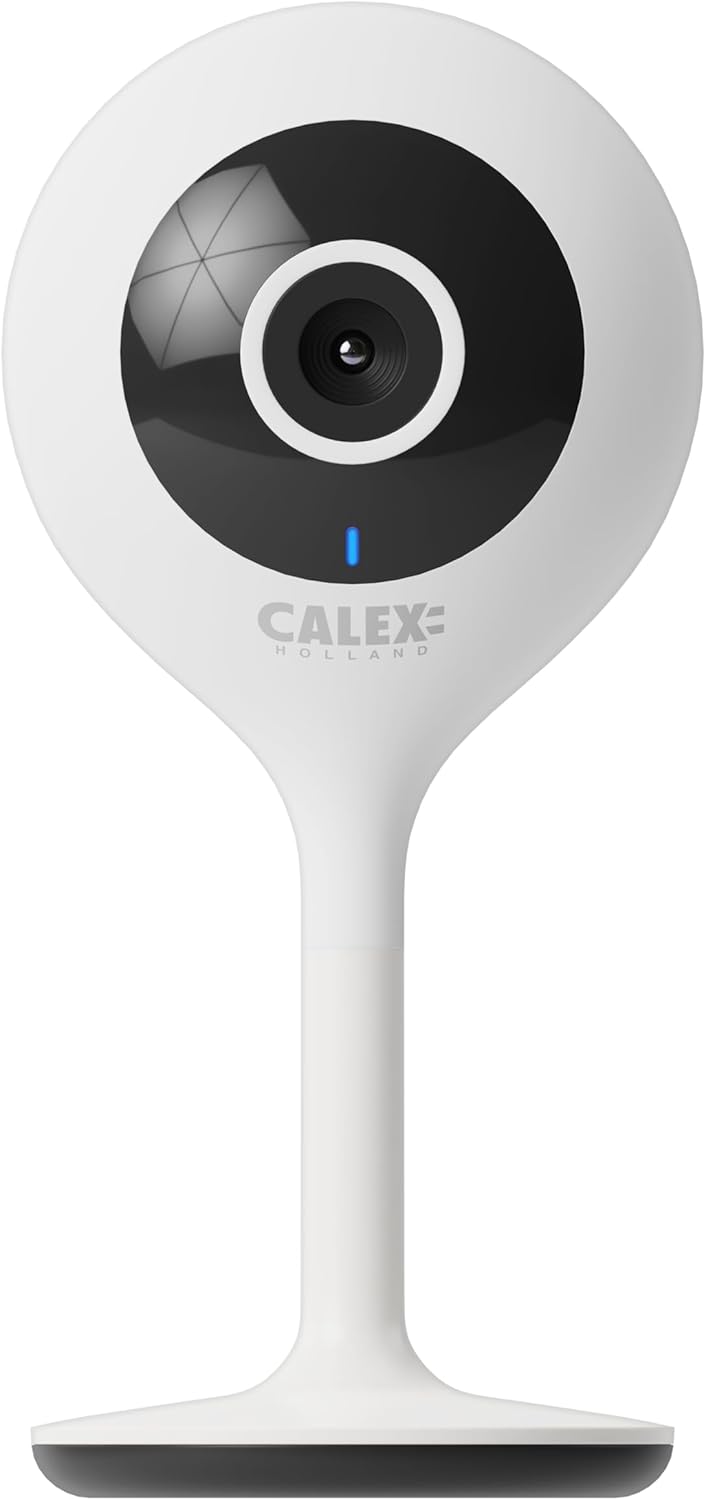
3.1 pav.: priekis view of the CALEX Smart Mini Indoor IP Camera. It features a central lens, an indicator light, and the CALEX HOLLAND logo.

3.2 pav.: galinis view of the CALEX Smart Mini Indoor IP Camera. This view shows the speaker grille, a reset button, and the MicroSD card slot. The USB power input is located at the base.
Pagrindinės funkcijos:
- Full HD 1080p raiška: Pateikiamas aiškus ir išsamus vaizdo įrašastage.
- Naktinis matymas: Equipped with infrared LEDs for clear monitoring in low-light or dark conditions.
- Dvipusis garsas: Įmontuotas mikrofonas ir garsiakalbis bendravimui.
- „Wi-Fi“ ryšys: Connects to your home Wi-Fi network (2.4 GHz only).
- Vietinė saugykla: Supports MicroSD card for continuous recording or event-triggered recording.
- Saugykla debesyje: Papildoma debesies saugyklos paslauga saugiam įrašymui ne vietoje.
- Judesio aptikimas: Įspėjimai ir įrašai aptikus judesį.
- Programų mobiliesiems valdymas: Tvarkyti ir view live feed via the Calex Smart app.
- Balso asistento suderinamumas: Veikia su „Amazon Alexa“ ir „Google Home“.
4. Sąranka ir diegimas
4.1 Prieš pradėdami
- Įsitikinkite, kad jūsų „Wi-Fi“ tinklas yra 2.4 GHz dažnio. Kamera nepalaiko 5 GHz „Wi-Fi“.
- Turėkite paruoštą „Wi-Fi“ tinklo pavadinimą (SSID) ir slaptažodį.
- Download the "Calex Smart" app from your mobile device's app store.
- Place the camera within range of your Wi-Fi router.

Figure 4.1: QR codes for downloading the Calex Smart app. Scan the appropriate QR code for your device (iOS or Android) to download the application.
Download the Calex Smart app here: iOS App Store | Google Play parduotuvė
4.2 Pradiniai nustatymo žingsniai
- Maitinimas: Connect the camera to a power outlet using the provided USB cable and power adapter. The camera's indicator light will begin to flash, indicating it is ready for pairing.
- Open Calex Smart App: Launch the Calex Smart app on your smartphone. If you are a new user, register an account. If you already have an account, log in.
- Pridėti įrenginį: Tap the "+" icon in the top right corner of the app to add a new device. Select "Security & Video Surveillance" and then "Smart Camera".
- Patvirtinkite indikatoriaus būseną: Follow the in-app instructions. Confirm that the indicator light on your camera is flashing rapidly.
- Įveskite „Wi-Fi“ informaciją: Enter your 2.4 GHz Wi-Fi network name and password when prompted.
- Nuskaityti QR kodą: The app will generate a QR code. Hold your phone with the QR code approximately 15-20 cm (6-8 inches) in front of the camera lens. The camera will emit a sound when it successfully scans the QR code.
- Ryšys: Tap "I heard a prompt" in the app. The camera will then attempt to connect to your Wi-Fi network. Once connected, the indicator light will turn solid blue.
- Įrenginio pavadinimas: Once connected, you can name your camera (e.g., "Living Room Camera", "Nursery Camera").


4.2 pav. Pvzamples of the Calex Smart app interface. The left image shows a live camera feed with options for screenshot, speaking, and recording. The right image shows a settings screen within the app.
5. Kameros valdymas
5.1 Tiesiogiai View
Open the Calex Smart app and select your camera from the device list to access the live video feed. You can view the feed in portrait or landscape mode.

5.1 pav.: Vartotojas viewing the live feed from the CALEX Smart Mini Indoor IP Camera on their smartphone.
5.2 Dvipusis garsas
Kol vyksta gyvai view, tap the microphone icon to speak through the camera's speaker. Tap the speaker icon to listen to audio from the camera's microphone.
5.3 Įrašymas ir atkūrimas
- Rankinis įrašymas: Tap the "Record" button in the live view interface to start or stop manual recording. Recordings are saved to your phone's gallery.
- Ekrano kopija: Tap the "Screenshot" button to capture a still image from the live feed.
- MicroSD Card Recording: Insert a MicroSD card (up to 128GB, not included) into the camera's slot for continuous or event-triggered recording. Ensure the card is formatted within the app settings.
- Saugykla debesyje: Subscribe to the cloud storage service via the app for secure, off-site storage of event recordings.
- Atkūrimas: Prieiga įrašyta footage from the "Playback" section within the camera's settings in the app.

Figure 5.2: The Calex Smart app interface displaying options for cloud storage and video playback. This allows users to review užfiksuoti įvykiai.
5.4 Judesio aptikimas ir įspėjimai
Configure motion detection sensitivity and alert settings in the app. You will receive push notifications on your smartphone when motion is detected.
5.5 Balso valdymas („Alexa“ / „Google Home“)
To integrate your camera with Amazon Alexa or Google Home, follow the instructions in the respective voice assistant app to enable the "Calex Smart" skill/action. You can then use voice commands to view kameros vaizdo signalas suderinamuose išmaniuosiuose ekranuose.

Figure 5.3: A couple using voice commands with an Amazon Echo device, demonstrating the camera's compatibility with smart home ecosystems like Alexa and Google Home.
6. Priežiūra
- Valymas: Kameros objektyvą ir korpusą valykite minkštu, sausu audiniu. Nenaudokite skystų valiklių ar aerozolių.
- Firmware atnaujinimai: Periodically check the Calex Smart app for available firmware updates for your camera. Keeping the firmware updated ensures optimal performance and security.
- Kameros nustatymas iš naujo: If you experience connectivity issues or need to reconfigure the camera, locate the reset button on the back of the device (refer to Figure 3.2). Use a pin or a straightened paperclip to press and hold the reset button for approximately 5-10 seconds until the indicator light flashes rapidly. This will restore the camera to factory settings.
7. Problemų sprendimas
| Problema | Galima priežastis | Sprendimas |
|---|---|---|
| Kamerai nepavyksta prisijungti prie „Wi-Fi“. | Incorrect Wi-Fi password; 5 GHz Wi-Fi network; camera too far from router; Wi-Fi signal interference. |
|
| Nėra tiesioginio vaizdo transliacijos. | Camera offline; poor internet connection; app issue. |
|
| „MicroSD“ kortelė neatpažinta. | Card not inserted correctly; card corrupted; unsupported card size/format. |
|
| Dvipusis garsas neveikia. | Microphone/speaker muted in app; low volume; app permissions. |
|
8. Specifikacijos
| Funkcija | Detalė |
|---|---|
| Modelio pavadinimas | Išmanioji sauga |
| Modelio numeris | 5501000300 |
| Rezoliucija | 1080p „Full HD“ |
| Ryšys | „Wi-Fi“ (tik 2.4 GHz) |
| Maitinimo įvestis | AC 220-240 Volts, 50/60 Hz |
| Maitinimo išvestis (adapteris) | DC 5 voltų |
| Energijos suvartojimas | 5 vatų |
| Matmenys (I x P x A) | 3.2 x 5.3 x 11 cm (1.26 x 2.09 x 4.33 colio) |
| Svoris | 167 gramų (0.37 svaro) |
| Medžiaga | Plastikiniai |
| Spalva | Baltas |
| Saugojimo parinktys | „MicroSD“ (iki 128 GB), debesies saugykla |
| Ypatingos savybės | Night Vision, Two-Way Audio, Motion Detection, Compatible with Alexa/Google Home |
| Naudojimo aplinka | Vidinis |
9. Garantija ir palaikymas
CALEX products are designed and manufactured to the highest quality standards. For warranty information and technical support, please refer to the official CALEX websvetainėje arba susisiekite tiesiogiai su jų klientų aptarnavimo tarnyba.
Gamintojas: CALEX
Norėdami gauti daugiau pagalbos, apsilankykite CALEX oficialus Websvetainę.
10. Saugos informacija
- Saugokite fotoaparatą nuo vandens ar drėgmės. Šis gaminys skirtas naudoti tik patalpose.
- Nebandykite patys ardyti ar taisyti fotoaparato. Visus techninės priežiūros darbus patikėkite kvalifikuotiems specialistams.
- Use only the provided power adapter and cable to prevent damage or fire.
- Keep the camera away from direct sunlight, heat sources, and strong magnetic fields.
- Ensure the camera is placed on a stable surface to prevent it from falling.


