1. Įvadas
The TechniSat DIGITRADIO 21 is a compact DAB+ and FM radio designed for under-cabinet installation, ideal for kitchens or other spaces where a space-saving audio solution is desired. It features digital radio reception (DAB+), traditional FM radio, Bluetooth audio streaming, and a clear color display. This manual provides essential information for the safe and efficient use of your device.
2. Saugos informacija
- Prieš naudodami įrenginį, atidžiai perskaitykite visas instrukcijas.
- Laikykite prietaisą atokiau nuo vandens, drėgmės ir tiesioginių šilumos šaltinių.
- Užtikrinkite tinkamą vėdinimą aplink įrenginį, kad išvengtumėte perkaitimo.
- Naudokite tik pateiktą maitinimo adapterį.
- Nebandykite patys atidaryti ar taisyti įrenginio. Visus techninės priežiūros darbus patikėkite kvalifikuotiems specialistams.
- Prietaisą valykite minkštu, sausu skudurėliu. Nenaudokite skystų valiklių.
3. Pakuotės turinys
Patikrinkite, ar pakuotėje yra visi reikalingi daiktai:
- TechniSat DIGITRADIO 21 Unit
- Maitinimo adapteris
- Mounting Material (screws, mounting plate)
- Vartotojo vadovas (šis dokumentas)
4. Produktas baigtasview
4.1 Priekinio skydelio valdikliai ir ekranas
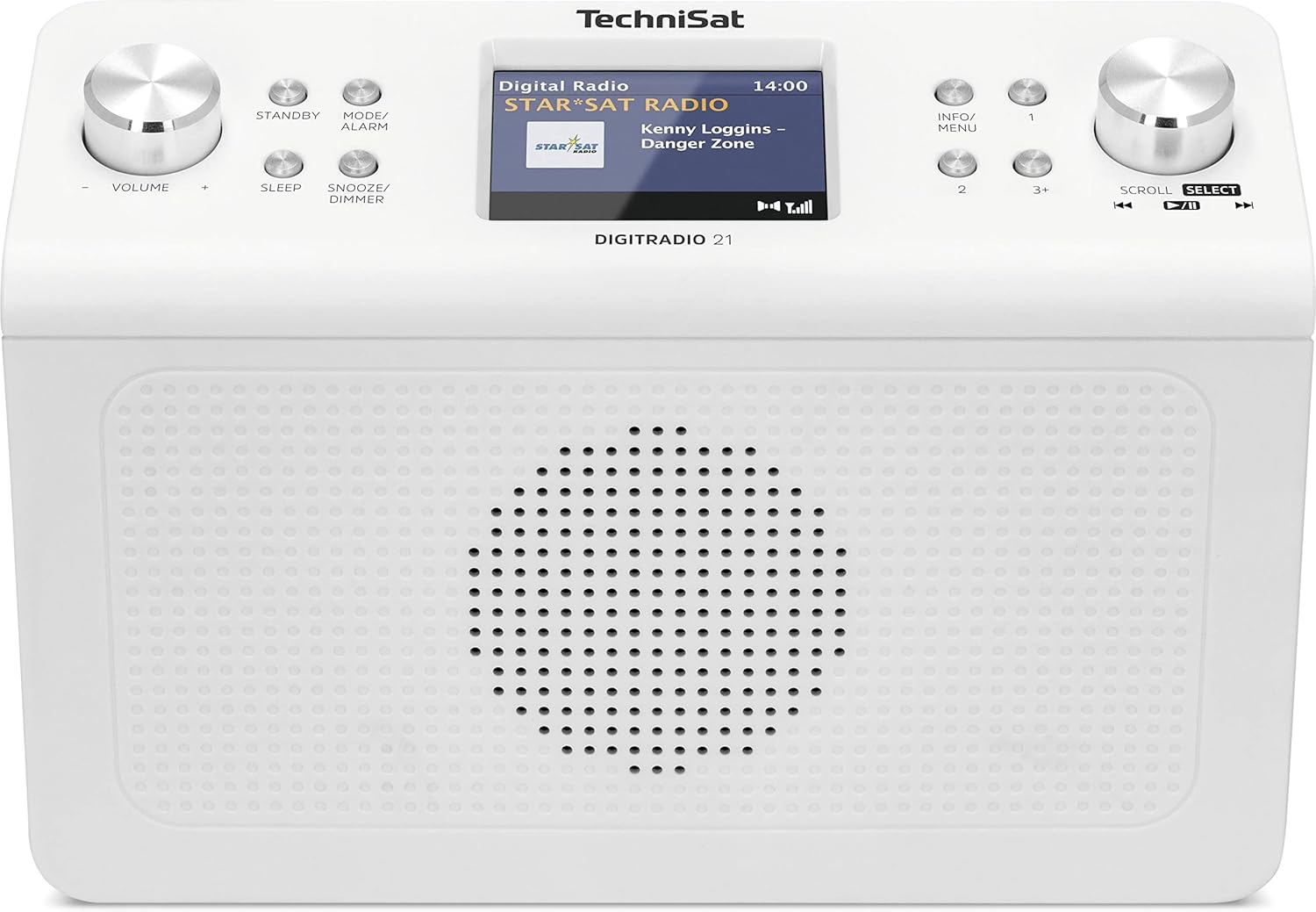
4.1 vaizdas: Priekyje view of the TechniSat DIGITRADIO 21. This image displays the central 2.8-inch color TFT display, the large volume knob on the left, and the scroll/select knob on the right. Surrounding buttons include Standby, Mode/Alarm, Sleep, Snooze/Dimmer, Info/Menu, and preset buttons 1, 2, 3+.
- Ekranas: 2.8-inch TFT color display for showing station information, time, and menu options.
- Garsumo rankenėlė: Pasukite norėdami reguliuoti garsumą.
- Budėjimo mygtukas: Įjungia arba išjungia įrenginį.
- Mode/Alarm Button: Switches between radio modes (DAB+, FM, Bluetooth) and accesses alarm settings.
- Miego mygtukas: Įjungia miego laikmačio funkciją.
- Snaudimo / pritemdymo mygtukas: Atima žadintuvą arba reguliuoja ekrano ryškumą.
- Informacijos / meniu mygtukas: Displays additional information or accesses the main menu.
- Iš anksto nustatytų stočių mygtukai (1, 2, 3+): Quickly access stored favorite stations.
- Slinkties / pasirinkimo rankenėlė: Rotate to navigate menus or tune stations, press to confirm selection.
4.2 Galinio skydelio jungtys

4.2 vaizdas: Galinis view of the TechniSat DIGITRADIO 21. This image highlights the power input port (DC IN) and the 3.5mm headphone jack located on the back of the unit.
- DC in: Maitinimo adapterio prijungimo prievadas.
- Ausinių lizdas (3.5 mm): Ausinėms prijungti privačiam klausymuisi.
5. Sąranka
5.1 Radijo montavimas
The DIGITRADIO 21 is designed for under-cabinet mounting. The included mounting plate and screws facilitate installation.
- Select a suitable location under a cabinet or shelf, ensuring sufficient space for the unit and access to controls.
- Position the mounting plate and mark the screw holes.
- Jei reikia, išgręžkite bandomąsias skylutes.
- Secure the mounting plate to the underside of the cabinet/shelf using the provided screws.
- Slide the DIGITRADIO 21 onto the mounted plate until it clicks securely into place.
Alternatively, the radio can be used as a standalone unit on a flat surface.
5.2 Maitinimo jungtis
- Connect the power adapter cable to the "DC IN" port on the rear of the DIGITRADIO 21.
- Prijunkite maitinimo adapterį į tinkamą sieninį lizdą.
- Įrenginys įsijungs arba pereis į budėjimo režimą.
6. Naudojimo instrukcijos
6.1 Maitinimo įjungimas/išjungimas
- Paspauskite Budėjimo režimas mygtuką, kad įjungtumėte arba išjungtumėte radiją.
6.2 Režimo pasirinkimas
- Paspauskite Mode/Alarm button repeatedly to cycle through available modes: DAB+, FM, Bluetooth.
6.3 DAB+ radijo veikimas
- Pasirinkite DAB+ režimą naudodami Mode/Alarm mygtuką.
- The radio will automatically scan for available DAB+ stations upon first use or if no stations are found.
- Pasukite Slinkite / pasirinkite knob to browse the list of available stations.
- Paspauskite Slinkite / pasirinkite knob to select and listen to a station.
- To store a favorite station: While listening, press and hold one of the Preset buttons (1, 2, 3+) until "Preset Saved" appears on the display.
- To recall a favorite station: Briefly press the corresponding Iš anksto nustatytas mygtukas.
6.4 FM radijo veikimas
- Pasirinkite FM režimą naudodami Mode/Alarm mygtuką.
- Pasukite Slinkite / pasirinkite rankenėlę, kad rankiniu būdu nustatytumėte dažnį.
- Norėdami automatiškai ieškoti kitos prieinamos stoties, paspauskite ir palaikykite Slinkite / pasirinkite rankenėlė.
- To store a favorite station: While listening, press and hold one of the Preset buttons (1, 2, 3+) until "Preset Saved" appears on the display.
- To recall a favorite station: Briefly press the corresponding Iš anksto nustatytas mygtukas.
6.5 „Bluetooth“ garso transliacija
- Pasirinkite „Bluetooth“ režimą naudodami Mode/Alarm button. The display will show "Bluetooth Pairing".
- Savo „Bluetooth“ įrenginyje (pvz., išmaniajame telefone, planšetiniame kompiuteryje) įjunkite „Bluetooth“ ir ieškokite galimų įrenginių.
- Iš suporuojamų įrenginių sąrašo pasirinkite „DIGITRADIO 21“.
- Susiejus, galite transliuoti garsą iš savo įrenginio į radiją.
6.6 Alarm, Sleep Timer, and Snooze
- Signalizacija: Paspauskite ir palaikykite Mode/Alarm button to enter alarm settings. Use the Slinkite / pasirinkite knob to set time, source, and volume.
- Miego laikmatis: Paspauskite Miegoti button repeatedly to set a sleep timer (e.g., 15, 30, 60 minutes) after which the radio will automatically turn off.
- Snausti: Kai skamba žadintuvas, paspauskite Snausti/pritemdyti mygtuką, kad laikinai nutildytumėte nustatytą laiką.
6.7 Ekrano nustatymai
- Paspauskite Snausti/pritemdyti button (when not snoozing an alarm) to adjust the display brightness.
- Paspauskite Informacija / meniu button to cycle through different display information (e.g., program type, frequency, date/time).
7. Priežiūra
- Valymas: Radijo imtuvą valykite minkštu, sausu, nepūkuotu skudurėliu. Nenaudokite abrazyvinių valiklių, vaško ar tirpiklių.
- Saugykla: Jei įrenginį ilgesnį laiką sandėliuosite, atjunkite jį nuo maitinimo šaltinio ir laikykite vėsioje, sausoje vietoje.
8. Problemų sprendimas
| Problema | Galima priežastis | Sprendimas |
|---|---|---|
| Nėra galios | Neprijungtas maitinimo adapteris arba sugedęs lizdas. | Įsitikinkite, kad maitinimo adapteris yra tvirtai prijungtas, o lizdas veikia. |
| Prastas DAB+ / FM priėmimas | Weak signal, antenna position. | Adjust the position of the wire antenna for better reception. Perform a full scan for stations. |
| Bluetooth poravimo problemos | Device not in pairing mode, radio not discoverable. | Ensure the radio is in Bluetooth pairing mode. Check your device's Bluetooth settings and try re-pairing. |
| Nėra garso | Volume too low, headphones connected. | Increase volume. Disconnect headphones if external sound is desired. |
9. Specifikacijos
- Modelis: DIGITRADIO 21
- Prekinis ženklas: TechniSat
- Modelio numeris: 0001/3964
- Radijo grupės: DAB+, FM (su RDS ir PLL)
- Bluetooth versija: 4.2
- Pranešėjas: 2 W (RMS) Mono Speaker
- Ekranas: 2.8 colių TFT spalvotas ekranas
- Favorite Station Memory: 10 DAB+, 10 FM
- Jungtys: 3.5mm Headphone Jack, DC IN
- Ypatingos savybės: Clock, Alarm, Sleep Timer, Snooze Function, Display Dimmer, Bluetooth Audio Streaming
- Maitinimas: External Power Adapter (DC 5.9 V / 1000 mA)
- Matmenys (P x A x G): 22.5 x 7.2 x 15.1 cm (apytiksliai 8.86 x 2.83 x 5.94 colio)
- Spalva: Balta (neutrali)
10. Garantija ir palaikymas
Specific warranty details are not provided in the product information. For warranty claims or technical support, please refer to the official TechniSat website or contact your retailer. Keep your proof of purchase for any warranty-related inquiries.
Norėdami gauti daugiau pagalbos, apsilankykite TechniSat official websvetainę.


